
1. Introduction
Thank you for choosing the SYNCWIRE Portable Tire Inflator SW2004. This device is designed for convenient and efficient inflation of various items, including car tires, motorcycle tires, bicycle tires, and sports balls. It features a powerful 150 PSI maximum pressure, an extra-large LCD display, and multiple inflation modes for ease of use. Please read this manual thoroughly before operation to ensure safe and proper use.
2. Safety Information
- Keep the device away from children.
- Do not operate the inflator in wet conditions or near flammable liquids or gases.
- Ensure the inflation hose is securely connected to the valve stem before starting inflation.
- Do not over-inflate. Always refer to the recommended pressure for your item.
- Monitor the inflation process to prevent damage from over-inflation.
- The device may become warm during prolonged use. Allow it to cool down if necessary.
- Use only the provided accessories and charging cables.
- Do not disassemble or modify the device.
3. Package Contents
Verify that all items are present in the package:

Image: Contents of the SYNCWIRE Portable Tire Inflator SW2004 package, showing the air pump, 50cm air hose, nozzle for air pillow, nozzle for swimming ring, four car tire valve caps, ball needle, DC 12V cable, USB Type-C cable, nozzle for bike, and storage bag.
- Portable Inflatable Air Pump
- Air Hose (50cm)
- Nozzle for Air Pillow
- Nozzle for Swimming Ring
- Four Car Tire Valve Caps
- Ball Needle
- DC 12V Power Cord
- USB Type-C Charging Cable
- Nozzle for Bike
- Storage Bag
4. Product Features
- Extra Large LCD Display: Features dual pressure readings (real-time and preset) for clear visibility in various lighting conditions.
- Multiple Inflation Modes: Pre-set modes for cars, motorcycles, bicycles, balls, and a customizable setting.
- Automatic Shut-Off: Stops inflation automatically once the designated pressure is reached.
- Dual Power Source: Operates wirelessly with a built-in battery or via a DC 12V car cigarette lighter port.
- High Capacity Battery: 7800mAh battery for extended use.
- Included Accessories: Comes with various nozzle adapters and four aluminum alloy tire valve caps.

Image: The extra-large digital screen displays both real-time and preset pressure values, along with battery status and unit indicators (PSI, BAR, KPA, Kg/cm²).
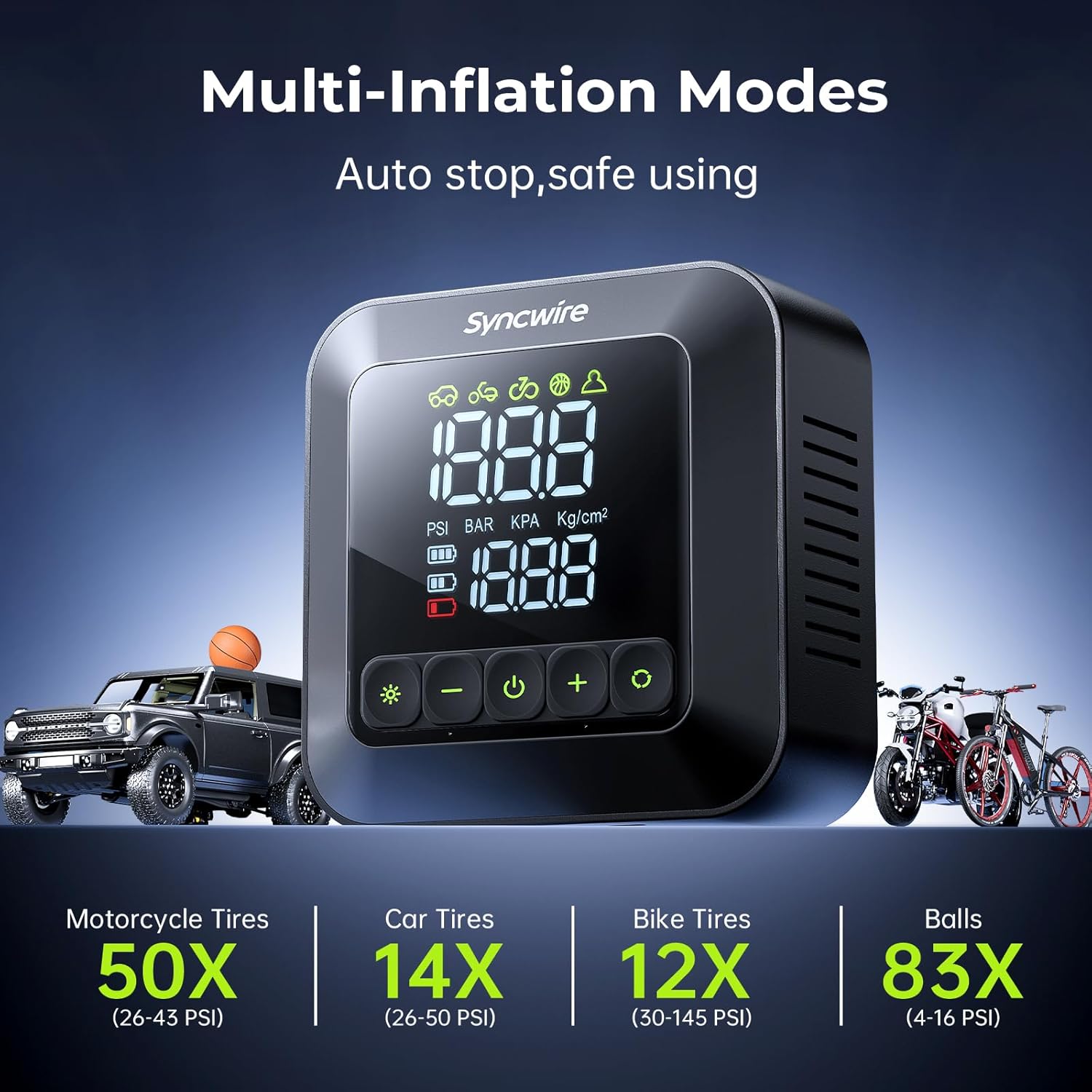
Image: The inflator features multiple pre-set inflation modes for various items, including motorcycle tires, car tires, bike tires, and balls, ensuring auto-stop for safe usage.

Image: The device supports two inflation methods: corded operation using the DC 12V car power outlet and cordless operation using its internal battery.

Image: The inflator is equipped with a 7800mAh battery, offering a 4-hour charging time and up to 365 days of standby, meeting various inflation needs.

Image: The product includes four high-quality aluminum alloy tire valve caps, serving as a convenient replacement for lost original caps.
5. Setup
- Initial Charge: Before first use, fully charge the inflator using the provided USB Type-C cable and a compatible USB power adapter (not included). The battery indicator on the LCD will show charging status.
- Attach Air Hose: Screw the air hose securely onto the inflator's air outlet.
- Select Nozzle: Choose the appropriate nozzle adapter for the item you intend to inflate and attach it to the other end of the air hose.
6. Operating Instructions
- Power On: Press and hold the power button (U) to turn on the inflator. The LCD display will illuminate.
- Select Mode: Press the mode button (※) to cycle through the pre-set inflation modes: Car, Motorcycle, Bicycle, Ball, and Custom. Each mode has a default pressure range.
- Set Target Pressure:
- In a pre-set mode, the bottom value on the LCD shows the preset pressure. Use the '+' and '-' buttons to adjust this value.
- For quick adjustment, long-press the '+' or '-' buttons.
- In Custom mode, you can set any desired pressure within the device's operating range.
- To change pressure units (PSI, KPA, BAR, KG/CM²), press the unit button (usually integrated with the mode button or a separate button, refer to display icons).
- Connect to Valve: Securely attach the nozzle adapter to the valve stem of the item to be inflated. The top value on the LCD will display the current real-time pressure.
- Start Inflation: Press the power button (U) to begin inflation. The inflator will automatically stop once the preset target pressure is reached.
- Stop Inflation: To manually stop inflation, press the power button (U) again.
- Disconnect: Once inflation is complete, carefully disconnect the nozzle from the valve stem. Some air may escape during disconnection, which is normal.
- Power Off: Press and hold the power button (U) to turn off the inflator.
Using DC 12V Power
If the built-in battery is low or depleted, you can power the inflator directly from your vehicle's 12V cigarette lighter socket:
- Connect the provided DC 12V power cord to the inflator's DC input port.
- Plug the other end of the DC 12V power cord into your car's cigarette lighter socket.
- Proceed with inflation as described above. The device will draw power directly from the car.

Image: The inflator demonstrates efficient performance, capable of inflating a 215/55 R17 tire from 28 PSI to 36 PSI in approximately 27 seconds.
7. Maintenance
- Cleaning: Wipe the exterior of the inflator with a soft, damp cloth. Do not use harsh chemicals or abrasive cleaners.
- Storage: Store the inflator and its accessories in the provided storage bag in a cool, dry place, away from direct sunlight and extreme temperatures.
- Battery Care: For optimal battery life, charge the device at least once every three months if not in regular use.
8. Troubleshooting
| Problem | Possible Cause | Solution |
|---|---|---|
| Inflator does not turn on. | Low battery or no power. | Charge the battery using the Type-C cable or connect to a 12V DC power source. |
| Inflation is slow or not working. | Hose not securely connected; incorrect nozzle; leak in hose/valve. | Ensure hose and nozzle are tightly connected. Check for leaks. |
| Device stops before reaching target pressure. | Battery low; internal overheating protection activated. | Recharge the battery. Allow the device to cool down if it has been running for a long time. |
| Inaccurate pressure reading. | Valve connection not secure. | Ensure the nozzle is fully and securely attached to the valve stem. |
9. Specifications
| Specification | Value |
|---|---|
| Brand | SYNCWIRE |
| Model Name | Syncwire Inflate 280 |
| Item Model Number | SW2004 |
| Maximum Operating Pressure | 150 PSI |
| Voltage | 12 Volts |
| Power Source | Battery and DC operated (12 volts) |
| Noise Level | 60 Decibels |
| Air Flow Capacity | 40 Liters Per Minute (LPM) |
| Item Weight | 839 g |
| Product Dimensions | 13L x 13W x 6.4H Centimeters |
| Material | High quality, durable |
| Special Features | Automatic Shut-Off, Cordless, Portable, Pressure Detection, Quick Inflation |
10. Warranty and Support
SYNCWIRE products are designed for reliability and performance. For warranty information, technical support, or any inquiries regarding your Portable Tire Inflator SW2004, please refer to the contact information provided on the product packaging or visit the official SYNCWIRE website. Please retain your proof of purchase for warranty claims.