
1. Introduction
Thank you for choosing SUNTHIN Outdoor Landscape Lighting. This manual provides detailed instructions for the safe and efficient installation, operation, and maintenance of your new lighting system. Please read this manual thoroughly before use and retain it for future reference.
2. What's in the Box
- Spotlights × 8
- IP65 Adapter × 1
- Sensor Controller × 1
- Manual × 1
3. Setup and Installation
Your SUNTHIN landscape lighting system is designed for easy plug-and-play installation, requiring no electrician. Follow these steps to set up your lights:
3.1 Connecting the Components
- Connect the sensor controller to the IP65 adapter.
- Connect the spotlights to the sensor controller. Ensure all connections are secure and waterproof.
- Plug the IP65 adapter into a standard outdoor power outlet.
3.2 Mounting Options
The spotlights offer versatile mounting options:
- Ground Insertion: Attach the included stakes to the spotlights and insert them firmly into the ground in your desired locations.
- Wall Mounting: Use the provided brackets and screws to mount the spotlights on walls or other vertical surfaces.
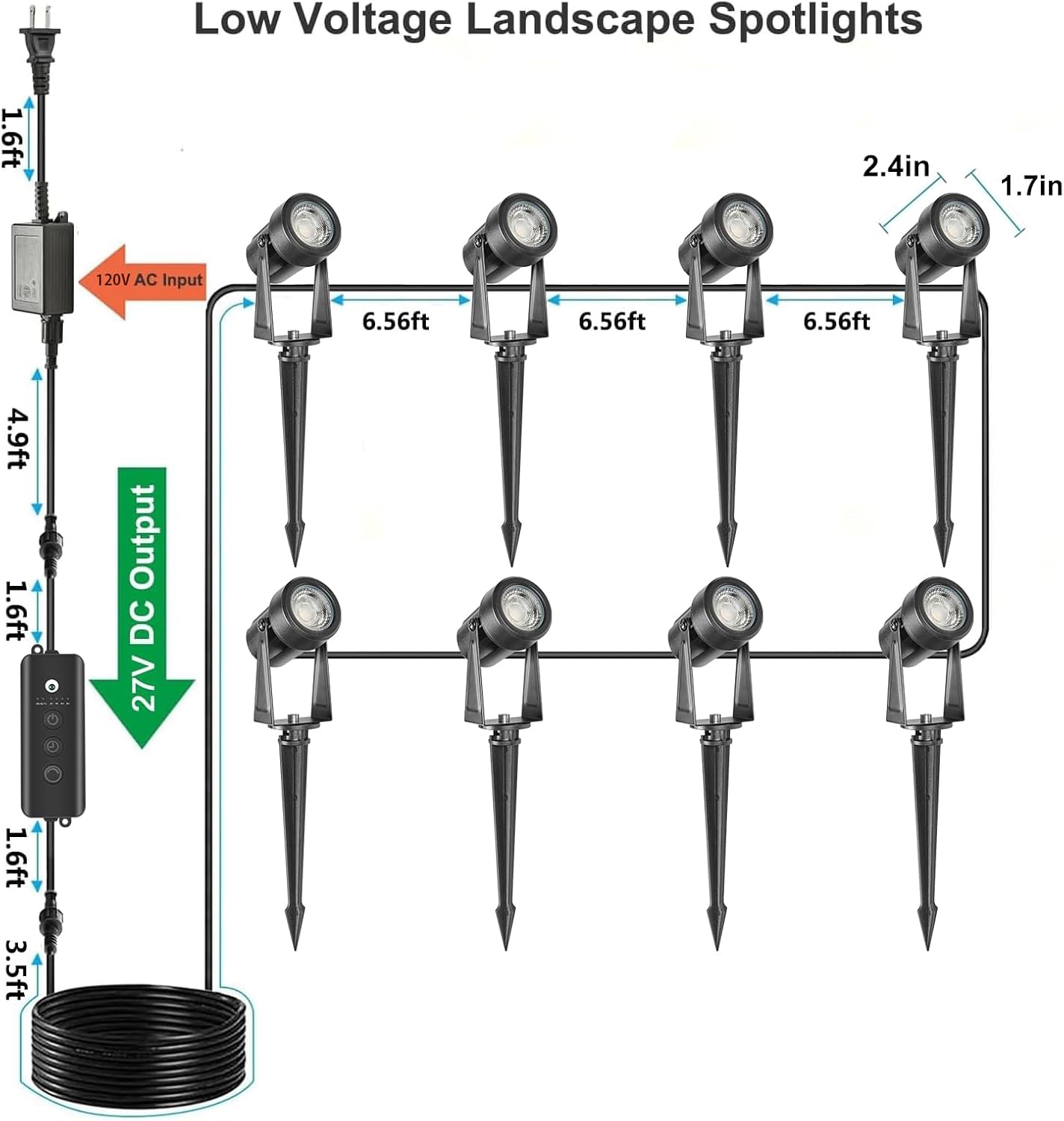
Figure 3.2: System Connection and Dimensions
3.3 Extending the System
For broader coverage, you can extend your lighting system using additional extension cords (sold separately). Align the male and female connectors and push until you hear a click to ensure a secure, waterproof connection.
Video 3.3: Demonstrates connecting extension cables and T-shaped connectors for system expansion.
4. Operating Instructions
The sensor controller provides intuitive control over your landscape lighting. It features a power button, timer button, and dimming button.

Figure 4.1: Sensor Controller Overview
4.1 Power Button (Automatic Switching On/Off)
- 1st Press: Activates 'Always On' mode. Lights remain on continuously.
- 2nd Press: Activates 'Dusk-to-Dawn Auto' mode. Lights turn on at sunset and off at sunrise automatically.
- 3rd Press: Turns the lights off immediately.
4.2 Timer Button (Countdown On/Off)
This button sets a countdown timer for the lights to remain on. Press the button multiple times to cycle through the timer options:
- 1st Press: 2 Hours
- 2nd Press: 4 Hours
- 3rd Press: 6 Hours
- 4th Press: 8 Hours
- 5th Press: Cancels the timer function.
4.3 Dimming Button (10% to 100% Brightness)
Adjust the brightness of your spotlights:
- Short Press: Cycles through five preset brightness levels: 10%, 25%, 50%, 75%, and 100%.
- Long Press: Gradually fades the brightness up or down, allowing for fine-tuned adjustment.
Video 4.4: Demonstrates the operation of the sensor controller, including power, timer, and dimming functions.
5. Key Features
5.1 Dusk-to-Dawn Operation with Natural Light Sensing
The integrated sensor precisely detects natural sunlight wavelengths, ensuring the lights activate only at true sunset and deactivate at sunrise. This intelligent design prevents false triggers from artificial light sources like streetlights or car headlights.

Figure 5.1: Dusk-to-Dawn Functionality
Video 5.2: Illustrates the automatic dusk-to-dawn operation of the landscape spotlights.
5.2 IP65 Waterproof Protection
All components, including the spotlights, low voltage power supply, sensor controller, and extension cables, are IP65-rated or higher. This ensures reliable performance in various outdoor weather conditions, including rain, snow, and wind.
- The lamp heads feature an internal O-ring seal beneath the lens and an epoxy-sealed cable exit for full submersion protection.
- The IP65 adapter has a sealed housing and reinforced joints to withstand water sprays from any angle.

Figure 5.3: IP65 Waterproof Design
5.3 Memory Function
The system automatically saves your last selected automation mode, timer duration, and dimming level. These settings are reapplied the next time the lights are activated, providing hassle-free personalized illumination.
5.4 Adjustable Spotlight Head
Each spotlight head can be rotated up to 270 degrees, allowing you to precisely direct the light to highlight specific features such as trees, walls, pathways, or garden elements.
6. Specifications
| Feature | Detail |
|---|---|
| Brand | SUNTHIN |
| Model Name | SCS24W007 |
| Color | Warm White |
| Material | Plastic |
| Light Source Type | LED |
| Number of Light Sources | 8 |
| Wattage | 24 watts |
| Voltage | 27 Volts (DC) |
| Brightness | 960 Lumen (120 lumens per bulb) |
| Color Temperature | 2700 Kelvin |
| Water Resistance Level | IP65 Waterproof |
| Control Method | Touch (on controller) |
| Installation Type | Ground insertion, Wall mounted |
| Product Dimensions | 46"L x 1.7"W x 8.6"H |
| Item Weight | 4.18 pounds |
7. Troubleshooting
- Lights not turning on:
- Check if the power adapter is securely plugged into a working outlet.
- Ensure all connections between the adapter, controller, and spotlights are firm.
- Verify the power button on the controller is set to 'ON' or 'AUTO' mode.
- In 'Dusk-to-Dawn Auto' mode, ensure the sensor is not obstructed and is receiving sufficient natural light during the day.
- Lights turning on/off at incorrect times:
- In 'Dusk-to-Dawn Auto' mode, ensure the sensor is not exposed to artificial light sources (e.g., streetlights, porch lights) that might interfere with its natural light detection.
- If using the timer, ensure the correct duration is selected.
- Lights flickering or dim:
- Check for loose connections.
- Ensure the dimming level is set to your desired brightness.
- Verify the power source is stable.
- Water ingress:
- Although IP65 rated, ensure all caps and seals are tightly secured during installation to prevent water from entering.
- If water is found, disconnect power immediately and allow components to dry completely before re-securing and reconnecting.
8. Maintenance
- Cleaning: Periodically wipe the spotlights and sensor controller with a soft, damp cloth to remove dirt and debris. Do not use harsh chemicals or abrasive cleaners.
- Inspection: Regularly inspect cables and connections for any signs of wear, damage, or loose fittings. Replace any damaged components immediately.
- Sensor Clarity: Ensure the dusk-to-dawn sensor is kept clean and free from obstructions (e.g., leaves, dirt) to maintain accurate light detection.
9. Warranty and Support
This product comes with a 1-year manufacturer warranty from the date of purchase. For warranty claims, technical support, or any inquiries, please contact SUNTHIN customer service through the retailer where the product was purchased or visit the official SUNTHIN website.
Please retain your proof of purchase for warranty validation.