Introduction
This manual provides detailed instructions for the proper use, installation, and maintenance of your Vector Optics Frenzy 1x17x24 Multi Reticle Red Dot Sight. Please read this manual thoroughly before operating the device to ensure optimal performance and safety.

Image: The Vector Optics Frenzy 1x17x24 Multi Reticle Red Dot Sight, showing its compact design and optical lens.
Key Features
- Multiple Reticle Options: Features 3 MOA dot, 42 MOA circle, and 50 MOA crosshair with 3 MOA dot for versatile aiming.
- 10 Illumination Levels: Includes 8 daylight brightness settings and 2 night vision (NV) compatible settings.
- Motion Awake Function: Automatic shut-off after 3 minutes of inactivity and reactivation upon movement to conserve battery.
- Durable Construction: Made from 6061-T6 aluminum alloy, offering shock resistance and IPX6 water/dust protection.
- Low Profile Design: Integrated back iron sight for precision and backup.
Specifications
| Feature | Detail |
|---|---|
| Dot Size | 3 MOA |
| Length | 40.9 mm / 1.6 in |
| Width | 26 mm / 1.0 in |
| Height | 24 mm / 0.9 in |
| Weight (net) | 19 g / 0.67 oz |
| Eye Relief | Free |
| Parallax | Free (<2MOA) |
| Parallax Setting | 25 yds |
| Adjustment Range | >45 MOA |
| Illumination | 10 Levels (8 Daylight + 2 NV) |
| Battery Type | CR2032 |
| Working Temperature | -20℃ to +50℃ |
| Housing Material | 6061-T6 aluminum alloy |
| Mounting System | Weaver (Compatible with RMSC Footprint) |
| Finish | Black matte |
| Waterproof | IPX6 |
| Battery Runtime | >20,000 hrs |

Image: Diagram illustrating the different reticle patterns: 3 MOA dot, crosshair dot, and 30 MOA circle with crosshair dot.
Setup and Installation
1. Battery Installation
- Locate the battery compartment on the side of the sight.
- Using a suitable tool, carefully open the battery compartment cover.
- Insert one CR2032 battery with the positive (+) side facing upwards.
- Securely close the battery compartment cover.
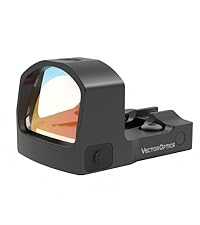
Image: Close-up view of the battery compartment, showing where the CR2032 battery is inserted.
2. Mounting the Sight
The Vector Optics Frenzy Red Dot Sight is designed for Picatinny or Weaver mounts and is compatible with the RMSC footprint.
- Ensure your firearm is unloaded and safe before proceeding.
- Align the sight's base with the mounting rail on your firearm.
- Secure the sight using the provided mounting screws, tightening them according to your firearm's specifications or the sight's torque recommendations (if available). Avoid over-tightening.

Image: The red dot sight mounted on a handgun, demonstrating its low-profile design and integration with the firearm.
Operating Instructions
1. Power On/Off and Brightness Adjustment
- To power on, press either the '+' or '-' button.
- To adjust brightness, press the '+' button to increase brightness or the '-' button to decrease brightness. There are 10 illumination levels, including 2 night vision settings.
- To power off, press and hold the '-' button for 3 seconds.

Image: Close-up of the '+' and '-' buttons used for power control and brightness adjustment.

Image: Visual representation of the red dot reticle at various brightness levels, from night vision compatible to bright daylight.
2. Reticle Selection
The sight offers multiple reticle patterns. To cycle through the available reticles (3 MOA dot, 42 MOA circle, 50 MOA crosshair with 3 MOA dot), press and hold the '+' button for 1 second.
3. Windage and Elevation Adjustment
Adjustments for windage and elevation are typically located on the top and side of the sight. Use a small flathead screwdriver or the provided tool to make adjustments. Each click corresponds to a specific MOA change (refer to specifications for exact values).

Image: Close-up of the adjustment screws for windage and elevation, indicating the direction of adjustment.
4. Motion Awake Function
The sight features a motion awake function. If the sight detects no movement for 3 minutes, it will automatically shut off to conserve battery. A slight movement will reactivate the sight instantly to the last used brightness setting.

Image: Diagram illustrating the motion sensor's auto shut-off after 3 minutes of inactivity and instant reactivation upon movement.
Maintenance
- Cleaning the Lenses: Use a soft, lint-free cloth and lens cleaning solution to gently wipe the lenses. Avoid abrasive materials that could scratch the lens coating.
- Cleaning the Body: Wipe the exterior of the sight with a damp cloth. Do not use harsh chemicals or solvents.
- Battery Replacement: Replace the CR2032 battery when the reticle dims or fails to illuminate. Ensure proper polarity during installation.
- Storage: Store the sight in a cool, dry place away from direct sunlight and extreme temperatures. Remove the battery if storing for extended periods.
Troubleshooting
| Problem | Possible Cause | Solution |
|---|---|---|
| Reticle does not illuminate. | Dead or incorrectly installed battery. | Replace battery (CR2032) ensuring correct polarity. |
| Reticle is dim or flickers. | Low battery power. | Replace battery. |
| Sight does not turn on after inactivity. | Motion Awake function not triggered or battery dead. | Gently shake the sight to activate. If still off, replace battery. |
| Inaccurate aiming. | Sight not zeroed or loose mounting. | Perform zeroing procedure. Check mounting screws for tightness. |
Warranty Information
Vector Optics products are backed by a manufacturer's warranty. For specific details regarding your product's warranty period and terms, please refer to the official Vector Optics website or contact customer support. Keep your proof of purchase for warranty claims.
Additional protection plans may be available for purchase:
- 2-Year Protection Plan
- 3-Year Protection Plan
Support and Contact
For further assistance, technical support, or inquiries, please visit the official Vector Optics website or contact their customer service department.
Vector Optics Official Store: Visit Store


