
1. Introduction
Thank you for choosing the Telbum Stage Wash Light Bar. This DMX-compatible 120W RGBA 4-in-1 LED light bar is designed to create vibrant and dynamic lighting effects for various events, including weddings, church services, DJ gigs, and live performances. Its ultra-wide angle coverage ensures even light distribution, making it an ideal solution for wall washing and stage illumination. This manual provides essential information for safe operation, setup, and maintenance of your new light bar.

Image 1.1: The Telbum Stage Wash Light Bar, showcasing its array of RGBA LEDs and adjustable mounting brackets.
2. Safety Information
Please read all safety instructions carefully before operating the device. Failure to follow these instructions may result in electric shock, fire, or serious injury.
- Indoor Use Only: This product is designed for indoor use. Do not expose it to rain or moisture.
- Power Supply: Ensure the power supply voltage matches the requirements specified on the unit (AC110-240V, 50-60Hz).
- Grounding: Always connect the unit to a grounded power outlet.
- Ventilation: Do not block ventilation openings. Ensure adequate airflow around the unit to prevent overheating.
- Handling: Avoid direct eye exposure to the light source. Do not open the housing; there are no user-serviceable parts inside. Refer all servicing to qualified personnel.
- Cleaning: Disconnect from power before cleaning. Use a soft, dry cloth.
3. Package Contents
Verify that all items are present and in good condition upon opening the package:
- 1 x Telbum Stage Wash Light Bar
- 1 x Power Cable
- 1 x User Manual
- 2 x Knobs/Brackets (pre-attached or included for mounting)

Image 3.1: Contents of the product package, including the light bar, power cable, user manual, and mounting brackets.
4. Product Overview and Features
The Telbum Stage Wash Light Bar is equipped with advanced features for versatile lighting applications:
- RGBA Color Mixing: Utilizes RGBA (Red, Green, Blue, Amber) LEDs to produce a wide spectrum of colors, including warm tones, for rich and vivid visual effects.
- Segmented Control: Features 6 segments, each with 8 RGBW LEDs, allowing for independent control of brightness and color for precise color adjustment and dynamic chase effects.
- Multiple Operating Modes: Supports Automatic, Music (Sound-Activated), and DMX modes for flexible control options.
- Ultra-Wide Angle Coverage: Designed to illuminate large areas with an ultra-wide beam angle (35°) for even light distribution, ideal for wall washing.
- Linear Dimming: Offers 0-100% linear dimming for smooth transitions and precise brightness control.
- Fanless and Noiseless Design: Constructed with an aluminum alloy body for high heat dissipation, ensuring 100% quiet operation suitable for various indoor environments.
- Durable Construction: Solid aluminum housing provides excellent heat dissipation and robust build quality for reliability.

Image 4.1: Illustration of the 6x8 segmented control light bar, highlighting its ability to produce monochromatic light, full color, strobe, dimming, and gradient effects.

Image 4.2: Diagram illustrating the 35-degree beam angle and 0-100% linear dimming capability of the light bar.

Image 4.3: Visual representation emphasizing the 100% fanless and noiseless operation, suitable for quiet indoor environments.
5. Setup and Installation
The Telbum Stage Wash Light Bar is designed for quick and easy installation.
5.1 Mounting
The light bar comes with adjustable mounting brackets, allowing for versatile placement. You can place it on the floor, mount it on a truss, or install it on a wall.
- Attach the brackets securely using the provided knobs.
- Ensure the mounting surface or structure can support the weight of the light bar (approximately 7.35 pounds).
- Adjust the angle of the light bar using the adjustment knobs on the brackets to achieve the desired illumination direction.

Image 5.1: Examples of the light bar being placed on the floor and installed on a wall, demonstrating its flexible mounting options.
5.2 Power Connection
Connect the included power cable to the power input on the light bar and then to a suitable AC power outlet (110-240V, 50-60Hz).
5.3 DMX Connection (Optional)
If using DMX control, connect a DMX cable from your DMX controller's output to the DMX IN port on the light bar. For daisy-chaining multiple units, connect a DMX cable from the DMX OUT port of the first unit to the DMX IN port of the next unit.

Image 5.2: Close-up view of the DMX input/output ports and the LCD display with control buttons on the light bar.
6. Operating Modes
The light bar offers several operating modes, selectable via the LCD display and control buttons (MENU, UP, DOWN, ENTER) located on the unit's rear panel.
6.1 Automatic Mode
In Automatic mode, the light bar cycles through a variety of pre-programmed lighting effects and color changes. This mode is ideal for quick setup without external control.
- Use the MENU button to navigate to the Auto mode setting.
- Use UP/DOWN to select different auto programs if available.
- Press ENTER to confirm your selection.
6.2 Music Mode (Sound-Activated)
In Music mode, the lighting effects respond to the rhythm and sound changes detected by the built-in microphone. This creates dynamic, synchronized light shows.
- Use the MENU button to navigate to the Music mode setting.
- The light bar will automatically adjust effects based on ambient sound.
6.3 DMX Mode
DMX mode allows for professional control and programming of the light bar using an external DMX controller or software. This provides the most comprehensive control over color, brightness, and effects.
- Connect the light bar to a DMX controller as described in Section 5.3.
- Use the MENU button to navigate to the DMX address setting.
- Use UP/DOWN to set the desired DMX start address (e.g., A001).
- Press ENTER to confirm.
- Refer to the DMX Channel Chart (often found in a separate DMX manual or product page) for specific channel functions, including control over individual segments, RGBA intensity, and built-in programs.
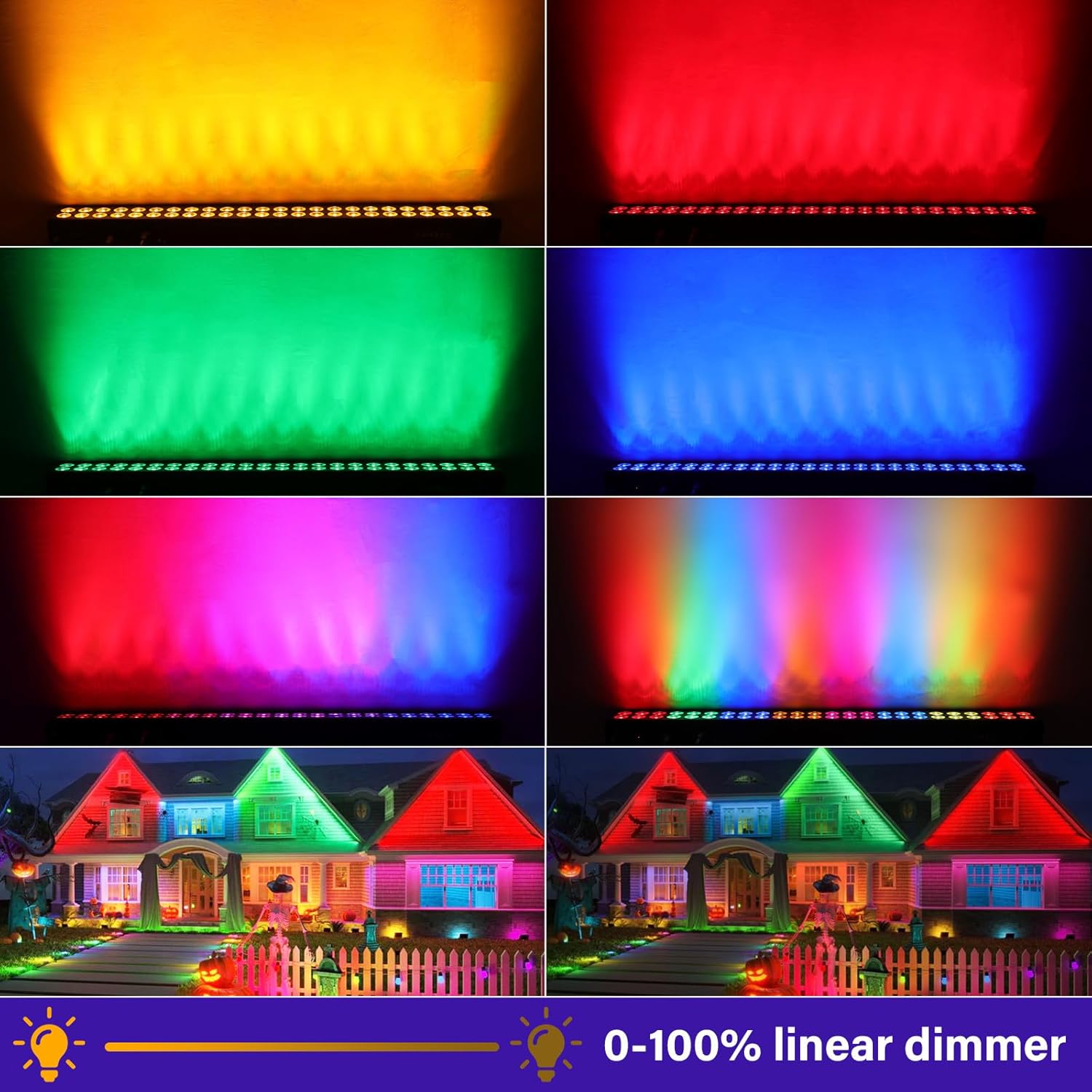
Image 6.1: Demonstrates the 0-100% linear dimmer and various static color outputs (yellow, red, green, blue, magenta, cyan) achievable with the RGBA LEDs.

Image 6.2: An example of the lighting effect scene display, showing the light bar used to create ambient lighting in a living space.
7. Maintenance
Proper maintenance ensures the longevity and optimal performance of your light bar.
- Cleaning: Regularly clean the lenses and housing with a soft, lint-free cloth. For stubborn dirt, use a slightly damp cloth. Do not use abrasive cleaners or solvents.
- Inspection: Periodically check power cables and DMX cables for any signs of damage. Ensure all connections are secure.
- Storage: When not in use, store the light bar in a dry, dust-free environment, preferably in its original packaging or a protective case.
- No User-Serviceable Parts: Do not attempt to repair the unit yourself. Refer all servicing to qualified service personnel.
8. Troubleshooting
If you encounter issues with your light bar, refer to the following common problems and solutions:
| Problem | Possible Cause | Solution |
|---|---|---|
| Light bar does not power on. | No power to the unit; faulty power cable; unit malfunction. | Check power outlet and cable connection. Try a different power cable. If problem persists, contact support. |
| No light output. | Unit is in standby; incorrect mode selected; DMX signal issue. | Ensure unit is powered on. Check selected operating mode. If in DMX mode, verify DMX connection and signal. |
| DMX control not working. | Incorrect DMX address; faulty DMX cable; DMX controller issue. | Verify DMX address setting on the light bar matches your controller. Check DMX cable for damage. Ensure DMX controller is functioning correctly. |
| Lights flicker or behave erratically. | Unstable power supply; DMX signal interference; loose connection. | Ensure stable power. Check DMX connections. Try a different DMX cable or isolate the unit. |
If the problem persists after attempting these solutions, please contact Telbum customer support for further assistance.
9. Specifications
| Attribute | Specification |
|---|---|
| Model Number | PL-32CJ |
| Color | RGBA |
| Material | Aluminum |
| Finish Type | Powder Coated |
| Light Source Type | Light Emitting Diode (LED) |
| Light Source Wattage | 120 Watts |
| Voltage | 120 Volts (AC) |
| Power Source | Corded Electric |
| Product Dimensions (L x W x H) | 39" x 4" x 3" (approx. 99cm x 10cm x 7.6cm) |
| Item Weight | 7.35 pounds (approx. 3.33 kg) |
| Mounting Type | Bracket Mount |
| Bulb Features | Color Changing, Segmented Control, Music Sync |
| Manufacturer | Guangzhou Xinyu stage lighting and sound equipment Co., LTD |
10. Warranty and Support
Telbum is committed to providing high-quality products and excellent customer service. While specific warranty details are not provided in this manual, Telbum values customer feedback and strives to improve product quality and support.
For any questions, technical assistance, or support inquiries regarding your Telbum Stage Wash Light Bar, please refer to the contact information provided at the point of purchase or visit the official Telbum website.
