
S4
GNSS Land Meter S4 User Manual
Model: S4
Brand: Generic
1. Introduction
The Generic GNSS Land Meter S4 is a high-precision surveying instrument designed for accurate measurement of area, slope, and distance. Equipped with a 2.8-inch LCD color screen and an advanced GNSS receiver chip, it provides real-time navigation and reliable data for various applications, including land mapping, agricultural surveying, and construction projects. Its robust design ensures durability in diverse outdoor environments, and the rechargeable battery supports extended field operations.

Figure 1.1: Front view of the GNSS Land Meter S4, showing its display and control buttons.
2. Key Features
- Accurate Positioning: Utilizes a GNSS receiver chip and a 2.8" LCD color screen for precise real-time navigation and area measurements.
- Versatile Functions: Capable of measuring area, slope, and distance with high accuracy, making it suitable for surveying, mapping, and various construction applications.
- Rugged Design: Constructed with durable and shock-resistant materials to ensure reliable performance in challenging outdoor conditions.
- Long Battery Life: Features a rechargeable battery that provides extended usage time, minimizing interruptions during field operations.
- User-Friendly Interface: Equipped with intuitive buttons and a clear menu system for easy operation and efficient data management.
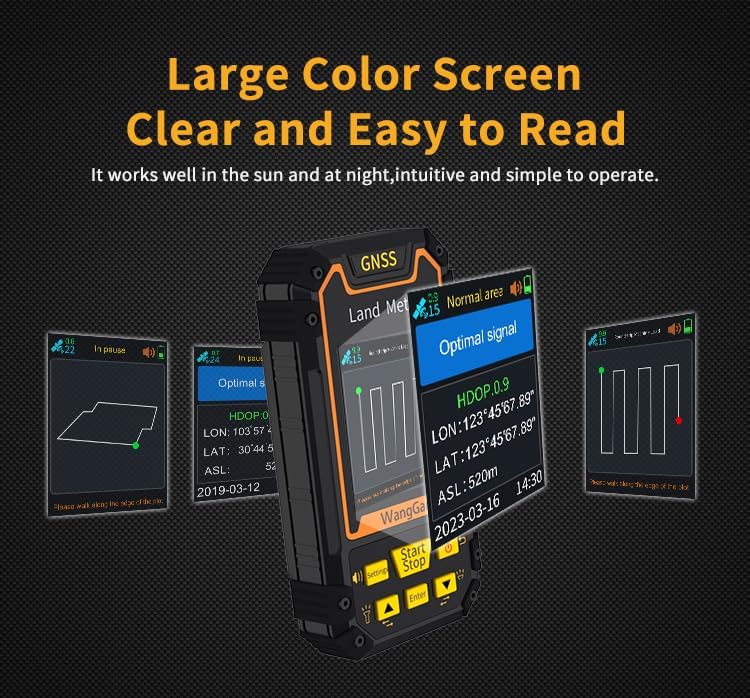
Figure 2.1: The device features a large color screen for clear and easy readability, even in varying light conditions.

Figure 2.2: The built-in barometer enhances altitude measurement accuracy, especially useful for intelligent mountain area calculations.
3. Setup Guide
3.1. Charging the Device
Before first use, fully charge the GNSS Land Meter S4. Connect the provided charging cable to the device's charging port and plug the other end into a compatible USB power adapter. The charging indicator on the screen will show the charging status. A full charge typically takes approximately 3-4 hours.
3.2. Powering On/Off
- To Power On: Press and hold the Power button (usually marked with a power symbol) until the screen illuminates and the device boots up.
- To Power Off: Press and hold the Power button until a power-off prompt appears on the screen. Select "Power Off" or confirm to shut down the device.
3.3. Initial Configuration
Upon first power-on or after a factory reset, you may need to configure basic settings:
- Language Selection: Navigate to the "Settings" menu and select your preferred language.
- Time and Date: Set the correct time zone, date, and time for accurate data logging.
- Unit Settings: Choose your desired units for area (e.g., acres, hectares, square meters), distance (e.g., meters, feet), and slope (e.g., degrees, percentage).
4. Operation Guide
4.1. General Interface and Navigation
The device features a main interface with various icons and information. Use the directional buttons (Up, Down, Left, Right) and the Enter button to navigate through menus and confirm selections. The Back or Return button allows you to go back to the previous screen.
4.2. Area Measurement (Normal Area)
This mode is used for measuring irregular land areas by walking the perimeter.
- At the starting point of the area to be measured, press the Start button on the main interface to begin the measurement.
- Walk along the perimeter of the area. The device will track your path.
- To pause the measurement, press the Stop button. You can then return to the starting point in a circle around the ground to resume or view the measurement data.
- Once the measurement is complete (you have returned to the starting point or covered the entire perimeter), press the Power button to end the measurement and save the data.

Figure 4.1: Illustration of normal area measurement, tracing the perimeter of a land parcel.

Figure 4.2: An example of a measurement path in a field, demonstrating how the device tracks movement for area calculation.
4.3. Slope Measurement
The device can measure slopes from 0-90 degrees.
- In the parameter settings, press the Up or Down button to set the gradient value if needed.
- After setting, press the Power button to return to the main interface.
- In the main interface, use the Up or Down button to switch the function to "Slope measurement".
- Press the Start button at the starting point of the slope and circle the slope.
- To pause measurement, press the Stop button. You can return to the starting point to resume measurement by pressing Start again, or view data.
- Once the measurement is complete, press the Power button to save the data.
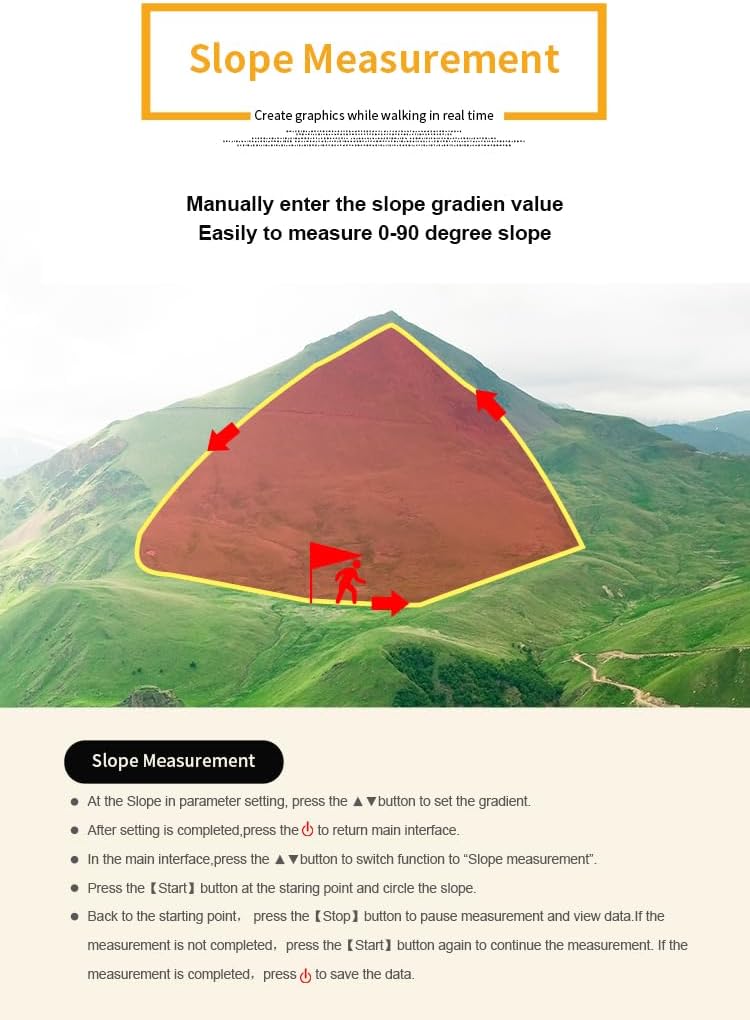
Figure 4.3: Visual representation of slope measurement, illustrating how the device calculates the gradient of terrain.
4.4. On-Vehicle Measurement
The GNSS Land Meter S4 supports measurement while mounted on agricultural machinery, automatically identifying and excluding repeated areas to ensure accurate calculations.
This feature is applicable for various agricultural machinery, including harvesters, tractors, seeders, and transplanters. Mount the device securely on the vehicle and follow the area measurement steps (Section 4.2) as the vehicle traverses the field.

Figure 4.4: The device can be used for on-vehicle measurement with various agricultural machines, ensuring efficient and accurate land surveying.

Figure 4.5: The GNSS Land Meter is versatile, applicable for measuring farmland, agricultural machinery operation areas, field seeding, fertilizer/medicine application areas, ponds, lakes, and hilly regions.
5. Maintenance
5.1. Cleaning
Wipe the device with a soft, damp cloth. Do not use harsh chemicals, solvents, or abrasive cleaners, as these can damage the screen or casing. Ensure the charging port is free of dust and debris.
5.2. Storage
When not in use for extended periods, store the device in a cool, dry place away from direct sunlight and extreme temperatures. It is recommended to charge the battery periodically (e.g., every 3 months) to maintain battery health.
5.3. Battery Care
To prolong battery life, avoid fully discharging the battery frequently. Charge the device when the battery level is low, and disconnect it once fully charged.
6. Troubleshooting
| Problem | Possible Cause | Solution |
|---|---|---|
| Device does not power on. | Low battery; device malfunction. | Charge the device for at least 30 minutes. If it still doesn't turn on, contact customer support. |
| Inaccurate measurements. | Poor GNSS signal; incorrect calibration; environmental interference. | Ensure you have a clear view of the sky. Check unit settings. Avoid areas with strong electromagnetic interference. |
| Screen is unresponsive. | Software glitch; extreme temperature. | Perform a soft reset (refer to manual for specific button combination, usually holding power button for 10-15 seconds). Move to a moderate temperature environment. |
| Battery drains quickly. | Frequent use of backlight; old battery. | Reduce screen brightness. Ensure background applications are closed. If battery life significantly degrades, consider battery replacement. |
7. Specifications
| Feature | Detail |
|---|---|
| Brand | Generic |
| Model Name | S4 |
| Manufacturer | Wanggan |
| Color | black |
| Material | Plastic, Metal |
| Display | 2.8" LCD Color Screen |
| Positioning | GNSS Receiver Chip |
| Battery | Rechargeable (Batteries Included: Yes) |
| Item Weight | 600 Grams |
| Product Dimensions (LxWxH) | 4.72"L x 2"W x 1.4"H |
| Included Components | Gps Land Meter |
8. Warranty Information
This product comes with a manufacturer's warranty. Please refer to the warranty card included in the product packaging for specific terms, conditions, and duration. Keep your purchase receipt as proof of purchase for any warranty claims.
For warranty service, please contact the seller or manufacturer directly using the contact information provided in the support section or on the product packaging.
9. Customer Support
If you encounter any issues or have questions regarding the GNSS Land Meter S4 that are not covered in this manual, please contact our customer support team.
Manufacturer: Wanggan
For the most up-to-date support information, including contact details, FAQs, and additional resources, please visit the official product support website (if available, link would be provided here).
Please have your product model (S4) and purchase details ready when contacting support.
Related documentsS4


Ask a question about this manual
Ask about setup, troubleshooting, compatibility, parts, safety, or missing instructions. Manuals+ will review the question and use this page’s manual context to help answer it.