
Introduction
The PGYTECH MagCam Phone Grip is a versatile, modular accessory designed for smartphone photography enthusiasts. It offers a camera-level shooting experience with its unique 3-in-1 detachable design, featuring multiple uses including magnetic wireless charging, a detachable Bluetooth remote, and a charging grip module. This manual will guide you through the setup, operation, and maintenance of your device.
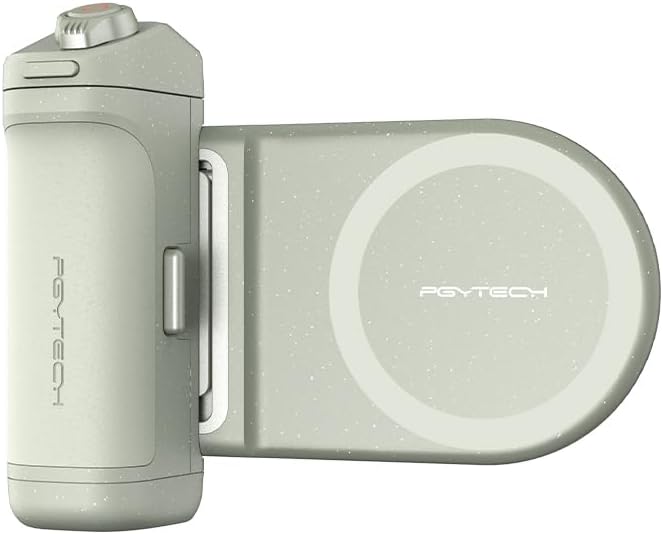
Image: PGYTECH MagCam 3-in-1 Phone Grip, showing the main grip and magnetic charging module.
What's in the Box
- PGYTECH MagCam Phone Grip - Mint Green
- Magnetic Wireless Charging Module
- Bluetooth Remote Module
- Charging Grip Module
- Magnetic Ring (for non-MagSafe phones)

Image: The three main components of the PGYTECH MagCam: the charging grip, the Bluetooth remote, and the magnetic wireless charging module.
Product Overview and Features
The PGYTECH MagCam Phone Grip is designed to enhance your smartphone photography experience with its innovative features:
- 3-in-1 Detachable Design: A modular smartphone photo grip with wireless charging and focus adjustment. It includes a magnetic wireless charging module, a charging grip module, and a Bluetooth remote control module.
- Timely Wireless Charging: Equipped with a built-in 3000 mAh 18650 battery and coil, supporting MagSafe magnetic wireless charging. The 18N vertical attraction force prevents unwanted movement. A double-sided magnet allows for attaching an additional fill light.
- Compact Design: Transforms into a slim magnetic phone stand with one click, featuring a thickness of 3.5 mm (5.5 mm at the thickest point) and a net weight of 48 g.
- Charging Grip + Bluetooth Remote: The grip module can serve as a compact 10W power bank. The magnetic Bluetooth remote offers remote control up to 10m for easy photo taking and video recording.
- Flexible Use: Wireless charging and grip modules feature a quick-lock design for secure connection. Easily switch between vertical and horizontal positions without changing the grip. Use the grip module as a desktop stand for viewing videos.
- Compatibility and Expansion: Compatible with iPhone 12–16 series, Huawei Mate, Huawei P, Xiaomi 15/14/13, and many other models. Features a 1/4" thread at the bottom for tripods and compatible accessories. (Note: During phone charging, the battery also powers the Bluetooth module to ensure continuous operation.)
Video: An overview of the PGYTECH MagCam Phone Grip, demonstrating its modularity, assembly, and various functions including charging and remote control.
Setup
1. App Installation (Recommended for enhanced features)
For iPhone users, download the PGYTECH PhotoVideo Creative app for professional camera shooting features. Scan the QR code or visit the App Store to download.

Image: QR code for the PGYTECH app and a preview of the app's camera interface.
Download the app: PGYTECH App on App Store
2. Bluetooth Pairing
Before using the MagCam, ensure the Bluetooth remote module is charged and powered on. To pair, follow these steps:
Video: A detailed tutorial demonstrating the Bluetooth pairing process for both iPhone and Android devices, as well as remote control functions and charging.
For iPhone Users:
- Open your iPhone's Settings.
- Navigate to Accessibility > Touch.
- Enable AssistiveTouch.
- Scroll down and set Tracking Sensitivity to the lowest level.
- Open the Control Center and enable Portrait Orientation Lock.
- Go back to Settings > Bluetooth.
- Find "PGY-MagCam" in the devices list and tap to pair. Confirm pairing when prompted.
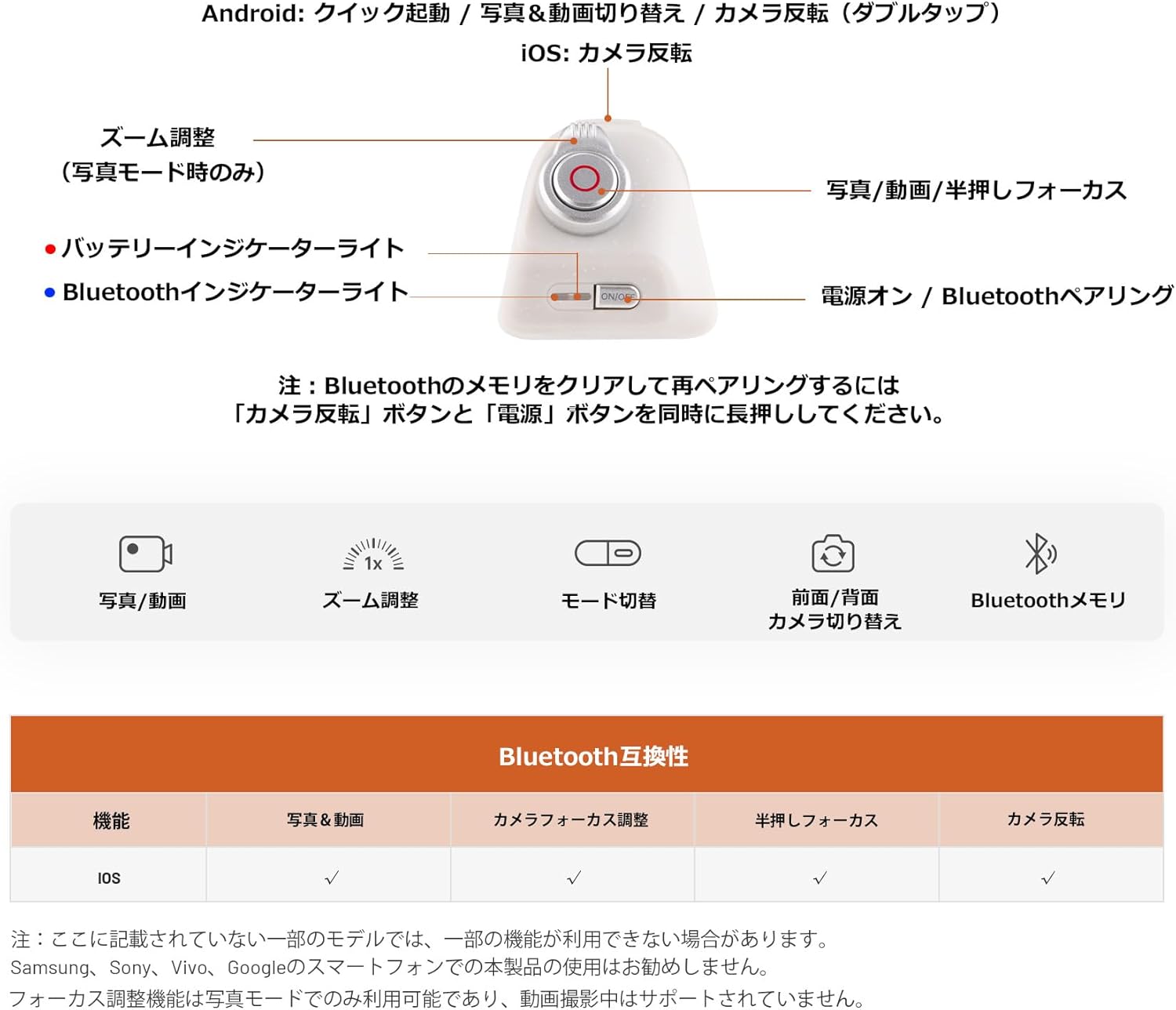
Image: Visual guide for iPhone users on enabling AssistiveTouch and pairing the PGYTECH MagCam via Bluetooth.
For Android Users:
- Ensure the remote control is powered on.
- Open your Android phone's Settings > Bluetooth.
- Find "PGY-MagCam" in the available devices list and tap to pair. Confirm pairing when prompted.
Operating Instructions
1. Remote Control Functions
The detachable Bluetooth remote provides convenient control over your smartphone's camera functions.
- Focal Length Adjustment: Toggle the dial left or right to adjust the focal length (zoom).
- Focus and Capture: Half-press the shutter button to focus. Fully press to capture photos or start/stop video recording.
- Camera Flip (iPhone): Double-tap the front button to switch between front and rear cameras.
- Quick Launch/Mode Switch (Android): Single-tap the front button to quick launch the camera. Tap again to switch between photo and video modes.
Note: Bluetooth compatibility and specific functions may vary by device. Please refer to the user guide for more details.

Image: Diagram illustrating the remote control buttons and a table detailing Bluetooth compatibility for various functions across iOS and Android.
2. Wireless and Wired Charging
The MagCam Phone Grip supports both wireless and wired charging for your smartphone and other devices.
- Wireless Charging: Attach your MagSafe-compatible phone to the magnetic charging module. Press the grip's power button once to start wireless charging. Double-press to stop charging.
- Wired Charging: Connect your device to the grip's USB port using a compatible cable to use it as a compact power bank.

Image: A smartphone displaying a wireless charging animation while attached to the PGYTECH MagCam grip.
3. Stand Function
The magnetic wireless charging module can be detached and its metal support leg unfolded to transform it into a compact desktop stand for both portrait and landscape viewing.

Image: Hands detaching the charging grip module and unfolding the metal support leg to use the device as a phone stand.
Specifications
| Feature | Detail |
|---|---|
| Brand | PGYTECH |
| Model | P-PG-036 |
| Color | Green |
| Special Features | 3-in-1 Detachable Design, Wireless Charging, Bluetooth Remote |
| Installation Type | Magnetic |
| Battery Type | Lithium-ion |
| Compatible Devices | Cellular Phone (iPhone 12-16 series, Huawei Mate/P, Xiaomi 15/14/13, etc.) |
| Material | Metal, Plastic |
| Package Dimensions | 13.1 x 11.9 x 3.9 cm |
| Item Weight | 0.15 grams |
Troubleshooting
If you encounter issues with your PGYTECH MagCam Phone Grip, please refer to the following common solutions:
- Bluetooth Connection Issues:
- Ensure the remote control module is charged and powered on.
- Verify Bluetooth is enabled on your smartphone.
- Forget "PGY-MagCam" from your phone's Bluetooth settings and attempt to re-pair.
- For iPhone, ensure AssistiveTouch is enabled and Tracking Sensitivity is set to the lowest.
- To clear Bluetooth memory and re-pair, long-press both the "Camera Flip" button and "Power" button simultaneously on the remote.
- Wireless Charging Not Working:
- Ensure your phone is MagSafe compatible or has the provided magnetic ring properly attached.
- Press the grip's power button once to initiate wireless charging.
- Check the battery level of the grip.
- Ensure there are no obstructions between the phone and the charging module.
- Remote Control Functions Not Responding (e.g., zoom, camera flip):
- Confirm successful Bluetooth pairing.
- Some advanced camera functions may require the PGYTECH app for full compatibility, especially on iPhones.
- Bluetooth compatibility varies by device and operating system. Refer to the compatibility table in the "Operating Instructions" section or the full user guide for specific limitations.
Maintenance
- Keep the device clean and dry. Avoid exposure to extreme temperatures or moisture.
- Use a soft, dry cloth for cleaning. Do not use harsh chemicals or abrasive materials.
- Store the device in a safe place when not in use to prevent damage.
Warranty and Support
The PGYTECH MagCam Phone Grip comes with a manufacturer's warranty. For specific warranty details, claims, or technical support, please contact PGYTECH customer service or visit their official website.
Manufacturer: PGYTECH
For further assistance, you may visit the PGYTECH store on Amazon: PGYTECH Store


