
DIYPHONE ATTEN ST-862D
ATTEN ST-862D 1000W Lead-free Hot Air Gun Soldering Station
Brand: DIYPHONE | Model: ATTEN ST-862D
1. Introduction
This manual provides detailed instructions for the safe and efficient operation, setup, maintenance, and troubleshooting of your ATTEN ST-862D 1000W Lead-free Hot Air Gun Soldering Station. Please read this manual thoroughly before using the device to ensure optimal performance and safety.
2. Safety Information
Always observe the following safety precautions to prevent injury or damage to the equipment:
- Ensure the power supply matches the station's requirements (110V AC).
- Do not touch the hot air gun nozzle or heated components during or immediately after operation, as temperatures can reach up to 480°C.
- Use in a well-ventilated area to avoid inhaling fumes from soldering.
- Always connect the ground wire to a proper ground source before operation.
- Keep the work area clean and free of flammable materials.
- Unplug the station from the power outlet when not in use or before performing maintenance.
- This device is designed for lead-free soldering; ensure proper ventilation and safety measures for all materials used.
3. Package Contents
Please verify that all the following items are included in your package:
- 1 x ATTEN ST-862D Soldering Station
- 1 x Hot Air Gun
- 1 x Hot Air Gun Bracket
- 7 x Nozzles (various sizes and types, including straight and spiral wind)
- 1 x Ground Wire
- 1 x Power Cord
- 1 x English User Manual

4. Product Overview
The ATTEN ST-862D is a high-performance 1000W hot air rework station designed for precise desoldering and repair of electronic components, particularly for phone PCB chips. It features an intelligent digital display for accurate temperature and airflow control, and an automatic sleep function for extended hot air gun life.

Key features include:
- Automatic Sleep Function: Extends the lifespan of the hot air gun by entering hibernation when placed in its bracket.
- Lead-free Anti-static Design: Ensures safe handling of sensitive electronic components.
- 1000W Powerful Desoldering: Provides rapid heating and strong airflow for efficient work.
- Digital Display: Clear LCD for precise temperature and airflow readings.
- Menu-style Operation: Intuitive controls for easy adjustments.
- Three Preset Channels: Quickly switch between common temperature and airflow settings.
- Quick Change Nozzle Holder: Allows for fast and easy nozzle replacement.


5. Setup
Follow these steps to set up your ATTEN ST-862D soldering station:
- Unpack: Carefully remove all components from the packaging.
- Position: Place the soldering station on a stable, heat-resistant, and level surface. Ensure adequate space for ventilation around the unit.
- Connect Hot Air Gun: Insert the hot air gun's hose connector firmly into the designated port on the front of the main station unit.
- Place in Bracket: Place the hot air gun securely into its dedicated bracket. This bracket also serves as the trigger for the automatic sleep function.
- Connect Ground Wire: Attach the ground wire to the appropriate terminal on the station and connect the other end to a reliable ground source.
- Connect Power: Plug the power cord into the station's power inlet, then plug the other end into a grounded 110V AC power outlet.
6. Operating Instructions
6.1 Power On/Off
To power on the station, press the main power switch located on the front panel. The digital display will illuminate. To power off, press the switch again.
6.2 Temperature and Airflow Adjustment
The station allows precise control over temperature and airflow:
- Temperature Control: Use the 'TEMP' up/down arrow buttons to adjust the desired temperature. The range is 100°C to 480°C (212°F to 896°F).
- Airflow Control: Use the 'AIR' up/down arrow buttons to adjust the airflow volume. The maximum airflow is 120 L/min.
- Preset Channels: The station features three preset channels (1, 2, 3) for quick recall of frequently used temperature and airflow settings. To save a setting, adjust to the desired values, then press and hold the corresponding preset button until it beeps. To recall a setting, simply press the desired preset button.

6.3 Nozzle Installation and Replacement
The hot air gun features a quick-change air nozzle holder for easy and fast replacement of nozzles. Ensure the hot air gun is cool before changing nozzles.
- To install a nozzle, align it with the hot air gun's tip and push it firmly until it clicks into place.
- To remove a nozzle, gently pull it straight off.
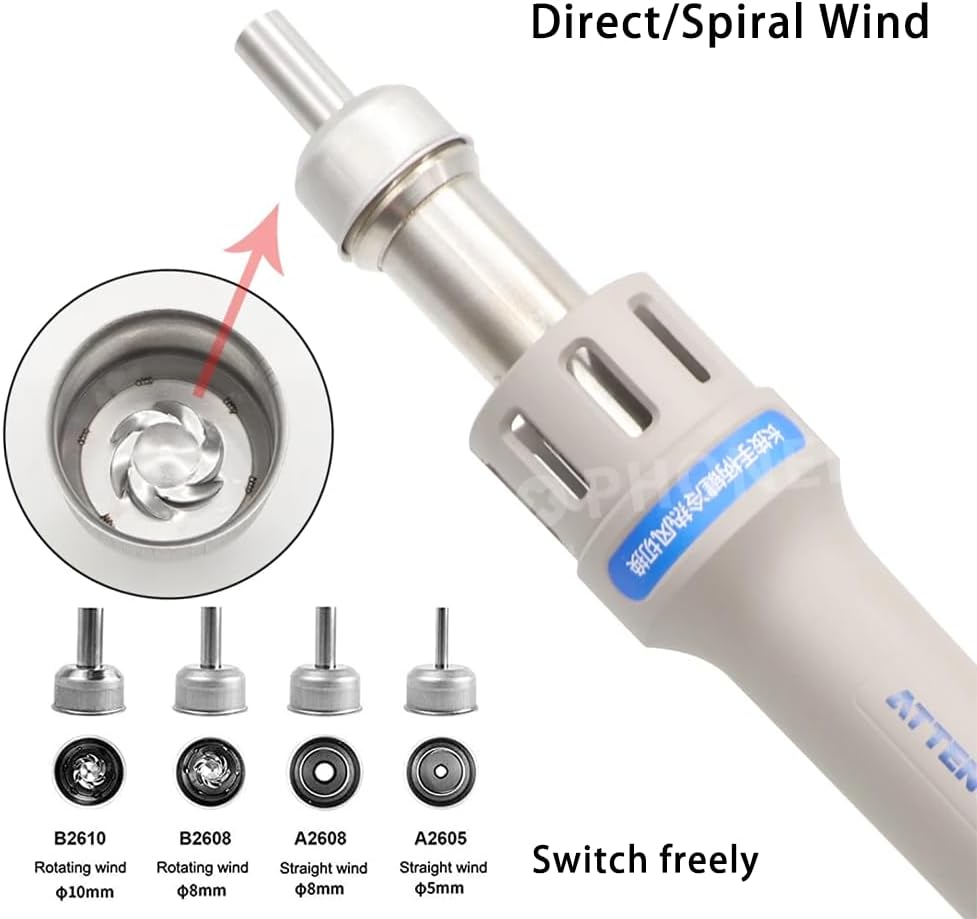


6.4 Automatic Sleep Function
The ATTEN ST-862D is equipped with an automatic hibernation function. When the hot air gun handle is placed into its designated sleep bracket, the station will automatically enter a hibernation state, reducing power consumption and extending the lifespan of the heating element and fan. When the handle is lifted from the bracket, it will quickly resume operation to the last set parameters.
7. Maintenance
Regular maintenance ensures the longevity and optimal performance of your soldering station:
- Cleaning: Periodically clean the exterior of the station and the hot air gun with a soft, dry cloth. Do not use abrasive cleaners or solvents.
- Nozzle Cleaning: Ensure nozzles are free from debris or solder residue to maintain proper airflow.
- Air Filter: Check and clean the air intake filter (if applicable) regularly to prevent dust buildup and maintain airflow efficiency.
- Storage: Store the station in a dry, dust-free environment when not in use.
8. Troubleshooting
If you encounter issues with your ATTEN ST-862D, refer to the following common problems and solutions:
| Problem | Possible Cause | Solution |
|---|---|---|
| No power/Display off | Power cord disconnected; Power switch off; Outlet issue | Check power cord connection; Ensure power switch is ON; Test outlet with another device |
| Hot air gun not heating | Heating element failure; Incorrect temperature setting | Contact support; Verify temperature setting is above ambient |
| Low or no airflow | Airflow setting too low; Blocked nozzle; Fan malfunction | Increase airflow setting; Clean or replace nozzle; Contact support |
| Automatic sleep not working | Hot air gun not properly seated in bracket | Ensure hot air gun is fully seated in its bracket |
If the problem persists after attempting these solutions, please contact customer support.
9. Specifications
Technical specifications for the ATTEN ST-862D Soldering Station:
| Feature | Value |
|---|---|
| Model Number | ATTEN ST-862D |
| Power | 1000W |
| Voltage | 110V AC |
| Temperature Range | 100°C ~ 480°C (212°F ~ 896°F) |
| Maximum Air Flow | 120 L/min |
| Temperature Stability | ±1.0°C / 3°F |
| Display Type | LCD |
| Number of Channels | 3 |
| Product Dimensions (L x W x H) | 8.2 x 6.85 x 5.9 inches (20.8 x 17.4 x 15 cm) |
| Item Weight | 4.5 pounds (2.04 kg) |
| UPC | 794414192955 |

10. Warranty and Support
Your ATTEN ST-862D Soldering Station comes with a 12-month warranty for quality-related issues. If you experience any quality problems within this period, please do not hesitate to contact our customer support team. We are committed to providing assistance and resolving any concerns you may have.
For support, please refer to the contact information provided in your purchase documentation or visit the DIYPHONE official store page on Amazon.
Related documentsATTEN ST-862D

Ask a question about this manual
Ask about setup, troubleshooting, compatibility, parts, safety, or missing instructions. Manuals+ will review the question and use this page’s manual context to help answer it.