
1. Introduction
This manual provides essential information for the safe and effective operation of your HITBOX HBM145 Multi-Process Welder. The HBM145 is a versatile 4-in-1 welding machine designed for flux core MIG, MMA (Stick), and Lift TIG welding. It also supports spool gun welding (spool gun and TIG torch sold separately). This welder features synergic control for simplified settings and is suitable for various applications including carbon steel and stainless steel.
Please read this manual thoroughly before operating the machine to ensure proper usage and to prevent injury or damage.
2. Safety Information
Welding can be dangerous. It is crucial to follow all safety precautions to prevent serious injury or death.
- Electric Shock Can Kill: Ensure the welder is properly grounded. Do not touch live electrical parts. Wear dry welding gloves.
- Fumes and Gases Can Be Dangerous: Keep your head out of the fumes. Use enough ventilation or exhaust at the arc to keep fumes and gases away from the breathing zone.
- Arc Rays Can Burn Eyes and Skin: Wear a welding helmet with a proper shade filter. Wear protective clothing (gloves, long sleeves, pants) to protect skin.
- Fire and Explosion Hazard: Remove all flammable materials from the welding area. Have a fire extinguisher readily available.
- Hot Parts Can Cause Severe Burns: Allow welded materials and equipment to cool before handling.
- Read the Entire Manual: Understand all instructions and warnings before operating the welder.
3. Product Overview
The HITBOX HBM145 is a compact and portable multi-process welding machine.
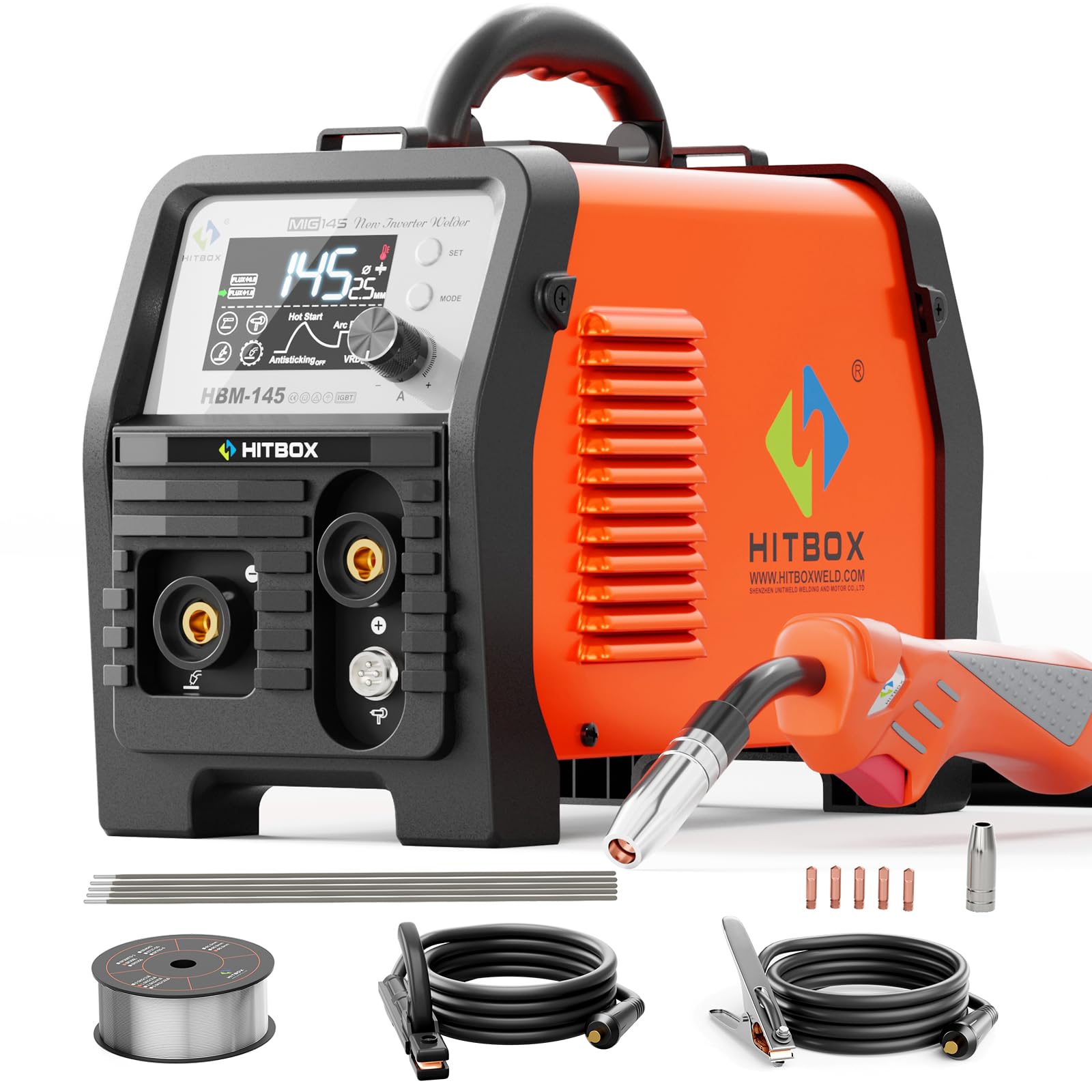
Image: Front view of the HITBOX HBM145 Multi-Process Welder, showcasing its compact design and control panel.
Key Features:
- 4-in-1 Welding Modes: Supports Gasless MIG, MMA (Stick), Lift TIG, and Spool Gun welding.
- Synergic Control: Automatic adjustment of current and wire feed speed for ease of use.
- Dual Voltage Input: Compatible with 110V and 220V power supplies.
- Portable Design: Lightweight (approximately 9.92 lbs) with a built-in handle for easy transport.
- Safety Protections: Includes VRD, overcurrent, overvoltage, overload, and overheat protection.
- Large LED Display: Provides clear visibility of welding parameters.

Image: Illustration showing the four welding processes supported by the HBM145: Gasless MIG, MMA, Lift TIG, and Spool Gun.

Image: An internal view of the HITBOX HBM145, highlighting its integrated circuit board and cooling fan, which contribute to its secure and long-lasting operation with built-in protections.

Image: The HITBOX HBM145 welder being carried by hand, illustrating its compact and lightweight design for easy portability.
4. Setup
4.1 Power Connection
The HBM145 welder supports both 110V and 220V input voltages. Ensure the power source matches the welder's requirements and that the circuit breaker can handle the welding current. Use a dedicated circuit if possible.
- Connect the power cord to a suitable electrical outlet.
- Turn on the main power switch located on the rear of the machine.
4.2 Ground Clamp Connection
Always connect the ground clamp securely to the workpiece or welding table. A good ground connection is essential for stable arc and safe operation.
- Insert the ground clamp cable connector into the appropriate terminal on the welder (usually marked with a ground symbol or "-").
- Attach the clamp firmly to a clean, bare metal section of the workpiece, ensuring good electrical contact.
4.3 Wire Installation (MIG/Flux Core)
The HBM145 supports 2 lbs spools of .030" and .039" welding wire.

Image: Internal view of the HITBOX HBM145 showing the wire spool and wire feeding mechanism.
- Open the side panel of the welder to access the wire spool compartment.
- Place the wire spool onto the spindle, ensuring it rotates freely.
- Feed the wire through the guide tube and into the drive roller mechanism.
- Close the drive roller tension arm and adjust the tension according to the wire diameter.
- With the MIG gun pointed away from yourself and others, press the trigger to feed the wire through the gun liner until it exits the contact tip.
- Trim the wire to approximately 1/2 inch (12-15mm) stick-out.
4.4 MMA (Stick) Welding Setup
- Connect the electrode holder cable to the positive (+) terminal and the ground clamp cable to the negative (-) terminal for DCEN (Direct Current Electrode Negative) or vice-versa for DCEP (Direct Current Electrode Positive), depending on the electrode type.
- Insert the desired welding electrode into the electrode holder.
4.5 Lift TIG Welding Setup (TIG torch sold separately)
- Connect the TIG torch cable to the negative (-) terminal and the ground clamp cable to the positive (+) terminal.
- Ensure a suitable tungsten electrode is installed in the TIG torch.
- Connect the gas hose from the TIG torch to a suitable shielding gas cylinder (e.g., Argon) with a regulator.
4.6 Spool Gun Welding Setup (Spool gun sold separately)
The HBM145 supports spool gun welding for gasless applications. Aluminum welding is not supported with the spool gun.

Image: The HITBOX HBM145 welder with a spool gun connected, demonstrating its use for gasless welding.
- Connect the spool gun cable to the designated port on the front panel of the welder.
- Ensure the wire spool inside the spool gun is correctly loaded and threaded.
5. Operating Instructions
5.1 Control Panel Overview
The HBM145 features a large LED display and intuitive controls for easy operation.

Image: Close-up of the HITBOX HBM145's LED display showing synergic control settings for MIG welding, including wire size and current adjustment.
- LED Display: Shows current welding mode, wire diameter, current/voltage, and other settings.
- MODE Button: Press to cycle through welding modes (MIG, MMA, Lift TIG).
- SET Button: Used to select parameters for adjustment within a mode.
- Control Knob: Rotate to adjust current, voltage, or wire feed speed depending on the selected parameter.
5.2 MIG Welding (Flux Core / Gasless)
- Select MIG Mode: Press the MODE button until MIG is selected on the display.
- Select Wire Size: Use the SET button to highlight the wire diameter setting, then use the control knob to select the correct wire size (e.g., Flux Φ0.8 or Flux Φ1.0).
- Adjust Current: The synergic control will suggest a current. You can fine-tune the current using the control knob.
- Begin Welding: Ensure proper PPE is worn. Position the MIG gun and press the trigger to start welding.
5.3 MMA (Stick) Welding
- Select MMA Mode: Press the MODE button until MMA is selected.
- Adjust Current: Use the control knob to set the appropriate welding current for your electrode type and material thickness.
- Begin Welding: Strike the electrode against the workpiece to initiate the arc.
5.4 Lift TIG Welding
- Select TIG Mode: Press the MODE button until Lift TIG is selected.
- Adjust Current: Use the control knob to set the desired welding current.
- Initiate Arc: Gently touch the tungsten electrode to the workpiece and then lift it slightly to initiate the arc.
6. Maintenance
Regular maintenance ensures the longevity and safe operation of your welder. Always disconnect the power before performing any maintenance.
- Cleaning: Periodically clean the internal components of the welder using compressed air to remove dust and debris. Ensure the cooling fan vents are clear.
- Cable Inspection: Regularly inspect all welding cables, including the MIG gun, electrode holder, and ground clamp cables, for cuts, fraying, or damaged insulation. Replace damaged cables immediately.
- MIG Gun Maintenance: Clean the MIG gun nozzle, contact tip, and diffuser regularly. Replace worn contact tips and liners as needed to ensure consistent wire feeding.
- Wire Feed Rollers: Check the wire feed rollers for wear and ensure they are clean and free of debris. Adjust tension as necessary for smooth wire feeding.
- Storage: Store the welder in a clean, dry environment when not in use.
7. Troubleshooting
Refer to this section for common issues and their potential solutions.
| Problem | Possible Cause | Solution |
|---|---|---|
| No power to the welder | Power cord unplugged, circuit breaker tripped, main switch off | Check power connections, reset circuit breaker, turn on main switch |
| No arc | Poor ground connection, incorrect settings, faulty cable/torch | Ensure ground clamp is secure, verify welding settings, inspect cables and torch for damage |
| Inconsistent wire feed (MIG) | Incorrect wire tension, clogged liner, worn contact tip, wrong drive roller size | Adjust wire tension, clean/replace liner, replace contact tip, ensure correct drive rollers are installed |
| Overheat protection activated | Exceeded duty cycle, blocked cooling vents, high ambient temperature | Allow welder to cool down, clear cooling vents, operate in a well-ventilated area |
8. Specifications
| Feature | Detail |
|---|---|
| Manufacturer | HITBOX |
| Model Number | HBM145 |
| Welding Processes | MIG (Gasless Flux Core), MMA (Stick), Lift TIG, Spool Gun (Gasless) |
| Input Voltage | 110V / 220V (Auto-sensing) |
| Rated Voltage (Specification) | 230 Volts |
| Item Weight | 4.5 Kilograms (approx. 9.92 lbs) |
| Product Dimensions | 10 x 10 x 12 cm (approx. 3.9 x 3.9 x 4.7 inches) |
| Style | MIG Welder 145A |
| Protection Features | VRD, Overcurrent, Overvoltage, Overload, Overheat Protection |
Note: Specifications are subject to change without notice.
9. Warranty and Support
For warranty information and technical support, please contact HITBOX customer service. Details regarding warranty coverage and duration are typically provided with your purchase documentation or can be found on the official HITBOX website.
When contacting support, please have your model number (HBM145) and purchase date available.
Contact Information: Refer to your product packaging or the official HITBOX website for the most current contact details.


