
1. Introduction
The EMSON Bullseye Pro POCKET AIR PRO Portable Tire Inflator is a compact, cordless, and rechargeable air compressor designed for convenient inflation of various items. Its portability makes it an ideal tool for on-the-go tire maintenance for cars, bikes, and other inflatables. This manual provides essential information for safe and effective use of your device.
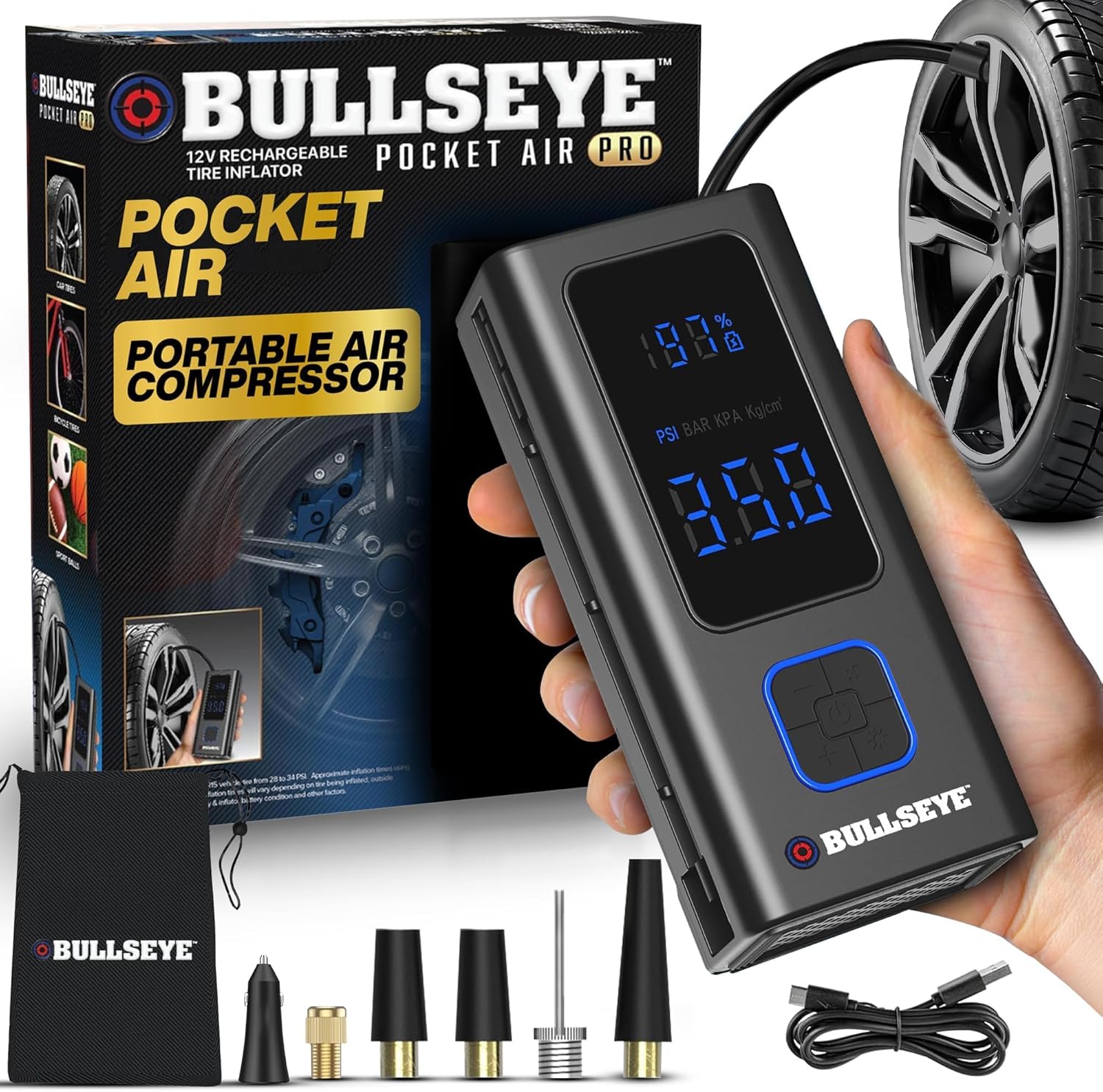
Image 1.1: The POCKET AIR PRO Portable Tire Inflator with its included accessories and retail packaging.
2. What's in the Box
Upon opening your POCKET AIR PRO package, you should find the following components:
- 1x POCKET AIR PRO Portable Tire Inflator Unit
- 1x USB-C Charging Cable (wall charger not included)
- 1x Air Hose
- 1x Sports Needle
- 2x Nozzle Adapters
- 1x Spare Fuse
- 1x Bullseye Pro Travel Bag

Image 2.1: All components included with the POCKET AIR PRO Portable Tire Inflator.
3. Product Features
The POCKET AIR PRO is designed with user convenience and safety in mind:
- Compact and Portable: Weighing less than a pound, its ultra-compact size allows for easy storage in a glove box, backpack, or pocket.
- Cordless Operation: Powered by a rechargeable 6000mAh battery for maximum convenience.
- Quick Inflation: Equipped with a high-performance motor capable of inflating standard car tires in minutes.
- High Pressure Capability: Supports a maximum pressure of 120 PSI, suitable for various vehicles and inflatables.
- Digital Pressure Gauge: Features a built-in, easy-to-read digital display for precise pressure monitoring.
- Auto-Shutoff Function: Automatically stops inflation once the preset pressure is reached, preventing over-inflation.
- Versatile Use: Compatible with car tires, bike tires (including Presta valve with adapter), sports balls, and other inflatables.
- Integrated Lighting: Includes a built-in night light and an SOS probe for emergency situations.

Image 3.1: Key features of the POCKET AIR PRO Portable Tire Inflator.
4. Setup
- Charge the Device: Before first use, fully charge the POCKET AIR PRO using the provided USB-C charging cable. Connect the cable to the device and a compatible USB power adapter (not included). The digital display will indicate charging status.
- Attach Air Hose: Screw the air hose securely into the designated port on the inflator unit.
- Select Appropriate Nozzle: Choose the correct nozzle adapter for the item you intend to inflate (e.g., standard Schrader valve for car/bike tires, sports needle for balls, Presta valve adapter for bikes). Attach it to the end of the air hose.
5. Operating Instructions
5.1. Power On/Off and Setting Pressure
- Power On: Press and hold the power button for 2 seconds to turn on the device. The digital display will illuminate.
- Select Unit: Use the 'M' button to cycle through pressure units (PSI, BAR, KPA, Kg/cm²).
- Set Target Pressure: Use the '+' and '-' buttons to set your desired target pressure. The device will automatically stop once this pressure is reached.
- Power Off: Press and hold the power button for 2 seconds to turn off the device. It will also auto-shutoff after a period of inactivity.
5.2. Inflating Items
- Connect to Valve: Securely attach the nozzle adapter to the valve stem of the item you wish to inflate. Ensure a tight seal to prevent air leakage.
- Start Inflation: Once the target pressure is set and the hose is connected, press the start button (usually the central button on the control panel) to begin inflation. The digital display will show the real-time pressure.
- Automatic Stop: The inflator will automatically stop once the preset target pressure is achieved.
- Disconnect: Carefully disconnect the nozzle from the valve stem. A small amount of air may escape, which is normal.

Image 5.1: Inflating a car tire with the POCKET AIR PRO, demonstrating the digital display and auto-shutoff.
5.3. Using the SOS Light
The POCKET AIR PRO includes a built-in light for visibility and emergencies:
- Activate Light: Press the light button (often indicated by a lightbulb icon) to turn on the solid white light.
- SOS Mode: Press the light button again to cycle through different light modes, including a blinking SOS signal for emergencies.
- Turn Off Light: Continue pressing the light button until the light turns off.
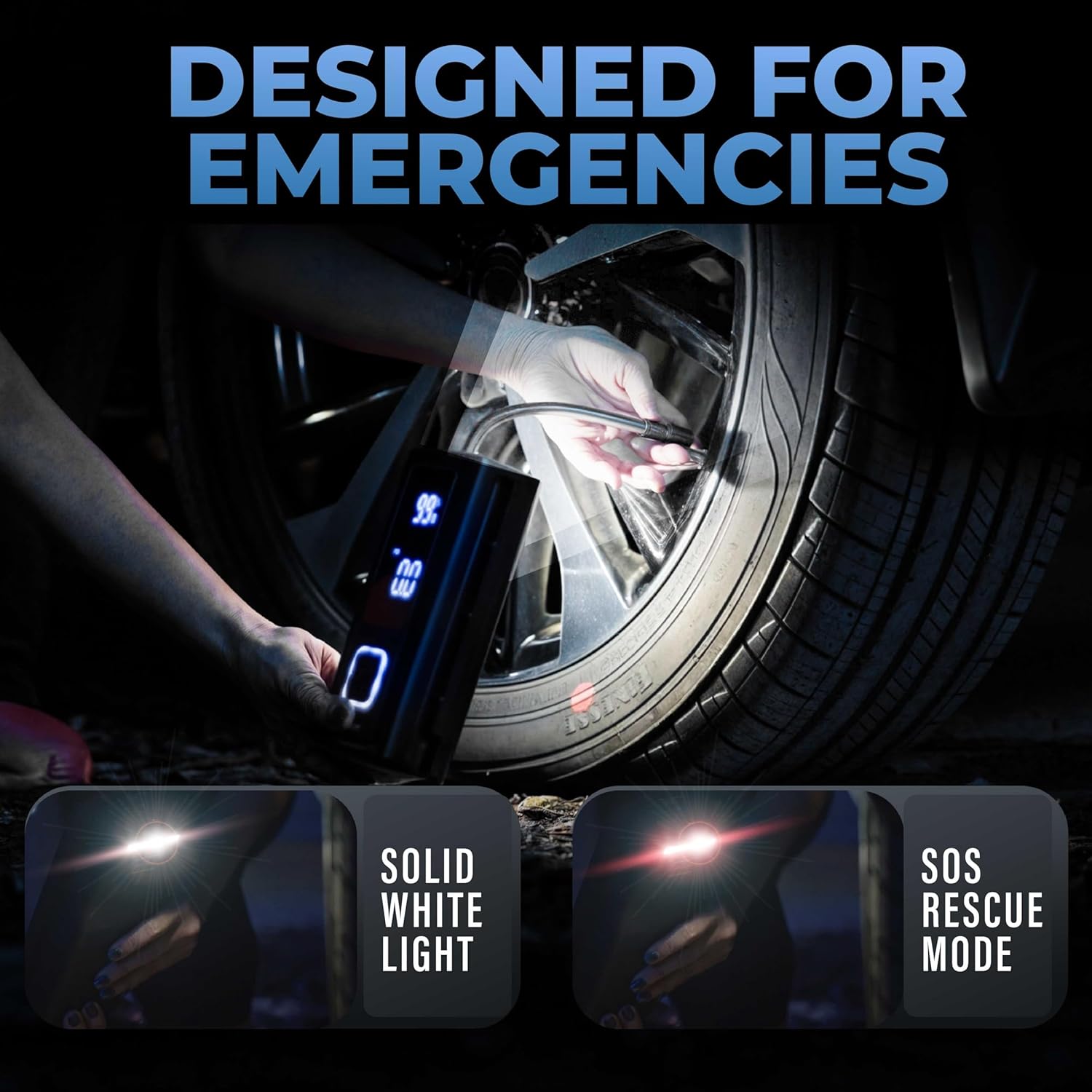
Image 5.2: The integrated light feature for night use and SOS signaling.
5.4. Versatile Applications
The POCKET AIR PRO is suitable for a wide range of inflation needs:
- Car Tires: Ideal for maintaining optimal tire pressure for improved safety and fuel efficiency.
- Motorcycle Tires: Ensures correct pressure for motorcycle handling and safety.
- Bicycle Tires: Easily inflates various bicycle tires, including those with Presta valves using the provided adapter.
- Sports Balls: Use the sports needle to inflate basketballs, soccer balls, footballs, etc.
- Inflatables: Perfect for small inflatable toys, air mattresses, and other recreational items.

Image 5.3: Examples of various items that can be inflated with the POCKET AIR PRO.
6. Charging
The POCKET AIR PRO is powered by a rechargeable battery. To charge the device:
- Locate the USB-C charging port on the device.
- Connect the provided USB-C charging cable to the device.
- Plug the other end of the USB-C cable into a compatible USB power adapter (not supplied) or a powered USB port.
- The digital display will show the charging status. Ensure the device is fully charged before extended use.
Note: If you have not received a charging cable with your order, please contact customer support for a replacement.
7. Maintenance
- Cleaning: Wipe the device with a soft, dry cloth. Do not use harsh chemicals or abrasive cleaners.
- Storage: Store the inflator in its travel bag in a cool, dry place away from direct sunlight and extreme temperatures.
- Battery Care: For optimal battery life, avoid completely draining the battery frequently. Recharge the device regularly, especially if it has not been used for an extended period.
- Hose and Adapters: Ensure the air hose and nozzle adapters are clean and free from debris before and after each use to maintain proper function.
8. Troubleshooting
| Problem | Possible Cause | Solution |
|---|---|---|
| Device does not turn on | Low battery; Power button not pressed correctly | Charge the device; Press and hold the power button for 2 seconds |
| Slow inflation or no inflation | Air hose or nozzle not securely attached; Item valve blocked; Low battery | Ensure all connections are tight; Check and clear valve; Recharge device |
| Device does not stop at preset pressure | Incorrect pressure setting; Malfunction | Verify target pressure setting; Contact customer support if issue persists |
| Battery drains quickly | Old battery; Extreme temperatures; Continuous heavy use | Ensure proper charging and storage; Avoid prolonged continuous use; Contact customer support if battery life is significantly reduced |
9. Specifications
- Brand: EMSON
- Model Name: Pocket Air Pro
- Item Model Number: 6163
- Power Source: Rechargeable (6000mAh)
- Voltage: 12 Volts
- Maximum Operating Pressure: 120 PSI
- Hose Length: 6 Inches
- Item Weight: 2.35 pounds (1.07 Kilograms)
- Color: Black
- Special Features: Cordless, Lightweight, Portable, Compact, Built-in Night Light, SOS Probe, Digital Pressure Gauge, Auto Shut-Off
10. Official Product Video
Video 10.1: An overview of the Pocket Air Pro, demonstrating its features and ease of use. This video is provided by Bell + Howell.
11. Warranty and Support
The EMSON Bullseye Pro POCKET AIR PRO comes with a 5-Year Warranty. For assistance with your purchase or any product-related inquiries, please contact customer support directly through Amazon.
