
1. Introduction
Thank you for choosing the UBPET V10 Robot Vacuum Cleaner. This manual provides essential information for the safe operation, maintenance, and troubleshooting of your device. Please read it thoroughly before use and retain it for future reference.

Image 1.1: UBPET V10 Robot Vacuum Cleaner with accompanying app interface.
2. Product Overview
2.1 Key Features
- Powerful 22,000Pa Suction: Four adjustable levels (9,000-22,000Pa) for deep cleaning on various surfaces, including carpets and hard floors.
- Tangle-Free Pet Hair Cleaning System: Anti-tangle brush roller with self-cleaning technology to prevent hair wrap.
- Superior Carpet Cleaning: Automatically boosts suction power on carpets up to 1.5 inches high.
- LiDAR Navigation & App Control: 360° LiDAR scanning for precise home mapping, efficient cleaning paths, obstacle avoidance, and customizable cleaning schedules via smartphone app.
- Quiet & Efficient Operation: Operates at approximately 60dB, minimizing disturbance.
- 4-Stage Filtration System: Includes HEPA filtration at the air outlet, sponge filtration, cyclone filtration, and stainless filter element filtration.
2.2 Included Components
Carefully unpack the box and ensure all the following components are present:
- Cyclone vacuum robot
- Cleaning brush tool
- Cyclone dustbin
- Charging dock
- HEPA filter (pre-installed)
- Dustbin brush
- Power cable
- Cleaning brush
- User manual

Image 2.1: Exploded view of the UBPET V10 Robot Vacuum Cleaner and its accessories.
3. Setup
3.1 Charging Dock Placement
Place the charging dock against a wall in an open area, ensuring there are no obstacles within 1 meter (3 feet) to the front and 0.5 meters (1.5 feet) to the sides. Connect the power cable to the charging dock and plug it into a power outlet. Ensure the dock is on a hard, flat surface.
3.2 Initial Charging
Place the robot vacuum onto the charging dock. The robot will automatically align and begin charging. For first-time use, fully charge the robot before operation. The indicator light on the robot will show charging status.
3.3 App Connection
- Download the UBPET app from your smartphone's app store.
- Open the app and follow the on-screen instructions to create an account.
- Add your UBPET V10 device by selecting the model and following the pairing process, which typically involves connecting to the robot's Wi-Fi network temporarily.
- Once connected, the app will guide you through initial mapping and customization options.

Image 3.1: UBPET app interface for customizing cleaning maps and schedules.
4. Operating Instructions
4.1 Starting and Stopping Cleaning
- Start: Press the power button on the robot or use the 'Start Cleaning' option in the UBPET app. The robot will begin its cleaning cycle.
- Pause: Press the power button once during operation to pause cleaning.
- Resume: Press the power button again to resume cleaning.
- Stop/Return to Dock: Press and hold the power button for a few seconds, or use the 'Return to Dock' option in the app. The robot will return to its charging station.
4.2 Cleaning Modes and Suction Levels
The UBPET V10 offers various cleaning modes and suction levels, adjustable via the app:
- Eco Mode (9,000Pa): Suitable for light cleaning and extending battery life on hard floors.
- Normal Mode (12,000-18,000Pa): Standard cleaning for daily dirt and debris.
- Strong Mode (18,000-22,000Pa): For tougher messes and deeper carpet cleaning.
- Turbo Mode (22,000Pa): Maximum suction for embedded dirt and pet hair on carpets.

Image 4.1: The UBPET V10 demonstrating powerful suction on carpet.
4.3 Smart Features
- LiDAR Navigation: The robot uses 360° LiDAR to create precise maps of your home, ensuring efficient and systematic cleaning paths.
- Obstacle Avoidance: Equipped with laser line sensors and TOF sensors, the robot intelligently recognizes and avoids obstacles, preventing collisions.
- Anti-Cliff Technology: Infrared sensors detect ledges and stairs, preventing the robot from falling.
- Automatic Suction Boost: The robot automatically increases suction power when transitioning from hard floors to carpets for deeper cleaning.
- App Customization: Use the UBPET app to set cleaning schedules, define no-go zones, create virtual walls, and select specific rooms for cleaning.
- Auto-Return Charging: The robot automatically returns to its charging dock when the battery is low or when a cleaning cycle is complete.

Image 4.2: Obstacle avoidance technology in action.

Image 4.3: Drop-sensing technology preventing falls from stairs.
5. Maintenance
Regular maintenance ensures optimal performance and extends the lifespan of your UBPET V10.
5.1 Emptying the Dustbin
- Press the dustbin release button to remove the dustbin from the robot.
- Open the dustbin lid and empty its contents into a trash bin.
- Close the dustbin lid and reinsert it into the robot until it clicks into place.
5.2 Cleaning Filters
The UBPET V10 features a 4-stage filtration system. Clean the filters regularly to maintain suction power.
- Stainless Filter Element: Tap off loose debris.
- Cyclone Filter: Rinse with water and allow to air dry completely before reinstallation.
- Sponge Filter & HEPA Filter: Tap off loose debris. Replace the HEPA filter every 3 months or as needed.
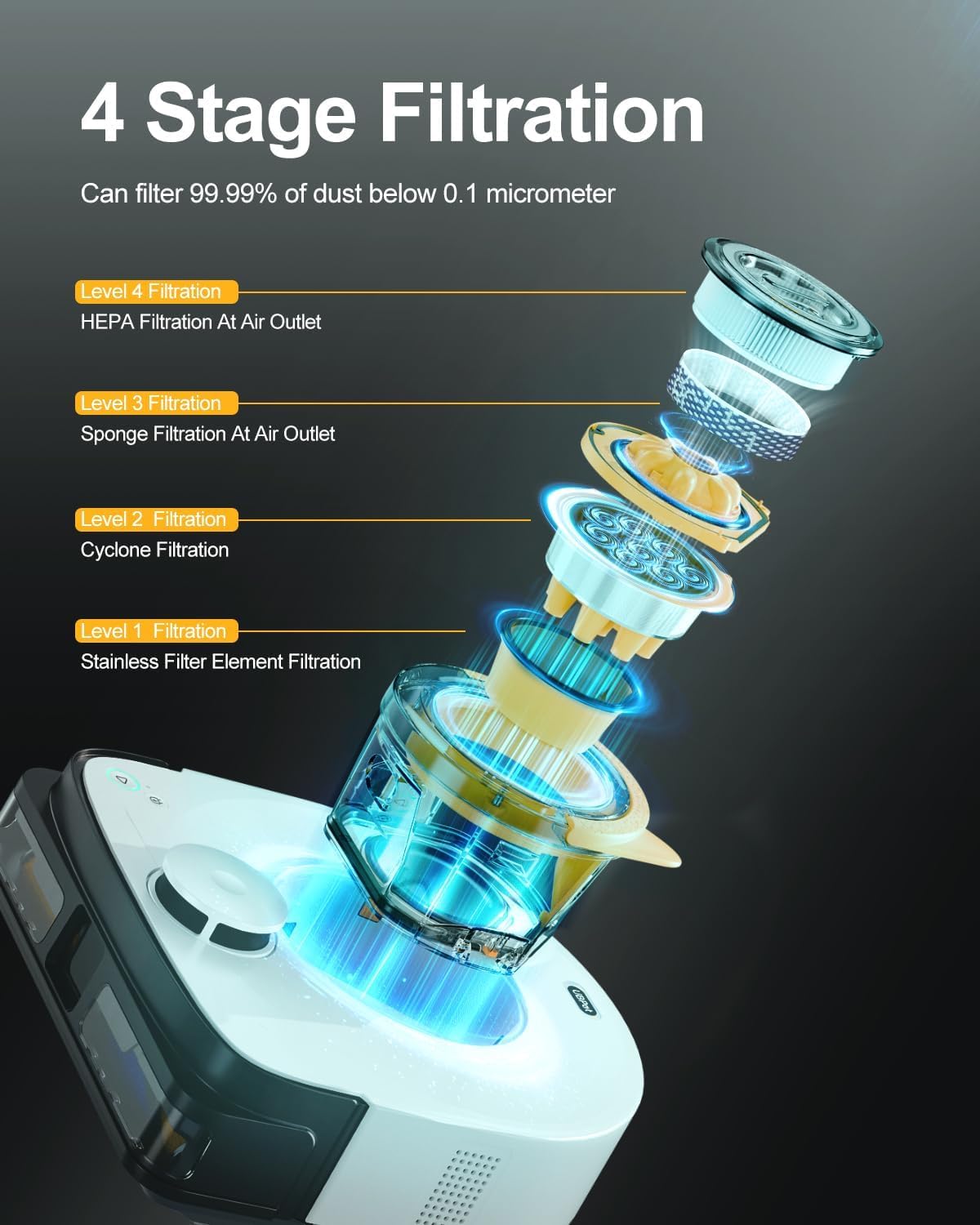
Image 5.1: Detailed view of the 4-stage filtration system.

Image 5.2: Instructions for dustbin emptying and cleaning washable components.
5.3 Cleaning the Brush Roller
The anti-tangle brush roller minimizes hair wrap, but occasional cleaning is recommended.
- Remove the brush cover and lift out the main brush.
- Use the provided cleaning tool to cut and remove any tangled hair or debris from the brush.
- Reinstall the main brush and brush cover.
5.4 Cleaning Sensors and Charging Contacts
Wipe the sensors (LiDAR, obstacle avoidance, anti-cliff) and charging contacts on both the robot and the dock with a clean, dry cloth to ensure proper function.
6. Troubleshooting
If you encounter issues with your UBPET V10, refer to the following common solutions:
| Problem | Possible Cause | Solution |
|---|---|---|
| Robot does not start or respond. | Low battery; Power switch off; Robot stuck. | Charge the robot; Ensure power switch is ON; Clear any obstructions. |
| Robot cannot return to charging dock. | Dock obstructed; Dock not powered; Robot too far. | Ensure clear area around dock; Check power connection; Manually place robot near dock. |
| Poor cleaning performance. | Full dustbin; Clogged filters; Tangled brush. | Empty dustbin; Clean or replace filters; Clean main brush. |
| App connectivity issues. | Incorrect Wi-Fi password; Router issues; Robot not in pairing mode. | Verify Wi-Fi credentials; Restart router; Reset robot's Wi-Fi and re-pair. |
| Robot gets stuck frequently. | Loose cables; Small objects; Dark surfaces. | Clear floor of cables and small items; Use no-go zones for problematic areas. |
7. Specifications
| Brand | UBPET |
| Model Name | V10 |
| Item Model Number | VACUUM-V10 |
| Special Feature | 22,000 Pa Suction, Cyclonic, Deep Carpet Cleaning, HEPA Filtration, Hassle-free Pet Hair Cleanup |
| Color | White |
| Product Dimensions | 12.4"L x 11.7"W x 4.3"H |
| Item Weight | 9.68 pounds |
| Battery Life | 70 minutes |
| Power Source | Battery Powered (1 Lithium Ion battery included) |
| Capacity (Dustbin) | 300 Milliliters |
| Cleaning Path Width | 9.2 Inches |
| Compatible Devices | Smartphones |
| Manufacturer | UBTECH ROBOTICS CORP LTD |
8. Warranty and Support
Your UBPET V10 Robot Vacuum Cleaner is covered by a manufacturer's warranty. Please refer to the warranty card included in your product packaging for specific terms and conditions. For technical support, troubleshooting assistance, or warranty claims, please contact UBPET customer service through the contact information provided on the official UBPET website or within the UBPET app.
Optional protection plans are available for extended coverage. Please check the product listing or contact your retailer for details on 2-Year or 3-Year Protection Plans.

