
BoyKeep Y108
BoyKeep Y108 1080P Outdoor Security Camera User Manual
Model: Y108
1. Introduction
This manual provides detailed instructions for the installation, operation, and maintenance of your BoyKeep Y108 1080P Outdoor Security Camera. Please read this manual thoroughly before using the product to ensure proper function and safety.
The BoyKeep Y108 camera offers comprehensive home security with its 1080P high-resolution video, 360° pan/tilt view, color night vision, motion detection, and two-way audio communication. It connects via 2.4GHz Wi-Fi for convenient remote monitoring.
2. Package Contents
Verify that all items are present in your package:
- BoyKeep Y108 Camera Body (Quantity: 8, if 8 PC pack)
- Power Adapter (for each camera)
- Mounting Screws and Anchors
- User Manual (this document)

Image 1: Contents of the 8-pack BoyKeep Y108 security camera package, showing multiple camera units and their associated mounting hardware.
3. Setup and Installation
3.1 Choosing a Location
Select a location that provides the desired viewing angle and is within range of your 2.4GHz Wi-Fi network. The camera is designed for outdoor use and can be ceiling-mounted or wall-mounted.
3.2 Mounting the Camera
- Mark the drilling points on the wall or ceiling using the camera's base as a template.
- Drill holes at the marked positions. Insert wall anchors if mounting on drywall or masonry.
- Secure the camera base to the surface using the provided screws.
- Adjust the camera's angle as needed after mounting.

Image 2: A BoyKeep Y108 camera mounted on an exterior wall, illustrating its pan and tilt capabilities for wide coverage.
3.3 Powering On and App Connection
- Connect the power adapter to the camera and plug it into a power outlet. The camera will power on and initiate its self-test.
- Download the official BoyKeep app from your smartphone's app store (iOS or Android).
- Open the app, create an account, and follow the on-screen instructions to add your camera. Ensure your phone is connected to a 2.4GHz Wi-Fi network during setup.
- The app will guide you through connecting the camera to your home Wi-Fi network.
4. Operating Instructions
4.1 Live View and Pan/Tilt Control
Once connected, open the BoyKeep app to access the live video feed. Use the on-screen controls to pan (horizontal rotation up to 360°) and tilt (vertical rotation up to 90°) the camera lens to monitor different areas.
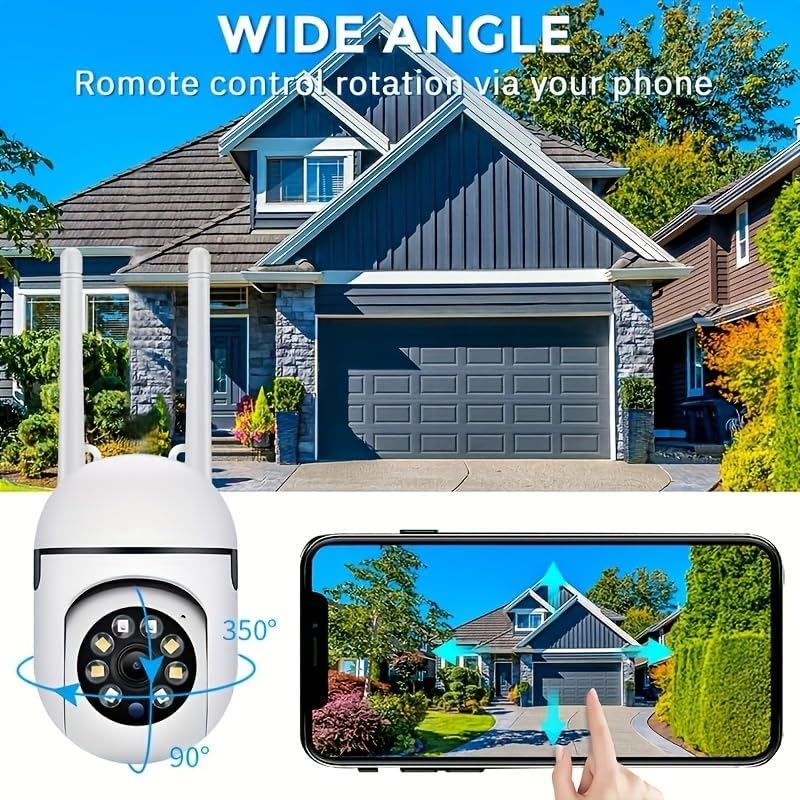
Image 3: A smartphone displaying the live feed from the BoyKeep Y108 camera, with virtual joystick controls for pan and tilt adjustments.
4.2 Night Vision Modes
The camera features three night vision modes for enhanced surveillance in low-light conditions:
- Infrared Night Vision: Provides clear black-and-white video in complete darkness.
- Full-Color Night Vision: Utilizes built-in spotlights to capture full-color video at night.
- Sound and Light Alarm Night Vision: Activates spotlights and an audible alarm upon motion detection at night, deterring intruders and capturing color video.

Image 4: Visual representation of the three distinct night vision modes available on the BoyKeep Y108 camera, showing their effects on image clarity and color.
4.3 Motion Detection and Alerts
The camera can detect motion and send real-time alerts to your smartphone. You can customize motion detection zones and sensitivity settings within the app to minimize false alarms.
4.4 Two-Way Audio
Utilize the built-in microphone and speaker for two-way communication. This allows you to speak to visitors or deter unwanted guests directly through the camera via the app. The camera also supports a one-touch call button for family members to initiate a call to your phone.
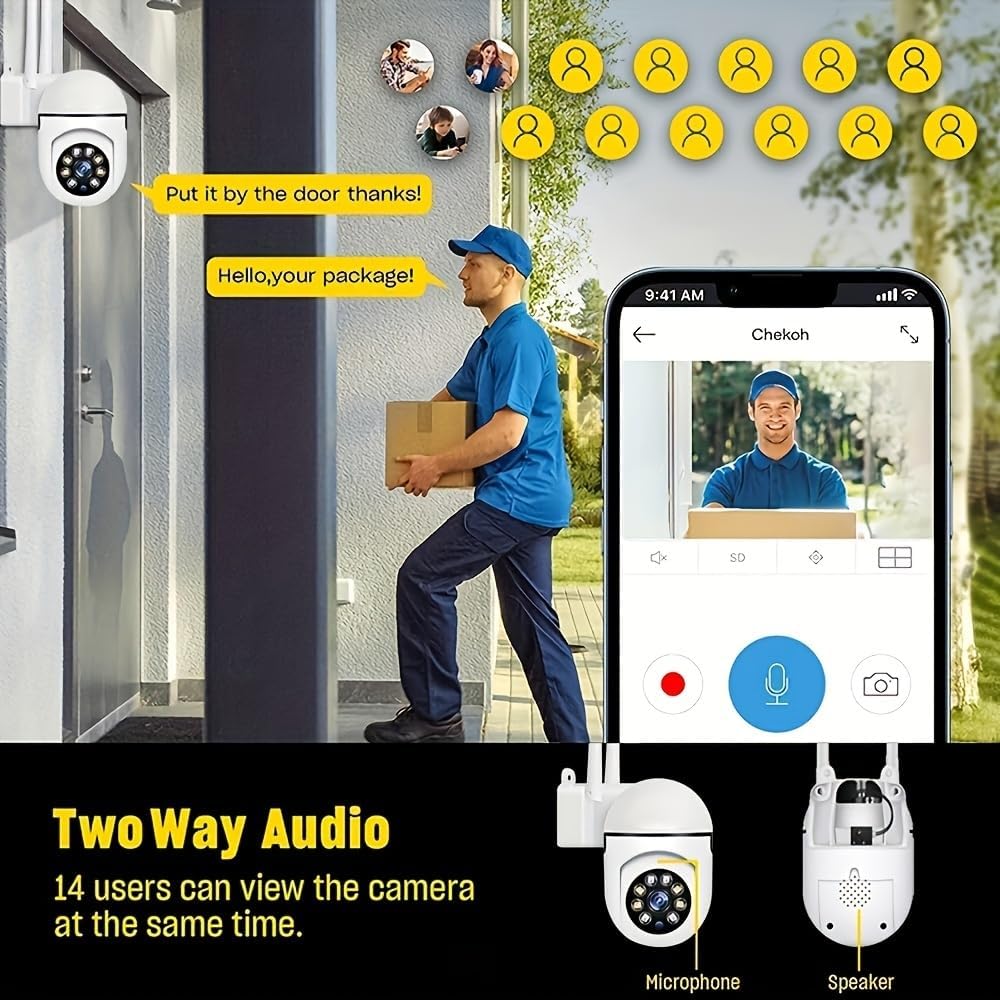
Image 5: An illustration of the two-way audio feature, depicting a user communicating with someone near the camera using their smartphone.
4.5 Video Recording and Storage
The BoyKeep Y108 camera supports two storage options for recorded video:
- Memory Card Storage: Insert a compatible memory card (not included) into the camera's slot for continuous 24/7 recording.
- Cloud Service: A 30-day free trial of cloud storage is available for storing alert videos securely. Subscription options are available after the trial period.
4.6 Multi-Device Viewing and Sharing
The app allows you to add multiple BoyKeep cameras and view up to four live feeds simultaneously. You can also share access to your camera's feed with up to 10 other devices, enabling family members to monitor the property.
5. Maintenance
- Cleaning: Gently wipe the camera lens and body with a soft, dry cloth. Do not use harsh chemicals or abrasive cleaners.
- Firmware Updates: Regularly check the app for available firmware updates to ensure optimal performance and security.
- Power Supply: Ensure the power adapter and cable are free from damage.
6. Troubleshooting
| Problem | Possible Solution |
|---|---|
| Camera fails to connect to Wi-Fi. |
|
| Poor image quality. |
|
| Motion alerts are not received. |
|
| Two-way audio not working. |
|
7. Specifications
| Feature | Detail |
|---|---|
| Model Number | Y108 |
| Video Capture Resolution | 1080p |
| Connectivity Technology | Wired (Power), Wi-Fi (Data) |
| Connectivity Protocol | Wi-Fi (2.4GHz only) |
| Power Source | Corded Electric |
| Indoor/Outdoor Usage | Outdoor |
| Mounting Type | Ceiling Mount (also suitable for wall mount) |
| Controller Type | App (Smartphone) |
| Compatible Devices | Smartphone |
| Special Feature | Adjustable (Pan/Tilt), Color Night Vision, 2-Way Talk, Motion Detection |
| Low Light Technology | Night Color |
| Video Capture Format | MP4 |
8. Warranty and Support
For warranty information and technical support, please refer to the official BoyKeep website or contact their customer service directly. Keep your purchase receipt as proof of purchase.
For further assistance, please visit: BoyKeep Official Store on Amazon
Related documentsY108


Ask a question about this manual
Ask about setup, troubleshooting, compatibility, parts, safety, or missing instructions. Manuals+ will review the question and use this page’s manual context to help answer it.