
LETOUR W5167
LETOUR W5167 LED Handheld Spotlight User Manual
Model: W5167
Introduction
Thank you for choosing the LETOUR W5167 LED Handheld Spotlight. This high-performance device is designed for various outdoor and emergency situations, offering exceptional brightness, long battery life, and versatile functionalities.
The W5167 spotlight features an impressive 450,000 lumens of brightness, illuminating even the darkest environments with a range of up to 4,000 feet. Its robust design ensures reliability for years of adventure.
Equipped with a 350-degree rotatable head, the spotlight allows for effortless adjustment between close-range and long-range lighting. It offers nine distinct lighting modes to adapt to any situation, from general illumination to emergency signaling. Additionally, it functions as a power bank, ensuring your devices stay charged when you need them most.

The LETOUR W5167 LED Handheld Spotlight provides powerful illumination for various outdoor activities.
Product Features Overview
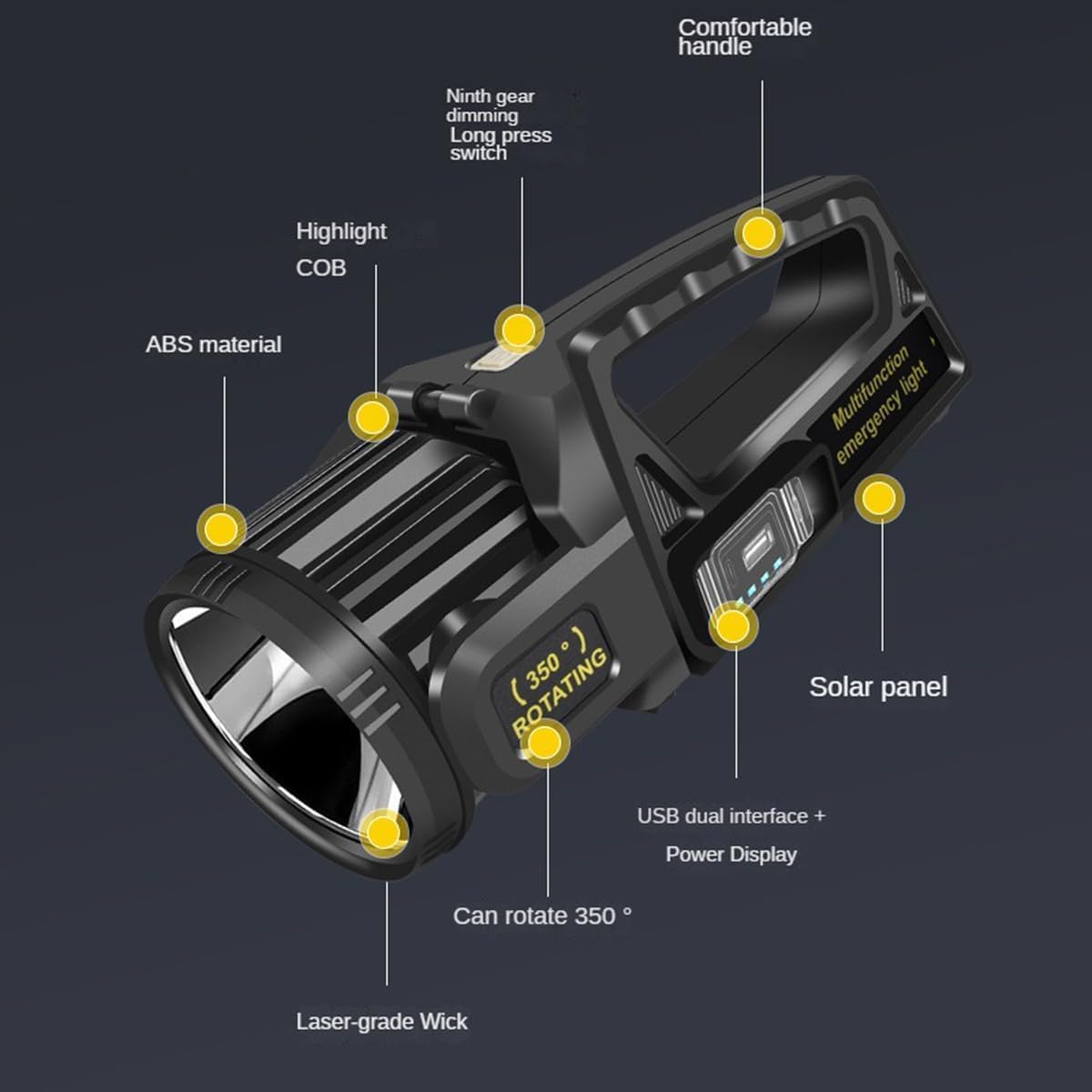
Key components and features of the LETOUR W5167 spotlight.
- Comfortable Handle: Ergonomically designed for easy carrying.
- Solar Panel: Integrated for convenient solar charging.
- USB Dual Interface + Power Display: Allows charging external devices and shows battery level.
- 350° Rotating Head: Adjustable light angle for versatile use.
- Highlight COB: Provides wide-angle floodlight illumination.
- Laser-grade Wick: Delivers powerful spotlight beam.
- ABS Material: Durable and lightweight construction.
Setup
Charging the Spotlight
The LETOUR W5167 offers two convenient charging methods:
- USB Charging: Connect the included USB cable to the spotlight's charging port and a compatible USB power adapter (not included). The power display will indicate charging progress.
- Solar Charging: Place the spotlight with its solar panel facing direct sunlight. The solar panel will convert sunlight into energy to charge the internal battery. Solar charging is ideal for maintaining charge or for emergency situations when a power outlet is unavailable.

The spotlight can be charged via USB or its integrated solar panel.
Ensure the spotlight is fully charged before first use to maximize battery life and performance.
Operating Instructions
Power On/Off and Mode Switching
The LETOUR W5167 features a simple control button for power and mode selection:
- Short Press: Quickly press the power button to cycle through the various lighting modes.
- Long Press: Press and hold the power button for a few seconds to turn the spotlight off.
Lighting Modes (9 Modes)
The spotlight offers a comprehensive range of lighting options:

The spotlight offers both focused and wide-angle illumination with multiple settings.
- Spotlight Modes (Front Light):
- LED Strong Light: Maximum brightness for long-distance illumination.
- LED Weak Light: Lower brightness for extended battery life or closer range.
- LED Flash: Strobe mode for signaling or emergency.
- Floodlight Modes (Side COB Light):
- White Strong Light: Bright white light for wide area illumination.
- White Weak Light: Dimmer white light for ambient lighting.
- Yellow Strong Light: Bright yellow light, often preferred in foggy conditions.
- Yellow Weak Light: Dimmer yellow light.
- Red Light: For preserving night vision or signaling.
- Red Light Explosive Flash: Flashing red light for emergency alerts.
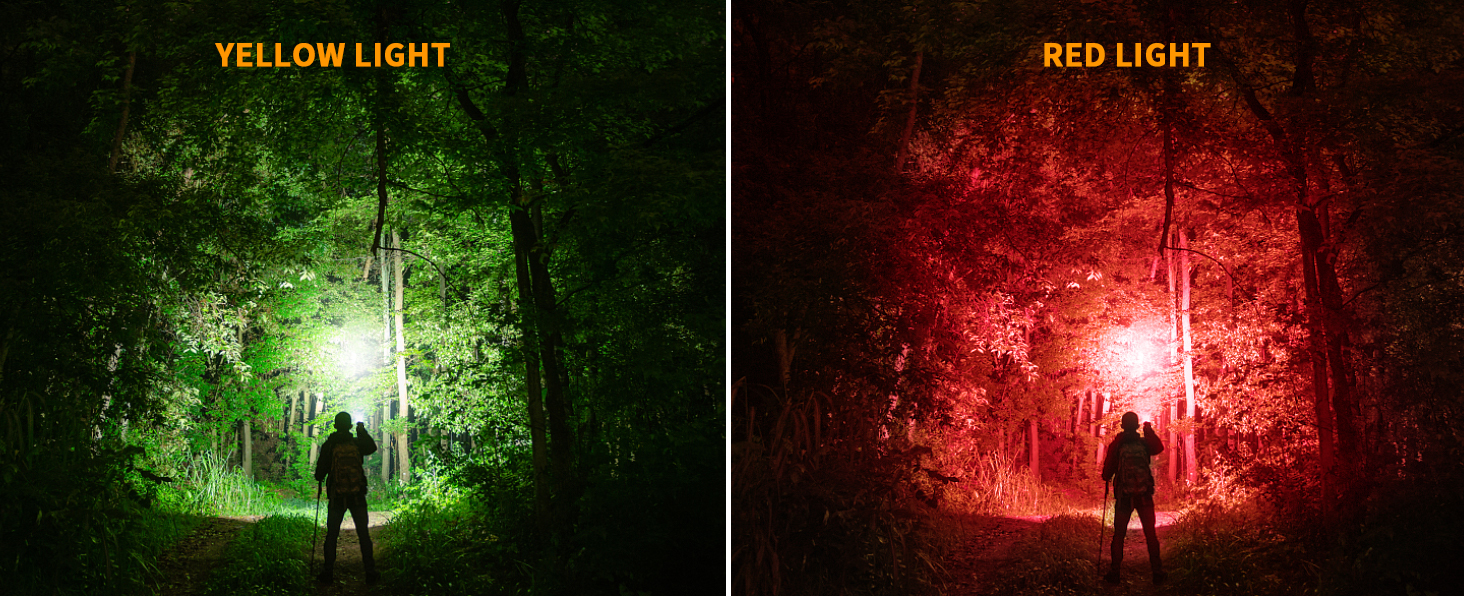
The spotlight offers various light colors, including yellow and red, for different needs.
350° Head Rotation
The spotlight head can be rotated up to 350 degrees, allowing you to direct the light precisely where needed. This feature is particularly useful for hands-free operation or when illuminating specific areas.

Adjust the spotlight head for optimal lighting angles.
Power Bank Function
The LETOUR W5167 can also serve as an emergency power bank. Connect your smartphone or other USB-powered devices to the spotlight's USB output port to charge them. The integrated power display will show the remaining battery level of the spotlight.

Use the spotlight to charge your mobile devices in emergencies.
Durability Features
- IPX7 Waterproof: The spotlight is designed to withstand harsh weather conditions and can be submerged in water up to 1 meter for 30 minutes. This makes it suitable for use in rain or near water bodies.
- Impact-Resistant: Certified to withstand a 3-meter drop test, the W5167 is built to endure accidental impacts, making it a reliable tool for rugged environments.
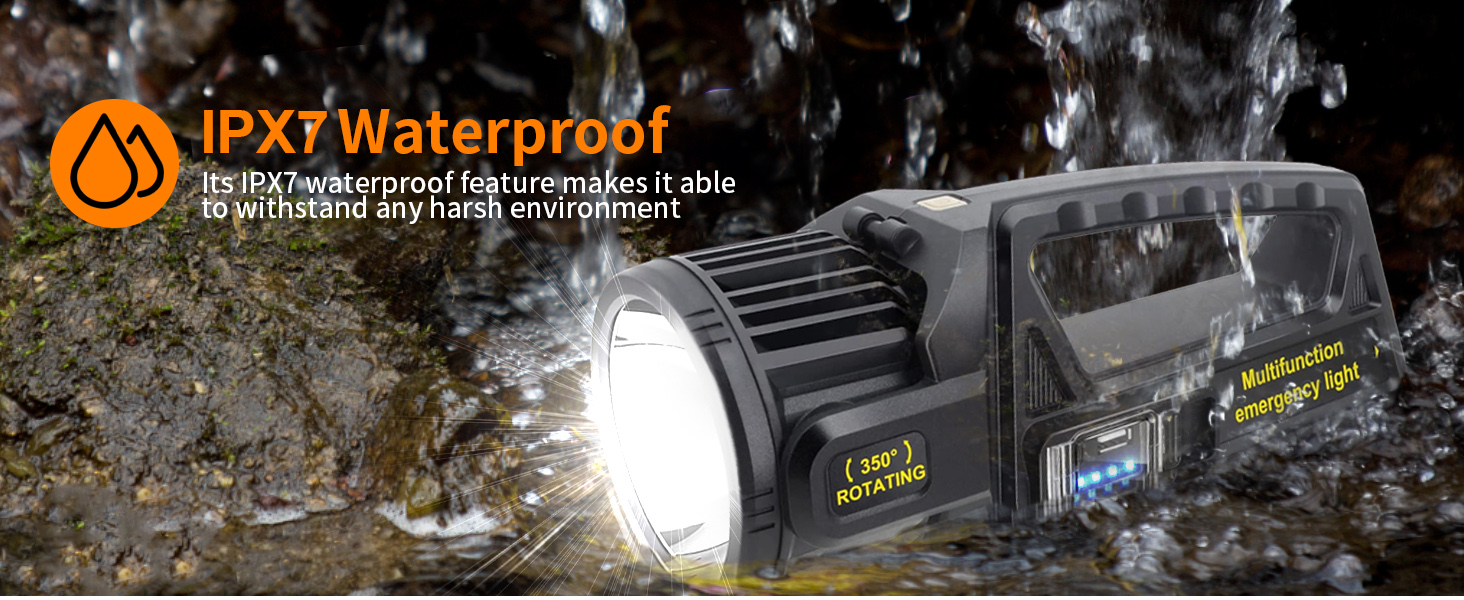
The IPX7 rating ensures the spotlight's performance even when exposed to water.

Designed to be durable and withstand impacts from drops.
Multiple Usage Scenarios
The versatility of the LETOUR W5167 makes it suitable for a wide range of applications:
- Camping: Illuminate your campsite and surroundings.
- Hunting: Provide powerful light for tracking or navigating in low-light conditions.
- Fishing: Essential for night fishing, illuminating the water and your gear.
- Equipment Maintenance: Bright, adjustable light for working on vehicles or machinery.
- Emergency Situations: A reliable light source during power outages or unexpected events.

The spotlight is a versatile tool for various outdoor and professional uses.
Maintenance
- Cleaning: Wipe the spotlight with a soft, damp cloth. Do not use abrasive cleaners or solvents. Ensure the charging ports are free of dust and debris.
- Storage: Store the spotlight in a cool, dry place away from direct sunlight and extreme temperatures. If storing for extended periods, charge the battery every 3-6 months to maintain its health.
- Battery Care: Avoid fully discharging the battery frequently. Recharge the spotlight when the power indicator shows low battery to prolong its lifespan.
Troubleshooting
| Problem | Possible Cause | Solution |
|---|---|---|
| Spotlight does not turn on. | Battery is depleted. | Charge the spotlight using the USB cable or solar panel. |
| USB charging is not working. | Loose cable connection; faulty cable/adapter; charging port obstruction. | Ensure the USB cable is securely connected to both the spotlight and the power source. Try a different USB cable or power adapter. Check the charging port for any debris. |
| Solar charging is not working effectively. | Insufficient sunlight; dirty solar panel. | Place the spotlight in direct, strong sunlight. Clean the solar panel surface with a soft cloth to remove any dirt or obstructions. Note that solar charging is slower than USB charging. |
| Light output is dim. | Low battery; incorrect mode selected. | Recharge the spotlight. Cycle through the modes with a short press to ensure you are in a high brightness mode. |
| Power bank function not charging devices. | Spotlight battery is low; device cable is faulty; device is incompatible. | Ensure the spotlight has sufficient charge. Try a different charging cable for your device. Some devices may draw too much power or be incompatible. |
Specifications
| Feature | Detail |
|---|---|
| Brand | LETOUR |
| Model Number | W5167 (LT-CL012B) |
| Brightness | 450,000 Lumens |
| Light Range | Up to 4,000 feet (approx. 1,219 meters) |
| Water Resistance | IPX7 (Waterproof) |
| Battery Type | 1 Lithium-Ion Battery (included) |
| Power Source | Battery Powered |
| Charging Methods | USB, Solar Panel |
| Product Dimensions | 29.01 x 11.61 x 12.4 cm (11.42 x 4.57 x 4.88 inches) |
| Item Weight | 680 grams (1.5 lbs) |
| Head Rotation | 350 degrees |
| Mounting Type | Tabletop Mount |
| Manufacturer | Shuofeng |
Warranty and Support
For any questions, concerns, or technical support regarding your LETOUR W5167 LED Handheld Spotlight, please contact the seller or refer to the product's purchase platform for customer service options.
You can also visit the official LETOUR store for more information and products: LETOUR Store
Ask a question about this manual
Ask about setup, troubleshooting, compatibility, parts, safety, or missing instructions. Manuals+ will review the question and use this page’s manual context to help answer it.