
Surtime 8903-nickel-52
Surtime 132 cm Ceiling Fan with Lighting User Manual
Model: 8903-nickel-52
Introduction
Thank you for choosing the Surtime 132 cm Ceiling Fan with Lighting. This manual provides detailed instructions for the safe installation, operation, and maintenance of your new ceiling fan. Please read this manual thoroughly before installation and keep it for future reference.

Image: The Surtime 132 cm Ceiling Fan with Lighting, showcasing its nickel finish and five wooden blades, along with the integrated light kit and remote control.
Safety Information
Always follow basic safety precautions when installing and operating electrical appliances to reduce the risk of fire, electric shock, and personal injury.
- Ensure the power is turned off at the circuit breaker before installation or maintenance.
- All electrical connections must be in accordance with local codes and ordinances, and the National Electrical Code. If you are unfamiliar with installing electrical wiring, seek the services of a qualified electrician.
- The mounting structure must be capable of supporting a minimum of 15.9 kg (35 lbs).
- Do not operate the fan with damaged wiring or if it has been dropped or damaged in any way.
- Avoid placing objects in the path of the fan blades.
- This appliance is not intended for use by persons (including children) with reduced physical, sensory or mental capabilities, or lack of experience and knowledge, unless they have been given supervision or instruction concerning use of the appliance by a person responsible for their safety.
Package Contents
Carefully unpack your ceiling fan and ensure all components are present before beginning installation. Refer to the parts list below:
- Motor Housing Assembly
- Fan Blades (5 pieces, double-sided: Silver/White)
- Downrod (various lengths may be included)
- Mounting Bracket
- Canopy
- Light Kit Assembly with LED module
- Remote Control with Wall Holder
- Hardware Pack (screws, washers, wire nuts, etc.)
- Instruction Manual

Image: Illustration of the double-sided fan blades, showing one side in silver and the other in white, allowing for customizable aesthetics.
Setup and Installation
Follow these steps for proper installation of your Surtime ceiling fan. It is recommended to have two people for installation.
- Prepare the Mounting Location: Ensure the electrical box is securely fastened to the building structure and can support the fan's weight. Turn off power at the main circuit breaker.
- Install the Mounting Bracket: Attach the mounting bracket to the electrical box using the provided screws and washers. Ensure it is firmly secured.
- Assemble the Downrod: Insert the downrod through the canopy and connect it to the motor housing assembly. Secure with the provided pin and screws.
- Hang the Fan: Carefully lift the fan assembly and hang it on the mounting bracket. Ensure the ball joint of the downrod is properly seated in the bracket's opening.
- Make Electrical Connections: Connect the fan's electrical wires to the household wiring according to the wiring diagram in the separate wiring instructions. Ensure all connections are secure with wire nuts.
- Attach the Canopy: Slide the canopy up to the ceiling and secure it to the mounting bracket with the provided screws.
- Install Fan Blades: Attach each fan blade to the motor housing using the blade screws. Choose either the silver or white side of the blades to face downwards.
- Install the Light Kit: Connect the light kit wiring to the fan's light kit wiring. Secure the light kit assembly to the bottom of the motor housing. The LED module is often magnetically attached for ease of installation.
- Restore Power: Once all connections are secure and the fan is fully assembled, restore power at the circuit breaker.

Image: Diagram illustrating the dimensions of the 52-inch ceiling fan and its compatibility with both flat and sloped ceiling installations.
Operating Instructions
Your Surtime ceiling fan comes with a remote control for convenient operation of all its functions.
Remote Control Functions:
- Fan ON/OFF: Press to turn the fan on or off.
- Fan Speed Control: Adjusts fan speed through 6 levels.

Image: Visual guide to the 6-speed adjustment, showing 1-2 speeds for comfortable wind (sleep), 3-4 speeds for natural wind (daily life), and 5-6 speeds for strong wind (hot summer).
- Light ON/OFF: Press to turn the light on or off.
- Light Color Temperature Adjustment: Cycles through 3 light color temperatures (Warm Light 3000K, Natural Light 4500K, White Light 6000K).

Image: Display of the three available light color temperatures: 3000K Warm Light, 4500K Natural Light, and 6000K White Light, demonstrating the dimmable feature.
- Light Dimming: Press and hold the light button to dim or brighten the light.
- Timer Function: Sets a 2-hour timer for automatic fan shutdown.

Image: Overview of the 52-inch ceiling fan's features, including 6 speeds, reversible motor, 3 light colors, dimmable light, 2-hour timer, and silent operation, with a child sleeping peacefully.
- Reversible DC Motor: Changes the direction of blade rotation for seasonal use.
- Summer Mode (Forward Rotation): Air flows downwards, creating a cooling breeze.
- Winter Mode (Reverse Rotation): Air flows upwards, circulating warm air trapped near the ceiling.
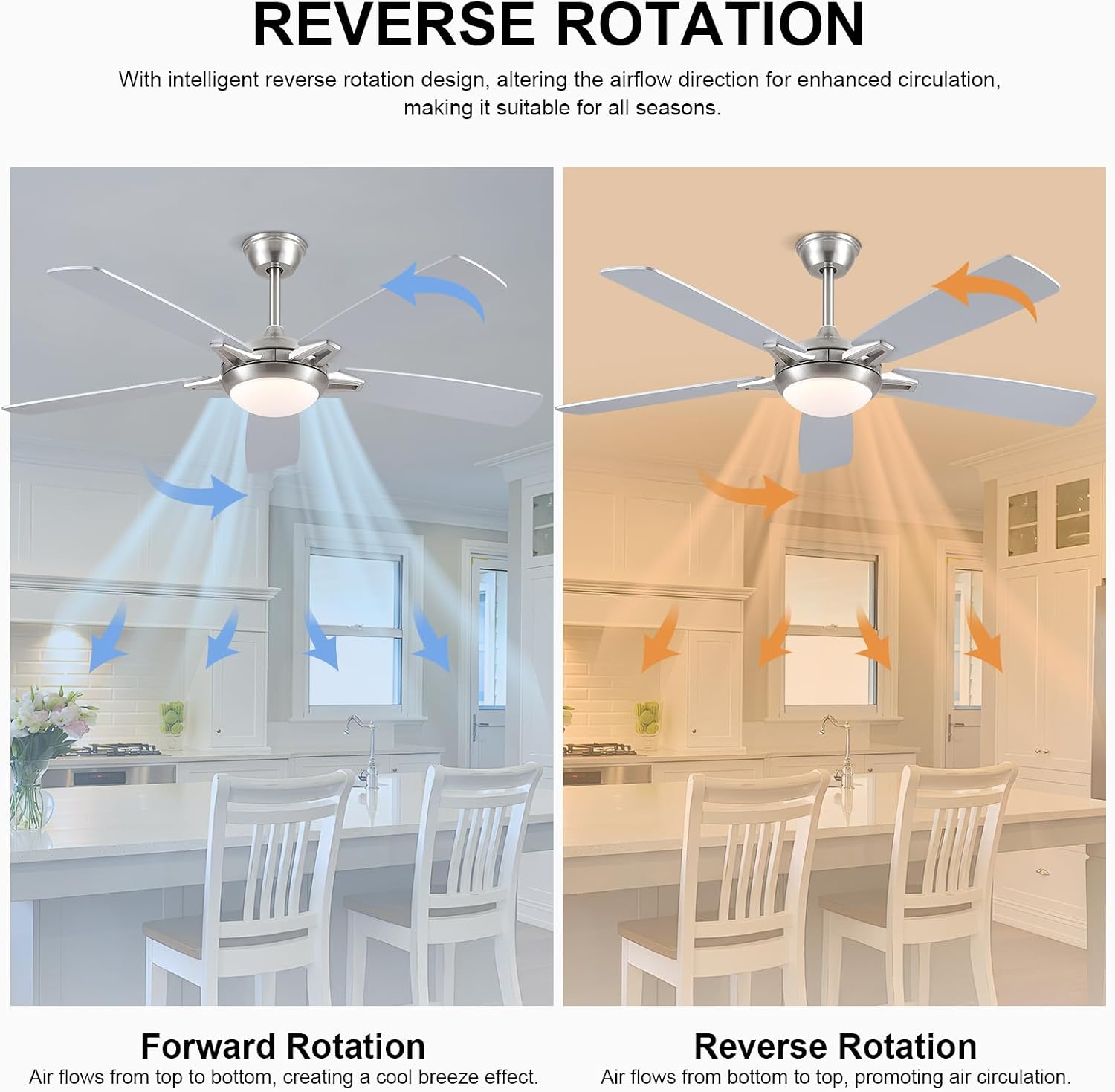
Image: Diagram illustrating the reverse rotation feature, showing forward rotation for a cool breeze effect and reverse rotation for promoting air circulation in winter.
- Silent Operation: The DC motor ensures quiet performance, ideal for bedrooms and living rooms.

Image: A ceiling fan operating silently in a kitchen setting, with a baby sleeping peacefully in the foreground, highlighting the quiet performance and 2-hour timer feature.
Maintenance
Regular maintenance will ensure the longevity and optimal performance of your ceiling fan.
- Cleaning: To clean the fan, wipe with a soft, damp cloth. Do not use abrasive cleaners or solvents, as these may damage the finish.
- Blade Cleaning: Dust the fan blades regularly to prevent dust buildup, which can affect fan balance and performance.
- Tighten Screws: Periodically check all screws on the fan and light kit to ensure they are tight. Loose screws can cause wobbling or noise.
- No Lubrication Needed: The motor is permanently lubricated and does not require oiling.
- Light Source: The integrated LED light source is designed for long life and typically does not require replacement. If issues arise, contact customer support.
Troubleshooting
If you experience issues with your ceiling fan, refer to the following common problems and solutions:
| Problem | Possible Cause | Solution |
|---|---|---|
| Fan does not start | No power to the fan; Loose wire connections; Remote control battery low or not paired. | Check circuit breaker and wall switch. Ensure all wire connections are secure. Replace remote battery or re-pair remote. |
| Fan wobbles | Loose blade screws; Unbalanced blades; Loose mounting bracket. | Tighten all blade screws. Ensure blades are installed correctly. Check mounting bracket for secure attachment. |
| Light does not work | Loose wire connections; Faulty LED module. | Check light kit wire connections. If problem persists, contact customer support. |
| Remote control not working | Low battery; Not paired with fan. | Replace battery. Refer to remote pairing instructions (usually involves pressing a button on the remote within a few seconds of turning on power to the fan). |
| Excessive noise | Loose screws; Fan rubbing against ceiling; Motor issue. | Check and tighten all screws. Ensure proper clearance from ceiling. If noise persists, contact customer support. |
Specifications
| Feature | Detail |
|---|---|
| Brand | Surtime |
| Model Number | 8903-nickel-52 |
| Colour | Nickel |
| Product Dimensions | 132 x 132 x 34 cm (52 inch diameter) |
| Item Weight | 5.66 kg |
| Power / Wattage | 60 watts |
| Voltage | 230 Volts |
| Material | Wood, Metal, Acrylic |
| Motor Type | Reversible DC Motor |
| Fan Speeds | 6 |
| Light Type | Integrated LED |
| Light Color Temperatures | 3000K (Warm), 4500K (Natural), 6000K (White) |
| Dimmable Light | Yes |
| Timer Function | 2-hour |
| Control Method | Remote Control |
Warranty and Support
For warranty information or technical support, please contact Surtime customer service through the retailer where the product was purchased. Please have your model number (8903-nickel-52) and purchase date available when contacting support.
For further assistance, you may also refer to the official Surtime website or contact their support channels as listed on your product packaging or purchase documentation.
Related documents8903-nickel-52


Ask a question about this manual
Ask about setup, troubleshooting, compatibility, parts, safety, or missing instructions. Manuals+ will review the question and use this page’s manual context to help answer it.