
1. Introduction
This instruction manual provides detailed information on the setup, operation, and maintenance of your Radtel RT-900 Multi-Band Ham Radio. The RT-900 is an 8W VHF/UHF two-way radio with 256 channels, designed for various communication needs including air band, NOAA weather, marine, and river frequencies. It features high-gain antennas for enhanced signal, premium-quality speakers for clear audio, and a multi-scan function for optimal channel selection. This model includes a convenient Type-C charging port.
2. What's in the Box
Upon unboxing, please verify that all the following components are included:
- 1x RT-900 Main Unit (without Bluetooth)
- 1x 2200mAh Li-ion Battery
- 1x Dual Band Antenna
- 1x Belt Clip
- 1x Type-C Charging Cable
- 1x Power Supply with USB Port
- 1x English User Manual

Image: The Radtel RT-900 radio unit displayed with all its standard accessories, including the radio body, battery, antenna, belt clip, Type-C charging cable, and power adapter.
3. Product Overview
The Radtel RT-900 features a robust design with an intuitive interface for ease of use. Key components include:
- Large LCD Display: Shows channel number, channel frequency, and channel name.
- High-Gain Antenna: Enhances signal reception and transmission range.
- Premium Speakers: Delivers clear and natural audio.
- Keypad: For manual frequency input, channel selection, and function access.
- Type-C Charging Port: For convenient and fast charging.

Image: A detailed view of the Radtel RT-900's large LCD display, highlighting its ability to show multiple lines of information including channel number, frequency, and channel name simultaneously.

Image: The Radtel RT-900 radio shown with its display indicating "Air Band Receive 108-136Mhz AM," illustrating its capability to receive aviation communication.

Image: An infographic detailing the Radtel RT-900's full frequency band capabilities, including UV full frequency band, AM: 108-136MHz RX, 144-148MHz TX/RX, 420-450MHz TX/RX, 2200mAh battery, 8W power, aviation frequency band support, VOX, 256 channels, and Type-C fast charging.
4. Setup
4.1. Battery Installation
- Align the 2200mAh Li-ion battery with the battery compartment on the back of the radio.
- Gently push the battery into place until it clicks securely.
- To remove, press the battery release latch (if present) and slide the battery out.
4.2. Antenna Attachment
- Locate the antenna connector on the top of the radio.
- Screw the dual band antenna clockwise onto the connector until it is finger-tight. Do not overtighten.
4.3. Charging the Battery
The RT-900 features a Type-C charging port for convenient power-ups.
- Connect the Type-C charging cable to the radio's Type-C port.
- Connect the other end of the Type-C charging cable to the provided power supply with a USB port.
- Plug the power supply into a standard electrical outlet.
- The charging indicator on the radio will illuminate, typically red during charging and green when fully charged.
- A full charge typically provides 3-5 days of standby time.
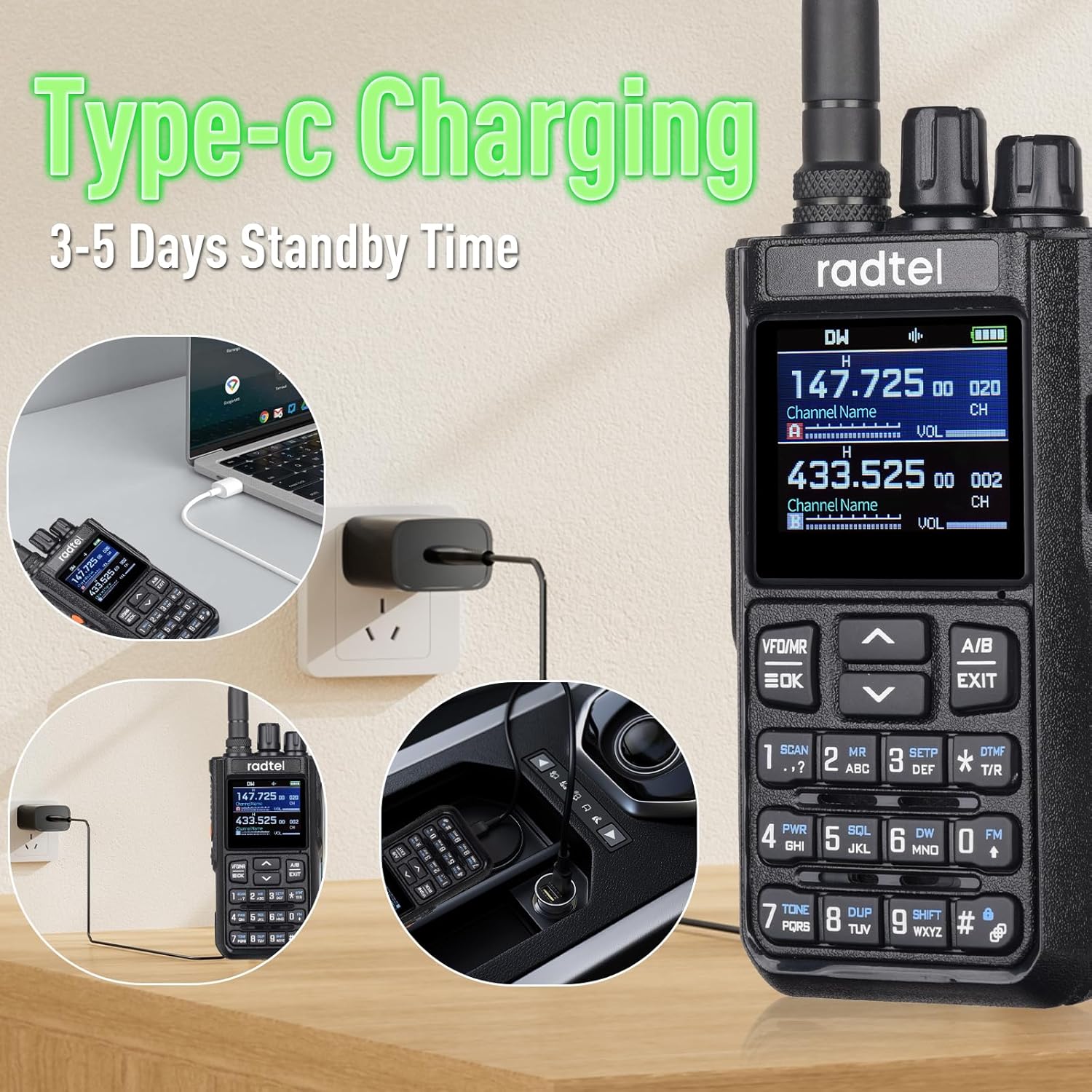
Image: The Radtel RT-900 being charged via its Type-C port in different settings, including a wall outlet, a laptop, and a car charger, demonstrating its versatile charging capabilities.
5. Operating Instructions
5.1. Powering On/Off
Rotate the power/volume knob clockwise to turn the radio on. Continue rotating to increase volume. Rotate counter-clockwise until a click is heard to turn the radio off.
5.2. Channel Selection and Frequency Modes
The RT-900 supports 256 channels and operates across multiple frequency bands:
- VHF/UHF: 144-148MHz (TX/RX) and 420-450MHz (TX/RX).
- Air Band: 108-136MHz (RX only) for aviation communication.
- NOAA Weather: For receiving weather alerts.
- Marine & River: Specific frequencies for water-based communication.
Use the VFO/MR button to switch between Frequency Mode (VFO) and Channel Mode (MR). In Frequency Mode, you can manually input frequencies using the keypad. In Channel Mode, use the up/down arrow keys to navigate through programmed channels.
5.3. Multi-Scan Feature
The multi-scan feature allows the radio to automatically scan for active signals across Frequency, DCS (Digital Coded Squelch), and CTCSS (Continuous Tone-Coded Squelch System) tones. To activate scanning, press the 'SCAN' button (typically '1' on the keypad).
5.4. VOX Function (Voice Operated Transmit)
The VOX function enables hands-free transmission. When activated, the radio will automatically transmit when it detects your voice. Refer to the detailed English User Manual for specific steps to enable and adjust VOX sensitivity.
5.5. Transmitting and Receiving
To transmit, press and hold the Push-to-Talk (PTT) button on the side of the radio. Speak clearly into the microphone. Release the PTT button to return to receive mode.

Image: The Radtel RT-900 radio depicted in different operational environments, including mountaineering tourism, engineering maintenance, remote communication, and site construction, illustrating its versatility.
6. Maintenance
6.1. Cleaning
Wipe the radio's surface with a soft, damp cloth. Do not use harsh chemicals or abrasive cleaners. Ensure the Type-C port is free of dust and debris.
6.2. Battery Care
- Avoid fully discharging the battery frequently.
- Charge the battery in a cool, dry environment.
- If storing the radio for an extended period, charge the battery to approximately 50% capacity and remove it from the radio.
6.3. Storage
Store the radio in a cool, dry place away from direct sunlight, extreme temperatures, and humidity. Keep it away from strong magnetic fields.
7. Troubleshooting
| Problem | Possible Cause | Solution |
|---|---|---|
| Radio does not power on. | Battery is low or not installed correctly. | Charge the battery. Ensure the battery is securely installed. |
| Cannot transmit or receive. | Incorrect frequency/channel, antenna not attached, or out of range. | Verify frequency/channel settings. Ensure antenna is securely attached. Move closer to the other radio. |
| Poor audio quality. | Volume too low, squelch level too high, or interference. | Adjust volume. Lower squelch level. Move away from sources of interference. |
| Battery not charging. | Charging cable or adapter faulty, or port is dirty. | Check cable and adapter. Clean Type-C port. Try a different power source. |
8. Specifications
| Feature | Detail |
|---|---|
| Brand | radtel |
| Model Number | RT-900 |
| Item Weight | 0.017 ounces |
| Product Dimensions | 0.13 x 0.17 x 0.88 inches |
| Batteries | 1 9V batteries required (included) - Note: Product description states 2200mAh Li-ion, 9V might be a generic placeholder or error in source data. |
| Number of Channels | 256 |
| Special Feature | Type-C, 8W power |
| Frequency Range | 144-148Mhz/420-450Mhz (TX/RX), 108-136Mhz (RX for Air Band) |
| Talking Range Maximum | 6 Kilometer |
| Tuner Technology | UHF/VHF |
| Voltage | 7.38 Volts |
| Water Resistance Level | Not Water Resistant |
| Manufacturer | Xiamen Radtel Electronics Co.,Ltd |
| Color | Without Bluetooth |
9. Warranty & Support
9.1. Warranty Information
The Radtel RT-900 comes with a 1-Year Warranty from the date of purchase. This warranty covers manufacturing defects and malfunctions under normal use. It does not cover damage caused by misuse, accidents, unauthorized modifications, or natural disasters.
9.2. Customer Support
For technical assistance, troubleshooting not covered in this manual, or warranty claims, please contact Radtel customer support. Refer to the contact information provided in the original packaging or visit the official Radtel website for the most up-to-date support details.
When contacting support, please have your product model (RT-900) and purchase date readily available.


