
Renogy RBC20D1U
Renogy DC to DC Charger 12V 20A User Manual
Model: RBC20D1U
1. Introduction
The Renogy 12V 20A DC to DC Charger is a multi-stage battery charger designed to efficiently charge your auxiliary battery from your vehicle's alternator. It is compatible with various battery types, including LiFePO4, AGM, Gel, and Flooded batteries, making it ideal for RVs, marine vessels, and other automotive applications. This manual provides detailed instructions for installation, operation, maintenance, and troubleshooting to ensure optimal performance and longevity of your charger.

Figure 1: Front view of the Renogy 12V 20A DC to DC Charger, showing input and output terminals and indicator lights.
2. Safety Information
Please read all safety instructions carefully before installing or operating the charger. Failure to follow these instructions may result in electric shock, fire, or serious injury.
- Always disconnect power before making or breaking electrical connections.
- Ensure proper ventilation around the charger to prevent overheating.
- Do not expose the charger to rain, moisture, or excessive dust.
- Use appropriate wire gauges and fuses as specified in the installation section.
- Keep out of reach of children.
- Consult a qualified electrician or technician if you are unsure about any installation steps.
3. Product Overview
The Renogy DC to DC Charger is designed for robust performance and ease of use. It features intelligent charging algorithms and built-in protections to ensure safe and efficient battery charging.
3.1 Key Components
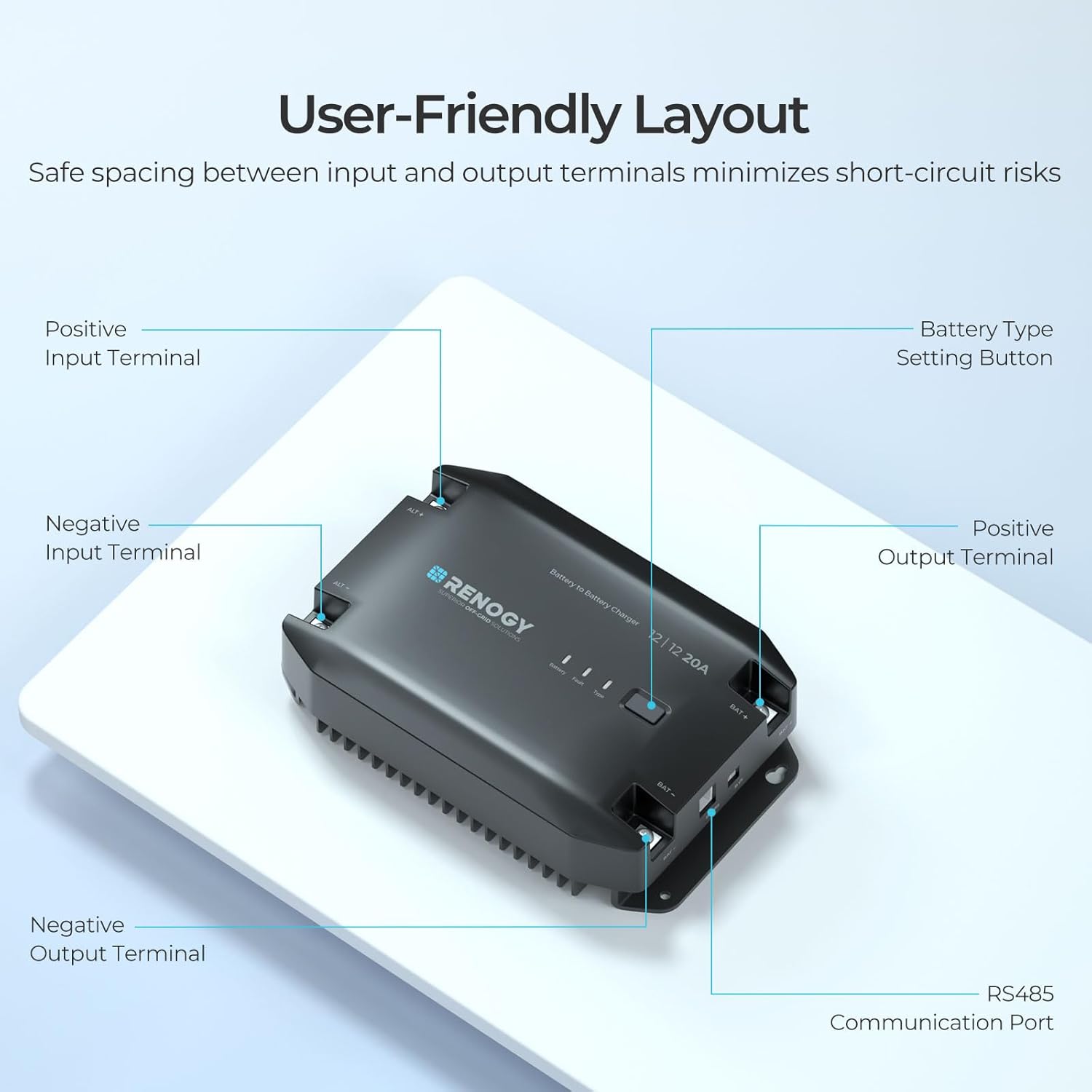
Figure 2: User-Friendly Layout. This diagram highlights the positive input terminal, negative input terminal, positive output terminal, negative output terminal, battery type setting button, and RS485 communication port. The design ensures safe spacing between input and output terminals to minimize short-circuit risks.
3.2 Features
- Alternator Detection: Charges only when the engine is running, protecting the starter battery.
- Multi-Stage Charging: Optimizes charging for various battery types (LiFePO4, AGM, Gel, Flooded).
- LiFePO4 Activation: Intelligent activation feature for LiFePO4 batteries.
- Comprehensive Protection: Includes overload, short circuit, over-temperature, and over-voltage protection.
- Bluetooth Compatibility: Remote control and monitoring via Renogy BT-2 Module (sold separately) and DC Home app.
- Compact Design: Wall-mount design for easy installation.
4. Setup & Installation
Proper installation is crucial for the safe and efficient operation of your Renogy DC to DC Charger. Follow these guidelines for a successful setup.
4.1 Wiring Diagram
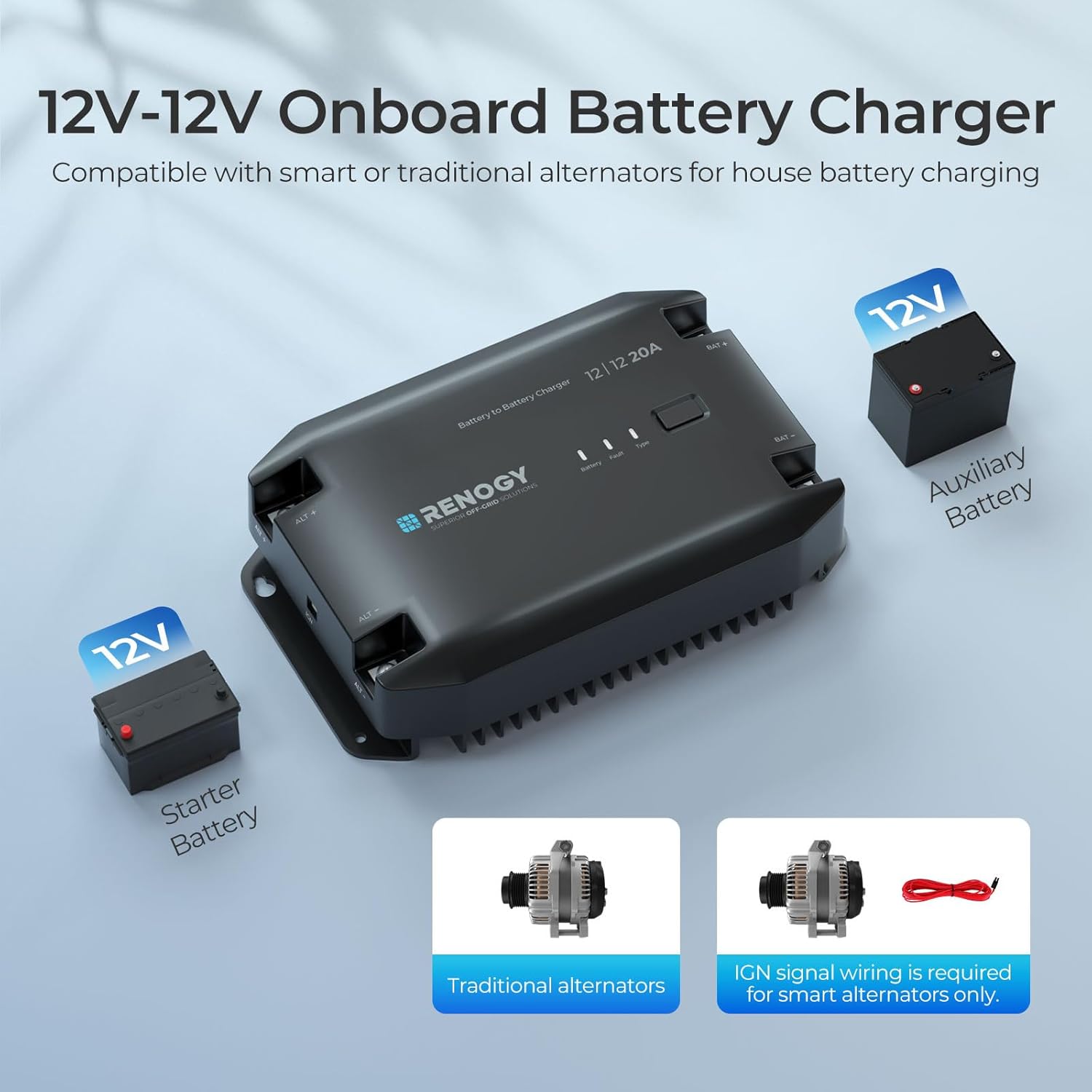
Figure 3: 12V-12V Onboard Battery Charger Wiring. This diagram illustrates the connection between the starter battery, the Renogy DC to DC Charger, and the auxiliary battery. It also shows the distinction between traditional alternators and smart alternators requiring an IGN signal wire.
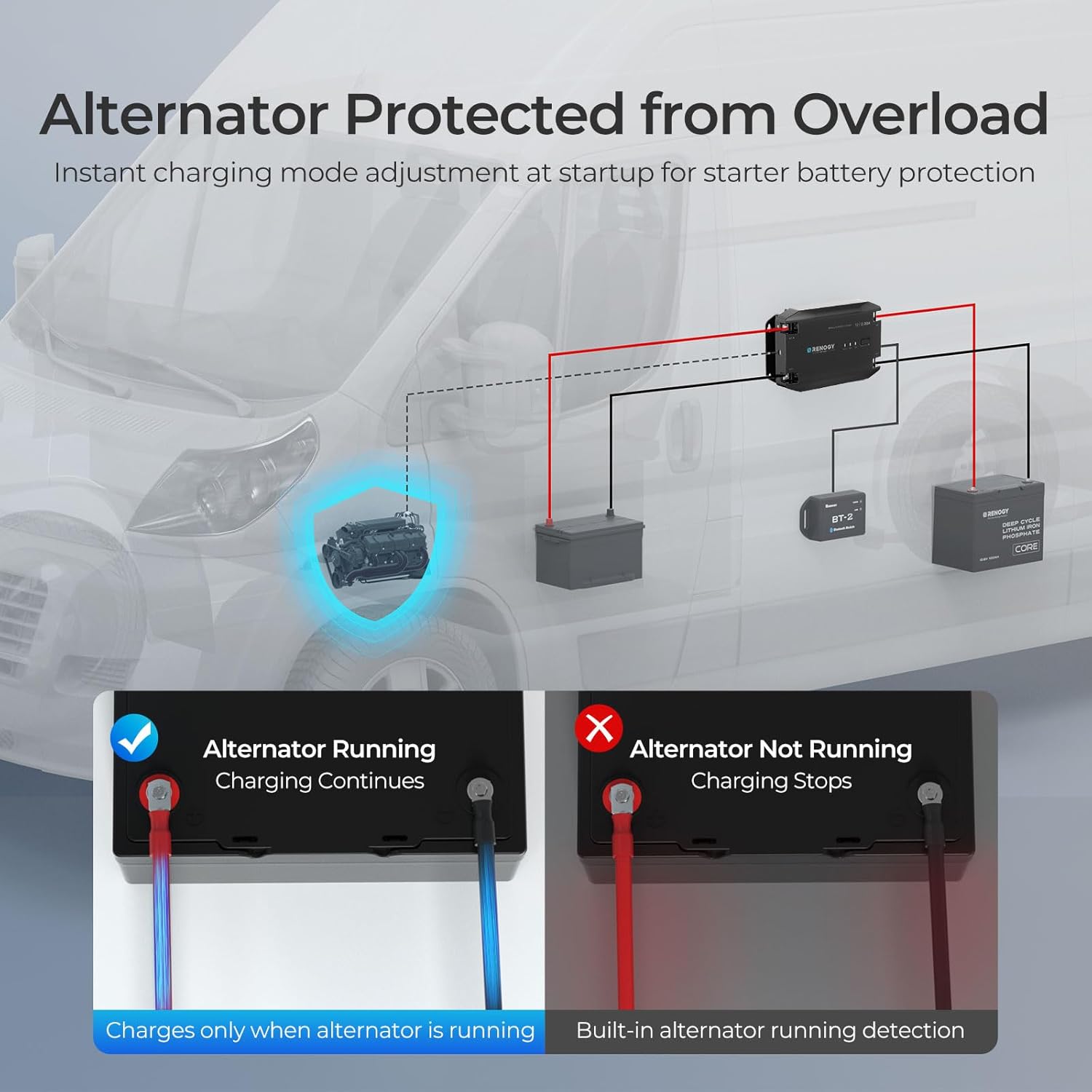
Figure 4: Alternator Protection from Overload. This image demonstrates how the charger detects if the alternator is running. When the alternator is running, charging continues. When the alternator is not running, charging stops, protecting the vehicle's starter battery.
4.2 Mounting and Connections
- Mount the charger in a cool, dry, and well-ventilated area.
- Ensure the mounting surface is stable and secure.
- Connect the input terminals (ALT+ and ALT-) to your vehicle's starter battery/alternator.
- Connect the output terminals (BAT+ and BAT-) to your auxiliary battery.
- For smart alternators, connect the IGN signal wire as required.
- Ensure all connections are tight and secure to prevent loose contacts and potential hazards.

Figure 5: Comprehensive Accessories for Easy Installation. The charger includes a battery temperature sensor for real-time data, an IGN signal wire, and mounting screws. Note: If a lithium battery has a built-in BMS, an external temperature sensor may not be necessary.
5. Operating Instructions
The Renogy DC to DC Charger offers flexible settings to accommodate various battery types and optimize charging performance.
5.1 Battery Type Selection
The charger supports LiFePO4, Gel, Flooded, AGM, and User-defined battery types. Use the 'Type' button on the charger to cycle through the preset battery types. For lithium batteries, the lithium battery activation feature can be enabled or disabled. You can customize parameters for 'User' mode via the DC Home app.
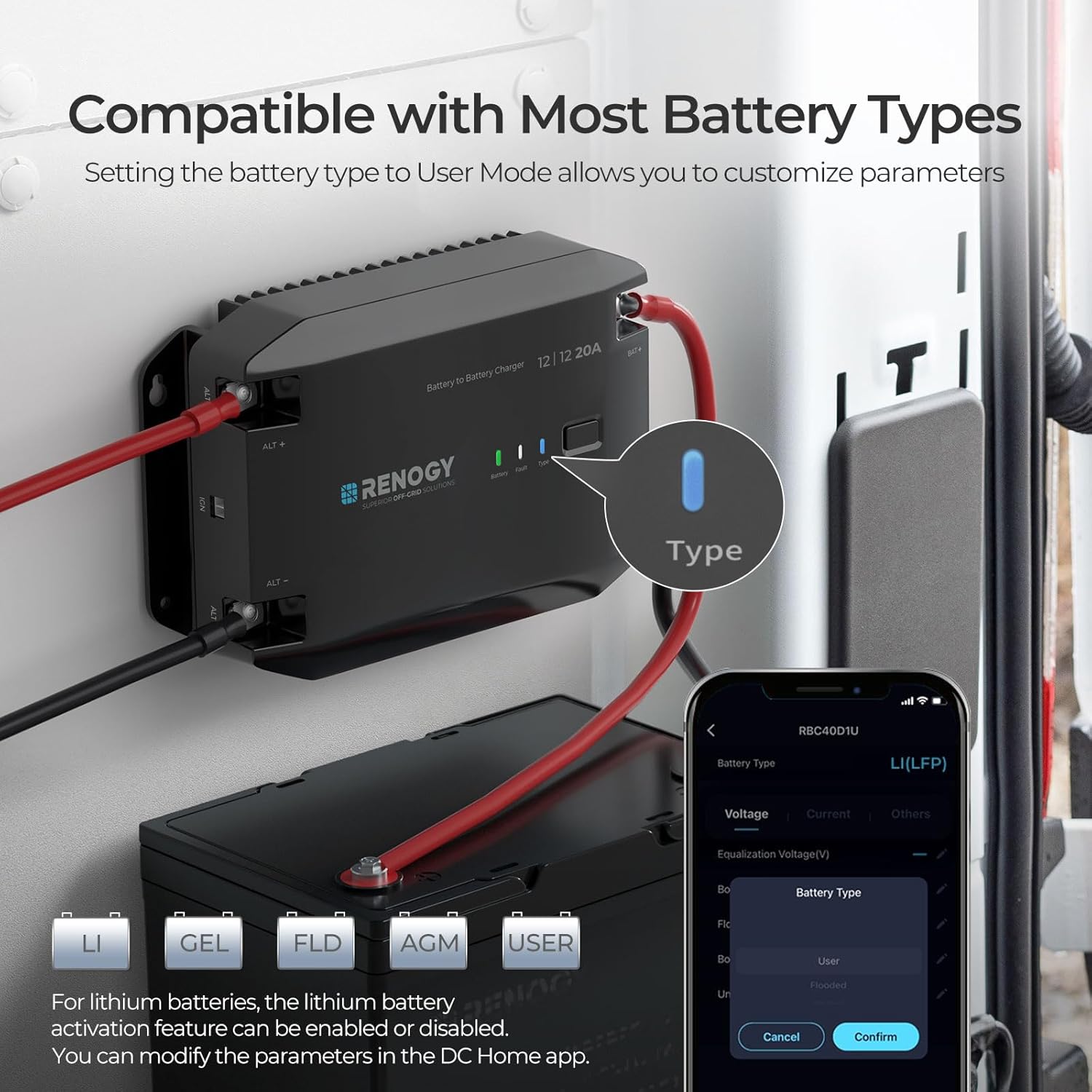
Figure 6: Compatible with Most Battery Types. The charger supports LiFePO4, Gel, Flooded, AGM, and User-defined battery types. The 'Type' button allows selection, and the DC Home app provides customization for User mode.
5.2 LiFePO4 Battery Activation
For LiFePO4 batteries, the charger includes an intelligent activation feature. This function can be enabled or disabled with a one-touch operation to optimize battery health and extend lifespan.

Figure 7: Optimize Battery Health. This feature allows you to enable or disable lithium battery activation based on battery status via the DC Home app. Disabling prevents unnecessary charging cycles, while enabling restores low-voltage batteries.
5.3 Bluetooth Control and Monitoring
With the optional Renogy BT-2 Module (sold separately), you can remotely adjust charger settings and monitor performance via the Renogy DC Home app or Renogy One Core. This allows tracking of charging data for up to 365 days.

Figure 8: Smart Control for Simplicity and Efficiency. Download the DC Home App for effortless remote monitoring and control of charging parameters, offering both short-range (up to 20m) and wireless long-range monitoring.
6. Maintenance
Regular maintenance ensures the longevity and reliable operation of your Renogy DC to DC Charger.
- Periodically inspect all wiring connections to ensure they are tight and free from corrosion.
- Keep the charger clean and free from dust and debris. Use a dry cloth for cleaning.
- Ensure adequate airflow around the unit. Do not block ventilation openings.
- Check for any signs of physical damage or unusual odors.

Figure 9: Quieter Cooling Solution. The charger is designed with natural heat dissipation, resulting in reduced noise levels (40dB) compared to fan-cooled alternatives (60dB), contributing to its durability.

Figure 10: Corrosion-Proof for Long-Term Use. With an IP32 moisture resistance rating, this compact charger is suitable for installation in small boat cabins and humid marine environments, ensuring long-term reliability.
7. Troubleshooting
If you encounter issues with your Renogy DC to DC Charger, refer to the table below for common problems and their solutions.
| Problem | Possible Cause | Solution |
|---|---|---|
| Charger not activating/charging | Engine not running; loose connections; incorrect wiring; low starter battery voltage. | Start engine; check all wiring connections; verify starter battery voltage is sufficient. |
| Overload/Over-temperature fault indicator on | Excessive load; insufficient ventilation; high ambient temperature. | Reduce load; ensure proper ventilation; allow unit to cool down. |
| Incorrect battery type selected | Wrong setting for auxiliary battery. | Press 'Type' button to select correct battery type. Use DC Home app for 'User' mode customization. |
| Bluetooth connection issues | BT-2 Module not connected; app issues; out of range. | Ensure BT-2 Module is properly connected; restart app; move closer to the charger. |
If the problem persists after attempting these solutions, please contact Renogy customer support for further assistance.
8. Specifications
Detailed technical specifications for the Renogy 12V 20A DC to DC Charger.
| Specification | Value |
|---|---|
| Model Number | RBC20D1U |
| Product Dimensions | 9.31" (L) x 5.17" (W) x 2.30" (H) |
| Item Weight | 3.3 pounds |
| Output Voltage | 12 Volts (DC) |
| Charging Current | 20A |
| Charging Power | 300W |
| Charging Efficiency | 94% |
| Operating Temperature | Up to 45°C (No Power Drop) |
| Self-Consumption | <15mA |
| Moisture Resistance | IP32 |
| Certifications | UL, CE, FCC, IEC |

Figure 11: Dimensions of the Renogy 12V 20A DC to DC Charger.

Figure 12: Advanced High-Temperature Performance. The graph illustrates the charger's ability to maintain power output up to 45°C without derating, ensuring efficient and safe charging even in high-temperature environments.
9. Warranty and Support
Renogy is committed to providing high-quality products and excellent customer service. For warranty information, technical support, or any inquiries regarding your DC to DC Charger, please visit the official Renogy website or contact their customer support team.
You can find more information and support resources by visiting the Renogy Brand Store on Amazon.
Related documentsRBC20D1U


Ask a question about this manual
Ask about setup, troubleshooting, compatibility, parts, safety, or missing instructions. Manuals+ will review the question and use this page’s manual context to help answer it.