
1. Introduction
Thank you for choosing the Fame SP-5 Stage Piano and Stand. This manual provides essential information for the safe and efficient use of your new instrument. Please read it thoroughly before operating the product and keep it for future reference.
Safety Instructions
- Power Supply: Use only the specified power adapter. Ensure the voltage matches your local power supply.
- Placement: Place the instrument on a stable, level surface. Avoid direct sunlight, heat sources, and excessive humidity or dust.
- Ventilation: Do not block ventilation openings. Ensure adequate airflow around the instrument.
- Water and Moisture: Keep the instrument away from water and other liquids. Do not operate with wet hands.
- Cleaning: Disconnect from power before cleaning. Use a soft, dry cloth. Avoid abrasive cleaners.
- Servicing: Do not attempt to repair the instrument yourself. Refer all servicing to qualified personnel.
2. Package Contents
Please check that all items are present in the package:
- Fame SP-5 Stage Piano
- Dedicated Piano Stand
- Triple Pedal Unit
- Power Adapter
- Music Rest
- User Manual (this document)
3. Setup
3.1 Assembling the Stand
Carefully unpack all components of the stand. Follow these steps to assemble:
- Identify the two side panels and the crossbar.
- Attach the crossbar between the two side panels using the provided screws. Ensure all connections are secure.
- Attach the triple pedal unit to the designated area on the stand, typically at the base of the front side.

Image 3.1: The assembled piano stand with the triple pedal unit attached. This image shows the sturdy construction designed to support the stage piano.
3.2 Placing the Piano and Connecting Components
Once the stand is assembled, carefully place the Fame SP-5 Stage Piano onto the stand, ensuring it is securely seated. Connect the following:
- Pedal Unit: Connect the cable from the triple pedal unit to the corresponding pedal input jack on the rear of the SP-5 piano.
- Power Adapter: Connect the power adapter to the DC IN jack on the piano, then plug it into a suitable electrical outlet.
- Music Rest: Insert the music rest into the slots on the top panel of the piano.
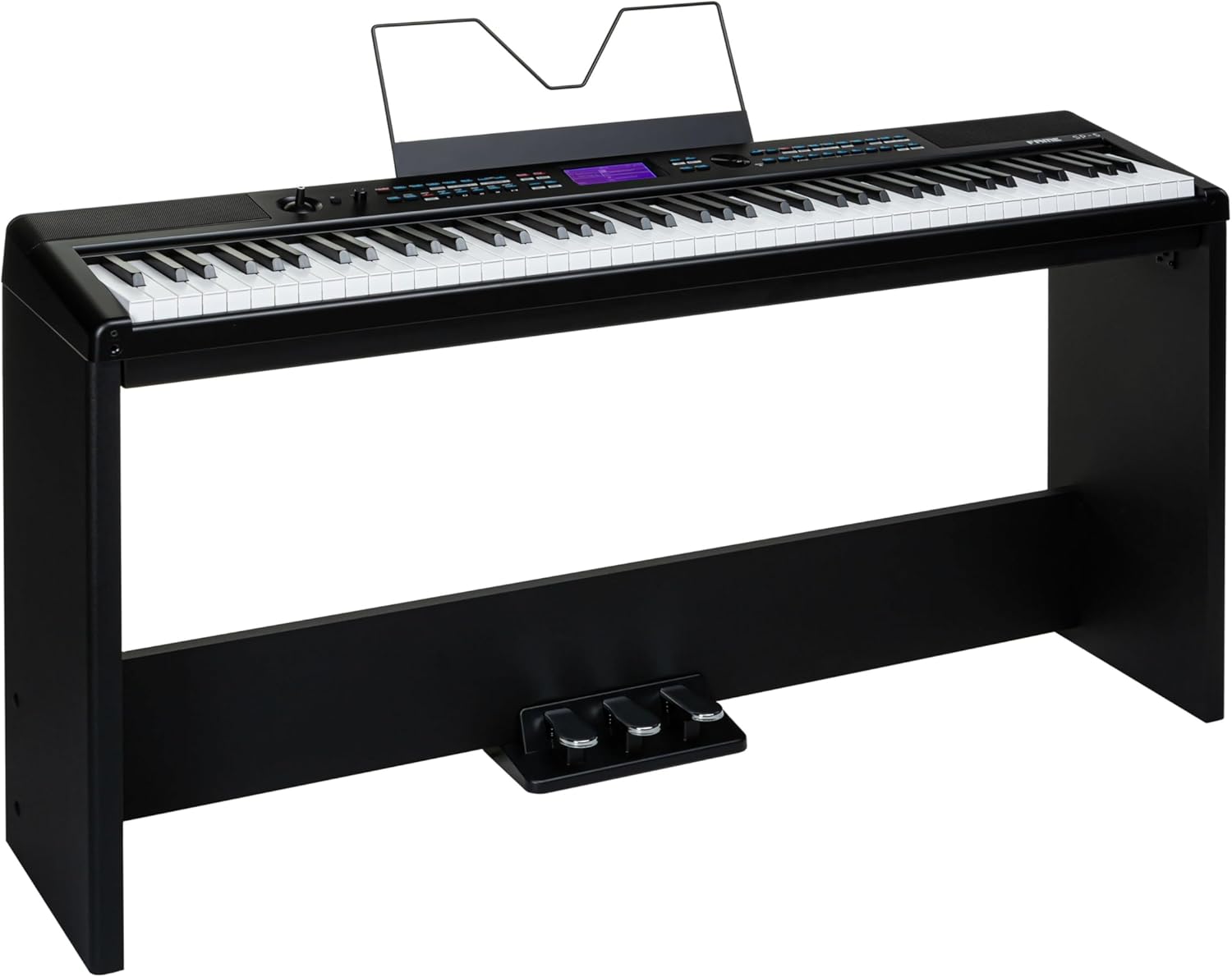
Image 3.2: The Fame SP-5 Stage Piano fully assembled on its dedicated stand, with the music rest in place. This provides a complete view of the instrument ready for use.
4. Operating Instructions
4.1 Powering On/Off
Press the POWER button located on the control panel to turn the instrument on. The display will illuminate. To turn off, press and hold the POWER button until the display shuts down.
4.2 Basic Controls
The Fame SP-5 features an intuitive control panel for easy access to various functions:
- Volume Knob: Adjust the overall output volume using the large knob on the left side of the control panel.
- Sound Selection: Use the dedicated buttons or the data entry knob to browse and select different instrument sounds (e.g., Grand Piano, Electric Piano, Strings). The selected sound will be displayed on the LCD screen.
- Reverb/Chorus: Buttons for applying or adjusting built-in effects like reverb and chorus.
- Metronome: Activate the metronome function and adjust its tempo using the dedicated controls.
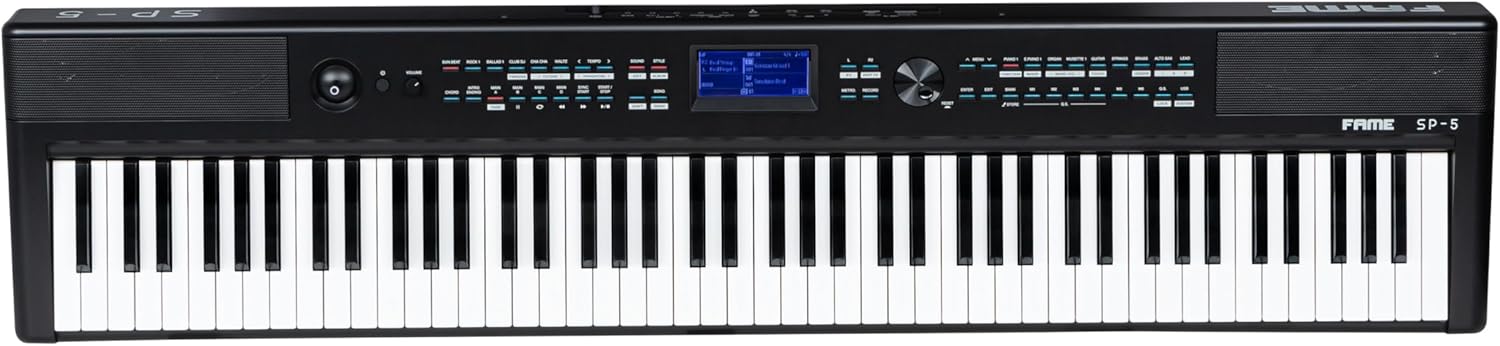
Image 4.1: A detailed top-down view of the Fame SP-5 Stage Piano, highlighting the control panel with its various buttons, knobs, and LCD screen, alongside the full 88-key keyboard.
4.3 Pedal Functions
The triple pedal unit provides standard piano pedal functions:
- Right Pedal (Sustain): Sustains the notes played.
- Middle Pedal (Sostenuto): Sustains only the notes held down at the moment the pedal is pressed.
- Left Pedal (Soft/Una Corda): Softens the sound.
5. Maintenance
5.1 Cleaning
To maintain the appearance and functionality of your Fame SP-5:
- Always disconnect the power adapter before cleaning.
- Use a soft, dry, lint-free cloth to wipe the surface of the piano and stand.
- For stubborn dirt, slightly dampen the cloth with water, then wipe dry immediately.
- Do not use chemical cleaners, waxes, or solvents, as these can damage the finish.
5.2 Storage
When not in use for extended periods, store the instrument in a cool, dry place, away from extreme temperatures and humidity. Consider using a dust cover to protect it from dust accumulation.
6. Troubleshooting
If you encounter any issues with your Fame SP-5, please refer to the following common problems and solutions:
- No Power:
- Ensure the power adapter is securely connected to both the piano and a working electrical outlet.
- Verify the power outlet is functional by plugging in another device.
- No Sound:
- Check the master volume knob and ensure it is turned up.
- If headphones are connected, disconnect them to check speaker output.
- Ensure external speakers or amplifiers (if used) are powered on and connected correctly.
- Keys Not Responding:
- Restart the instrument by powering it off and on again.
- Ensure no foreign objects are lodged between the keys.
- Pedals Not Working:
- Check that the pedal unit cable is securely connected to the correct input jack on the piano.
If the problem persists after trying these solutions, please contact customer support.
7. Specifications
| Feature | Specification |
|---|---|
| Model | Fame SP-5 |
| Product Dimensions (Piano) | Approximately 146 x 38 x 21.6 cm (L x W x H) |
| Item Weight (Total) | Approximately 32.6 kg |
| Manufacturer | Fame |
| Manufacturer Reference | KEY023 |
| ASIN | B0DQNVJYV3 |
| Country of Origin | Germany |
8. Warranty Information
Fame products are manufactured to high-quality standards. This product is covered by a manufacturer's warranty against defects in materials and workmanship. The specific terms and duration of your warranty may vary depending on your region and point of purchase. Please retain your proof of purchase for any warranty claims. For detailed warranty information, refer to the documentation provided at the time of purchase or contact your retailer.
9. Customer Support
Should you require assistance, have questions about your Fame SP-5 Stage Piano, or need to report a problem, please contact the retailer where you purchased the product. They will be able to provide support or guide you to the appropriate service channels.
For general inquiries about Fame products, you may visit the official Fame website or consult their customer service contact information available online.


