
1. Introduction
This manual provides comprehensive instructions for the safe and effective use of your RENPHO ELIS 3X Smart Body Composition Scale. This device is designed to measure body weight and analyze various body composition metrics. Please read this manual thoroughly before first use and retain it for future reference.

Image: RENPHO ELIS 3X Smart Scale highlighting its user-friendly dial operation and display metrics.
2. Package Contents
- RENPHO ELIS 3X Smart Body Composition Scale
- User Manual
3. Setup
3.1 Initial Charging
The RENPHO ELIS 3X scale is equipped with a rechargeable battery. Before first use, fully charge the device using the provided USB-C cable.
- A full charge takes approximately 3 hours.
- A single charge can provide up to 180 days of use.

Image: The RENPHO ELIS 3X Smart Scale showing its USB-C charging port and overall dimensions.
3.2 Placement
For accurate measurements, place the scale on a hard, flat surface. Avoid carpets or uneven flooring, as this can affect accuracy. The scale features anti-slip foot pads for stability.
3.3 Unit Conversion
The scale supports various units for weight (kg, lb, st) and height (cm, inch). You can typically change these settings via the dial on the scale or within the RENPHO Health App.

Image: Close-up of the RENPHO ELIS 3X Smart Scale illustrating the dial for profile editing and a button for unit conversion.
4. Operating Instructions
4.1 Creating a User Profile (On-Scale)
The ELIS 3X scale allows you to create and manage user profiles directly on the device using the integrated dial.
- Turn the dial to select "USER 1-8" or "GUEST" and press the dial to enter profile settings.
- Turn the dial to select gender and press to confirm.
- Turn the dial to select age and press to confirm.
- Turn the dial to select height and press to confirm.

Image: Visual guide demonstrating the four steps to set up a user profile directly on the scale's display using the control dial.
4.2 Taking a Measurement
Step onto the scale with bare, dry feet. Ensure your feet are positioned correctly on the ITO-coated full-coverage sensor area for accurate body composition analysis. The scale will display your metrics.

Image: The RENPHO ELIS 3X Smart Scale highlighting its ITO-coated full-coverage sensor for accurate data collection.
4.3 Displayed Metrics
The large VA display on the scale provides instant insights into 6 key health metrics:
- Weight
- Body Fat Percentage
- Muscle Percentage
- Visceral Fat Index
- BMI (Body Mass Index)
- 20-day Weight Trend

Image: The RENPHO ELIS 3X Smart Scale's display showing weight, body fat, muscle, visceral fat, BMI, and a 20-day weight trend graph.
4.4 Optional App Connection (RENPHO Health App)
For a more detailed analysis of 18 body metrics and long-term tracking, connect your scale to the RENPHO Health App.
- Download the RENPHO Health App from your device's app store.
- Register and add users within the app.
- Step on the scale and connect it to your smartphone via Bluetooth.
- Match your profile in the app and set your goals.
- The scale will display your user ID and progress towards goals.
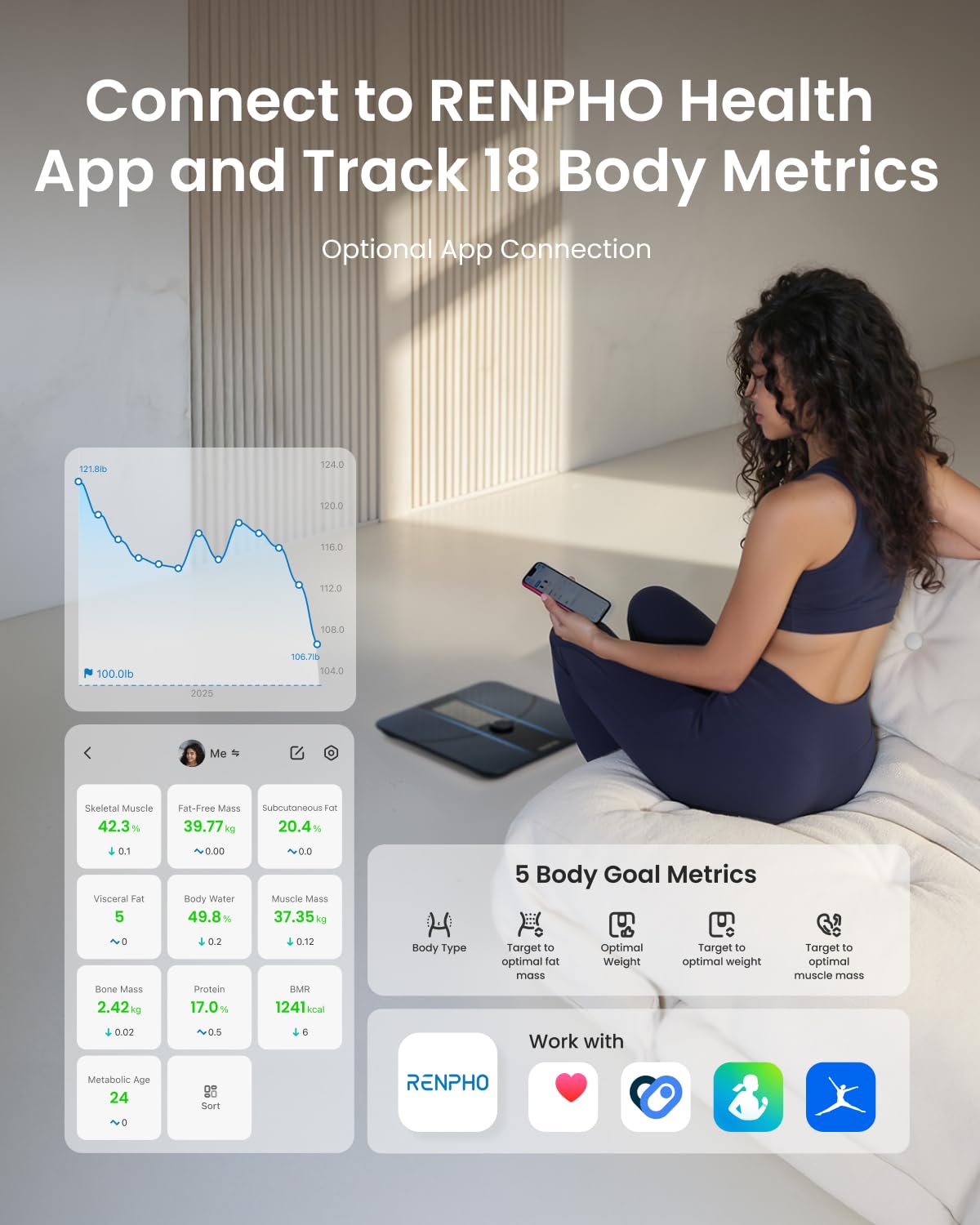
Image: A user interacting with the RENPHO Health App on a smartphone, displaying various body metrics tracked by the scale.

Image: A visual representation of the four steps required to sync the smart scale with the RENPHO Health App for data tracking.
4.5 Multi-User Functionality
The scale can store up to 8 user profiles. It can auto-identify users by weight or allow manual selection via the dial.
- Auto-Identify: The scale attempts to match the current measurement to an existing profile based on weight.
- Manual Selection: If auto-identification is not desired or if weights are similar, use the dial to select your profile before weighing.

Image: A family using the RENPHO ELIS 3X Smart Scale, illustrating its capability to store and track data for multiple users.

Image: The RENPHO ELIS 3X Smart Scale demonstrating its feature to automatically identify different users based on their weight.

Image: The RENPHO ELIS 3X Smart Scale illustrating the process of manually selecting a user profile using the integrated dial.
4.6 Pregnancy Mode
The scale includes a Pregnancy Mode, designed for expectant mothers and individuals with implanted medical devices. This mode provides weight tracking without bio-electrical impedance analysis (BIA), ensuring safety.

Image: A pregnant woman near the RENPHO ELIS 3X Smart Scale, with an inset showing the Pregnancy Mode setting enabled in the app.
5. Maintenance
5.1 Cleaning
Wipe the scale's surface with a damp cloth and mild detergent. Avoid abrasive cleaners or submerging the scale in water. Ensure the scale is dry before storage or next use.
5.2 Storage
Store the scale in a cool, dry place away from direct sunlight and extreme temperatures.
6. Troubleshooting
- Scale not turning on: Ensure the scale is fully charged. Connect it to a USB-C power source for at least 3 hours.
- Inaccurate readings:
- Ensure the scale is placed on a hard, flat surface.
- Step onto the scale with bare, dry feet.
- Avoid moving during measurement.
- Recalibrate the scale by stepping on it briefly, then stepping off, and waiting for it to display '0.0'.
- App not syncing:
- Ensure Bluetooth is enabled on your smartphone.
- Make sure the RENPHO Health App is open and running in the foreground.
- Check if the scale is within Bluetooth range of your smartphone.
- Restart both the scale and your smartphone.
- Body composition metrics not displayed: Ensure you are stepping on the scale with bare, dry feet, making full contact with the ITO-coated sensor area.
7. Specifications
| Feature | Specification |
|---|---|
| Brand | RENPHO |
| Model | ELIS 3X |
| Display Type | Digital VA Display |
| Weight Limit | 400 Pounds (180 kg) |
| Power Source | Rechargeable (USB-C) |
| Battery Life | Up to 180 days on a single charge |
| Body Composition Metrics | 6 on-scale, 18 via app |
| User Profiles | Up to 8 |
| Dimensions | 11.02 x 11.02 x 1.26 inches (approx.) |
| Color | Dark Blue |

Image: An exploded diagram showing the internal components and layers of the RENPHO ELIS 3X Smart Scale, including the dial, ITO sensor, tempered glass, BIA chip, base, and anti-slip foot pads.
8. Warranty and Support
For warranty information and customer support, please refer to the official RENPHO website or contact their customer service directly. Details are typically available on the product packaging or within the RENPHO Health App.
Manufacturer: RENPHO


