
NOPAARD YJ805
NOPAARD 72 Inch Smart Ceiling Fan User Manual
Model: YJ805
Introduction
This manual provides detailed instructions for the installation, operation, and maintenance of your NOPAARD 72 Inch Smart Ceiling Fan. This large, reversible 8-blade ceiling fan features a quiet DC motor, 6-speed settings, 3CCT dimmable LED light, and multiple control options including remote, app, and voice control (Alexa, Google Assistant). Please read this manual thoroughly before installation and use to ensure safe and efficient operation.
Safety Information
Always follow basic safety precautions when installing and operating electrical appliances. Failure to do so may result in fire, electric shock, or personal injury.
- Ensure power is disconnected at the circuit breaker before installation or servicing.
- All wiring must be in accordance with national and local electrical codes.
- Installation should be performed by a qualified electrician if you are unsure.
- Mount the fan only to an outlet box marked "Acceptable for Fan Support of 35 lbs (15.9 kg) or less" and use the mounting screws provided with the outlet box.
- Do not insert objects into the path of the fan blades.
- Do not operate the fan if any part is damaged.
- This fan is damp-rated for covered outdoor locations but should not be exposed to direct water.
Package Contents
Verify that all components are present before beginning installation:
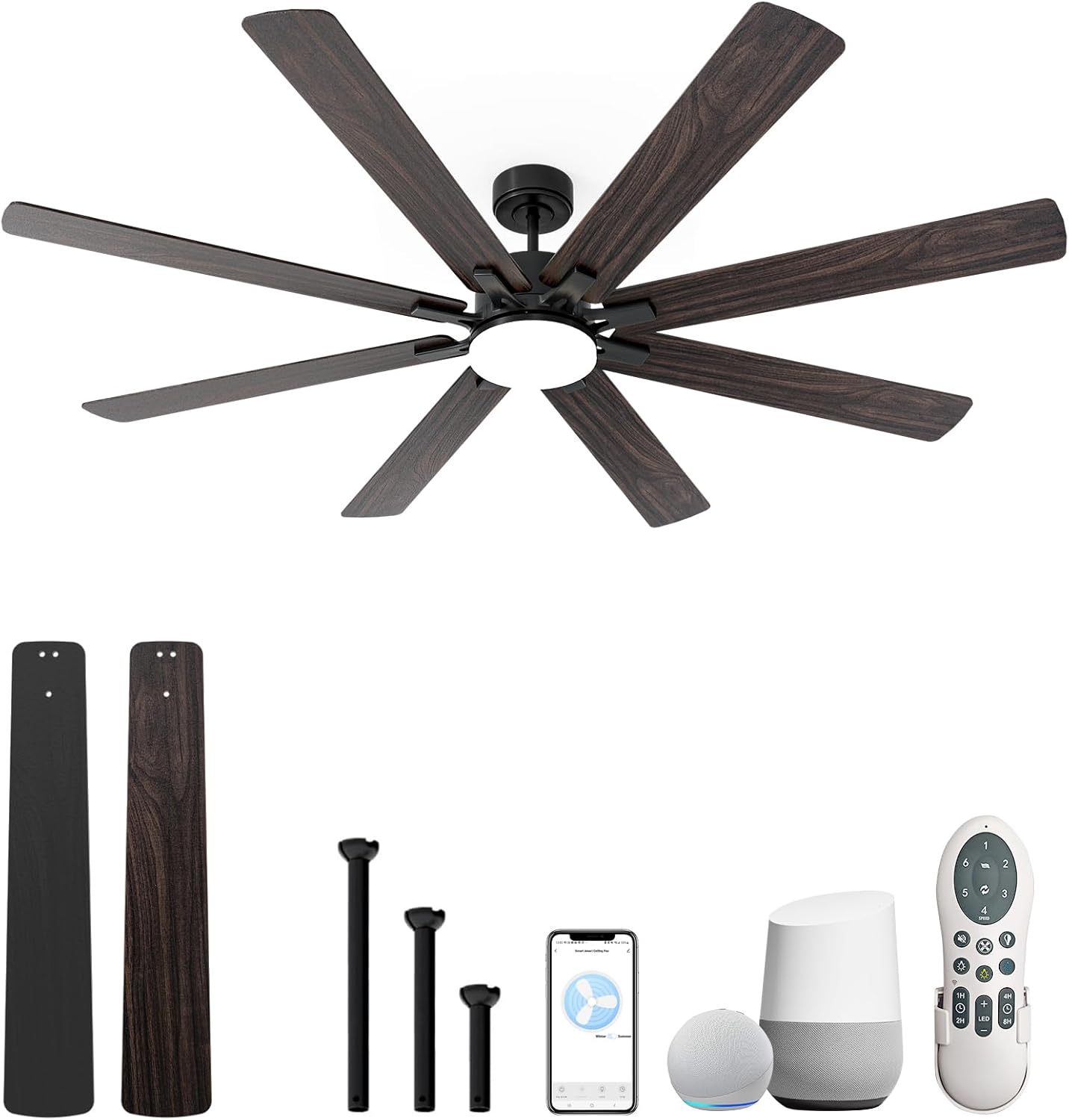
Image: The NOPAARD 72 Inch Smart Ceiling Fan disassembled, showing the main fan body, eight reversible black and walnut blades, three different length downrods (6", 10", 24"), a remote control, and representations of smart home devices (Alexa Echo Dot, Google Home) for voice control integration.
- Ceiling Fan Motor Housing
- 8 Fan Blades (Dual-finish: Black/Walnut)
- 3 Downrods (6", 10", 24")
- Mounting Bracket
- Remote Control
- LED Light Kit
- Hardware Pack (screws, washers, wire nuts)
- User Manual
Specifications
| Brand | NOPAARD |
| Model Name | YJ805 |
| Color | 72" Black/Walnut |
| Material | Engineered Wood, Alloy Steel |
| Product Dimensions | 14.5"L x 8"W x 29.4"H (variable with downrod) |
| Item Weight | 24.2 pounds (11 Kilograms) |
| Power Source | DC Motor |
| Voltage | 110 Volts |
| Wattage | 77 watts |
| Airflow (CFM) | Up to 11630 |
| Noise Level | Less than 35dB (Speed 1-2) |
| Light Type | 3CCT Dimmable LED (3000K, 4000K, 6000K) |
| Control Method | Remote, App (Tuya), Voice (Alexa, Google Assistant) |
| Damp Rating | IP20 (Covered Outdoor/Indoor) |
| Certifications | ETL Listed |
Setup and Installation
Mounting Options
The NOPAARD ceiling fan is designed for versatile installation to suit various ceiling types and heights.
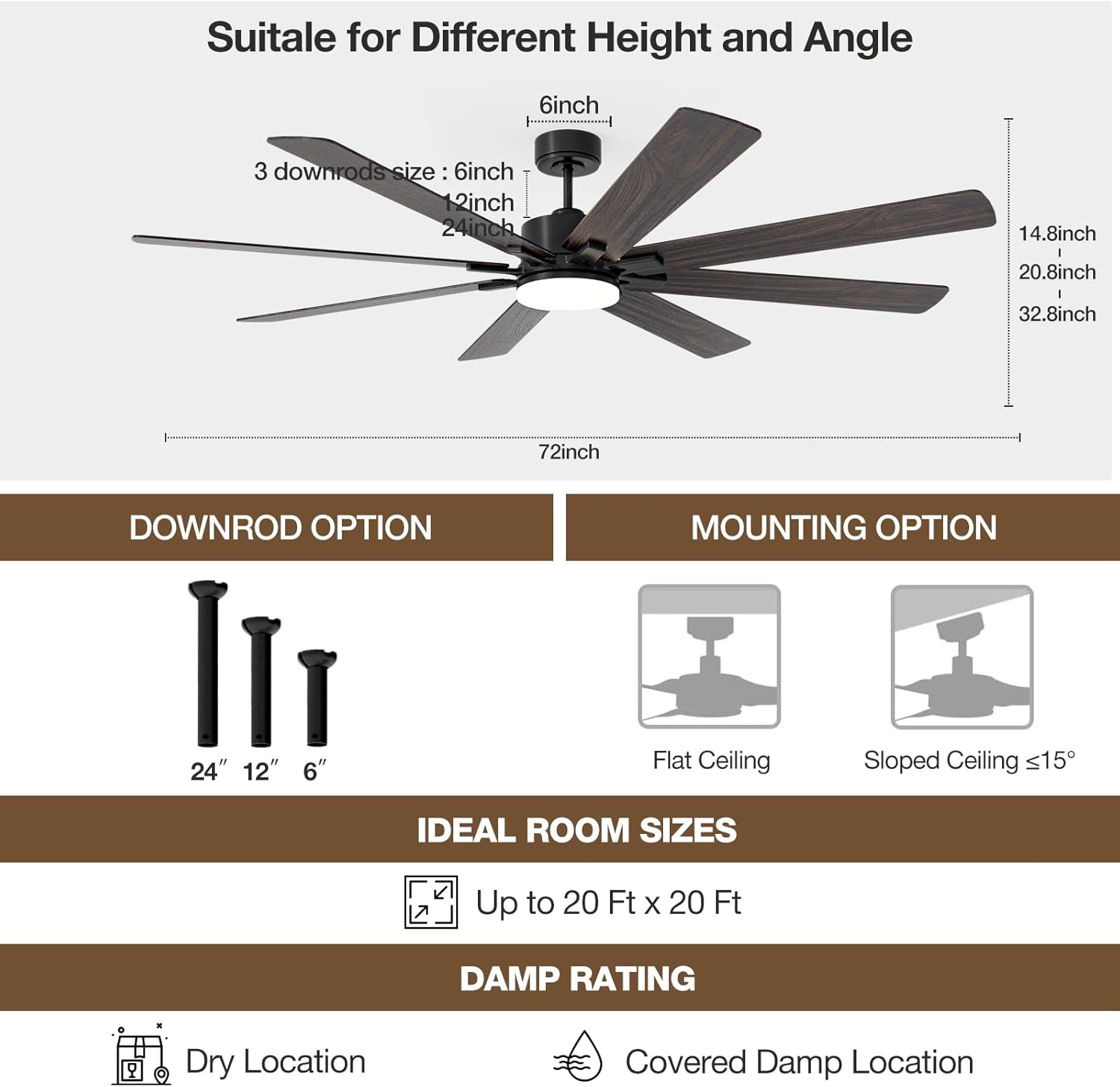
Image: A diagram illustrating the fan's dimensions (72-inch diameter, variable height with downrods), available downrod lengths (6", 12", 24"), and compatible mounting types (flat ceiling and sloped ceiling up to 15 degrees). It also indicates suitability for rooms up to 20 ft x 20 ft and covered damp locations.
- Downrod Lengths: Includes 6-inch, 10-inch, and 24-inch downrods to accommodate ceiling heights from 14.8 inches to 32.8 inches.
- Ceiling Types: Suitable for both flat ceilings and sloped ceilings with an angle smaller than 15 degrees.
- Room Size: Ideal for rooms up to 20 ft x 20 ft.
- Location: Rated IP20 for covered damp locations, making it suitable for indoor use (bedroom, living room, kitchen, dining room) and covered outdoor areas (patios, porches, gazebos). Avoid direct exposure to water.
General Installation Steps (Summary)
- Turn off power at the circuit breaker.
- Install the mounting bracket to the ceiling outlet box.
- Assemble the fan motor housing with the chosen downrod.
- Hang the fan assembly onto the mounting bracket.
- Connect electrical wiring according to local codes (ensure proper grounding).
- Attach the fan blades to the motor housing.
- Install the LED light kit.
- Secure all covers and ensure all connections are tight.
- Restore power and test the fan.
For detailed step-by-step installation instructions, refer to the separate installation guide included in your product packaging.
Operating Instructions
Control Methods
Your NOPAARD smart ceiling fan offers multiple convenient ways to control its functions:

Image: An illustration showing the four primary control methods for the fan: a physical remote control, the Tuya Smart app interface on a smartphone, a microphone icon representing voice control (Alexa/Google Assistant), and a wall switch icon for basic wall control. A note indicates that wall control can only turn the fan and lights on/off together and cannot adjust them separately.
- Remote Control: The included remote allows for full control of fan speeds, light settings, and direction.
- Tuya APP Control: Download the Tuya Smart app to control the fan from your smartphone or tablet, offering convenience from anywhere in your house.
- Voice Control: Compatible with Amazon Alexa and Google Assistant devices. Use simple voice commands like "Alexa, turn on the fan in the bedroom" for hands-free operation.
- Wall Control: Basic on/off functionality for both fan and light. Note: Wall control typically operates the fan and light together and may not allow separate adjustment of fan speed or light dimming/color temperature.
Fan Speed Adjustment
The fan features 6 variable speeds to meet different airflow needs:
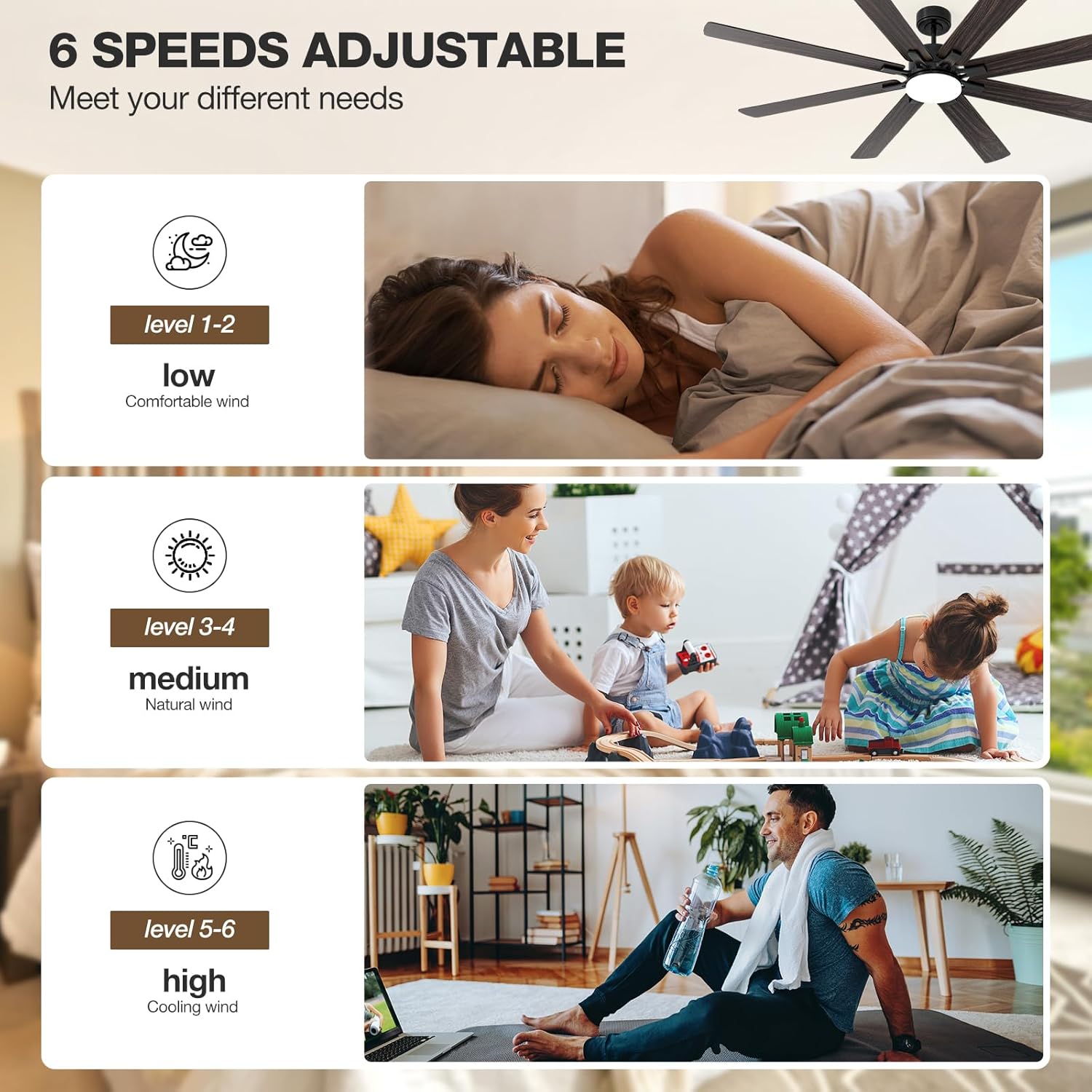
Image: A visual guide to the fan's 6-speed settings. Levels 1-2 are described as "low" for comfortable wind, suitable for sleeping. Levels 3-4 are "medium" for natural wind, ideal for daily activities. Levels 5-6 are "high" for cooling wind, providing maximum airflow for active environments.
- Levels 1-2 (Low): Provides a gentle, comfortable breeze, ideal for quiet environments like bedrooms or for sleep.
- Levels 3-4 (Medium): Offers a natural wind sensation, suitable for general daily use in living areas.
- Levels 5-6 (High): Delivers powerful cooling wind, perfect for quickly circulating air or during warmer conditions.
Light Control
The integrated LED light offers customizable illumination:

Image: A visual representation of the fan's dimmable LED light, showing three color temperature options: 3000K (warm yellow light), 4000K (bright daylight), and 6000K (cool white light). The image also indicates that the light is dimmable from 0% to 100% (0-2000 lumens), allowing for independent and dimmable control.
- 3 Color Temperatures (3CCT):
- 3000K: Warm yellow light for a cozy atmosphere.
- 4000K: Bright daylight for general illumination.
- 6000K: Cool white light for task lighting or a modern feel.
- Dimmable: Adjust brightness from 0% to 100% (up to 2000 lumens) to create the desired ambiance.
- Independent Control: The light can be controlled independently from the fan speed using the remote or app.
Reversible Blade Function
The reversible DC motor allows for year-round comfort:

Image: An illustration demonstrating the reversible function of the fan blades. In winter mode, the blades rotate clockwise to create an updraft, which helps to circulate warm air trapped near the ceiling. In summer mode, the blades rotate counter-clockwise to create a downdraft, providing a cooling breeze.
- Summer Mode (Downdraft): Blades rotate counter-clockwise to create a direct breeze, enhancing cooling.
- Winter Mode (Updraft): Blades rotate clockwise to circulate warm air trapped near the ceiling, reducing heat loss.
Timer and Memory Function
- Timer: Set the fan to turn off automatically after 1, 2, 4, or 8 hours.
- Memory Function: The fan remembers your last used settings (speed and light) when turned off and on again.
Maintenance
- Cleaning: To clean the fan, wipe with a soft, damp cloth. Do not use abrasive cleaners or solvents. Ensure power is off before cleaning.
- Blade Care: The dual-finish plywood blades (black/walnut) can be reversed to change the aesthetic. Clean them gently to avoid scratching.
- Motor Longevity: The high-quality pure copper DC motor is designed for durability, with an expected life of up to 10 years. No specific user maintenance is required for the motor itself.
- Light Source: The integrated LED light is designed for long life and typically does not require replacement.
Troubleshooting
| Problem | Possible Cause | Solution |
|---|---|---|
| Fan does not start. | No power to the fan; Loose wire connections; Remote battery low/dead. | Check circuit breaker and wall switch. Ensure all wire connections are secure. Replace remote battery. |
| Remote control not working. | Battery issue; Remote not paired; Remote receiver issue. | Replace remote battery. Refer to pairing instructions in the full manual. If issue persists, contact customer support for receiver troubleshooting or replacement. |
| Fan makes excessive noise. | Loose screws on fan blades or mounting; Blades unbalanced. | Ensure all screws are tightened. Check blade balance and use balancing kit if necessary. Noise level should be less than 35dB at low speeds. |
| Light does not work or flickers. | Loose wire connection to light kit; LED driver issue. | Check light kit wiring. If problem persists, contact customer support. |
| Cannot connect to Wi-Fi/App/Alexa. | Incorrect Wi-Fi password; Router too far; App setup incomplete. | Ensure correct Wi-Fi credentials. Move router closer or use a Wi-Fi extender. Follow Tuya APP pairing instructions carefully. Verify Alexa/Google Assistant integration steps. |
| Fan does not move enough air. | Incorrect speed setting; Fan size inadequate for room; Reversible mode set incorrectly. | Increase fan speed. Ensure fan size is appropriate for the room (up to 20x20 ft). Check if the fan is in the correct directional mode (summer/winter). |
Warranty and Support
NOPAARD stands behind the quality of its products.
- Quality Assurance: We offer a 24-month quality assurance period from the date of purchase.
- DC Motor Warranty: The DC motor is covered by a 10-year warranty.
- Customer Support: If you encounter any issues with product installation or quality, please do not hesitate to contact our professional support team. We are committed to assisting you.
- Contact Information: Please refer to the contact details provided on your product packaging or the official NOPAARD website for support.
Ask a question about this manual
Ask about setup, troubleshooting, compatibility, parts, safety, or missing instructions. Manuals+ will review the question and use this page’s manual context to help answer it.