
1. Introduction
The Radtel RT-900 GMRS Radio is a professional-grade handheld walkie-talkie designed for long-range communication. It features an 8W high-power transmitter, 256 programmable channels, and support for Air Band and NOAA Weather reception. This manual provides essential information for setting up, operating, and maintaining your RT-900 radio.

Figure 1: Radtel RT-900 GMRS Radio and its components.
2. What's in the Box
- Radtel RT-900 Radio Unit
- 2200mAh Battery
- Professional Belt Clip
- Desktop Charger
- Antenna
- Type-C Charging Cable
- User Manual (this document)
3. Key Features
- Professional-Grade Long Range & Aviation Band Support: 8W high-power transmitter covering up to 5 miles in open areas. Features 256 programmable channels, including aviation radio bands (108-136MHz AM).
- Smart VOX Hands-Free & Noise Cancellation: Voice Activated Operation (VOX) for hands-free communication. Advanced noise reduction technology ensures clear voice transmission.
- Dual Programming + NOAA Weather: Supports programming via Bluetooth app (iOS/Android) and PC software (CHIRP protocols compatible). Preloaded with NOAA weather channels.
- Durability & Color LCD Display: 1.77-inch color LCD displays real-time radio data, battery status, and functions. Ergonomic, lightweight (440g) and rugged construction for outdoor use.
- 2200mAh Long-Lasting Battery: Provides 16-hour continuous usage with convenient USB-C fast charging.

Figure 2: Overview of RT-900 GMRS features.
4. Setup Guide
4.1 Battery Installation and Charging
Before first use, fully charge the 2200mAh battery. Connect the Type-C charging cable to the radio and a compatible USB power source (e.g., wall adapter, computer, car charger). The charging indicator will show status.

Figure 3: Type-C charging of the RT-900 radio.
4.2 Antenna Attachment
Screw the antenna clockwise into the antenna connector on top of the radio until it is finger-tight. Do not overtighten.
4.3 Initial Power On
Rotate the power/volume knob clockwise to turn on the radio. Adjust the knob to set the desired volume level.
4.4 Programming Channels
The RT-900 supports dual programming modes:
- Bluetooth App Programming: Use the dedicated mobile app (available for iOS and Android) to configure channels and settings via Bluetooth.
- PC Software Programming: Connect the radio to a computer using a programming cable (not included) and use compatible PC software (e.g., CHIRP) for advanced channel management.
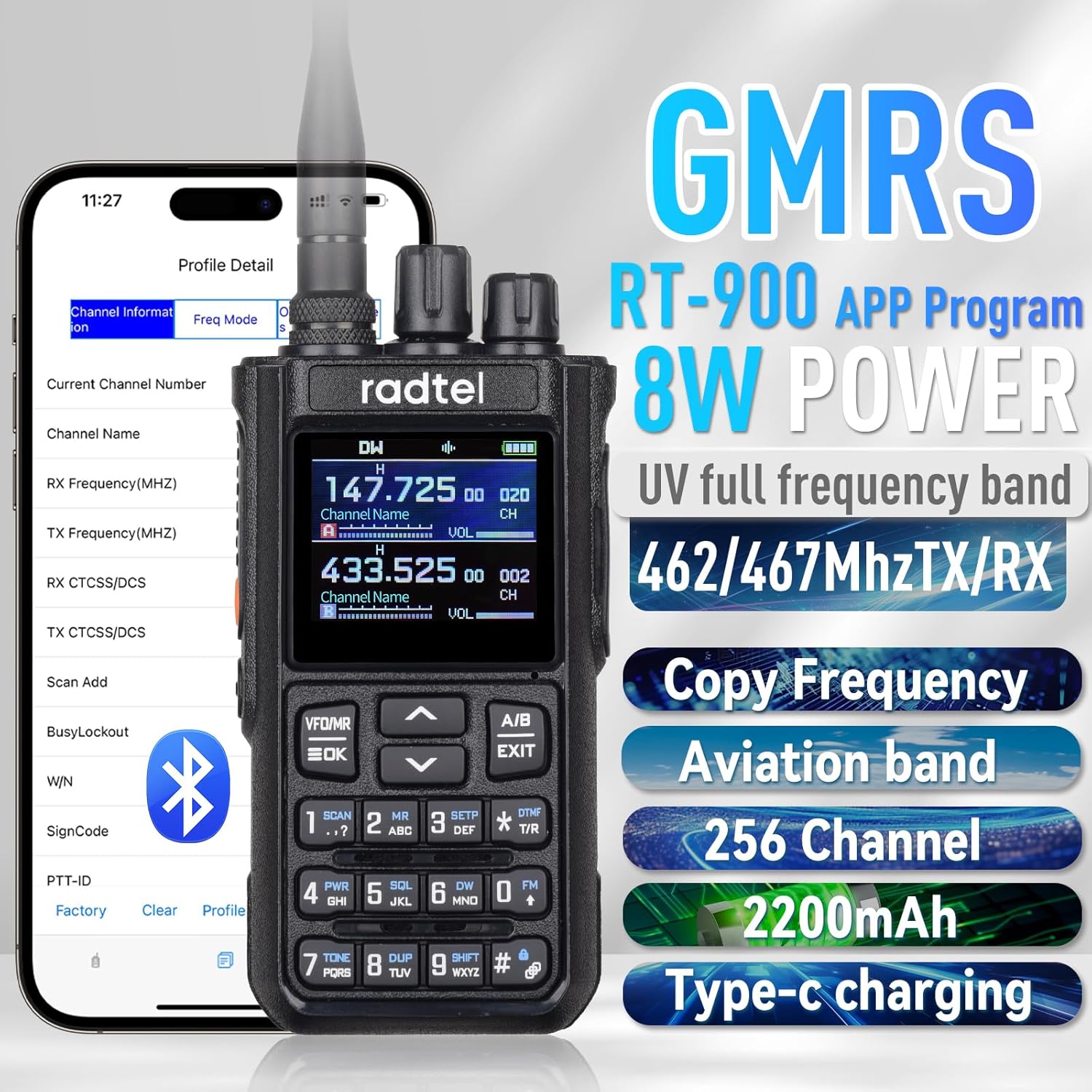
Figure 4: Programming the RT-900 via a smartphone app.
For Android users, the app can be downloaded from: Radtel Android App
Video: RT900 programming on PC
This video demonstrates the process of programming the Radtel RT-900 radio using PC software, including connecting the radio and reading/writing data.
5. Operating Instructions
5.1 Basic Communication
- Channel Selection: Use the up/down arrow keys to navigate through programmed channels.
- Push-to-Talk (PTT): Press and hold the PTT button on the side of the radio to transmit. Release to listen.
- Volume Adjustment: Rotate the top knob to adjust the listening volume.
5.2 Display and Modes
The 1.77-inch color LCD provides clear information on current frequencies, channel numbers, channel names, battery status, and various function indicators.

Figure 5: Large LCD display showing multi-display options.
Video: RT-900 GMRS Display Video
This video showcases the various display modes and information presented on the RT-900's color LCD screen.
Video: Switch between RT900 VFO mode and MR mode
This short video demonstrates how to switch between VFO (Variable Frequency Oscillator) mode and MR (Memory Recall) mode on the RT-900 radio.
5.3 Advanced Functions
- VOX (Voice Operated Exchange): Enables hands-free transmission when your voice is detected. Activate and adjust sensitivity through the radio's menu or programming software.
- NOAA Weather Receiver: Access NOAA weather channels for real-time weather alerts and forecasts.
- Air Band Reception: Listen to aviation communications on the 108-136MHz AM band.
- FM Radio: The radio includes an FM broadcast receiver for entertainment.

Figure 6: Air Band Receive capability.
Video: Frequency Expansion for RT900
This video demonstrates how to expand the frequency range of the RT-900 radio, allowing access to additional frequencies beyond the default GMRS channels.
6. Maintenance
- Cleaning: Use a soft, damp cloth to clean the radio's exterior. Do not use harsh chemicals or solvents.
- Battery Care: To prolong battery life, avoid fully discharging the battery frequently. Store the radio and battery in a cool, dry place when not in use for extended periods.
- Storage: Store the radio in a dry environment, away from direct sunlight and extreme temperatures.
- Antenna Care: Ensure the antenna is securely attached. Avoid bending or forcing the antenna, as this can damage the connector.
7. Troubleshooting
| Problem | Possible Cause | Solution |
|---|---|---|
| Radio does not power on. | Low or dead battery; incorrect battery installation. | Charge the battery fully. Ensure the battery is correctly installed. |
| Cannot transmit or receive. | Incorrect frequency/channel; antenna not connected; out of range; squelch too high. | Verify frequency/channel settings. Ensure antenna is secure. Move closer to other radios. Adjust squelch level. |
| Poor audio quality / Noise. | Weak signal; interference; squelch setting. | Move to an area with better signal. Check for sources of interference. Adjust squelch. Ensure noise reduction is enabled if desired. |
| Radio locks up or malfunctions. | Software glitch; internal issue. | Perform a soft reset (power off, remove battery, wait 30 seconds, reinsert battery, power on). If issues persist, contact customer support. |
8. Specifications
- Brand: Radtel
- Model: RT-900
- Item Weight: 15.2 ounces
- Product Dimensions: 0.13 x 0.17 x 0.86 inches
- Country of Origin: China
- Batteries: 1 x 9V battery (included)
- Number of Channels: 256
- Special Feature: Type-C charging
- Frequency Range: 462/467MHz TX/RX (GMRS), 108-136MHz AM (Air Band Receive)
- Talking Range Maximum: 8 Kilometers (approx. 5 miles in open areas)
- Tuner Technology: AM/FM
- Water Resistance Level: Not Water Resistant
9. Warranty & Support
The Radtel RT-900 GMRS Radio comes with a 1-Year Warranty. Radtel also offers lifetime firmware upgrades and 24/7 expert technical support for worry-free ownership.
For technical assistance or warranty claims, please refer to the contact information provided with your purchase or visit the official Radtel website.


