Introduction
This manual provides detailed instructions for the assembly, operation, and maintenance of your Pamray S8 Small Rolling Gaming Desk. Designed for compact spaces, this desk features integrated LED lighting, power outlets, a storage pegboard, and mobile casters for versatile use. Please read this manual thoroughly before assembly and operation to ensure proper use and longevity of your product.
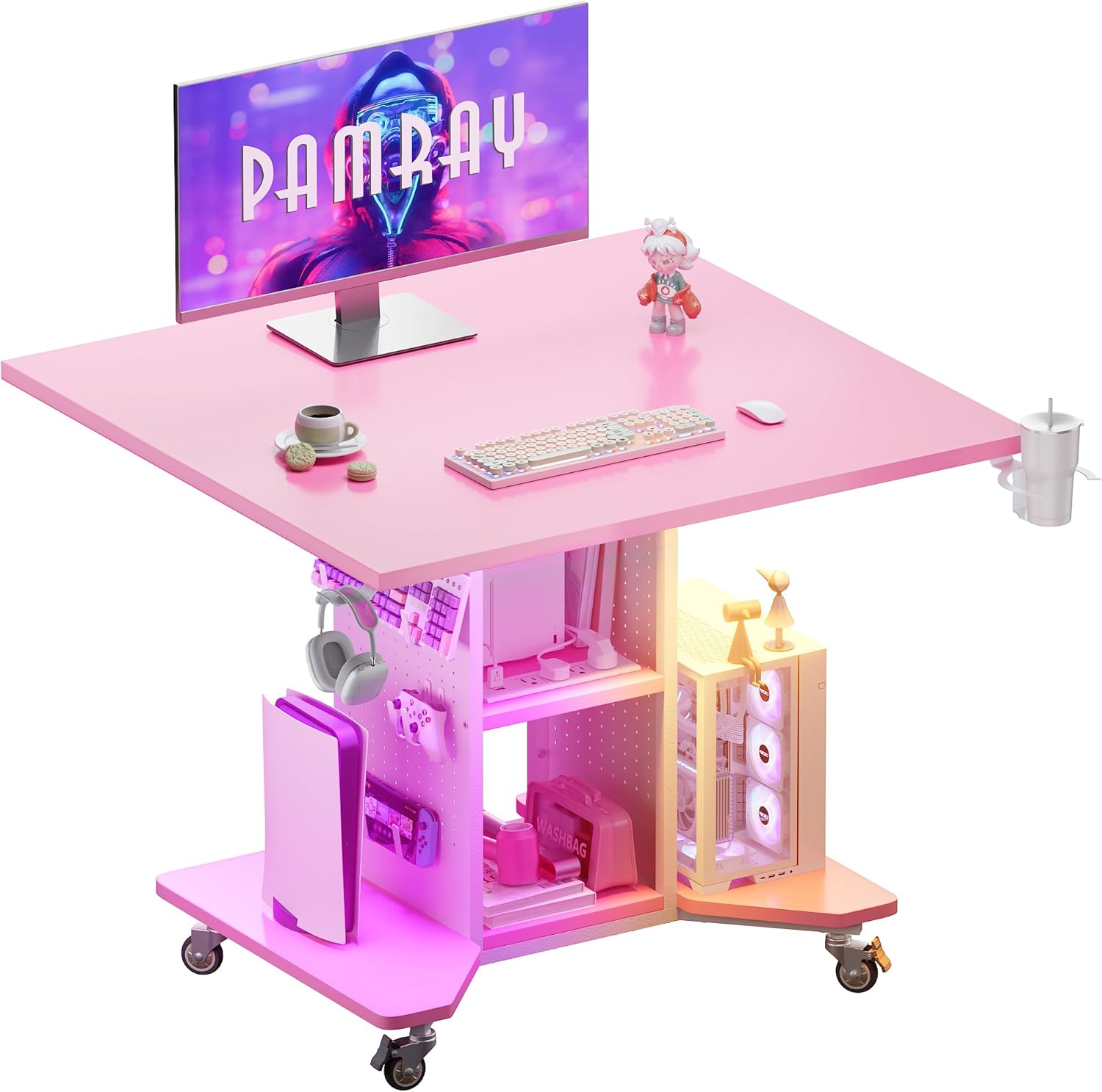
Image: The Pamray S8 Small Rolling Gaming Desk in pink, showcasing its compact design with a monitor, keyboard, and various accessories.
Safety Information
Important Safety Warning:
Always secure the desk to the wall or floor when in use to prevent tip-overs. Be cautious of the tip-over risk, especially when using the caster wheels. Ensure all electrical connections are secure and follow local electrical codes.
Setup and Assembly
The Pamray S8 desk is designed for straightforward assembly. All necessary tools and clear instructions are included in the accessory bag. For visual guidance, comprehensive installation videos are available by scanning the transparency label on the packaging or through the product page.
Assembly Steps Overview:
- Unpack Components: Carefully remove all parts from the packaging and verify against the included parts list.
- Assemble Frame: Attach the main support beams and legs according to the diagrams. Ensure all screws are tightened securely.
- Install Shelves and Pegboard: Secure the two-tier storage shelves and side pegboards to the frame.
- Attach Casters: Install the four caster wheels to the base. Ensure the two lockable wheels are positioned for easy access.
- Mount Desktop: Carefully place and secure the desktop to the assembled frame.
- Install Accessories: Attach the headphone hook and cup holder as desired.
- Connect LED Lights and Power Strip: Route the LED light strip and connect the built-in power outlet according to instructions.

Image: A detailed view of the Pamray S8 desk's side pegboard and two-tier storage shelves, illustrating potential organization for gaming controllers, headphones, and other accessories.
Operating Instructions
LED Lighting System
The integrated LED light strip offers 358 adjustable modes, including flowing rainbow effects and 14 monochrome options. Use the independent remote control to select your preferred lighting effects and adjust brightness. The upgraded lamp beads provide consistent brightness.

Image: The Pamray S8 desk illuminated by its RGB LED light strip, demonstrating various dynamic multicolor lighting modes and the included remote control for customization.
Built-in Power Outlet
The desk features a built-in charging station with 4 AC outlets (125V/12A) and 2 USB ports (5V/2A). This allows simultaneous charging of up to 6 devices, such as phones, tablets, and laptops. The power cord is 4.92 feet long, and the rated power is 1500W.

Image: A close-up view of the recessed power strip on the Pamray S8 desk, showing the 4 AC outlets and 2 USB ports with devices plugged in.
Mobile Design
Equipped with 4 caster wheels (2 lockable, 2 swivel), the desk can be easily moved to different locations. Lock the wheels to secure the desk in place during use. This feature makes it suitable for various uses, including as a gaming desk, side table, or computer table in small spaces.

Image: The Pamray S8 desk in a living room setting, highlighting its mobility with caster wheels and versatile placement options.
Ample Storage Space
The desk includes two side pegboards with 12 hooks (6 large, 6 small), two-tier storage shelves, two open bottom racks, a headphone hook, and a cup holder. The pegboard hooks are ideal for organizing gaming controllers, headphones, and other accessories. The bottom racks provide space for speakers or PC towers.
Maintenance
Cleaning
- Wipe surfaces with a soft, damp cloth. Avoid abrasive cleaners or harsh chemicals that may damage the finish.
- For the LED strip, gently wipe with a dry cloth. Do not immerse in water.
Hardware Check
- Periodically check all screws and fasteners to ensure they remain tight. Retighten as necessary to maintain stability.
- Inspect caster wheels for smooth operation and clean any accumulated debris.
Electrical Components
- Ensure the power cord and plug are free from damage. Do not use if damaged.
- Avoid overloading the power outlets.
Troubleshooting
LED Lights Not Working
- Check Power: Ensure the LED strip is properly connected to the power source and the power outlet is active.
- Remote Control: Verify the remote control batteries are functional and that there are no obstructions between the remote and the LED receiver.
- Connections: Inspect all connections of the LED strip for looseness.
Power Outlets Not Functioning
- Main Power: Confirm the desk's power cord is securely plugged into a working wall outlet.
- Overload: Disconnect some devices to check if the circuit breaker within the power strip has tripped due to overload.
Desk Instability
- Tighten Screws: Re-check and tighten all assembly screws.
- Level Surface: Ensure the desk is on a flat, level surface.
- Lock Casters: If using the desk in a stationary position, ensure the lockable caster wheels are engaged.
Specifications
| Feature | Detail |
|---|---|
| Brand | Pamray |
| Model Number | S8 |
| Product Dimensions (D x W x H) | 23.6"D x 31.5"W x 28.74"H |
| Item Weight | 32.5 Pounds |
| Color | Pink |
| Base Material | Metal |
| Top Material Type | FSC-Certified Wood |
| Finish Type | Powder Coated |
| Special Features | Built-In Outlet, Compact, Wheel, LED Lights, Pegboard |
| Maximum Weight Recommendation | 150 Pounds |
| Power Outlet | 4 AC Outlets (125V/12A), 2 USB Ports (5V/2A) |
| Rated Power | 1500W |
| Power Cord Length | 4.92 FT |
| Number of Shelves | 2 |
| Included Components | Built-in Outlet, Cup Holder, Headphone Hook, Pegboard |

Image: A diagram illustrating the precise dimensions of the Pamray S8 Small Rolling Gaming Desk, including height, width, and depth measurements.
Warranty and Support
For warranty information and customer support, please refer to the documentation included with your purchase or contact Pamray customer service directly. Protection plans may be available for extended coverage.
You can visit the official Pamray store for more information: Pamray Store


