
E GATE EGK6
Egate Zen DLP 6X Smart Projector (Model EGK6) User Manual
Comprehensive Instructions for Setup, Operation, and Maintenance
1. Introduction
This manual provides detailed instructions for the safe and efficient use of your Egate Zen DLP 6X Smart Projector, Model EGK6. Please read this manual thoroughly before operating the device and retain it for future reference. This projector is designed for home entertainment, offering a portable solution with advanced features.
2. Safety Information
Observe the following safety precautions to prevent damage to the projector and ensure user safety:
- Do not look directly into the projector lens when the lamp is on.
- Ensure proper ventilation around the projector to prevent overheating.
- Do not expose the projector to rain, moisture, or extreme temperatures.
- Use only the power adapter supplied with the device.
- Keep the projector away from water and other liquids.
- Do not attempt to disassemble or repair the projector yourself. Contact qualified service personnel.
3. What's in the Box
Verify that all items are present upon unboxing:
- Egate Zen DLP 6X Smart Projector (Model EGK6)
- Remote Control
- Power Adapter
- User Manual with Warranty Card
4. Product Overview
The Egate Zen DLP 6X Smart Projector is a portable device featuring a DLP display, native 1080p resolution with 4K Ultra HD support, and an integrated Android 9.0 operating system. It includes a built-in battery for extended use and offers various connectivity options.
4.1. Projector Components
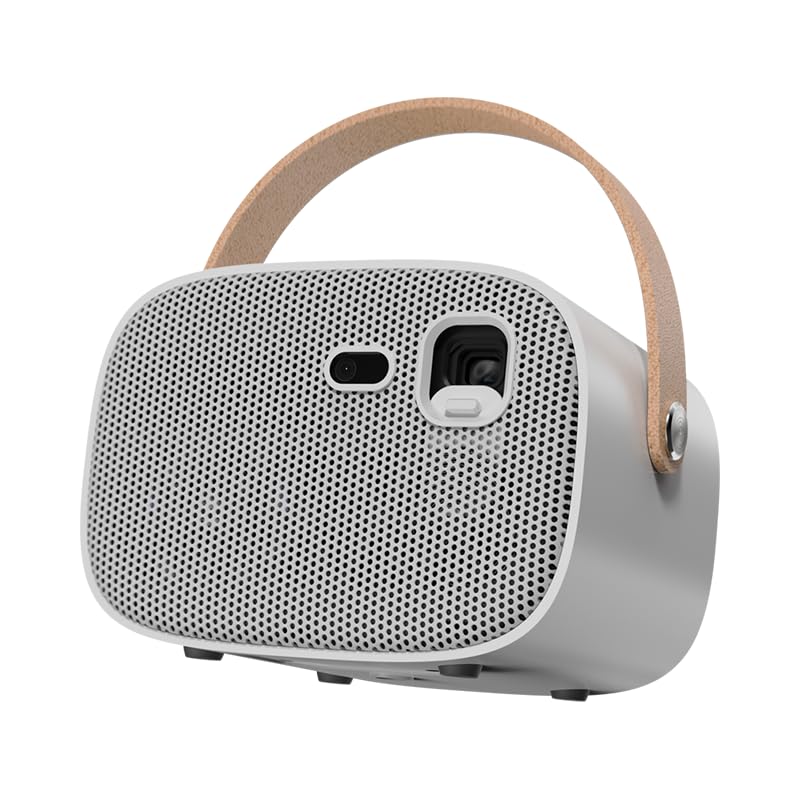
Image: Front view of the Egate Zen DLP 6X Smart Projector, showing the lens and front grille.

Image: Rear view of the projector highlighting the DC In, HDMI, USB 2.0, and AUX ports.
4.2. Key Features
- Display Technology: DLP (Digital Light Processing) for sharp images and vibrant colors.
- Resolution: Native 1080p (1920 x 1080 pixels) with support for 4K Ultra HD input.
- Brightness: 600 ISO Lumens, providing clear visuals in various lighting conditions.
- Contrast Ratio: 3000:1 for deep blacks and bright whites.
- Screen Size: Up to 381 cm (150 inches) diagonal projection.
- Operating System: Android 9.0 with 2GB RAM and 32GB ROM for direct app access.
- Auto Focus & Auto Keystone: Automatic image adjustment for quick setup.
- Built-in Battery: Provides 120-180 minutes of playback time for portable use.
- Audio: Integrated 5-watt Harmonized Frequency Speaker.
- Connectivity: HDMI, USB, Audio Out (3.5mm), AV, Bluetooth 5.2, Dual-band Wi-Fi (2.4G+5.8G).
- Screen Mirroring: Wireless Screen Cast for Android & iOS, and Wired Screen Share for iOS via Ushare (Airplay/DLNA/Mirroring).

Image: Visual representation of key features including 600 ISO brightness, 150-inch screen capability, 1080p resolution, and built-in battery.

Image: Depiction of the Android 9 operating system interface, showcasing various streaming applications.
5. Setup
5.1. Initial Placement
- Place the projector on a stable, flat surface.
- Ensure there is adequate space around the projector for ventilation.
- Position the projector at an appropriate distance from the projection surface (wall or screen) to achieve the desired image size.
5.2. Power Connection
- Connect the power adapter to the DC In port on the projector.
- Plug the power adapter into a suitable electrical outlet.
- The projector can also operate on its internal battery for portable use.
5.3. Focus and Keystone Adjustment
The projector features automatic focus and keystone correction for ease of use.
- Upon powering on, the projector will automatically adjust the focus and correct image distortion.
- Manual adjustments can be made via the on-screen menu or remote control if needed.

Image: Illustration of the auto and electronic focus feature, ensuring a clear projected image.
6. Operating Instructions
6.1. Power On/Off
- Power On: Press the power button on the projector or the remote control.
- Power Off: Press the power button again. A shutdown confirmation may appear on screen.
6.2. Navigating the Android OS
- Use the remote control's directional pad and 'OK' button to navigate the Android 9.0 interface.
- Access pre-installed apps or download new ones from the app store.
6.3. Connecting External Devices
The projector supports various external devices:
- HDMI: Connect laptops, gaming consoles, Blu-ray players via the HDMI port. Select the HDMI input source from the projector's menu.
- USB: Insert USB drives into the USB 2.0 port to play media files directly.
- Audio Out: Connect external speakers or headphones using the 3.5mm audio jack.
- Bluetooth: Pair Bluetooth speakers or headphones via the Bluetooth 5.2 settings in the Android OS.

Image: Projector connected wirelessly to various Bluetooth devices, illustrating Bluetooth 5.2 connectivity.
6.4. Screen Mirroring
The projector supports wireless and wired screen mirroring:
- Wireless Screen Cast (Android & iOS): Use the pre-installed Ushare app or compatible mirroring features on your device to cast content wirelessly. Ensure both devices are on the same Wi-Fi network.
- Wired Screen Share (iOS): Connect your iOS device directly for a stable wired connection.

Image: Devices like smartphones and laptops mirroring their screens to the projector via DLNA, Airplay, or Ushare.
7. Maintenance
Regular maintenance ensures optimal performance and longevity of your projector.
- Cleaning the Lens: Use a soft, lint-free cloth specifically designed for optical lenses. Do not use abrasive cleaners or harsh chemicals.
- Cleaning the Exterior: Wipe the projector's exterior with a soft, dry cloth. For stubborn marks, a slightly damp cloth can be used, followed by a dry wipe.
- Ventilation: Ensure the ventilation openings are clear of dust and obstructions. Do not block airflow during operation.
- Storage: When not in use for extended periods, store the projector in a cool, dry place, protected from dust and direct sunlight.
8. Troubleshooting
Refer to the following table for common issues and their solutions:
| Problem | Possible Cause | Solution |
|---|---|---|
| No image projected | Power not connected; Projector off; Incorrect input source | Check power connection; Turn on projector; Select correct input source (HDMI, USB, etc.) |
| Image is blurry | Out of focus; Lens dirty | Allow auto-focus to adjust or manually adjust focus; Clean the projector lens |
| No sound | Volume too low; External audio device not connected; Incorrect audio output selected | Increase volume; Connect external speakers/headphones; Check audio settings in Android OS |
| Remote control not working | Batteries low/dead; Obstruction between remote and projector | Replace batteries; Ensure clear line of sight to the projector's IR receiver |
| Cannot connect to Wi-Fi | Incorrect password; Router issue; Out of range | Verify Wi-Fi password; Restart router; Move projector closer to router |
9. Specifications
| Feature | Detail |
|---|---|
| Brand | E GATE |
| Model | EGK6 |
| Display Type | DLP |
| Native Resolution | 1920 x 1080 Pixels (1080p) |
| Supported Resolution | 4K Ultra HD |
| Brightness | 600 ISO Lumens |
| Image Contrast Ratio | 3000:1 |
| Aspect Ratio | 16:9 |
| Operating System | Android 9 |
| Processor | Quad-core Cortex-A55 1.9GHz |
| GPU | G31 MP2 |
| Memory | 2GB RAM, 32GB ROM |
| Connectivity Technology | Wi-Fi (Dual Band 2.4G+5.8G), Bluetooth 5.2 |
| Hardware Interface | HDMI, USB, Audio Out (3.5mm), AV |
| Special Features | TI DLP DMD 0.23”, Auto Focus, Auto Keystone, Inbuilt Battery, HDR +10 |
| Battery Life | 120-180 minutes (approx.) |
| Audio Output | 5-watt Built-in Harmonized Frequency Speaker, 3.5 mm Audio Out Jack |
| Product Dimensions | 15.2 x 16.8 x 18.8 cm |
| Item Weight | 1.4 kg |
10. Warranty and Support
Your Egate Zen DLP 6X Smart Projector comes with a warranty. Please refer to the 'Manual with Warranty Card' included in the box for detailed warranty terms and conditions. For technical support or service inquiries, please contact Egate customer service. Contact details are typically provided on the warranty card or the official Egate website.
Related documentsEGK6

Ask a question about this manual
Ask about setup, troubleshooting, compatibility, parts, safety, or missing instructions. Manuals+ will review the question and use this page’s manual context to help answer it.