
weidilixiang I6 MAX
I6 MAX 4K Dual Camera Drone User Manual
Model: I6 MAX | Brand: weidilixiang
1. Introduction
The weidilixiang I6 MAX 4K Dual Camera Drone is an advanced aerial vehicle designed for capturing high-quality footage and providing an engaging flight experience. It features a 4K ultra-high-definition dual camera system, obstacle avoidance capabilities, and a brushless motor for stable and efficient operation.
This manual provides essential information for the safe and effective operation, maintenance, and troubleshooting of your I6 MAX drone. Please read it thoroughly before first use.

Figure 1: The I6 MAX 4K Dual Camera Drone, its remote control, and the drone in its folded configuration.
2. Package Contents
Verify that all items listed below are present in your package. If any items are missing or damaged, contact customer support.
- I6 MAX Drone (excluding batteries)
- Remote Control
- Battery * 1 (for drone)
- Fan Blades * 4 (spare propellers)
- Charging Cable / Screwdriver
- Storage Bag
- Instructions Manual

Figure 2: Illustration of the complete package contents for the I6 MAX drone.
3. Setup Guide
3.1. Charging the Drone Battery
Before first use, fully charge the drone battery. Connect the charging cable to the drone battery and a compatible USB power adapter (not included). The charging indicator will show the charging status.
3.2. Installing Propellers
Attach the propellers to the corresponding motor shafts. Ensure that propellers are installed correctly according to their rotation direction (indicated by markings on the propellers and drone arms). Incorrect installation can affect flight stability.
3.3. Preparing the Remote Control
Insert the required batteries (not included) into the remote control. Ensure correct polarity. Extend the phone holder if you plan to use a smartphone for FPV viewing.
3.4. Unfolding the Drone
Gently unfold the drone arms until they lock into place. Ensure all arms are fully extended and secure before flight.
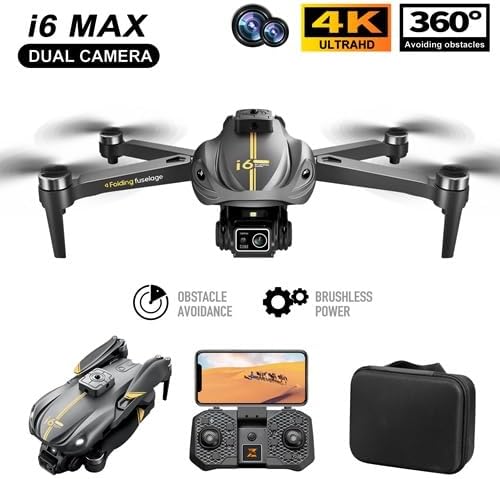
Figure 3: The I6 MAX drone in its unfolded state, ready for operation.
4. Operating Instructions
4.1. Power On and Pairing
- Power on the drone by pressing and holding the power button.
- Power on the remote control.
- The drone and remote control will automatically pair. Refer to the remote control's indicator lights for pairing status.
4.2. One-Click Control for Beginners
The I6 MAX drone features simplified controls for ease of use, especially for beginners:
- One-Click Takeoff: Press the designated button on the remote control to initiate automatic takeoff. The drone will ascend to a safe hovering altitude.
- One-Click Landing: Press the designated button to initiate automatic landing. The drone will descend and land gently.
- One-Click Return: Press the designated button to command the drone to return to its takeoff point.

Figure 4: Visual representation of the one-click control features for simplified operation.
4.3. Flight Features
- 360° Aerial Stunts: Execute impressive 360-degree rolling stunts with a dedicated button on the remote control.
- Brushless Motor: The brushless motor provides powerful and stable flight performance, offering Level 5 wind resistance.
- Optical Flow Fixed Point Hovering: Utilizes optical flow sensors for precise hovering, maintaining a stable position even indoors.
- Air Pressure Fixed Altitude: Maintains a consistent altitude, simplifying flight control.

Figure 5: The I6 MAX drone demonstrating its stable flight capabilities due to the brushless motor and wind resistance.
4.4. Camera Operation and Features
The I6 MAX drone is equipped with a 4K ultra-high-definition dual camera system for versatile photography and videography.
- 4K Dual Camera: Capture stunning 4K video and 16MP photos. The dual lens system allows for varied perspectives.
- 90° Manual Adjustment: The camera angle can be manually adjusted by 90 degrees to capture different views.
- 50x Zoom: Utilize the digital zoom feature to get closer to your subject without moving the drone.
- Gesture Control: Perform specific hand gestures to trigger photo or video recording. Refer to the app instructions for specific gestures.
- HD Image Transmission: Real-time video feed to your smartphone via Wi-Fi for FPV (First Person View) flying and monitoring.
- Filter + Beauty Mode: Enhance your photos directly through the companion application with built-in filters and beauty effects.
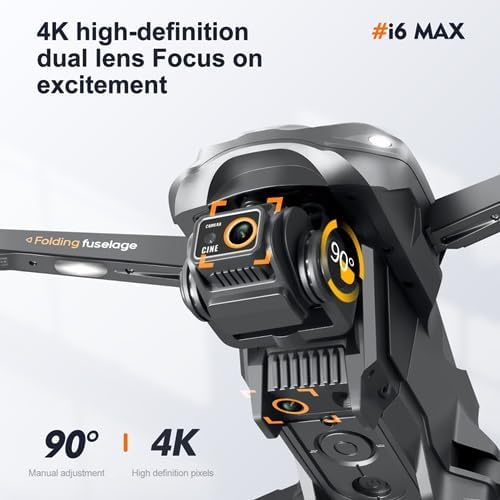
Figure 6: Detailed view of the drone's dual camera system and its manual adjustment capability.

Figure 7: Example of photo enhancement options within the drone's companion application.
4.5. Intelligent Flight Modes
- Obstacle Avoidance: Advanced sensors detect obstacles in all directions, allowing the drone to intelligently navigate around them for safer flights.
- Intelligent Follow Mode: The drone can automatically follow a designated subject, keeping it in the frame.
- Trajectory Mapping: Draw a flight path on your smartphone screen, and the drone will follow it automatically.

Figure 8: Overview of key intelligent features and flight capabilities.
5. Maintenance
- Cleaning: Regularly clean the drone body, propellers, and camera lens with a soft, dry cloth. Avoid using liquids.
- Propeller Inspection: Before each flight, inspect propellers for any cracks, bends, or damage. Replace damaged propellers immediately using the provided spares.
- Battery Care: Store batteries in a cool, dry place. Do not overcharge or over-discharge batteries. If storing for extended periods, charge to approximately 50%.
- Storage: When not in use, fold the drone and store it in its carrying case to protect it from dust and physical damage.
6. Troubleshooting
| Problem | Possible Cause | Solution |
|---|---|---|
| Drone does not power on. | Low battery or battery not properly inserted. | Charge the drone battery. Ensure the battery is securely inserted. |
| Remote control does not connect. | Remote control batteries low or pairing failed. | Replace remote control batteries. Re-attempt pairing process. |
| Unstable flight or drifting. | Propellers damaged or incorrectly installed. Drone not calibrated. | Check and replace damaged propellers. Ensure correct propeller installation. Perform drone calibration as per quick start guide. |
| No image from camera. | Wi-Fi not connected or app issue. | Ensure smartphone is connected to the drone's Wi-Fi network. Restart the app and drone. |
7. Specifications
| Feature | Detail |
|---|---|
| Brand | weidilixiang |
| Model Name | I6 MAX |
| Video Capture Resolution | 4K |
| Effective Still Resolution | 32 MP |
| Connectivity Technology | Wi-Fi |
| Special Feature | Foldable |
| Skill Level | Beginner |
| Item Weight | 450 Grams (15.9 ounces) |
| Product Dimensions (Folded) | 6.15"L x 6"W x 2"H (Approx. 16.5x8.5x7.5cm) |
| Product Dimensions (Expanded) | Approx. 27x33x7.5cm |
| Flight System | Air pressure fixed altitude + Optical flow visual positioning hovering + Brushless power |
| Battery Life | Approximately 15 minutes |
| Signal/Distance | 2.4G / Approximately 500 meters |
| Charging | USB intelligent charging |
| Material | Plastic |
| UPC | 635412062256 |
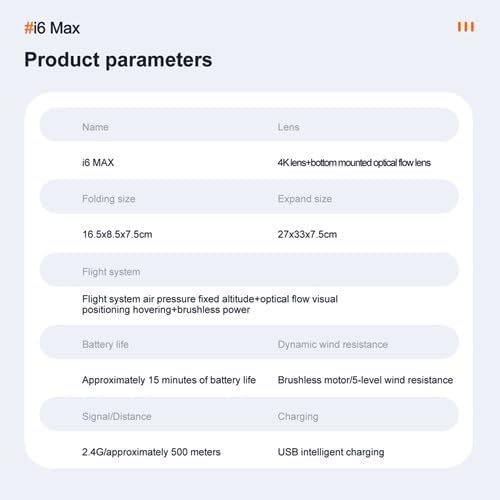
Figure 9: Detailed product specifications and parameters.
8. Safety Guidelines
Operating a drone requires responsibility. Adhere to the following safety guidelines:
- Always fly in open areas, away from people, animals, buildings, and obstacles.
- Maintain visual line of sight with the drone at all times.
- Do not fly near airports or restricted airspace. Check local regulations.
- Avoid flying in strong winds, rain, or other adverse weather conditions.
- Ensure the drone battery and remote control batteries are fully charged before each flight.
- Keep fingers and loose clothing away from rotating propellers.
- Do not operate the drone under the influence of alcohol or drugs.
- Respect privacy when capturing photos or videos.
9. Warranty and Support
For warranty information and technical support, please refer to the documentation included with your product or contact the manufacturer directly. Keep your purchase receipt as proof of purchase.
Manufacturer: Vinci
Ask a question about this manual
Ask about setup, troubleshooting, compatibility, parts, safety, or missing instructions. Manuals+ will review the question and use this page’s manual context to help answer it.