1. Introduction
This manual provides comprehensive instructions for the CUIPPWRJ F745 V2 Stack, an integrated flight control system comprising an F722 Flight Controller and a 45A BL_S 4in1 Electronic Speed Controller (ESC). This stack is designed for use in 3-6S powered racing and freestyle quadcopters, offering stable performance and responsive control. Please read this manual thoroughly before installation and operation to ensure correct usage and optimal performance.
2. Safety Information
- High Current Warning: This device operates with high current. Incorrect wiring or short circuits can cause severe damage to the product, battery, and potentially lead to fire. Always ensure correct polarity and insulation.
- Soldering: Proper soldering techniques are crucial. Ensure all connections are secure and free from cold joints or bridges. If you are not experienced with soldering, seek professional assistance.
- Power Source: Use only compatible 3-6S LiPo batteries. Do not exceed the specified voltage range.
- Propellers: Always remove propellers from your drone before performing any setup, testing, or maintenance to prevent accidental injury.
- Environment: Operate your drone in a safe, open area, away from people, animals, and obstacles.
- Heat: The ESC and motors can become hot during operation. Avoid touching them immediately after flight.
3. Package Contents
Verify that all items are present in your package:
- 1x Zeus F722 Flight Controller
- 1x Zeus 45A V2 BL_S 3-6S 4in1 ESC
- 1x Accessory Package (includes cables, standoffs, etc.)
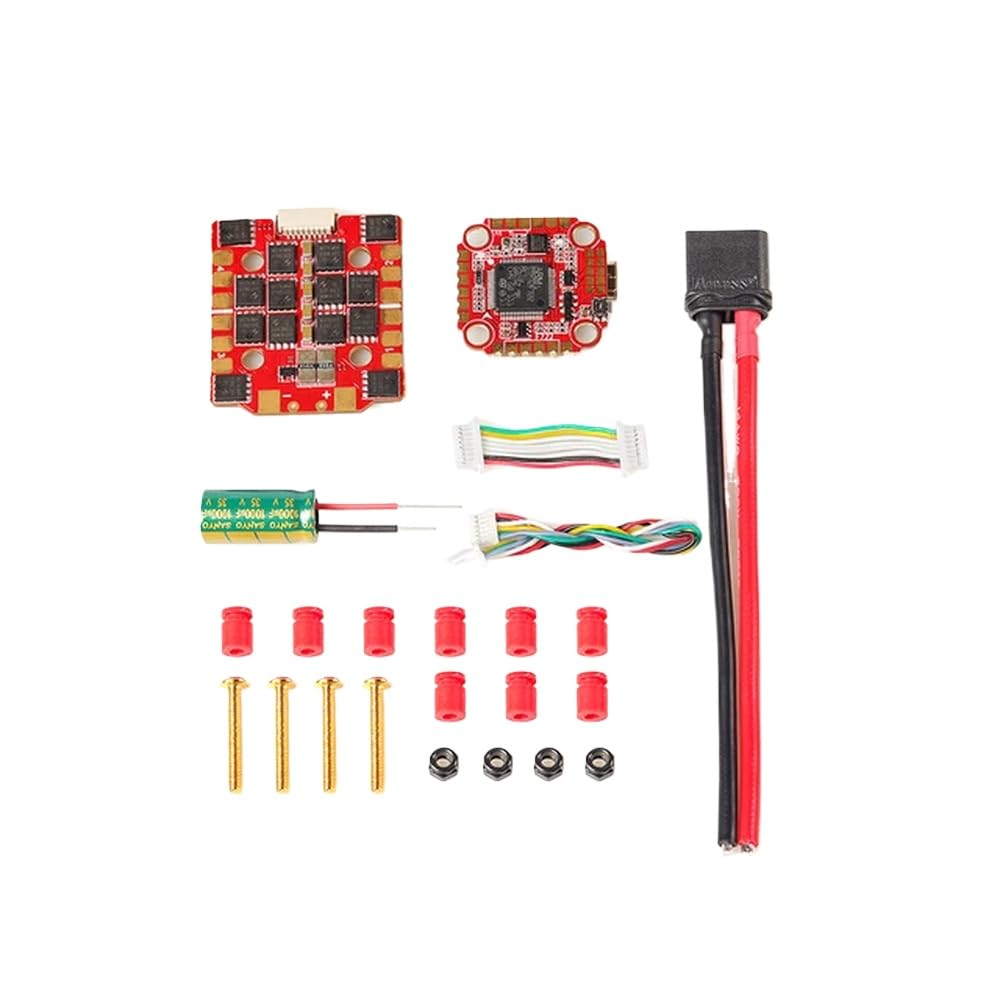
Image 3.1: The CUIPPWRJ F745 V2 Stack, showing the F722 Flight Controller and 45A BL_S 4in1 ESC.
4. Setup
4.1. Mounting
- Ensure your drone frame has 20x20mm mounting holes with M3 diameter.
- Carefully stack the ESC and Flight Controller using the provided standoffs and screws. Typically, the ESC is mounted below the Flight Controller.
- Ensure proper insulation between the stack and the carbon fiber frame to prevent short circuits.
4.2. Wiring Connections
Refer to the wiring diagram specific to your drone frame and components. General connections include:
- Battery Input: Solder the main battery lead (XT60/XT30 connector) to the designated BAT+/BAT- pads on the ESC. Ensure correct polarity.
- Motors: Solder motor wires to the corresponding motor pads (M1-M4) on the ESC.
- Receiver: Connect your receiver (e.g., SBUS, CRSF, Spektrum) to the appropriate UART pads on the Flight Controller.
- Video Transmitter (VTX): Connect VTX power, ground, and video signal to the designated pads.
- Camera: Connect camera power, ground, and video signal to the designated pads.
- GPS/Other Peripherals: Connect to available UARTs or I2C pads as required. The F722 FC supports I2C functionality.
4.3. Firmware Flashing & Configuration
- Flight Controller Firmware: Connect the Flight Controller to your computer via USB. Use Betaflight Configurator (or similar software) to flash the HGLRCF722 firmware target.
- ESC Firmware: The ESC comes with BL_S (F-H-40) firmware. If an update is required, use BLHeliSuite32 or similar software.
- Initial Configuration: Configure your Flight Controller settings in Betaflight Configurator, including receiver protocol, motor protocols (e.g., DShot600), PID tuning, and OSD settings.
- Calibration: Calibrate the accelerometer and ESCs as per the Betaflight/BLHeliSuite instructions.
5. Operating
5.1. Pre-Flight Checks
- Ensure all connections are secure and no loose wires are present.
- Verify propeller direction and tightness (if installed for flight).
- Check battery voltage.
- Confirm radio control link and arming switch functionality.
5.2. Powering On
Connect the fully charged LiPo battery to the main battery lead. The Flight Controller will power on, indicated by LED lights. Listen for the ESC startup tones.
5.3. Arming and Disarming
Arm the drone using the configured switch on your radio transmitter. The motors will spin at a low idle speed. To disarm, toggle the arming switch again. Always disarm before landing or if any issue occurs.
5.4. Flight
Once armed, use your radio transmitter to control the drone. Start with gentle movements to familiarize yourself with the controls. Monitor battery voltage and flight time.
6. Maintenance
- Regular Inspection: Periodically inspect the stack for any signs of physical damage, loose connections, or burnt components.
- Cleaning: Keep the Flight Controller and ESC clean from dirt, dust, and debris. Use compressed air or a soft brush. Avoid using liquids directly on the electronics.
- Firmware Updates: Check for new firmware releases for both the Flight Controller (HGLRCF722) and ESC (BL_S) to benefit from performance improvements and bug fixes.
- Component Replacement: If any component is damaged, replace it with an identical or compatible part.
7. Troubleshooting
- No Power:
- Check battery connection and voltage.
- Inspect main power leads for cold joints or breaks.
- Verify no short circuits are present on the board.
- Motors Not Spinning:
- Ensure the drone is armed.
- Check motor wiring to the ESC.
- Verify motor protocol settings in Betaflight.
- Check for bent motor shafts or obstructed propellers.
- No RC Link:
- Ensure receiver is powered and correctly wired to the Flight Controller.
- Verify receiver protocol settings in Betaflight.
- Check binding between transmitter and receiver.
- Unstable Flight:
- Review PID tuning settings in Betaflight.
- Check for loose components or frame damage.
- Ensure propellers are balanced and undamaged.
8. Specifications
| Item Name | Zeus F745 V2 STACK |
| Model Number | CUIPPWRJ123 |
| Usage | Compatible with 100mm-450mm Frame |
| Installing Hole | 20x20mm, M3 |
| Stack Weight | 20g |
| Manufacturer | CUIPPWRJ |
| Flight Controller (Zeus F722) | |
| FC Firmware | HGLRCF722 |
| CPU | STM32F722 RET6 |
| MPU | BMI270 |
| Input Voltage | 3-6S Lipo |
| I2C Function | Supports I2C function |
| ESC (Zeus 45A V2 BL_S 4in1) | |
| Input Voltage | 3-6S Lipo |
| ESC Firmware | BL_S (F-H-40) |
| Steady Current | 45A |
| Peak Current | 55A (10 Sec) |
9. Warranty & Support
The CUIPPWRJ F745 V2 Stack is covered by a standard manufacturer's warranty against defects in materials and workmanship. The specific duration and terms of the warranty may vary by region and retailer. Please retain your proof of purchase for warranty claims.
For technical support, troubleshooting assistance, or warranty inquiries, please contact CUIPPWRJ customer service through their official website or the retailer from whom you purchased the product. Provide your model number (CUIPPWRJ123) and a detailed description of the issue for efficient support.


