
1. Introduction
Thank you for choosing the nutcore Professional Cordless Hair Trimmer. This manual provides essential information for the safe and effective use, maintenance, and care of your new grooming tool. Please read these instructions thoroughly before first use and retain them for future reference.

Image 1.1: The nutcore Professional Cordless Hair Trimmer with included accessories, including various guide combs, scissors, cleaning brush, oil, USB charging cable, and a comb.
2. Safety Information
To reduce the risk of electric shock, injury, or fire, always follow these basic safety precautions:
- Always unplug the device before cleaning.
- Keep the device away from water and do not use it near bathtubs, showers, basins, or other vessels containing water.
- Do not use near open flames or in environments with explosive and/or flammable fumes.
- Keep out of reach of children.
- Do not ingest or inhale small parts.
- Do not operate the appliance with a damaged cord or plug, or if it malfunctions or has been dropped or damaged.
- Use this appliance only for its intended household use as described in this manual.
3. Product Features
- Cordless Operation: Provides freedom of movement during use.
- Precision Blades: Equipped with sharp, self-sharpening, R-type acute angle cutter blades for a smooth and efficient trim.
- Adjustable Speed Settings: 4-speed intensity settings for varied trimming needs.
- Digital Display: Intelligent electric display shows RPM, remaining power percentage, and charging status.
- Long-lasting Battery: 2500mAh high-capacity Lithium-Ion battery provides up to 210 minutes of use on a 3-hour charge.
- Powerful Motor: Features a 3.2V strong motor for efficient cutting without excessive heat or noise.
- Ergonomic Design: Anti-slip handle for comfortable and secure grip.
- Adjustable Blade Length: Lever for fine-tuning blade length from 0.5mm to 2mm.
- Included Accessories: 6 limit combs (3/6/10/13/16/19mm), cleaning brush, scissors, comb, oil, and USB charging cable.

Image 3.1: Overview of the nutcore hair clipper's key features, including blade type, comb options, charging time, battery capacity, motor, and blade material.
4. Setup
4.1 Initial Charging
- Before first use, fully charge the trimmer. Connect the USB charging cable to the trimmer's charging port and plug the other end into a compatible USB power adapter (not included) or a computer USB port.
- The intelligent electric display will show the charging status. A full charge typically takes approximately 3 hours.
- Once fully charged, the display will indicate 100% power. The trimmer provides up to 210 minutes of cordless operation on a full charge.

Image 4.1: The trimmer features a Type-C charging port. A 3-hour charge provides 3-4 hours of use, depending on the selected speed setting.
4.2 Attaching Guide Combs
The trimmer comes with 6 different guide combs (3mm, 6mm, 10mm, 13mm, 16mm, 19mm) to achieve various hair lengths.
- Ensure the trimmer is turned off before attaching or detaching guide combs.
- Select the desired guide comb.
- Align the comb with the trimmer blade and push it firmly until it clicks into place.
- To remove, gently pull the comb away from the blade.

Image 4.2: A hand demonstrating how to attach a guide comb to the trimmer blade.
4.3 Adjusting Blade Length
The trimmer features an adjustable lever on the side to fine-tune the blade length from 0.5mm to 2mm, even without a guide comb.
- Move the lever up or down to select the desired cutting length.
- The digital display may indicate the approximate setting (e.g., 0.5mm, 1mm, 1.5mm, 2mm).
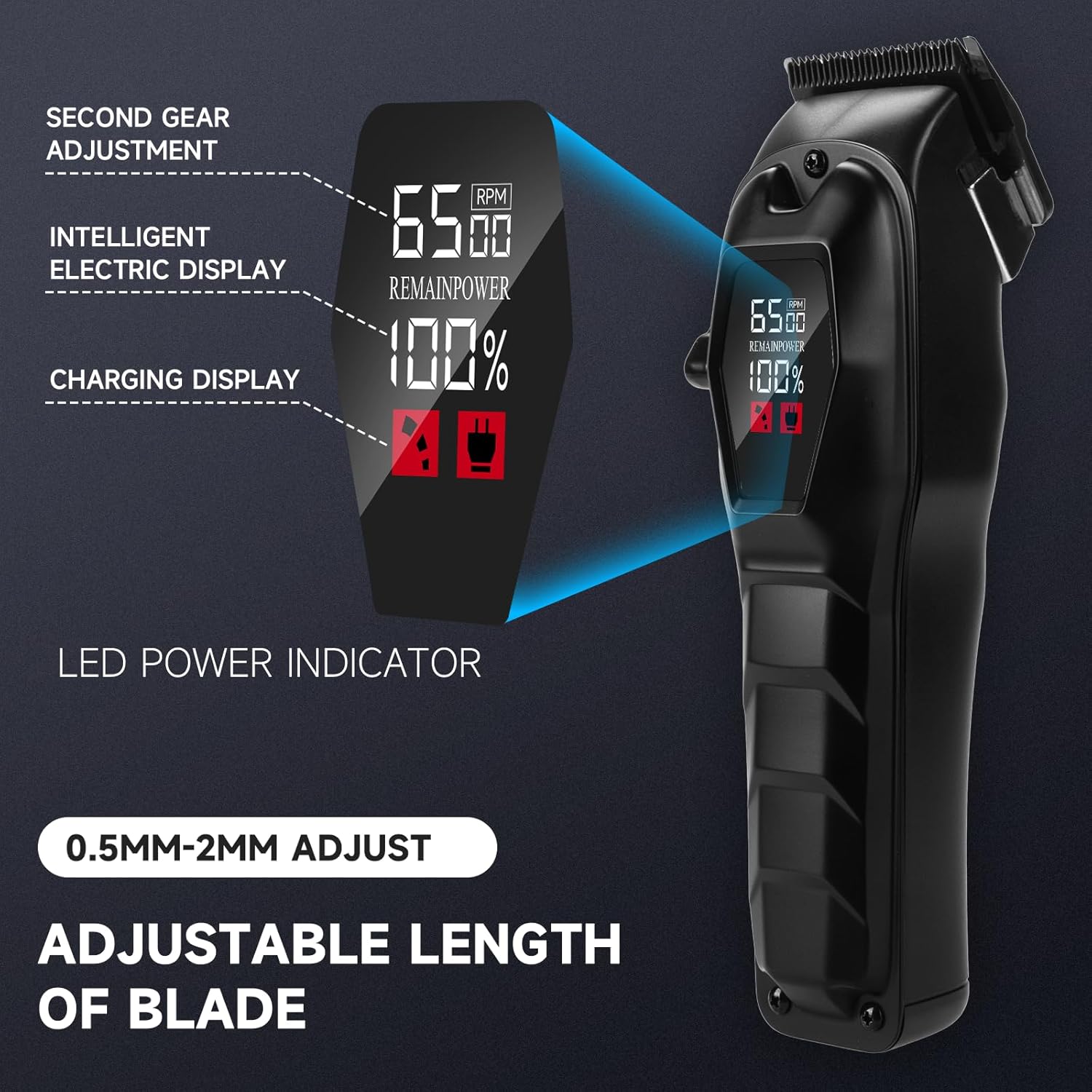
Image 4.3: The intelligent electric display shows power and RPM, while the side lever allows for 0.5mm-2mm blade length adjustment.
5. Operating Instructions
5.1 Powering On/Off and Speed Adjustment
- To turn on the trimmer, press the power button located on the side. The digital display will illuminate.
- To adjust the speed, press the power button again. The trimmer offers 4-speed intensity settings. Each press cycles through the available speeds. The RPM will be displayed on the screen.
- To turn off the trimmer, press and hold the power button for a few seconds.
5.2 Hair and Beard Trimming
- Ensure hair is clean and dry before trimming.
- Attach the desired guide comb or adjust the blade length using the lever.
- Start trimming against the direction of hair growth for an even cut.
- Use slow, controlled movements. For detailed work or edging, remove the guide comb and use the adjustable blade.

Image 5.1: A user demonstrating the application of the nutcore hair trimmer for beard grooming.
6. Maintenance
6.1 Cleaning the Blades
Regular cleaning ensures optimal performance and extends the life of your trimmer.
- Turn off the trimmer and unplug it if connected to a power source.
- Detach the blade assembly by gently pushing it forward or following the specific instructions for blade removal.
- Use the included cleaning brush to remove any loose hair from the blades and the trimmer body.
- The blades can be rinsed under running water. Ensure they are completely dry before reattaching. Do not immerse the entire trimmer in water.
- Reattach the blade assembly securely.
6.2 Oiling the Blades
To maintain cutting efficiency, oil the blades regularly, especially after cleaning or if the trimmer feels sluggish.
- Apply a few drops of the included lubricating oil (or a suitable clipper oil) to the teeth of the blades.
- Turn on the trimmer for a few seconds to allow the oil to distribute evenly.
- Wipe off any excess oil with a soft cloth.
7. Troubleshooting
If you encounter issues with your nutcore Professional Cordless Hair Trimmer, refer to the following common problems and solutions:
- Trimmer not turning on:
- Ensure the battery is charged. Connect the trimmer to the charger and allow it to charge for at least 30 minutes before attempting to turn it on again.
- Check if the power button is being pressed correctly.
- Poor cutting performance or pulling hair:
- Clean the blades thoroughly to remove any trapped hair or debris.
- Oil the blades as described in the maintenance section.
- Ensure the guide comb is securely attached and not damaged.
- The blades may be dull. Contact customer support for assistance.
- Trimmer making unusual noise:
- Clean and oil the blades.
- Ensure the blade assembly is correctly attached.
- Battery not charging:
- Verify the USB cable and power adapter are working correctly. Try a different cable or adapter.
- Ensure the charging port on the trimmer is clean and free of debris.
If the problem persists after attempting these solutions, please contact nutcore customer support.
8. Specifications
| Feature | Detail |
|---|---|
| Brand | nutcore |
| Model | Upgrade (B0DQJMW6SY) |
| Product Dimensions | 1.77 x 1.38 x 6.9 inches |
| Weight | 1.1 Pounds |
| Power Source | Battery Powered |
| Battery Type | Lithium-Ion (2500mAh) |
| Charging Time | Approx. 3 hours |
| Operating Time | Up to 210 minutes |
| Included Components | 6 limit combs (3/6/10/13/16/19mm), Cleaning brush, Instructions, Trimmer, USB cable, Scissors, Comb, Oil |

Image 8.1: Physical dimensions of the nutcore hair trimmer: 6.9 inches high, 1.77 inches wide, and 1.38 inches thick.
9. Warranty and Support
nutcore products are manufactured with quality and performance in mind. If you experience any issues with your Professional Cordless Hair Trimmer, please refer to the troubleshooting section first.
For further assistance, replacement, or refund inquiries, please contact nutcore customer support through your original point of purchase. Please have your product model (Upgrade) and ASIN (B0DQJMW6SY) available when contacting support.