
1. Introduction
This manual provides instructions for the Walfront Portable Air Cooler Humidifier, Model WALFRONTyqhx1gct4r. This device functions as a portable cooling fan, mini air conditioner, air humidifier, and features a 7-color night light. It is designed for personal use in various environments such as home, office, or during travel.

Front view of the Walfront Portable Air Cooler Humidifier, showcasing its compact design and control panel.
2. Safety Instructions
Please read and understand all safety instructions before using the appliance. Failure to follow these instructions may result in electric shock, fire, or serious injury.
- Do not immerse the appliance, power cord, or plug in water or other liquids.
- Use only the specified DC 5V, 2A power adapter. Using an incorrect power source may damage the device or pose a safety risk.
- Keep the appliance out of reach of children and pets.
- Place the appliance on a stable, level surface to prevent tipping.
- Unplug the appliance from the power source before cleaning, refilling the water tank, or when not in use for an extended period.
- Do not block the air inlets or outlets. Ensure adequate space around the unit for proper airflow.
- Do not use the appliance if the power cord or plug is damaged.
- Do not attempt to repair or disassemble the appliance yourself. Contact qualified service personnel for repairs.
- Avoid placing the appliance near heat sources or in direct sunlight.
3. Package Contents
Verify that all items are present in the package:
- 1 x Walfront Portable Air Cooler Humidifier
- 1 x USB Cable
- 1 x User Manual
4. Product Features
The Walfront Portable Air Cooler Humidifier offers multiple functionalities for enhanced comfort:
- 4-in-1 Design: Functions as a desktop cooling fan, mini air conditioner, air humidifier, and a 7-color night light.
- Large Water Tank: Features a 700mL water tank, providing up to 8 hours of humidification.
- USB Powered: Conveniently powered by adapters, PCs, power banks, or car chargers (requires ≥2A output).
- Adjustable Wind Speeds: Offers 3 wind speeds (low, medium, high) and manual adjustment of wind direction within 60°.
- Automatic Timers: Includes 3 automatic timer settings (2, 4, 6 hours) for energy saving and convenience.
- Touch Screen Control: Equipped with a touch screen interface for easy adjustment of settings.
- 7-Color Night Light: Integrated night light with 7 color options for ambient lighting.

Images depicting the air cooler being used in an office, during yoga, while sleeping, and in a kitchen, highlighting its versatility.

An image showing the air cooler with its 7-color night light function active, indicating low noise operation (≤58dB).
5. Setup
- Unpack the Device: Carefully remove the air cooler and all accessories from the packaging.
- Placement: Place the air cooler on a stable, level surface. Ensure there is sufficient space around the unit for proper air circulation.
- Fill the Water Tank:
- Rotate the lid on top of the unit counter-clockwise to open the water tank.
- Pour clean tap water into the 700mL water tank. For enhanced cooling, ice cubes can also be added. Do not exceed the maximum fill line.
- Close the lid by rotating it clockwise until securely fastened.
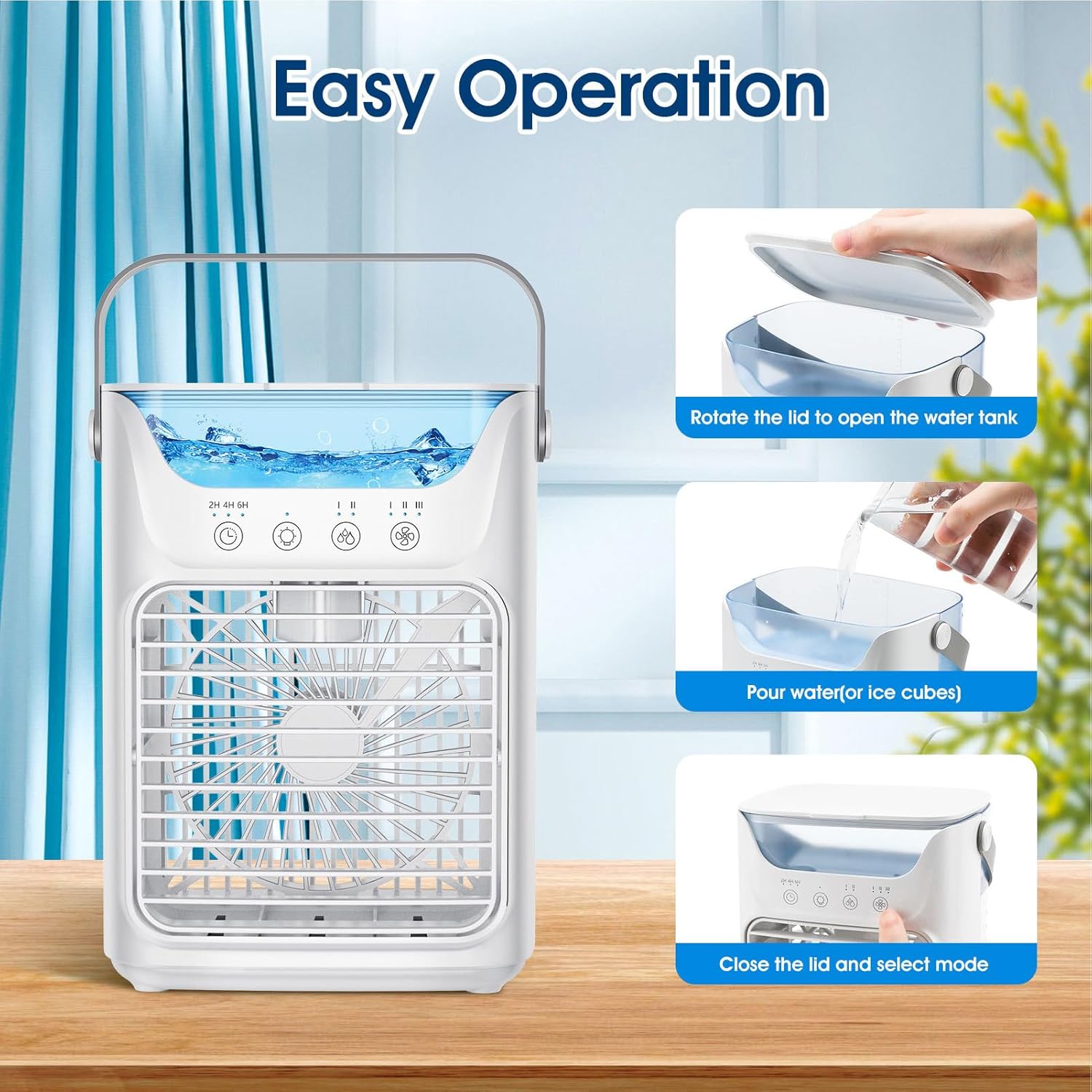
A visual guide demonstrating three simple steps for operating the cooler: rotating the lid to open the water tank, pouring water or ice cubes, and then closing the lid to select a mode.

An image highlighting the 700ml water tank capacity, suitable for adding both water and ice for extended cooling and humidification.
- Connect Power: Insert the USB cable into the power port on the back of the air cooler. Connect the other end of the USB cable to a compatible USB power source (DC 5V, 2A), such as a USB adapter, power bank, or computer USB port.

Illustration of various USB power supply methods for the air cooler, including power bank, USB adapter, and USB power strip, all requiring ≥2A output current.
6. Operating Instructions
The air cooler features a touch screen control panel for easy operation.
- Power On/Off: Touch the power button symbol on the control panel to turn the unit on or off.
- Adjust Fan Speed: Touch the fan speed button (indicated by fan icons) to cycle through the 3 available wind speeds: Low, Medium, and High. The current speed setting will be indicated on the display.
- Adjust Wind Direction: Manually adjust the front louver up or down to direct the airflow within a 60° range.
- Humidification/Cooling Mode: If water is present in the tank, the unit will operate as a humidifier/evaporative cooler. For enhanced cooling, add ice cubes to the water tank. If no water is added, it functions as a standard fan.

Images showing the cooler's three operational modes: fan-only (no water/ice), humidification (add water), and enhanced cooling (add ice).

Visual representation of the three adjustable wind speed settings: Low, Middle, and High, for customized airflow.
- Set Timer: Touch the timer button (indicated by a clock icon with 2H, 4H, 6H) to select an automatic shut-off time. The unit will turn off after 2, 4, or 6 hours.
- Night Light: Touch the light bulb icon to turn the 7-color night light on or off. Cycle through colors by touching the button again.
7. Maintenance
Regular cleaning helps maintain the performance and longevity of your air cooler.
- Before Cleaning: Always unplug the appliance from the power source before performing any cleaning or maintenance.
- Cleaning the Water Tank:
- Empty any remaining water from the tank.
- Wipe the inside of the water tank with a soft, damp cloth. For stubborn deposits, a mild detergent can be used, followed by thorough rinsing.
- Allow the tank to air dry completely before refilling or storing.
- Cleaning the Exterior: Wipe the exterior surfaces of the unit with a soft, dry, or slightly damp cloth. Do not use abrasive cleaners or solvents.
- Storage: When not in use for an extended period, ensure the water tank is empty and dry. Store the appliance in a cool, dry place, away from direct sunlight.
8. Troubleshooting
If you encounter issues with your air cooler, refer to the following common problems and solutions:
| Problem | Possible Cause | Solution |
|---|---|---|
| Unit does not turn on | No power supply; USB cable not connected; Power adapter insufficient (less than 2A) | Ensure USB cable is securely connected. Verify power adapter provides DC 5V, 2A. Try a different USB port or adapter. |
| No mist/humidification | Water tank is empty; Water level too low; Humidifier function not activated (if applicable) | Refill the water tank. Ensure water level is above the minimum mark. |
| Weak airflow | Fan speed set too low; Air inlets/outlets blocked | Increase fan speed. Clear any obstructions from air inlets and outlets. |
| Unusual noise | Unit not on a stable surface; Internal component obstruction | Place the unit on a flat, stable surface. If noise persists, discontinue use and contact support. |
9. Specifications
Technical specifications for the Walfront Portable Air Cooler Humidifier:
| Feature | Specification |
|---|---|
| Model | WALFRONTyqhx1gct4r |
| Input Voltage | DC 5V |
| Operating Current | 2A (at 5V) |
| Wattage | 10 Watts |
| RGB Lights Current | ≤60mA |
| Fan Speed (RPM) | 1st Gear: 2150RPM±10%, 2nd Gear: 2750RPM±10%, 3rd Gear: 3200RPM±10% |
| Air Velocity (at 20cm) | 1st Gear: 2.8m/s±10%, 2nd Gear: 3.8m/s±10%, 3rd Gear: 4.2m/s±10% |
| Noise Level | ≤58dB |
| Mist Output | High Gear: 60mL/H ±15mL/H, Low Gear: 40mL/H ±15mL/H |
| Water Tank Capacity | 700mL |
| Dimensions (H x W x D) | 21.1cm (8in) x 16.5cm (6.5in) x 12.2cm (4.8in) |
| Item Weight | 1.72 pounds |
| Controls Type | Touch Screen |
| Special Features | Automatic Timers (2, 4, 6H), 7 Color Night Light |

Diagram illustrating the dimensions of the air cooler: 21.1cm (8 inches) height, 16.5cm (6.5 inches) width, and 12.2cm (4.8 inches) depth.
10. Warranty and Support
For warranty information or technical support, please refer to the documentation included with your purchase or contact the manufacturer directly. Keep your purchase receipt as proof of purchase.