
Keyluv KSTLV-303B
Keyluv Twin Bed Frame KSTLV-303B Instruction Manual
Model: KSTLV-303B | Brand: Keyluv
1. Product Overview
The Keyluv Twin Bed Frame Model KSTLV-303B is designed to provide both comfort and functionality. It features a sturdy metal frame, an upholstered headboard with integrated storage and a charging station, multi-color RGB LED lights, flexible bedside storage racks, and an under-bed storage drawer. This manual provides detailed instructions for assembly, operation, maintenance, and troubleshooting to ensure optimal use of your bed frame.

Figure 1: Keyluv Twin Bed Frame with Storage Headboard and Charging Station.
2. Safety Information
- Weight Limit: Do not exceed the maximum weight recommendation of 800 lbs (362 kg) for this bed frame.
- Assembly: Ensure all parts are correctly assembled and tightened before use. Refer to the assembly instructions carefully.
- Sharp Edges: Exercise caution during assembly and handling to avoid injury from sharp edges.
- Electrical Safety: When using the charging station and LED lights, ensure proper connection to a power source. Do not overload the charging ports.
- Children: Keep small parts away from children during assembly. Do not allow children to play on or under the bed frame unsupervised.
- Maintenance: Regularly check all connections and fasteners to ensure they remain secure.
3. Package Contents
Before beginning assembly, verify that all components listed below are present and undamaged. If any parts are missing or damaged, please contact customer support.
- 1 x Metal Frame
- 1 x Headboard (Upholstered with Storage and Charging Station)
- 1 x Storage Drawer
- Assembly Kits (Hardware and Tools)
- Installation Manual
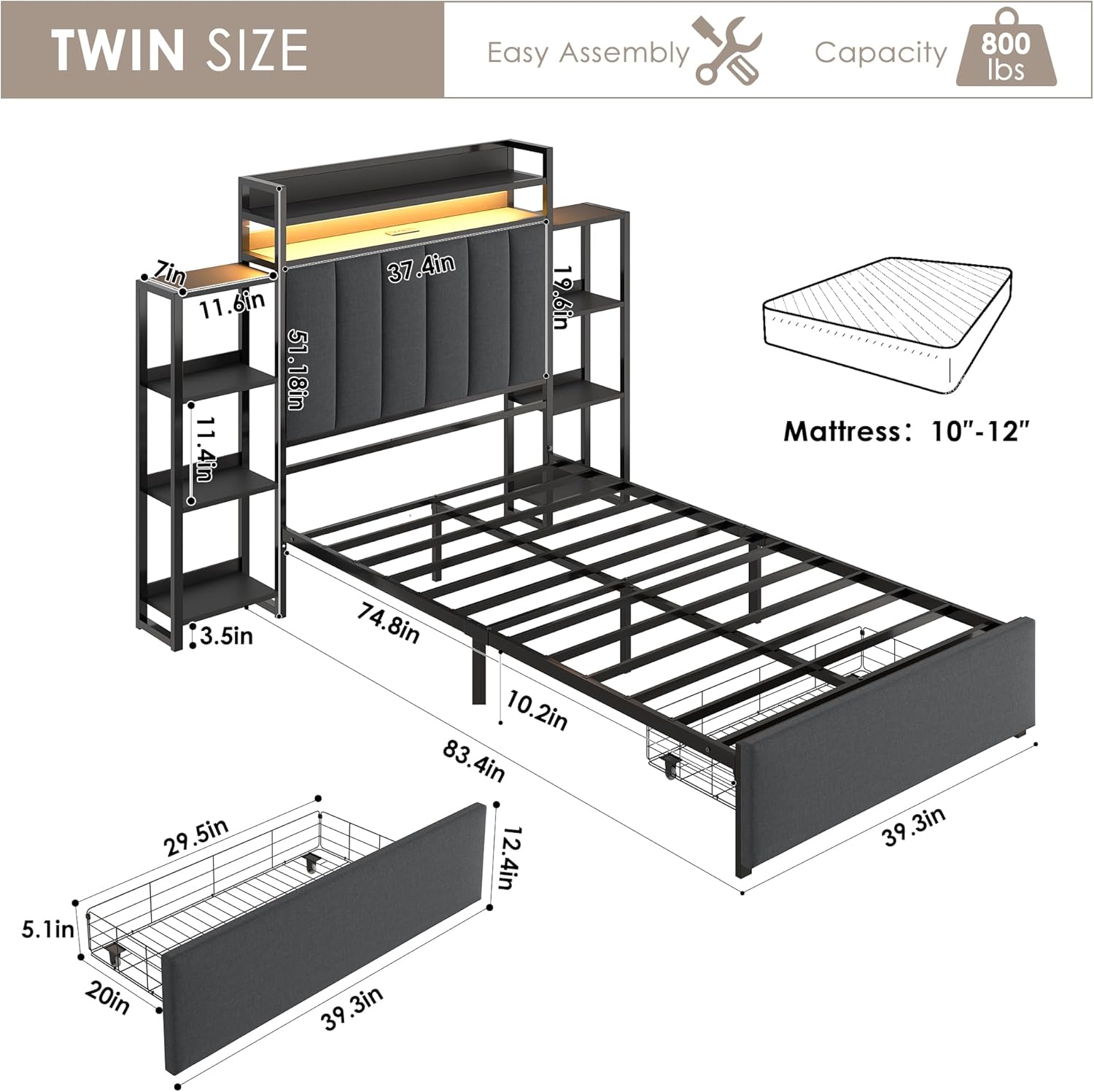
Figure 2: Exploded view showing bed frame dimensions and main components.
4. Setup and Assembly
Assembly of the Keyluv Twin Bed Frame requires following the included illustrated instructions. It is recommended to have two people for assembly. All necessary tools are provided in the assembly kit.
4.1 General Assembly Steps
- Unpack: Carefully unpack all components and lay them out on a clean, soft surface to prevent scratches.
- Identify Parts: Match each part to the numbered diagrams in the instruction manual.
- Assemble Frame: Begin by assembling the main metal frame structure. Ensure all bolts are securely tightened. The metal slats feature a boltless quick-lock assembly system for stability.
- Attach Headboard: Secure the upholstered headboard to the main frame.
- Install Bedside Storage Racks: The 4-layer storage shelves can be installed on either side of the headboard or omitted based on room layout.
- Insert Drawer: Assemble the under-bed storage drawer and slide it into place. Ensure the drawer fixture system is engaged to prevent sliding.
- Connect Electrical: Plug in the power cord for the charging station and LED lights.

Figure 3: Illustration of the sturdy metal frame construction.
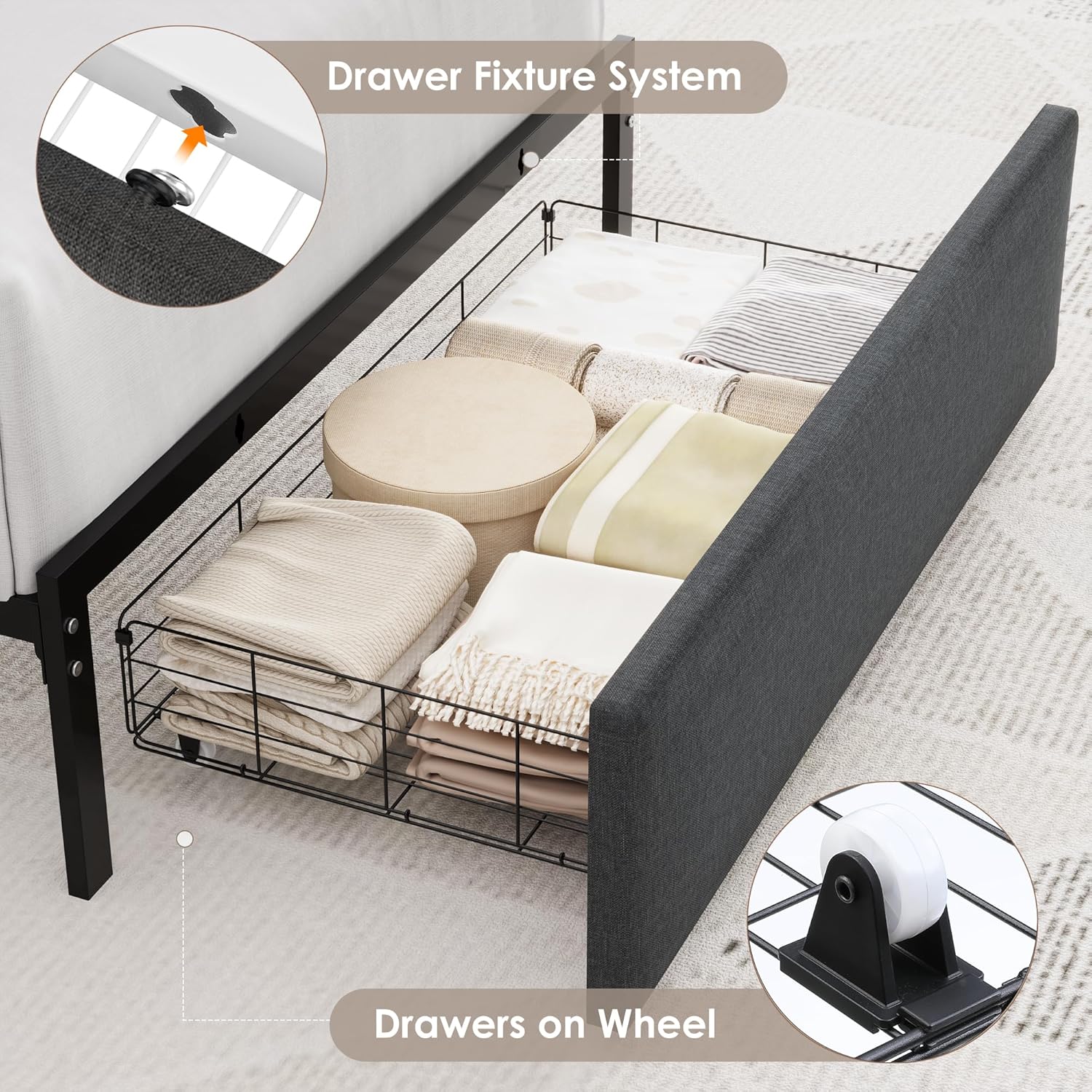
Figure 4: Detail of the under-bed storage drawer with rolling wheels and fixture system.
5. Operating Instructions
5.1 LED Lights Operation
The integrated RGB LED lights can be controlled via a remote control or a dedicated mobile application. They offer customizable light colors, brightness, modes, and timing functions.
- Remote Control: Use the provided remote to turn the lights on/off, change colors, adjust brightness, and select lighting modes.
- App Control: Download the specified mobile application (refer to the full manual for app details) to access advanced features such as music sync mode and timing functions.
- Music Sync Mode: The lights can react to sound and music, creating a dynamic ambiance.

Figure 5: The bed frame with RGB LED lights illuminated.

Figure 6: Detail of the charging station with USB and Type-C ports.
5.2 Charging Station Usage
The headboard includes a built-in charging station with 3 USB ports and 1 Type-C port. Connect your devices to these ports for convenient charging.
- Ensure the bed frame is connected to a power outlet.
- Plug your device's charging cable into the appropriate USB or Type-C port.
5.3 Storage Features
- Headboard Storage: The 2-tier storage shelves on the headboard are ideal for organizing small items like phones, glasses, and books.
- Bedside Storage Racks: The optional 4-layer storage shelves on both sides can serve as nightstands for books, personal items, or decorative elements.
- Under-Bed Drawer: The large-capacity sliding drawer under the bed provides additional storage for clothing or bedding. Its rolling wheels allow for easy access, and the fixture system prevents unintended movement.

Figure 7: The multi-functional bedside storage rack.

Figure 8: Illustration of the 10.2-inch under-bed storage space.
6. Maintenance
- Cleaning: Wipe the bed frame surfaces with a damp cloth. Avoid harsh chemicals or abrasive cleaners that may damage the finish or fabric.
- Fabric Care: For the linen fabric upholstery, spot clean with a mild detergent and water solution if necessary. Test on an inconspicuous area first.
- Fasteners: Periodically check all bolts and screws to ensure they are tight. Re-tighten if loose to maintain stability and prevent noise.
- Electrical Components: Ensure the charging station and LED light connections are secure and free from damage.
7. Troubleshooting
| Problem | Possible Cause | Solution |
|---|---|---|
| LED lights not working. | Power cable disconnected, remote battery low, app not connected. | Check power connection. Replace remote battery. Ensure app is correctly paired. |
| Charging station not working. | Power cable disconnected, device cable faulty. | Verify power connection to the bed frame. Try a different charging cable or device. |
| Bed frame is noisy/squeaks. | Loose bolts or connections. | Inspect all assembly points and tighten any loose bolts or screws. |
| Under-bed drawer slides out easily. | Drawer fixture system not engaged. | Ensure the drawer fixture system is properly engaged to hold the drawer in place. |
| Mattress slides on the frame. | No anti-slip mechanism for mattress. | Consider using a non-slip mattress pad or grip strips to prevent mattress movement. |
8. Specifications
| Model Number | KSTLV-303B |
| Brand | Keyluv |
| Size | Twin |
| Material | Metal, Linen Fabric, Foam |
| Product Dimensions (L x W x H) | 83.4"L x 39.3"W (bed frame) / 60.6"W (overall with shelves) x 51.2"H |
| Weight | 83 Pounds (37.6 kg) |
| Maximum Weight Recommendation | 800 Pounds (362 kg) |
| Under-Bed Clearance | 10.2 Inches |
| Compatible Mattress Size | Twin, Twin XL (Recommended 10"-12" thickness) |
| Charging Station | 3 USB Ports, 1 Type-C Port |
| Special Features | Bedside Storage Rack, Charging Station, LED Lights, Storage Drawer, Storage Headboard, Noise-Free Design |

Figure 9: Overview of the Keyluv Twin Bed Frame's features.
9. Warranty and Customer Support
Keyluv products are designed for quality and durability. For any questions, concerns, or assistance with your bed frame, please contact Keyluv customer support.
- Returns: This product typically includes a 30-day easy return policy. Please refer to your purchase documentation for specific details.
- Customer Service: For technical support, missing parts, or warranty inquiries, please reach out to the seller, Keylove-direct, or visit the official Keyluv store online.

Figure 10: For assistance, contact Keyluv customer support.
10. Product Video
Watch the official product video for a visual guide to the Keyluv Twin Bed Frame's features and functionality.
Video 1: Keyluv Storage Bed Frame with 2 Drawers and LED Lights. This video demonstrates the bed frame's features, including the storage headboard, charging station, LED lights, and under-bed drawers.
Ask a question about this manual
Ask about setup, troubleshooting, compatibility, parts, safety, or missing instructions. Manuals+ will review the question and use this page’s manual context to help answer it.