
1. Introduction and Overview
Thank you for choosing the DATOUBOSS 1600W Pure Sine Wave Power Inverter. This device is designed to convert 12V DC power from your battery into stable 110/120V AC power, suitable for a wide range of electronic devices and appliances. With its advanced pure sine wave technology, it provides clean and reliable power, making it ideal for use in vehicles, RVs, homes, trucks, and off-grid solar systems. This manual provides essential information for safe installation, operation, and maintenance of your inverter.

Figure 1.1: The DATOUBOSS 1600W Pure Sine Wave Power Inverter, showing the main unit, wired remote control, and battery connection cables.
2. Safety Information
Please read and understand all safety instructions before installing or operating the inverter. Failure to follow these instructions may result in electric shock, fire, or serious injury.
- Ventilation: Ensure adequate ventilation around the inverter. Do not block cooling vents.
- Environment: Install the inverter in a cool, dry, and well-ventilated area, away from direct sunlight, heat sources, and flammable materials. Avoid exposure to water or excessive humidity.
- Connections: Always connect the inverter to a 12V DC power source. Ensure all connections are tight and secure to prevent loose connections and overheating.
- Polarity: Observe correct polarity when connecting to the battery (positive to positive, negative to negative). Incorrect connection can damage the inverter and battery.
- Grounding: Properly ground the inverter according to local electrical codes.
- Load Capacity: Do not exceed the inverter's continuous power rating (1600W) or peak surge rating (3200W). Overloading can cause damage and pose a fire hazard.
- Protection Features: The inverter includes built-in protections for short circuit, over-voltage/under-voltage, overload, over-current, and over-temperature. These features are designed to protect the unit and connected devices.
- Maintenance: Do not attempt to disassemble or modify the inverter. Refer all servicing to qualified personnel.

Figure 2.1: The inverter's comprehensive protection features, including short circuit, over-voltage, under-voltage, overload, over-current, and over-temperature protection.
3. Package Contents
Upon opening the package, please verify that all items listed below are present and in good condition:
- 1 x DATOUBOSS 1600W Pure Sine Wave Power Inverter
- 1 x Wired Remote Control (19.58 ft cable)
- 1 x Pair of Battery Connection Cables (Red for Positive, Black for Negative)
- 1 x User Manual
Video 3.1: Unboxing and overview of the DATOUBOSS 1600W Pure Sine Wave Power Inverter and its included accessories.
4. Product Features
The DATOUBOSS 1600W Pure Sine Wave Power Inverter is equipped with several features for optimal performance and user convenience:
- Continuous Power: Delivers continuous 1600W DC 12V to AC 120V power.
- Peak Surge Power: Capable of handling up to 3200W peak surge for starting high-power appliances.
- Multiple Outputs: Features 2 AC outlets, 1 USB port, and 1 Type-C port for versatile charging and power needs.
- Battery Compatibility: Works seamlessly with various battery types including Lithium (LI), Sealed Lead Acid (SLA), Gel, Flooded (FLD), and Absorbent Glass Mat (AGM) batteries.
- Advanced Protection: Comprehensive safety features including short circuit, input over-voltage/under-voltage, output short-circuit, overload, over-current, and over-temperature protection.
- Durable Construction: Robust aluminum housing protects against drops and bumps.
- Efficient Cooling: Built-in cooling fan ensures silent operation and prevents overheating.
- Real-Time Monitoring: LED screen and three indicator lights display voltage, output power, and fault codes.
- Remote Control: Includes a 19.58 ft wired remote control for convenient on/off operation from a distance.
- Automatic Shutdown: Features an automatic shutdown in case of incorrect power connection or short circuit.
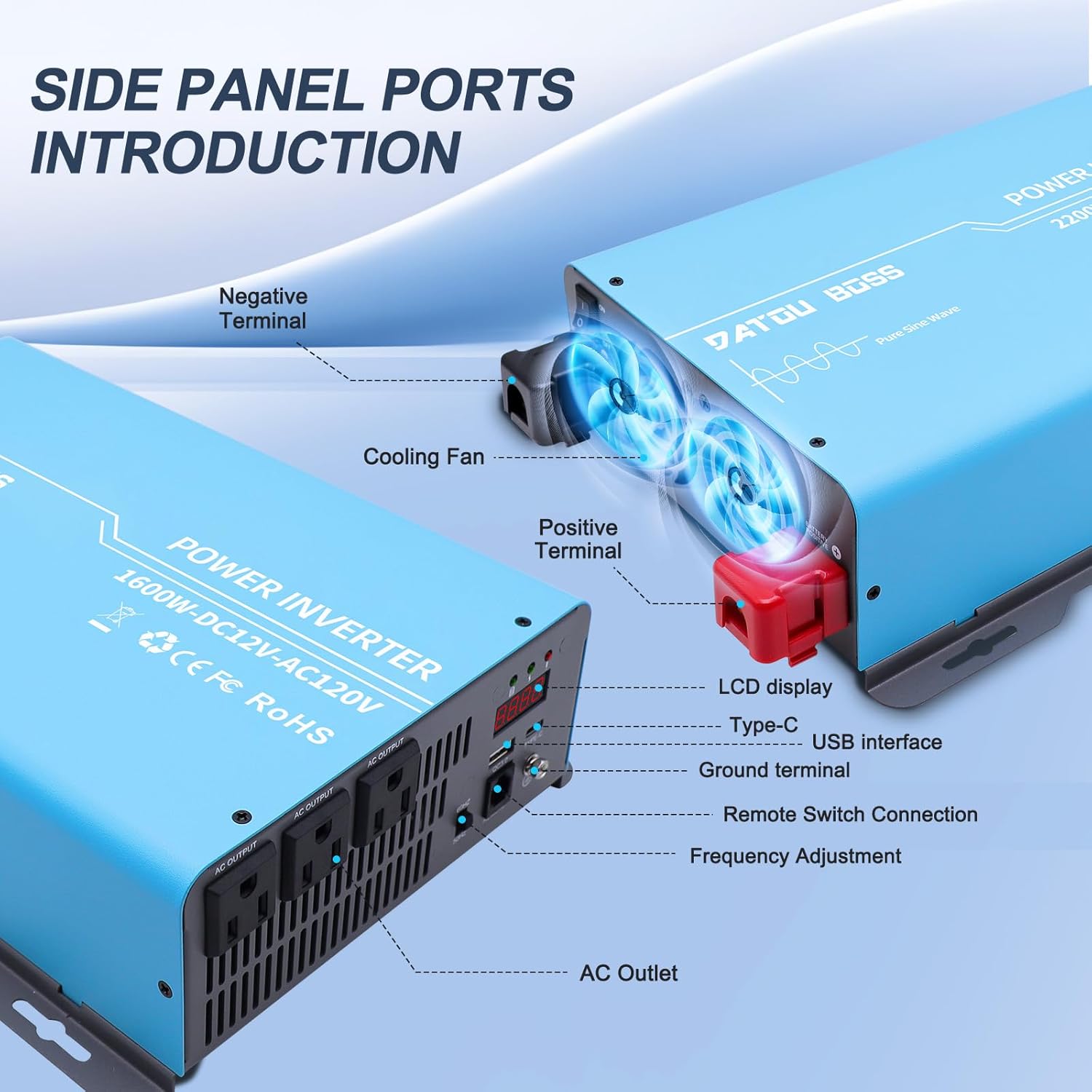
Figure 4.1: Detailed view of the inverter's side panel, showing the negative terminal, cooling fan, positive terminal, LCD display, Type-C port, USB interface, ground terminal, remote switch connection, frequency adjustment, and AC outlets.

Figure 4.2: Illustration of pure sine wave technology, highlighting its ability to withstand strong loads and high conversion efficiency.
5. Setup
Follow these steps to set up your DATOUBOSS Power Inverter:
- Choose a Location: Select a dry, cool, and well-ventilated area for installation. Ensure there is sufficient space around the inverter for proper airflow and cooling. Avoid areas with direct sunlight, high temperatures, or excessive dust.
- Mounting (Optional): The inverter can be mounted using its integrated mounting brackets. Secure it to a stable surface using appropriate fasteners.
- Connect Battery Cables:
- Ensure the inverter's power switch is in the "OFF" position.
- Connect the red battery cable to the positive (+) terminal of the inverter and then to the positive (+) terminal of your 12V battery.
- Connect the black battery cable to the negative (-) terminal of the inverter and then to the negative (-) terminal of your 12V battery.
- Ensure all connections are tight and secure. Loose connections can cause excessive heat and damage.
- Connect Ground Wire: Connect a ground wire from the inverter's ground terminal to a suitable ground point (e.g., vehicle chassis or earth ground).
- Connect Remote Control: Plug the wired remote control cable into the designated "REMOTE" port on the inverter's front panel.

Figure 5.1: Example of the inverter integrated into a solar power setup.
6. Operating Instructions
Once the inverter is properly set up, follow these steps for operation:
- Power On:
- Ensure all connections are secure.
- Turn on the main power switch located on the inverter unit.
- Alternatively, if the main switch is OFF, you can use the wired remote control to turn the inverter ON/OFF.
- Monitor Display: The LED screen will display the input voltage and output power. The three indicator lights will show the status (e.g., normal operation, fault).
- Connect Devices: Plug your AC-powered devices into the AC outlets. For USB-powered devices, use the USB or Type-C ports.
- Power Off: When finished, turn off the inverter using either the main power switch or the remote control. Disconnect devices before powering down the inverter.
Important Note: The inverter's cooling fan will activate automatically when needed to maintain optimal operating temperature. It may produce some noise during operation, which is normal.

Figure 6.1: The inverter can power various essentials, including CPAP machines, refrigerators, TVs, induction cookers, and ovens.

Figure 6.2: The inverter provides power for electronics during road trips and outdoor adventures, such as in an RV.
7. Maintenance
Regular maintenance ensures the longevity and optimal performance of your inverter:
- Cleaning: Periodically clean the exterior of the inverter with a soft, dry cloth. Do not use liquid cleaners or solvents.
- Ventilation: Ensure the cooling vents are free from dust and debris. Use compressed air to clear any blockages if necessary.
- Connections: Regularly check battery cable connections for tightness. Loose connections can lead to voltage drops and overheating.
- Storage: If storing the inverter for an extended period, ensure it is clean, dry, and stored in a cool environment. Disconnect it from the battery.

Figure 7.1: The inverter's efficient heat dissipation system, crucial for maintaining optimal performance and preventing overheating.
8. Troubleshooting
If you encounter issues with your inverter, refer to the table below for common problems and their solutions:
| Problem | Possible Cause | Solution |
|---|---|---|
| No output power / Inverter not turning on |
|
|
| Inverter shuts down automatically |
|
|
| Fan is loud or constantly running |
|
|
| LED display shows fault code | Specific fault condition (e.g., incorrect power connection, short circuit) | Refer to the inverter's LED display for the specific fault code and consult the manual's detailed fault code section (if available) or contact customer support. |
9. Specifications
Key technical specifications for the DATOUBOSS 1600W Pure Sine Wave Power Inverter:
| Specification | Value |
|---|---|
| Model Name | 1600W Power Inverter 12V to 110V |
| Continuous Power | 1600 Watts |
| Peak Surge Power | 3200 Watts |
| Input Voltage | 12V DC |
| Output Voltage | 110/120V AC |
| Output Waveform | Pure Sine Wave |
| Conversion Efficiency | >95% |
| AC Outlets | 2 |
| USB Ports | 1 x USB, 1 x Type-C |
| Item Weight | 8.89 pounds |
| Package Dimensions | 15.51 x 10.63 x 7.17 inches |
| Manufacturer | DATOUBOSS |

Figure 9.1: Physical dimensions of the DATOUBOSS 1600W Pure Sine Wave Power Inverter.
10. Warranty and Support
DATOUBOSS stands behind the quality of its products. Your 1600W Pure Sine Wave Power Inverter comes with a comprehensive 1-year warranty covering quality issues from the date of purchase.
For any questions, technical assistance, or warranty claims, please contact our professional after-sales service team. We offer 24-hour online service to ensure you receive prompt and effective support.
Please retain your proof of purchase for warranty validation.

Figure 10.1: Our dedicated customer support team is available to assist you.