
BAOFENG UV-5RM
BAOFENG UV-5RM Multi-Band Handheld Two-Way Radio User Manual
Model: UV-5RM
1. Introduction
The BAOFENG UV-5RM is a powerful and versatile 10W multi-band handheld two-way radio designed for reliable long-range communication. It features a robust design, a high-capacity battery, and multiple functionalities including NOAA weather reception, AM/FM radio, and one-touch frequency matching. This manual provides essential information for the proper setup, operation, and maintenance of your UV-5RM radio.

Image 1.1: Overview of the BAOFENG UV-5RM radio and included accessories.
2. What's in the Box
Please check the package contents upon receipt to ensure all items are present:
- 2x BAOFENG UV-5RM Radios
- 2x 2500mAh Lithium-ion Batteries
- 2x High-Quality Handheld Microphones
- 2x Charging Bases
- 2x USB-C Charging Cables
- 2x Original Antennas
- 2x 805 Mini Antennas
- 2x 771 Tactical Folding Antennas
- 2x Belt Clamps
- 2x Hand Straps
- 2x User Manuals

Image 2.1: Visual representation of the basic and additional components included with the UV-5RM package.
3. Setup
3.1 Battery Installation and Charging
- Align the battery pack with the grooves on the back of the radio.
- Slide the battery pack upwards until it clicks into place.
- To charge, connect the USB-C cable to the radio or place the radio in the charging base. The indicator light on the charging base will show charging status.
The 2500mAh high-capacity battery ensures extended operation. USB-C fast charging allows for convenient power replenishment.
3.2 Antenna Attachment
Screw the desired antenna (original, 805 mini, or 771 tactical folding antenna) clockwise onto the antenna connector at the top of the radio until it is finger-tight. Ensure a secure connection for optimal performance.

Image 3.1: Illustration of the high gain antenna, which can increase communication distance.
3.3 Programming with CHIRP Software
The UV-5RM supports programming via CHIRP software. Connect the radio to your computer using the provided programming cable. This allows for advanced customization of frequencies, channels, and other settings.

Image 3.2: The UV-5RM connected to a computer for programming using CHIRP software.
4. Operating Instructions
4.1 Power On/Off
Rotate the volume knob clockwise to power on the radio. Rotate counter-clockwise until a click is heard to power off.
4.2 Basic Frequency Selection
Use the keypad to directly input frequencies or navigate through stored channels. The VFO/MR button switches between Frequency Mode (VFO) and Channel Mode (MR).
4.3 One-Touch Frequency Matching
The UV-5RM features a one-touch frequency matching function. Press and hold the designated button (refer to your radio's specific button layout, often marked with a 'copy' or 'search' icon) to quickly copy frequencies from another radio. The radio will display the receiving frequency and any CTCSS/DCS values.
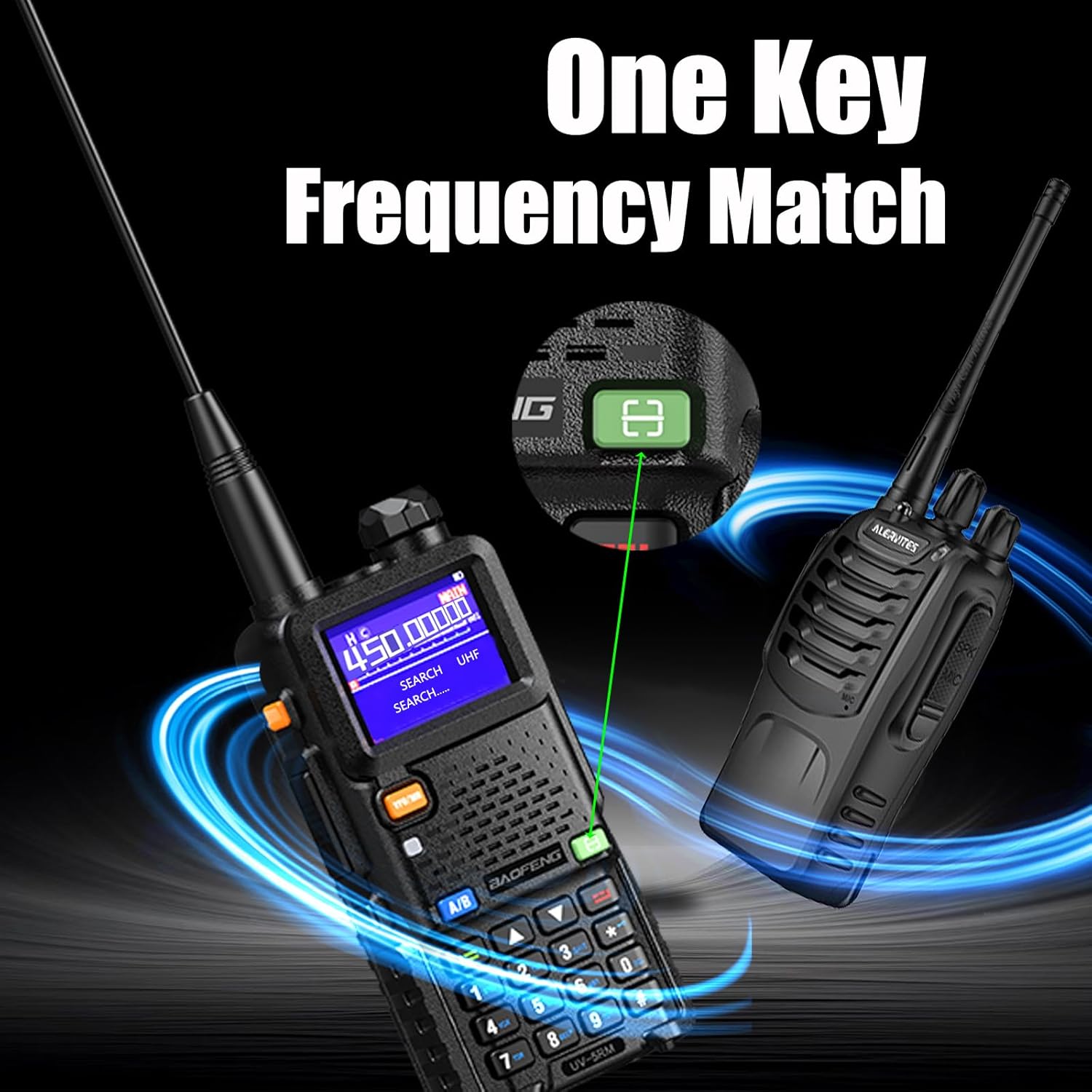
Image 4.1: Demonstrating the one-key frequency matching function for quick setup.
4.4 Adjusting Power Levels (H/M/L)
The radio offers High (10W), Middle (5W), and Low (2W) power output settings. Adjusting the power level can conserve battery life or extend range as needed. Consult the radio's menu for power level selection.

Image 4.2: Display showing High, Middle, and Low power output settings (10W, 5W, 2W).
4.5 NOAA Weather Reception
The UV-5RM includes a NOAA weather receiver, allowing you to access 10 NOAA weather bands for emergency alerts and weather information.
4.6 AM/FM Radio
The radio can receive standard AM and FM broadcast bands. Refer to the user interface for switching to AM/FM radio mode.

Image 4.3: The UV-5RM displaying its FM/AM and NOAA weather receiving capabilities.
4.7 Using the Handheld Microphone
Connect the handheld microphone to the radio's accessory port. The microphone allows for convenient one-handed control and clear audio transmission. It typically includes a Push-To-Talk (PTT) button and a speaker.

Image 4.4: Features of the high-quality handheld microphone, including portability and clear sound.
5. Maintenance
5.1 General Care
- Keep the radio clean by wiping it with a soft, damp cloth. Avoid harsh chemicals.
- Do not expose the radio to extreme temperatures, direct sunlight for prolonged periods, or excessive moisture. The radio is not water-resistant.
- Ensure all ports are covered when not in use to prevent dust and debris entry.
5.2 Battery Care
- Charge the battery fully before first use.
- Avoid overcharging or completely draining the battery to prolong its lifespan.
- Store the radio and battery in a cool, dry place when not in use for extended periods.
6. Troubleshooting
If you encounter issues with your BAOFENG UV-5RM, consider the following common solutions:
- No Power: Ensure the battery is properly installed and charged. Check the power knob.
- Cannot Transmit/Receive: Verify the antenna is securely attached. Check frequency settings and ensure you are on an active channel. Confirm power output settings.
- Poor Audio Quality: Check the microphone connection. Ensure the volume is adjusted correctly.
- Programming Issues: Ensure the programming cable is correctly connected and the CHIRP software is configured for the UV-5RM model.
For persistent issues, refer to the detailed troubleshooting section in the full user manual or contact customer support.
7. Specifications
| Feature | Detail |
|---|---|
| Model Number | UV-5RM |
| Output Power | 10W (High), 5W (Middle), 2W (Low) |
| Battery Capacity | 2500mAh Lithium-ion |
| Charging | USB-C Fast Charging, Charging Base |
| Number of Channels | 999 |
| Frequency Range (Receiving) | FM: 65-108MHz, AM: 108-136MHz, 136-174MHz, 220-260MHz, 350-390MHz, 400-520MHz |
| Frequency Range (Transmitting) | 144-148MHz, 420-450MHz |
| Special Features | Dual Band, Keypad Lock, Long Range, Rechargeable, NOAA Weather Bands |
| Talking Range Maximum | 5 Miles (under optimal conditions) |
| Voltage | 3.7 Volts (DC) |
| Water Resistance Level | Not Water Resistant |
| Item Weight | 3.54 pounds (approx.) |
| Package Dimensions | 9.76 x 8.27 x 5.98 inches (approx.) |
8. Warranty and Support
8.1 Warranty Information
BAOFENG offers a comprehensive warranty program:
- Radio Body: 2-year warranty
- Accessories: 1-year warranty
- Return Policy: 30-day no-reason return policy
After the warranty period, maintenance services are available at your cost.
8.2 Customer Support
For any questions, technical assistance, or warranty claims, please contact BAOFENG customer service through the Amazon platform. We aim to provide a prompt response within 12 hours.
Ask a question about this manual
Ask about setup, troubleshooting, compatibility, parts, safety, or missing instructions. Manuals+ will review the question and use this page’s manual context to help answer it.