
DATOUBOSS 2200W Pure Sine Wave Power Inverter
DATOUBOSS 2200W Pure Sine Wave Power Inverter User Manual
Model: 2200W Pure Sine Wave Power Inverter
Brand: DATOUBOSS
1. Introduction
This user manual provides detailed instructions for the safe and efficient operation of your DATOUBOSS 2200W Pure Sine Wave Power Inverter. This device converts 12V DC power from a battery into stable 120V AC power, suitable for a wide range of electronic devices and appliances. Please read this manual thoroughly before installation and use to ensure proper function and safety.
2. Safety Instructions
Always observe the following safety precautions to prevent injury or damage to the inverter and connected devices:
- Ventilation: Ensure adequate ventilation around the inverter. Do not block cooling vents.
- Environment: Install the inverter in a dry, cool, and well-ventilated area, away from direct sunlight, heat sources, and flammable materials. Avoid exposure to water or excessive humidity.
- Connections: Ensure all DC and AC connections are secure and correctly polarized. Loose connections can cause overheating and damage.
- Grounding: The inverter must be properly grounded.
- Load Capacity: Do not exceed the inverter's rated continuous power output (2200W) or peak power (4400W). Overloading can damage the inverter and connected appliances.
- Battery Compatibility: This inverter is designed for 12V DC input. Ensure your battery system matches this voltage. It is compatible with Lithium (LI), Sealed Lead Acid (SLA), Gel, Flooded (FLD), and Absorbent Glass Mat (AGM) batteries.
- Maintenance: Do not attempt to open or service the inverter yourself. Refer all servicing to qualified personnel.
- Children: Keep the inverter out of reach of children.
- Emergency: In case of smoke, unusual odors, or abnormal operation, immediately disconnect the inverter from the power source and contact support.
3. Package Contents
Upon opening the package, verify that all items listed below are present and undamaged:
- DATOUBOSS 2200W Pure Sine Wave Power Inverter
- Wired Remote Control (19.58 ft cable)
- Battery Cables (Red for positive, Black for negative)
- User Manual

Image: The DATOUBOSS 2200W Pure Sine Wave Power Inverter shown with its included wired remote control and battery connection cables.
Video: An unboxing demonstration of the 1200 Watt Pure Sine Wave Power Inverter, showing the main unit, remote control, and battery cables.
4. Product Overview
The DATOUBOSS 2200W Pure Sine Wave Power Inverter is designed for reliable power conversion, featuring advanced technology and multiple protection mechanisms.
4.1 Key Features
- Pure Sine Wave Output: Provides clean and stable power, suitable for sensitive electronics.
- High Power Output: Delivers continuous 2200W and peak 4400W power.
- Multiple Outlets: Equipped with 2 AC outlets, 1 USB port, and 1 Type-C port.
- Wide Battery Compatibility: Supports Lithium (LI), Sealed Lead Acid (SLA), Gel, Flooded (FLD), and Absorbent Glass Mat (AGM) 12V batteries.
- Advanced Protection: Includes short circuit, input over-voltage/under-voltage, output short-circuit, overload, over-current, and over-temperature protection.
- Real-Time Monitoring: LED screen and indicator lights display voltage, output power, and fault codes.
- Remote Control: 19.58 ft wired remote for convenient on/off operation.
- Durable Construction: Robust aluminum housing for protection against drops and bumps.
- Efficient Cooling: Built-in cooling fan ensures silent operation and prevents overheating.
4.2 Component Identification

Image: Detailed view of the inverter's side panel, highlighting the Negative Terminal, Cooling Fan, Positive Terminal, LCD display, Type-C port, USB interface, Ground terminal, Remote Switch Connection, Frequency Adjustment, and AC Outlets.

Image: Illustration of the inverter's pure sine wave output and various protection features including energy efficient, fast heat dissipation, under-voltage protection, over-voltage protection, overload protection, short-circuit protection, overheating protection, and reverse protection.

Image: The inverter connected to various devices, illustrating its comprehensive protection features such as reverse connection protection, over temperature protection, overload protection, over voltage protection, low voltage protection, and short circuit protection.
5. Setup
5.1 Choosing a Location
Select a location for the inverter that is:
- Dry and protected from moisture.
- Cool and well-ventilated.
- Away from direct sunlight and heat sources.
- Securely mounted to prevent movement.
5.2 Connecting the Inverter
- Prepare Battery: Ensure the 12V battery is fully charged and in good condition.
- Connect DC Cables:
- Connect the red battery cable to the positive (+) terminal of the inverter and then to the positive terminal of the battery.
- Connect the black battery cable to the negative (-) terminal of the inverter and then to the negative terminal of the battery.
- Ensure all connections are tight and secure to prevent arcing and overheating.
- Grounding: Connect the inverter's grounding terminal to a proper earth ground.
- Remote Control (Optional): Plug the wired remote control into the designated "REMOTE" port on the inverter for convenient power control.
Important: Always connect the battery cables to the inverter first, then to the battery. When disconnecting, disconnect from the battery first, then from the inverter.
6. Operating Instructions
6.1 Powering On/Off
- To Power On: Press the "ON" button on the inverter's front panel or the wired remote control. The LED screen will illuminate, and indicator lights will show the status.
- To Power Off: Press the "OFF" button on the inverter's front panel or the wired remote control. The LED screen and indicator lights will turn off.
6.2 Connecting AC Appliances
Once the inverter is powered on, you can connect your AC appliances to the AC outlets. For USB and Type-C devices, use the respective ports.
- Ensure the total wattage of all connected appliances does not exceed 2200W.
- For appliances with high starting current (e.g., motors, compressors), ensure their surge wattage is within the inverter's 4400W peak capacity.
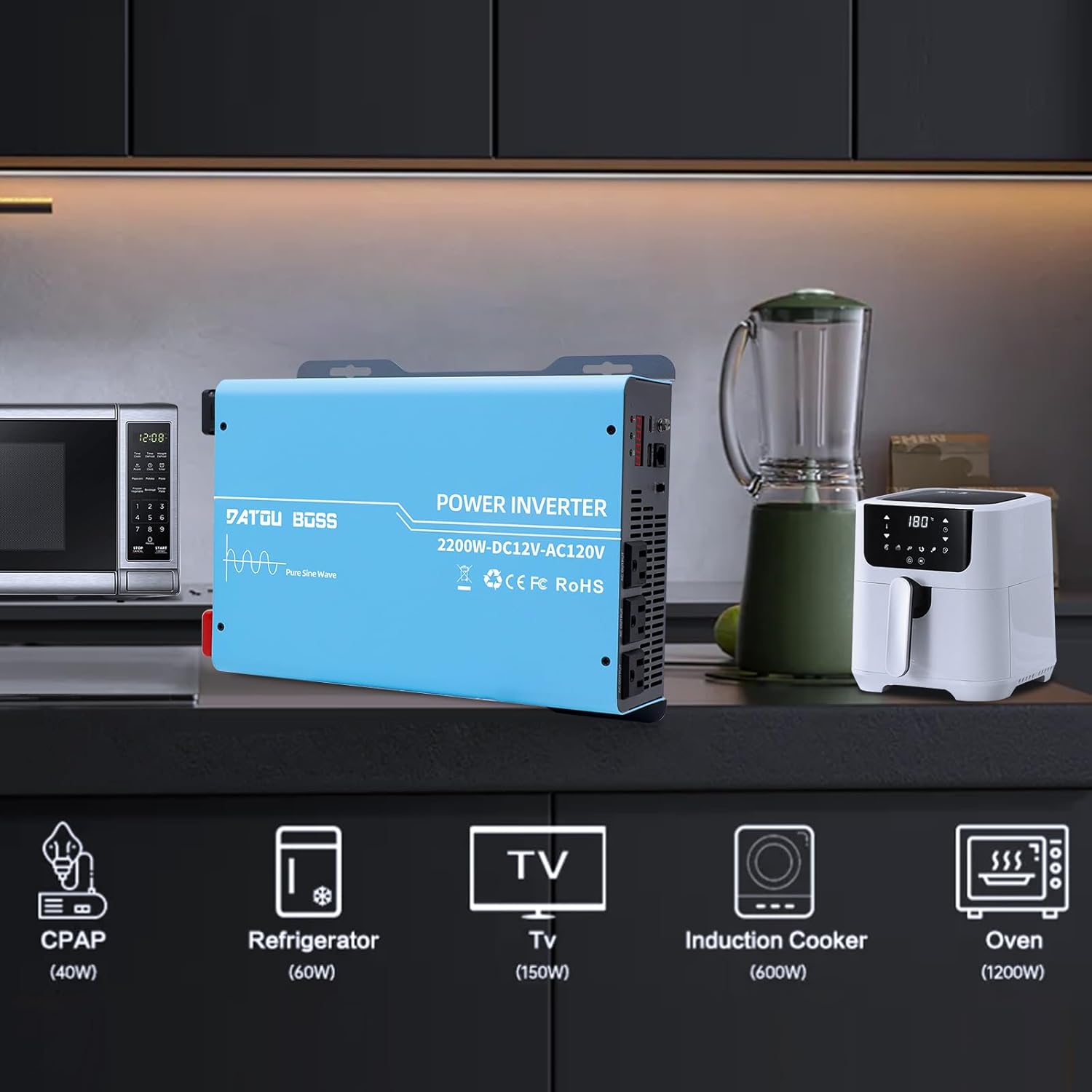
Image: The inverter connected to and powering common household appliances such as a microwave, refrigerator, TV, induction cooker, and oven, with their approximate wattages indicated.
6.3 Real-Time Monitoring
The LED screen provides real-time information:
- Voltage Display: Shows the input DC voltage from the battery.
- Output Power Display: Indicates the current AC power being drawn by connected devices.
- Fault Codes: Displays specific codes in case of an error or protection activation. Refer to the Troubleshooting section for code meanings.
7. Maintenance
- Cleaning: Regularly clean the exterior of the inverter with a dry, soft cloth. Do not use liquid cleaners or solvents. Ensure cooling vents are free from dust and debris.
- Connections: Periodically check all electrical connections to ensure they are tight and free from corrosion.
- Storage: If storing the inverter for an extended period, disconnect it from the battery and store it in a cool, dry place.
8. Troubleshooting
This section addresses common issues you might encounter with your inverter. For problems not listed here, please contact customer support.
| Problem | Possible Cause | Solution |
|---|---|---|
| Inverter does not power on. | Loose battery connections; Low battery voltage; Blown fuse; Inverter fault. | Check and tighten battery cables. Ensure battery voltage is above 11V. Check internal fuses (if accessible and safe to do so, otherwise contact support). |
| No AC output. | Overload; Over-temperature; Low/High input voltage; Short circuit on output. | Reduce connected load. Allow inverter to cool down. Check battery voltage. Disconnect all AC loads and restart. |
| Inverter beeps continuously. | Low battery voltage; Overload; Over-temperature. | Recharge or replace battery. Reduce connected load. Allow inverter to cool down. |
| Fan runs frequently/loudly. | High internal temperature; Normal operation under load. | Ensure adequate ventilation. This can be normal, especially under higher loads. If excessive, check for blocked vents. |
| LED screen displays a fault code. | Specific error detected by the inverter's protection system. | Refer to the inverter's display for the specific code. Common codes indicate over-voltage, under-voltage, overload, or over-temperature. Address the underlying issue (e.g., adjust load, check battery). The inverter has an automatic shutdown feature in case of incorrect power connection or short circuit. |
9. Specifications
| Feature | Detail |
|---|---|
| Model Name | 2200W Power Inverter 12V to 110V |
| Continuous Power | 2200W |
| Peak Power | 4400W |
| Input Voltage | 12V DC |
| Output Voltage | 110V/120V AC |
| Output Waveform | Pure Sine Wave |
| AC Outlets | 2 |
| USB Ports | 1 |
| Type-C Ports | 1 |
| Remote Control Cable Length | 19.58 ft |
| Dimensions (Package) | 17.04 x 10.67 x 7.17 inches |
| Item Weight | 10.03 pounds |
| Manufacturer | DATOUBOSS |
| Country of Origin | China |

Image: Diagram showing the physical dimensions of the inverter: 32.5cm/12.79in length, 22.8cm/8.97in width, and 7.8cm/3.07in height.
10. Warranty and Support
10.1 Warranty Information
DATOUBOSS provides a comprehensive 1-year warranty covering quality issues for this product. Please retain your proof of purchase for warranty claims.
10.2 Customer Support
For technical assistance, troubleshooting, or warranty inquiries, please contact DATOUBOSS customer support. Refer to the product packaging or the official DATOUBOSS website for the most current contact information.
Our brand is sold in over 200 countries worldwide, offering professional products and precision instruments. We are committed to providing excellent service.

Image: A customer service representative wearing a headset, symbolizing professional after-sales service and 24-hour online support.
Ask a question about this manual
Ask about setup, troubleshooting, compatibility, parts, safety, or missing instructions. Manuals+ will review the question and use this page’s manual context to help answer it.