
FIFINE K688+BM66T
FIFINE Dynamic Microphone with Boom Arm Bundle
Model: K688+BM66T User Manual
Introduction
This user manual provides detailed instructions for the setup, operation, and maintenance of your FIFINE Dynamic Microphone with Boom Arm Bundle (Model K688+BM66T). Please read this manual thoroughly before use to ensure optimal performance and longevity of your equipment. This bundle is designed for high-quality audio capture in various applications, including podcasting, recording, voice-overs, and live streaming.

Image: The FIFINE K688 dynamic microphone attached to the BM66T boom arm, mounted on a desk.
Package Contents
Please verify that all the following components are included in your package:
- FIFINE K688 Dynamic Microphone
- BM66T Boom Arm Stand
- Desk Clamp
- 5.9-inch (150mm) Extension Tube
- Shock Mount
- Windscreen
- USB-A to USB-C Cable
- XLR Cable
Setup Guide
Follow these steps to assemble and set up your microphone system:
- Attach Desk Clamp: Secure the desk clamp to a sturdy surface. Ensure the surface thickness is between 0.8 and 2.4 inches (2-6 cm) and the depth is at least 2.1 inches (5.3 cm) for proper stability. Tighten the clamp firmly.
- Insert Boom Arm: Insert the base of the boom arm into the hole on the desk clamp.
- Attach Extension Tube (Optional): If additional height is needed, screw the 5.9-inch extension tube onto the boom arm before attaching the microphone. This allows the microphone to clear monitors or other desk items.
- Mount Microphone: Attach the FIFINE K688 microphone to the shock mount. The shock mount helps to isolate the microphone from vibrations and mechanical noise from the desk.
- Connect Microphone to Boom Arm: Securely attach the shock mount (with the microphone) to the end of the boom arm.
- Connect Cables:
- USB Connection: Connect the USB-C end of the provided cable to the microphone and the USB-A end to your computer.
- XLR Connection: Connect one end of the XLR cable to the microphone and the other end to an audio interface, mixer, or preamplifier.
- Cable Management: Utilize the reconfigured cable management channels on the boom arm to neatly route your microphone cable. This keeps your workspace tidy and prevents cable interference.
- Adjust Position: Adjust the boom arm to your desired height and angle. The boom arm allows for 180-degree vertical adjustment and 360-degree rotation at the base for optimal microphone placement. The built-in springs ensure smooth and silent movement. The boom arm is designed to support microphones up to 2 kg (4.4 lbs).
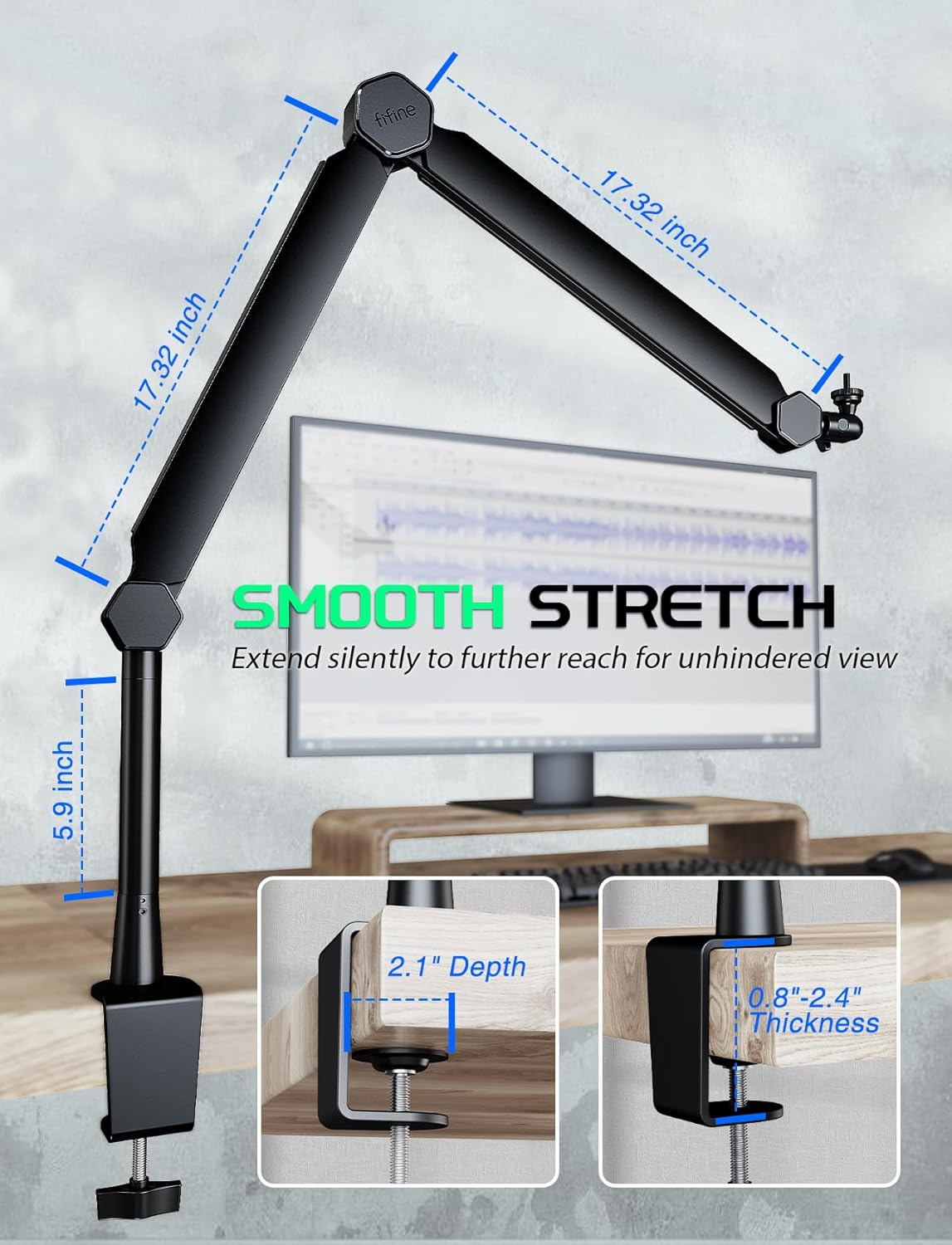
Image: Illustrates the dimensions of the boom arm segments (17.32 inches each), the 5.9-inch extension tube, and the compatible desk clamp thickness and depth.
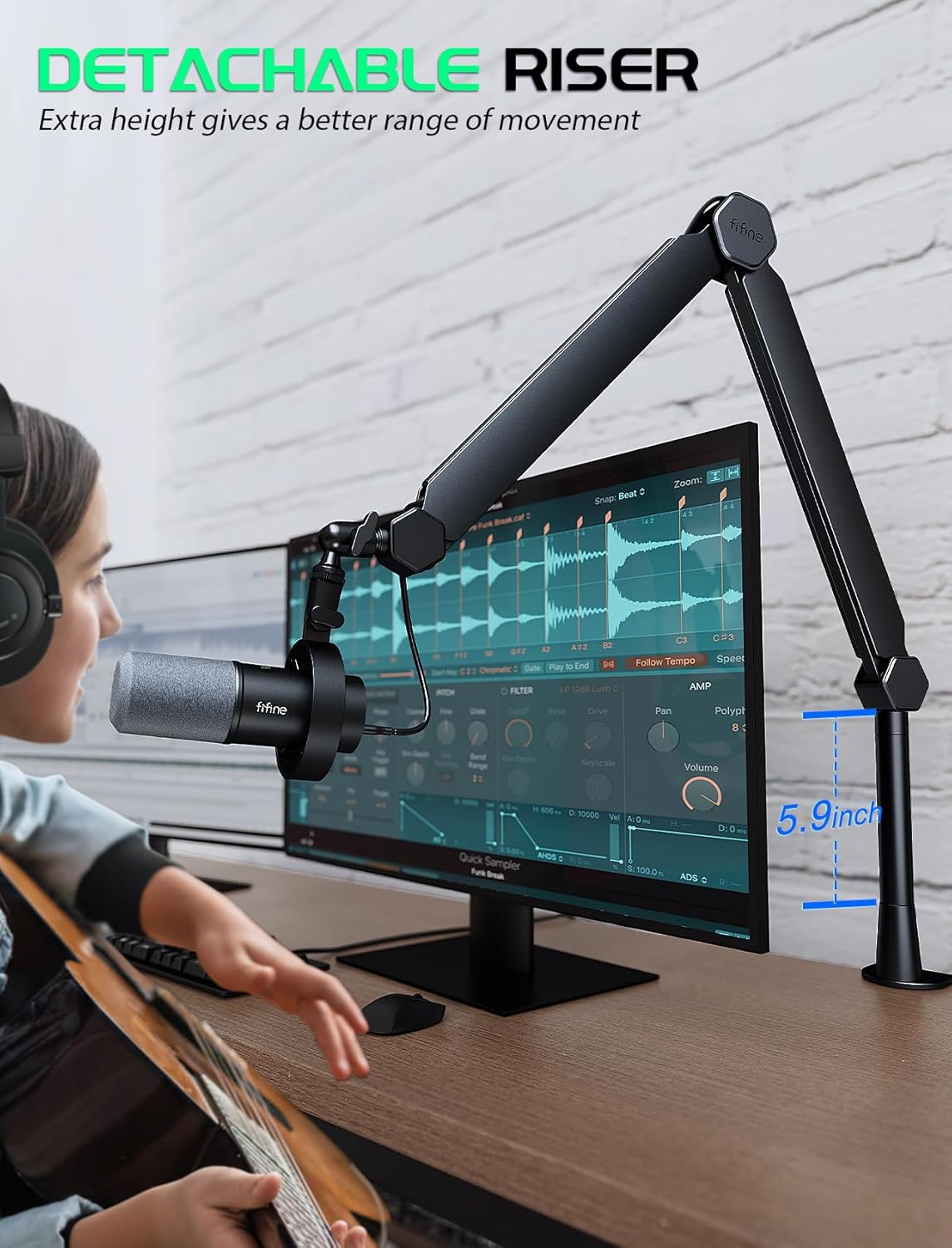
Image: A person using the microphone with the boom arm, highlighting the 5.9-inch detachable riser for extended height and better movement range.

Image: Demonstrates the 180-degree vertical adjustment and 360-degree rotational capability of the boom arm for precise microphone positioning.
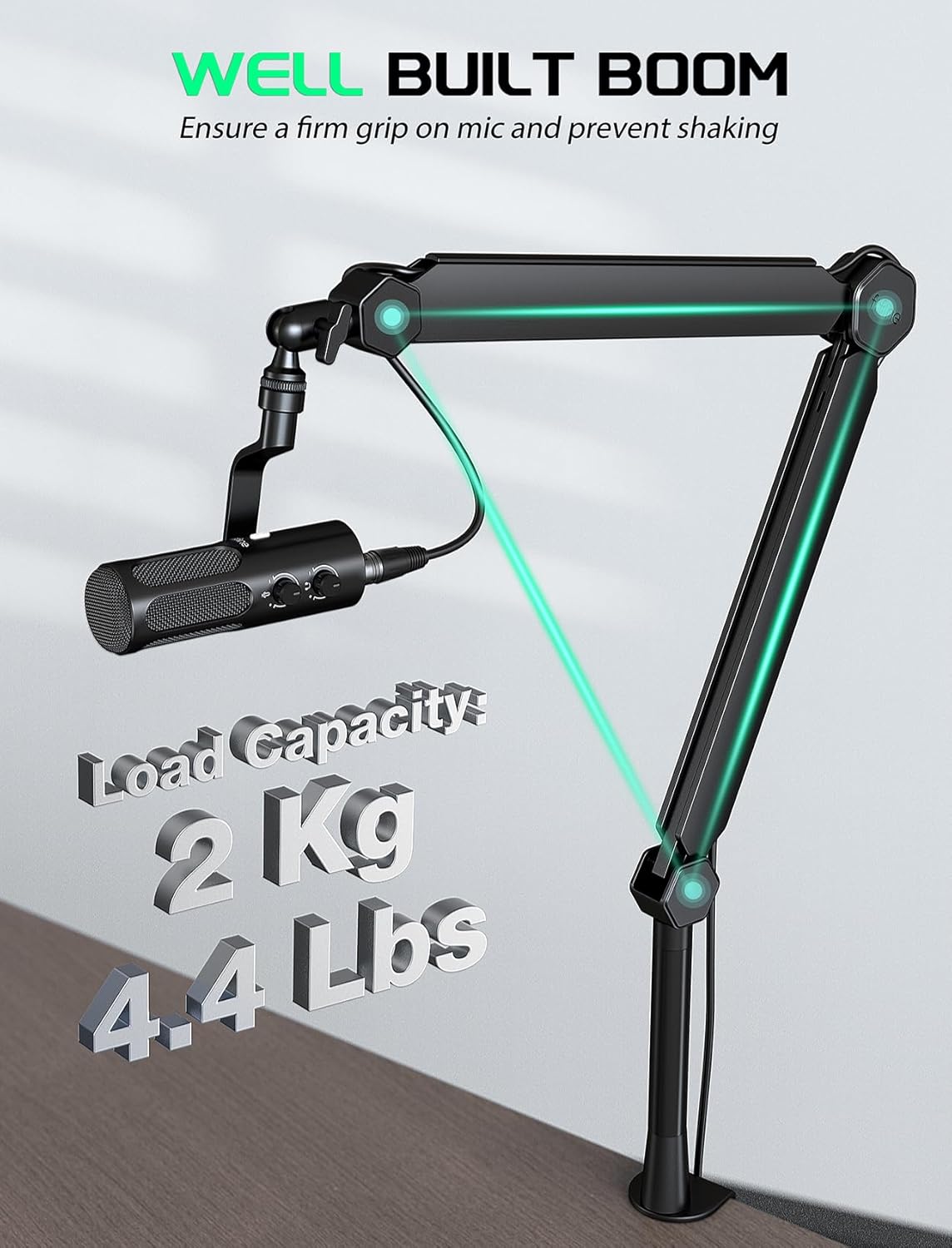
Image: Highlights the robust construction of the boom arm, capable of holding up to 2 kg (4.4 lbs) for stable microphone support.
Operating Instructions
Understanding the features of your FIFINE K688 microphone will help you achieve the best audio quality.

Image: An infographic detailing 9 core features of the microphone, including USB & XLR connectivity, noise rejecting dynamic core, 80dB SNR, DSP mic chip, and four physical functions: Tap-to-Mute, Headphone Jack, Mic Gain Knob, and Monitoring Volume Knob.
- Connectivity Modes:
- USB Mode: Ideal for direct connection to a computer for podcasting, streaming, and gaming. This mode supports real-time monitoring and headphone volume control.
- XLR Mode: For professional audio setups, connect via XLR to an audio interface or mixer. This mode provides high-quality analog output.
- Real-time Monitoring (USB Only): The 3.5mm headphone jack on the microphone allows for direct, real-time monitoring of your audio. This helps you hear exactly what is being recorded without latency.
- Headphone Volume Control (USB Only): Adjust the monitoring volume directly on the microphone using the dedicated knob. This allows you to set a comfortable listening level for your headphones.
- Mic Gain Adjustment: Use the Mic Gain knob to control the input sensitivity of the microphone. Adjust this to ensure your audio signal is strong without peaking or distorting.
- Tap-to-Mute Function: The microphone features a convenient tap-to-mute button. Simply tap the button to instantly mute or unmute your microphone.
- Noise Reduction Features:
- Windscreen: The included windscreen helps to dampen plosives (harsh 'p' and 'b' sounds) and reduce breath noise, resulting in clearer vocals.
- Shock Mount: The external shock mount isolates the microphone from vibrations transmitted through the desk or boom arm, reducing unwanted low-frequency rumble and mechanical noise.
- Internal Noise Filtering: The K688 features a 6-level noise filtering system, including a low self-noise capsule, integrated mic-core base, flocked pop shield, vibration dampening mesh, resonance-free armor, and a quad-point floating mount, all contributing to enhanced audio clarity and minimal background noise.

Image: A user interacting with the microphone, highlighting the Headphone Jack, Tap-to-Mute button, Monitoring Volume Knob, and Mic Gain Knob for direct and precise control.

Image: An exploded view of the FIFINE K688 microphone, illustrating its internal components that contribute to 6-level noise filtering, such as the low self-noise capsule, flocked pop shield, and vibration dampening mesh.
Maintenance
Proper care will extend the life and performance of your FIFINE microphone and boom arm:
- Cleaning: Use a soft, dry cloth to wipe down the microphone and boom arm. Avoid using abrasive cleaners or solvents.
- Storage: When not in use, store the microphone and boom arm in a clean, dry environment, away from extreme temperatures and humidity.
- Handling: Handle the equipment with care. Avoid dropping or subjecting it to strong impacts, which can damage internal components or the boom arm mechanism.
Troubleshooting
If you encounter issues with your FIFINE K688+BM66T bundle, refer to the following common problems and solutions:
| Problem | Possible Cause | Solution |
|---|---|---|
| No sound output (USB) | Microphone not selected as input device; Muted; Cable issue. | Check computer sound settings; Ensure microphone is unmuted; Try a different USB port or cable. |
| No sound output (XLR) | Incorrect gain setting on interface/mixer; Cable issue; Interface/mixer not powered. | Adjust gain; Check XLR cable connections; Ensure audio interface/mixer is powered on. |
| Distorted or low sound | Mic gain too high/low; Incorrect microphone placement; Background noise. | Adjust Mic Gain knob; Position microphone closer to sound source; Utilize windscreen and shock mount; Reduce environmental noise. |
| Boom arm unstable or sagging | Desk clamp not tightened; Overloaded; Joints loose. | Ensure desk clamp is securely tightened; Verify microphone weight is within 2 kg (4.4 lbs) limit; Tighten boom arm joints if adjustable. |
| Monitoring not working (USB) | Headphones not connected; Monitoring volume too low. | Ensure headphones are fully plugged into the 3.5mm jack; Increase Monitoring Volume knob. |
If the issue persists, please refer to the support section for further assistance.
Specifications
- Model: K688+BM66T
- Microphone Type: Dynamic
- Connectivity: USB-A (via USB-C on mic), XLR
- Signal-to-Noise Ratio (SNR): >80dB
- Internal Processing: DSP Mic Chip
- Noise Filtering: 6-level system
- Boom Arm Load Capacity: Up to 2 kg (4.4 lbs)
- Boom Arm Reach: Approximately 17.32 inches (44 cm) per arm segment
- Extension Tube Height: 5.9 inches (150mm)
- Desk Clamp Compatibility: Thickness 0.8"-2.4" (2-6 cm), Depth >2.1" (5.3 cm)
- Monitoring: 3.5mm Headphone Jack (USB mode only)
- Controls: Mic Gain Knob, Monitoring Volume Knob, Tap-to-Mute Button

Image: Illustrates the dynamic recording capabilities of the microphone, emphasizing an SNR greater than 80dB for top-tier clarity and minimal noise, with a comparison chart showing clear vocal levels above keyboard clicking and fan noise.
Warranty and Support
For warranty information, technical support, or any inquiries regarding your FIFINE K688+BM66T Dynamic Microphone with Boom Arm Bundle, please refer to the official FIFINE website or contact their customer service directly. Keep your purchase receipt as proof of purchase for any warranty claims.
No official product videos were found for this product that meet the specified criteria for inclusion in this manual.
Related documentsK688+BM66T


Ask a question about this manual
Ask about setup, troubleshooting, compatibility, parts, safety, or missing instructions. Manuals+ will review the question and use this page’s manual context to help answer it.