
1. Introduction
This manual provides comprehensive instructions for the Woyamay WOY-028 GPS Pet Tracker. This device is designed to help you monitor the location, health, and activity of your dogs and cats, offering peace of mind through advanced tracking features and a waterproof design. It is compatible with both Android and iOS devices.

Image: The Woyamay GPS Pet Tracker, its retail packaging, and a smartphone screen showing the pet tracking application.
Video: An overview of the Woyamay GPS Pet Tracker, highlighting its features and benefits for pet owners.
2. What's in the Box
The Woyamay WOY-028 GPS Pet Tracker package includes the following items:
- Woyamay GPS Tracker Device
- User Manual
- Charging Cable
- Tweezers (for SIM card handling)
- Rubber band (for collar attachment)
- Note: A SIM card is required for operation and is not included.

Image: A visual representation of all items included in the Woyamay GPS Pet Tracker retail box.
3. Setup
3.1. Powering On and Charging
Before first use, fully charge the device. Connect the provided charging cable to the tracker and a suitable USB power source. The device will indicate charging status. Once charged, press and hold the power button for 3-5 seconds to turn it on.
Video: Demonstrates how to properly power on and charge the Woyamay GPS Pet Tracker.
3.2. SIM Card Installation
The Woyamay WOY-028 requires a SIM card for cellular connectivity (not included). Use the provided tweezers to carefully insert the SIM card into the designated slot on the tracker. Ensure correct orientation as shown in the diagram or video.
Video: Step-by-step guide on how to correctly insert the SIM card into the Woyamay GPS Pet Tracker.
3.3. App Download and Connection
Download the "Tuya Smart" app from your device's app store (Android and iOS compatible). After installing the SIM card and powering on the tracker, wait 5-10 minutes for network registration. Then, open the Tuya Smart app, scan the QR code found in the manual, or manually add the device using its IMEI code to connect.
Video: Instructions on how to connect the Woyamay GPS Pet Tracker to the Tuya Smart app on both iOS and Android devices.
4. Operating Instructions
4.1. Power On/Off
- Power On: Press the power button for 2 seconds. Two beeps and a light flash indicate the device is on.
- Power Off: Press the power button for 2 seconds. A long beep indicates the device is turning off.
- Tip: The tracker lights up every 10 seconds to indicate it is powered on.
4.2. Live GPS Tracking
Once connected to the Tuya Smart app, you can view your pet's real-time location on a map. The app provides live and precise location updates, allowing you to track your pet anytime, anywhere.

Image: Real-time GPS tracking interface on a smartphone, showing a pet's current location and route history.
4.3. Historical Trajectory
The app allows you to review your pet's past routes and activity by date. This feature helps you understand your pet's movement patterns and common areas they visit.
4.4. Health Monitoring
Monitor your pet's steps, activity levels, and overall well-being. Set daily step goals and track active time, calories burned, rest time, and distance covered. This data can help you detect potential health issues early.
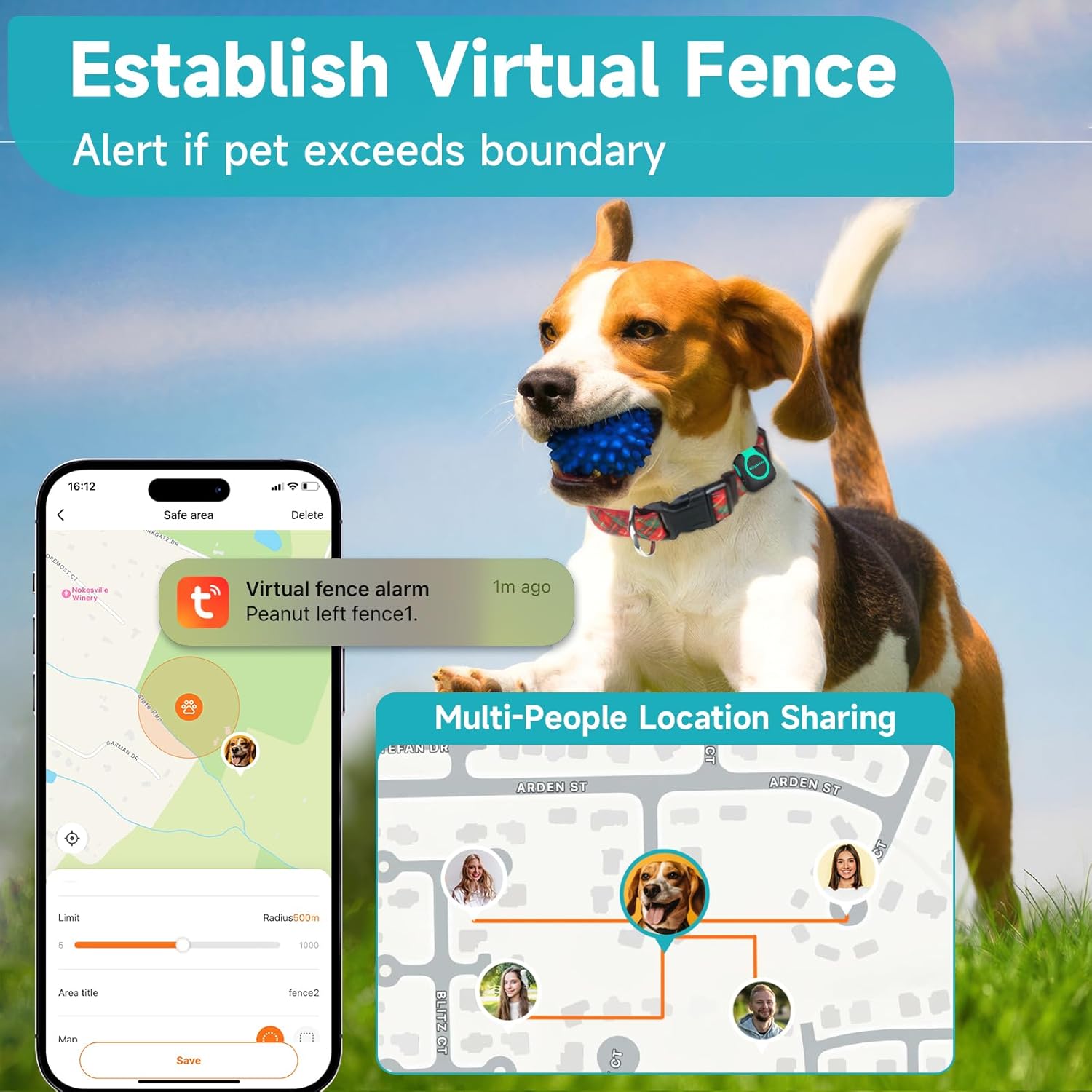
Image: Wellness monitoring features within the app, showing a pet's daily steps and activity metrics.
4.5. Virtual Fence (Geofence)
Establish virtual boundaries on the map. You will receive instant alerts on your smartphone if your pet enters or exits these predefined safe areas. This feature is crucial for preventing pets from wandering into unsafe zones.

Image: The virtual fence feature in the app, demonstrating how to set boundaries and receive alerts.
4.6. Multiple Positioning Modes
The tracker offers various positioning modes to balance battery life and tracking precision:
- Simple Mode: Reports location every 30 minutes to conserve battery (96-120 hours).
- Normal Mode: Reports location every 15 minutes for balanced tracking (72-96 hours).
- Powerful Mode: High-frequency updates every 5 minutes for precise tracking (48-72 hours).
- Smart Mode: Automatically adjusts update frequency based on movement (24-48 hours).
4.7. Multi-People Location Sharing
Share your pet's location with multiple family members or caregivers through the app, ensuring everyone can monitor your pet's whereabouts.
5. Maintenance
5.1. Waterproof Rating
The Woyamay WOY-028 GPS Pet Tracker has an IP65 waterproof rating, making it suitable for outdoor adventures and resistant to splashes and dust. However, it is not recommended for prolonged submersion in water.
5.2. Charging
Regularly charge the device according to the chosen positioning mode to ensure continuous tracking. Refer to section 4.6 for estimated battery life per mode. It is recommended to charge the device fully before each extended use.
6. Troubleshooting
Here are solutions to common issues you might encounter:

Image: A visual Q&A guide for common issues with the pet tracker.
- Q1: Why won't the tracker turn on?
A: The battery may be drained, the power button not held long enough, or the USB cable is faulty. Charge for 30 minutes, hold the button for 3-5 seconds, or try another cable. - Q2: Why can't the tracker connect to the app?
A: Do not use Bluetooth. Wait 5-10 minutes after turning on the device for network registration, then scan the QR code in the manual to connect. - Q3: Why is the SIM card not working or detected?
A: Wait 5-10 minutes after powering on for network registration. Then scan the QR code in the manual to connect. - Q4: Why does the device get warm while charging?
A: The charging contact may be poor. Check if the charging dock is properly connected. - Q5: What if the tracker doesn't fit my pet?
A: It includes an adjustable rubber ring. Check product images for sizing details.
Video: Provides solutions and tips for common setup issues encountered with the Woyamay GPS Pet Tracker.
7. Specifications
| Feature | Detail |
|---|---|
| Model Number | WOY-028 |
| Brand | Woyamay |
| Connectivity Technology | Cellular |
| Supported Application | Tuya App |
| Compatible Devices | Smartphone (Android and iOS) |
| Waterproof Rating | IP65 |
| Item Weight | 4.2 ounces |
| Package Dimensions | 4.84 x 4.09 x 1.42 inches |
8. Warranty and Support
For any product-related inquiries, technical support, or questions regarding SIM card renewal, please contact the seller directly through your purchase platform. The SIM card included with the product is valid for one year from activation, after which a $20/year renewal fee is required to continue the tracking service.