
Devoko 0244
Devoko Dressing Table with Mirror, LED Lights, and Power Outlet
User Manual
Introduction
Thank you for choosing the Devoko Dressing Table. This modern makeup desk is designed to enhance your daily routine with its functional features, including adjustable LED lights, convenient power outlets, and extensive storage. This manual provides essential information for safe assembly, operation, and maintenance of your new dressing table. Please read it thoroughly before use and retain it for future reference.
Important Safety Information
To ensure safe operation and prevent damage, please adhere to the following guidelines:
- Always follow the assembly instructions carefully.
- Keep electrical components away from water and never insert objects into the power outlets or LED lights.
- Always unplug the product before cleaning or performing any maintenance.
- Do not overload the power outlets.
- Ensure the dressing table is placed on a stable, level surface to prevent tipping.
- Keep small parts and packaging materials away from children to prevent choking hazards.
Package Contents
Your Devoko Dressing Table is shipped in two separate packages. Please verify that all components listed below are present before beginning assembly. If any parts are missing or damaged, please contact customer support.

Image: The dressing table is delivered in two separate packages.
- Dressing Table Panels (various sizes)
- Mirror with Integrated LED Lights
- Drawer Components (fronts, sides, backs, bottoms)
- Power Outlet Unit (with 2 AC sockets and 2 USB ports)
- Hair Dryer Holder
- Assembly Hardware (screws, dowels, cam locks, etc.)
- Assembly Instructions Manual
Product Overview
The Devoko Dressing Table is designed for optimal functionality and aesthetic appeal. Key features include:
- Adjustable LED Lights: 10 bulbs with three color settings (warm yellow, warm white, cold white) and adjustable brightness for ideal illumination.
- Convenient Power Outlets: Integrated European standard power outlet with 2 standard sockets and 2 USB sockets.
- Multifunctional Storage: Features 6 open top compartments and 7 large drawers for organizing cosmetics, skincare, and other items.
- Integrated Hair Dryer Holder: For easy access and storage of hair styling tools.
- Durable Construction: Made from engineered wood with a white finish.
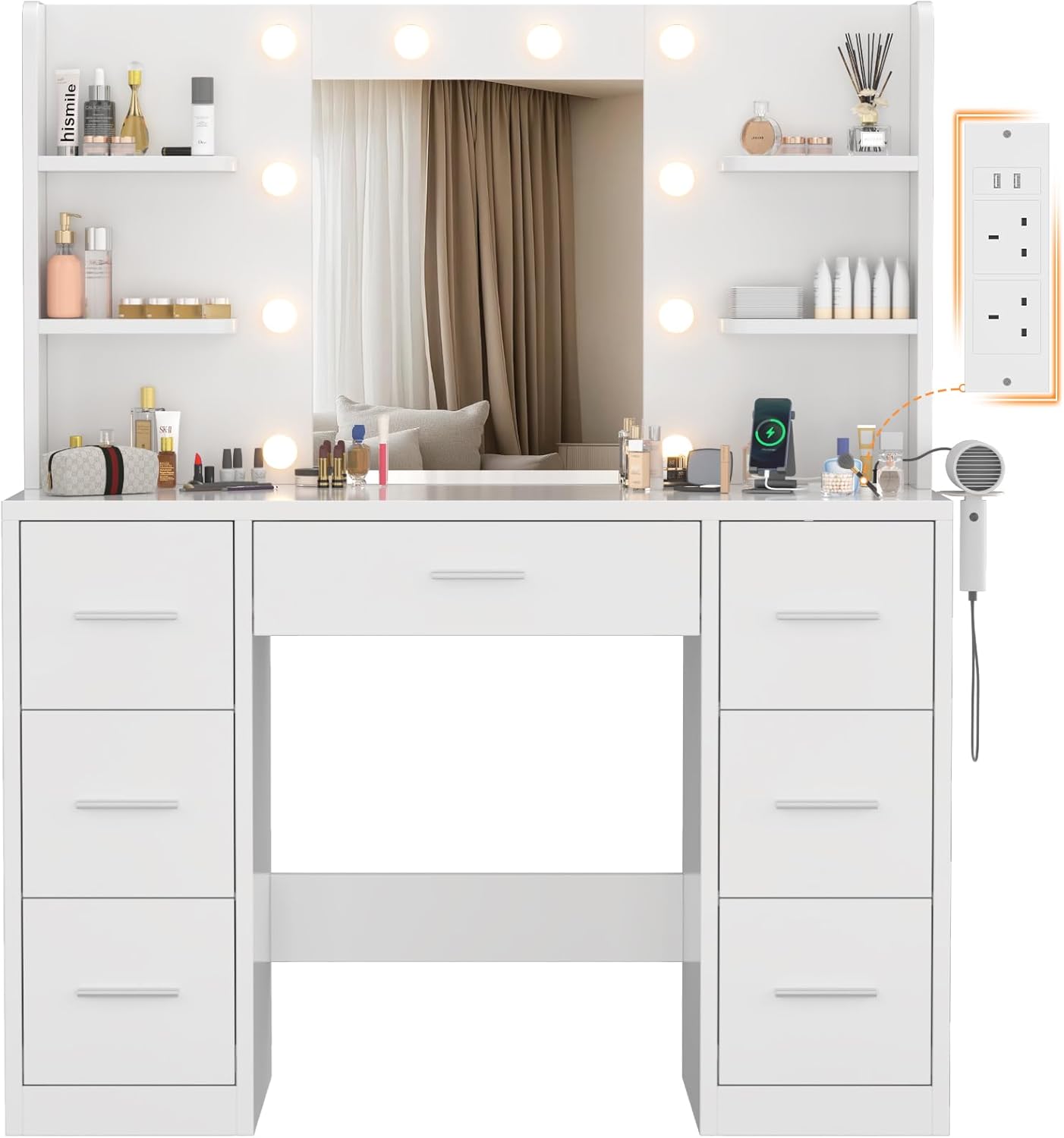
Image: Front view of the Devoko Dressing Table, highlighting the mirror, LED lights, and drawer configuration.

Image: Overhead view demonstrating the extensive storage capacity with drawers and open shelves.
Setup and Assembly
Assembly of the Devoko Dressing Table is required. Please follow the detailed instructions provided in the separate assembly manual included with your package. It is recommended to have at least two people for assembly to ensure stability and ease of construction.
- Unpack all components and verify against the parts list in the assembly manual.
- Identify each part, as they are typically numbered or labeled.
- Assemble the main frame of the table first, ensuring all connections are secure.
- Install the drawers and shelves according to the instructions.
- Mount the mirror unit with LED lights and connect the power supply.
- Attach the power outlet unit and hair dryer holder.

Image: Product dimensions, useful for planning placement and understanding component sizes during assembly.
Operating Instructions
LED Lights Operation
The integrated LED lights offer customizable illumination for your makeup application.
- Power On/Off: Use the inline remote control to turn the lights on or off.
- Change Color Mode: Short press the mode button on the remote to cycle through three light settings: Warm Yellow, Warm White, and Cool White.
- Adjust Brightness: Long press the brightness buttons (+/-) on the remote to increase or decrease the light intensity.

Image: Visual guide for adjusting LED light color modes and brightness.
Using the Power Outlets
The dressing table includes a built-in power strip for convenient access to electricity.
- AC Sockets: Two standard European AC sockets are available for plugging in hair dryers, curling irons, or other small appliances.
- USB Ports: Two USB ports are provided for charging mobile phones, tablets, or other USB-powered devices.
- Hair Dryer Holder: Utilize the dedicated holder for convenient storage and access to your hair dryer.

Image: Close-up view of the integrated power strip with AC outlets, USB ports, and the hair dryer holder.
Storage Utilization
Organize your beauty essentials efficiently using the various storage options.
- Open Shelves: Use the 6 open top compartments for frequently accessed items like perfumes, lotions, and decorative cosmetics.
- Drawers: The 7 spacious drawers provide ample space for larger items, makeup palettes, brushes, and other accessories, keeping your desktop clutter-free.
Maintenance
Proper care will extend the life and maintain the appearance of your dressing table.
- Cleaning: Wipe the surfaces with a dry, soft cloth. For stubborn marks, a slightly damp cloth can be used, followed immediately by a dry cloth. Avoid abrasive cleaners or harsh chemicals.
- Electrical Components: Ensure the unit is unplugged before cleaning around the power outlets or LED lights. Do not spray liquids directly onto electrical parts.
- Mirror Care: Clean the mirror with a glass cleaner and a lint-free cloth.
- Drawer Maintenance: Periodically check drawer slides for smooth operation. If needed, clean any dust or debris.
Troubleshooting
If you encounter issues with your Devoko Dressing Table, please refer to the following common solutions:
| Problem | Possible Cause | Solution |
|---|---|---|
| LED Lights not turning on. | Not plugged in; loose connection; faulty bulb; power outage. | Ensure the power cord is securely plugged into a working wall outlet. Check all connections to the LED strip. If individual bulbs are replaceable, check them. Verify power to the outlet. |
| Lights not changing color or brightness. | Remote control issue; internal wiring. | Ensure the remote control is functioning correctly. Re-check the connection of the LED light system. |
| Power outlets not working. | Not plugged in; circuit breaker tripped; faulty outlet unit. | Confirm the main power cord is plugged in. Check your household circuit breaker. Avoid overloading the outlets. |
| Drawers are stiff or not closing properly. | Improper assembly; debris in slides; overloaded drawer. | Review assembly instructions for correct drawer slide installation. Clear any obstructions from the drawer slides. Reduce the weight in the drawer. |
| Table feels unstable. | Loose connections; uneven floor. | Tighten all assembly screws and fasteners. Ensure the table is on a flat, level surface. |
If the problem persists after attempting these solutions, please contact Devoko customer support for further assistance.
Specifications
| Attribute | Detail |
|---|---|
| Brand | Devoko |
| Model Number | 0244 |
| Colour | White |
| Material | Engineered Wood |
| Product Dimensions (L x W x H) | 110 x 40 x 137 cm |
| Item Weight | 28.4 kg |
| Assembly Required | Yes |
| Power Outlets | 2 AC Sockets, 2 USB Ports |
| LED Lights | 10 bulbs, 3 color modes (Warm Yellow, Warm White, Cool White), Adjustable Brightness |
| Storage | 7 Drawers, 6 Open Shelves |
Warranty and Support
Devoko products are manufactured to high-quality standards. For specific warranty details, please refer to the warranty card or documentation included with your purchase. In case of any issues, missing parts, or questions not covered in this manual, please contact Devoko customer support through the retailer where you purchased the product or visit the official Devoko website for contact information.
For online support, you may visit the Devoko Store on Amazon.
Related documents0244

Ask a question about this manual
Ask about setup, troubleshooting, compatibility, parts, safety, or missing instructions. Manuals+ will review the question and use this page’s manual context to help answer it.