
GPD WIN MAX
GPD Win MAX 2 2025 Handheld Gaming PC Instruction Manual
Model: WIN MAX
1. Product Overview
The GPD Win MAX 2 2025 is a powerful handheld gaming PC designed for both high-fidelity gaming and productivity tasks. It features an AMD Ryzen AI 9 HX 370 processor and a 10.1-inch IPS touchscreen display, offering desktop-class performance in a portable form factor.
Key features include:
- Powerhouse Performance: Equipped with an AMD Ryzen AI 9 HX 370 processor (12 cores, 24 threads, up to 5.1GHz) and an AMD Radeon 890M GPU (up to 2900 MHz).
- Supreme Visual Experience: 10.1" IPS touchscreen with 1920x1200 resolution (supports up to 2560x1600), 299 PPI, and 16:10 aspect ratio.
- Unmatched Connectivity & Expansion: Includes 1x USB 4, 1x USB 3.2 Gen 2 Type-C, 1x USB 3.2 Gen 2 Type-A, OcuLink port for eGPU expansion, HDMI, micro SD, and SD card readers.
- Robust Memory & Storage: 64GB LPDDR5x RAM at 7500 MT/s and a 2TB M.2 NVME SSD for fast performance and ample storage.

Figure 1: Front view of the GPD Win MAX 2 2025 Handheld Gaming PC.
2. Setup
2.1 What's in the Box
- GPD Win MAX 2 2025 Handheld Gaming PC
- AC adapter
- Battery (included, may be pre-installed)
- Documentation (User Manual, Warranty Card)
- HDMI cable
- Micro SD card reader cable
- USB cables
- Gaming controls (may be covered or stored)
2.2 Initial Power-On and Configuration
- Charge the Device: Connect the AC adapter to the device and a power outlet. Allow the device to charge fully before initial use.
- Power On: Press and hold the power button (located on the front side, integrated with the fingerprint scanner) until the screen illuminates.
- Initial Setup: Follow the on-screen prompts to complete the Windows 11 Home operating system setup, including language, region, network connection, and user account creation.
- Fingerprint Setup: During the initial setup or later in Windows settings, configure the integrated fingerprint scanner for fast and secure login.
3. Operating the Device
3.1 Display and Touchscreen
The device features a 10.1-inch IPS touchscreen with a default resolution of 1920x1200 pixels, supporting up to 2560x1600 pixels. It is a 10-point multi-touch screen with MPP2.0 Pen Support, allowing for precise and responsive input with active pens (up to 4096 levels of pressure sensitivity).

Figure 2: Detailed view of the GPD Win MAX 2 2025 display features, including Gorilla Glass 5, 10-point multi-touch, WQXGA resolution, 400 nits brightness, 299 PPI, 16:10 ratio, and 80.2% DCI-P3 wide color gamut.
3.2 Keyboard and Touchpad
The integrated keyboard features laptop-sized keys with white backlighting, offering two brightness settings that can also be switched off. The touchpad is centrally located above the keyboard, providing a responsive surface for navigation and is pressable for left and right mouse clicks.
3.3 Gaming Controls
The GPD Win MAX 2 2025 includes built-in gaming controls hidden beneath removable magnetic covers. These covers can be stored in the back of the device when not in use. The controls include dual analog sticks, a D-pad, and standard gaming buttons (A, B, X, Y, Select, Menu, Start). The analog triggers support 256 levels of feedback for immersive gaming, and there are two mappable back buttons for quick actions.

Figure 3: Close-up view of the GPD Win MAX 2 2025's comfortable analog controllers, analog triggers with 256 levels of feedback, and two mappable back buttons.
3.4 Ports and Connectivity
The device offers extensive connectivity options:
- Left Side: Full-size SD card reader and Micro SD card reader.
- Right Side: 2x USB 3.2 Gen 2 Type-A ports for peripherals.
- Back Side: 2x USB 4 ports (for high-speed devices), 1x HDMI 2.1 port, 1x OcuLink port (SFF-8612 Female Port) for eGPU connection (e.g., GPD G1 eGPU for enhanced graphics), and a 3.5mm audio port.
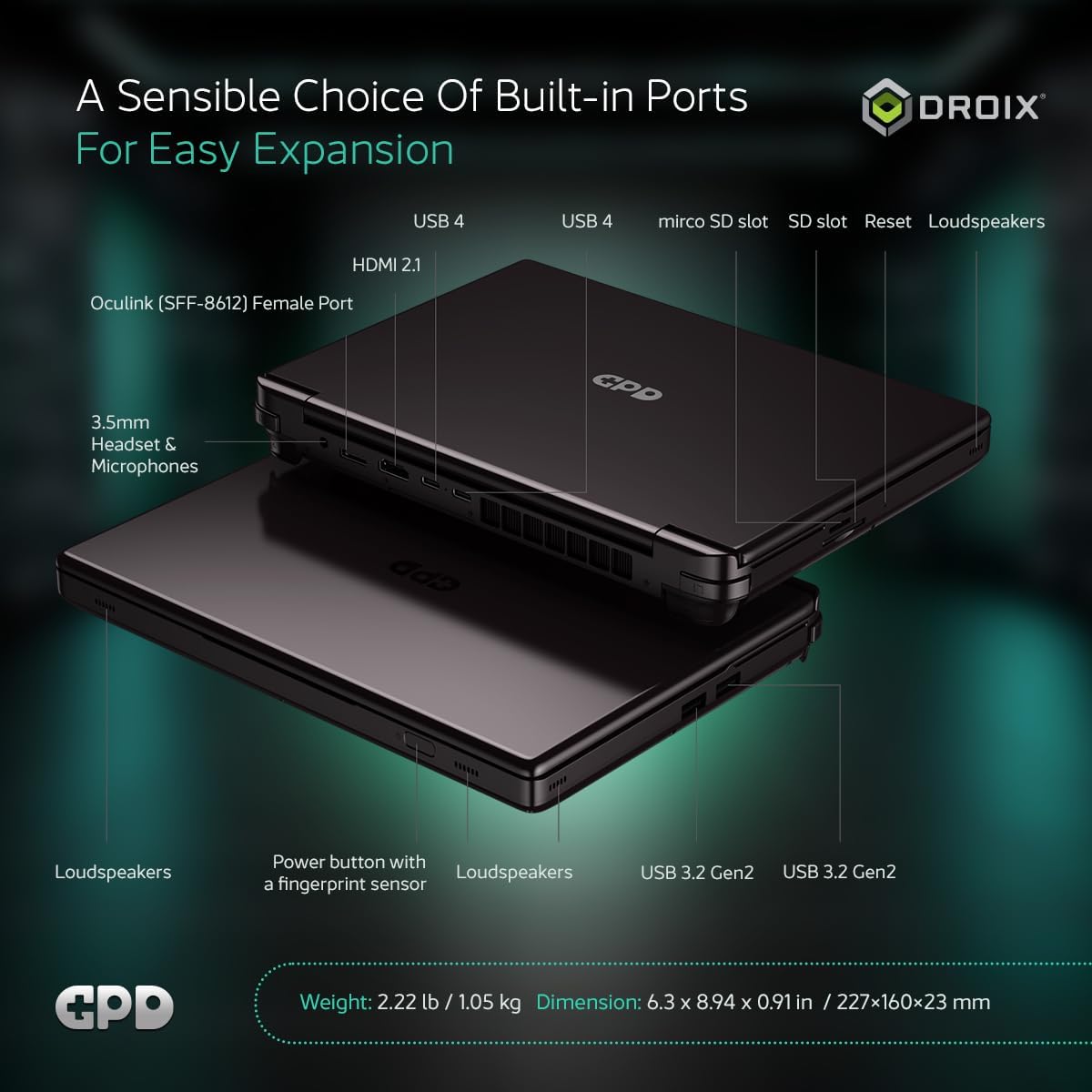
Figure 4: Diagram illustrating the various built-in ports on the GPD Win MAX 2 2025 for easy expansion and connectivity.
3.5 Camera
The device includes a 2-megapixel camera located under the hinge. It supports up to 1612x1212 super wide-angle resolution with a high refresh rate, suitable for video calls.
4. Maintenance
4.1 General Care
- Keep the device clean by wiping it with a soft, dry cloth.
- Avoid exposing the device to extreme temperatures or direct sunlight.
- Protect the screen from scratches by using a screen protector or a soft pouch when transporting.
4.2 Battery Care
- For optimal battery life, avoid fully discharging the battery frequently.
- Store the device in a cool, dry place if not used for extended periods.
5. Troubleshooting
5.1 Common Issues and Solutions
- Black Screen Issue: Some users have reported random black screens or black screens on restart. If this occurs, try letting the device sit for about 10 minutes, then turn it back on. If the issue persists, connect to an external monitor via HDMI to check if the display output is working.
- Device Not Powering On: Ensure the device is fully charged. Try connecting the AC adapter and waiting a few minutes before attempting to power on again.
- Connectivity Problems (Wi-Fi/Bluetooth): Check Windows settings to ensure Wi-Fi and Bluetooth are enabled. Restart the device and your router if necessary.
- Performance Issues: Close unnecessary background applications. Ensure drivers are up to date. Adjust power settings in Windows for optimal performance.
6. Specifications
| Feature | Specification |
|---|---|
| Brand | GPD |
| Model Name | WIN MAX |
| Screen Size | 10.1 Inches |
| Screen Resolution | 1920 x 1200 pixels |
| Max Screen Resolution | 2560x1600 Pixels |
| Processor | AMD Ryzen AI 9 HX 370 (3.3 GHz) |
| RAM | 64 GB LPDDR5x |
| Hard Drive | 2 TB SSD (M.2 NVME) |
| Graphics Coprocessor | Radeon 890M |
| Operating System | Windows 11 Home |
| Item Weight | 2.22 pounds |
| Product Dimensions | 6.3 x 8.94 x 0.91 inches |
| Average Battery Life | 8 Hours (67Wh) |
| Wireless Type | Bluetooth 5.3, 802.11ax (Wi-Fi 6E) |
7. Official Product Video
This video provides a comprehensive review of the GPD WIN MAX 2 2025, highlighting its features, performance, and comparisons with previous models and other devices. It covers aspects like design, display, controls, ports, technical specifications, and benchmark results.
8. Warranty and Support
GPD offers protection plans for their devices. For detailed information on warranty coverage and support options, please refer to the official GPD Store or contact their customer service.
- Protection Plans: Available options include 2-Year and 4-Year Protection Plans, as well as a Complete Protect monthly plan.
- Official Store: Visit the GPD Store for the latest devices and support.
Related documentsWIN MAX


Ask a question about this manual
Ask about setup, troubleshooting, compatibility, parts, safety, or missing instructions. Manuals+ will review the question and use this page’s manual context to help answer it.