
1. Introduction
Thank you for choosing the 5Rcom Monitor Stand MS1001U. This desktop monitor stand is designed to provide a stable and adjustable mounting solution for your 13-32 inch flat or curved screens. It features VESA compatibility, height adjustment, swivel, and rotation capabilities to optimize your viewing experience and workspace ergonomics. Please read this manual carefully before installation and use to ensure proper setup and safe operation.
2. Safety Information
- Weight Capacity: Do not exceed the maximum weight capacity of 10 kg (22 lbs). Overloading can result in serious injury or damage to equipment.
- Screen Size: Ensure your monitor or TV screen size is within the recommended range of 13-32 inches.
- VESA Compatibility: Verify that your screen's VESA mounting pattern is 75x75mm or 100x100mm.
- Assembly: Follow all assembly instructions carefully. Incorrect assembly may lead to instability and potential hazards.
- Placement: Place the stand on a stable, level surface to prevent tipping.
- Children: Keep small parts away from children to prevent choking hazards.
- Adjustments: When making adjustments (height, swivel, tilt), ensure the monitor is securely held to prevent accidental drops.
3. Package Contents
Please check that all components are present and undamaged. If any parts are missing or defective, contact customer support.
- Base Plate (Tempered Glass)
- Support Column (Steel)
- VESA Mounting Plate
- Cable Management Clips
- Hardware Kit (screws, washers, spacers, Allen key)
- Instruction Manual
4. Specifications
| Model Number | MS1001U |
| Brand | 5Rcom |
| Compatible Screen Size | 13 - 32 inches |
| Maximum Weight Capacity | 10 kg (22 lbs) |
| VESA Compatibility | 75x75mm, 100x100mm |
| Material | Steel (Support Column), Tempered Glass (Base) |
| Color | Black |
| Adjustments | Height, Swivel, Tilt, Rotation |
| Height Adjustment Levels | 5 levels (8.2" to 16.1") |
| Swivel Range | ±70° |
| Tilt Range | +10° to -15° |
| Rotation | 360° (Portrait to Landscape) |
5. Setup and Installation
The 5Rcom Monitor Stand MS1001U is designed for easy assembly. All necessary hardware is included and individually labeled.
Step-by-Step Assembly:
- Attach the Support Column to the Base:
Align the support column with the holes on the tempered glass base. Secure it using the provided screws and an Allen key. Ensure it is tightened firmly for stability.
Figure 5.1: Attaching the support column to the base.
- Attach the VESA Mounting Plate to the Support Column:
Slide the VESA mounting plate onto the support column. Secure it at your desired initial height using the locking mechanism or screws as indicated in the visual guide.
Figure 5.2: VESA mounting plate attached to the support column.
- Attach the Monitor to the VESA Mounting Plate:
Carefully align your monitor's VESA holes with the holes on the mounting plate. Use the appropriate screws, washers, and spacers from the hardware kit to secure your monitor. Do not overtighten.
Figure 5.3: Securing the monitor to the VESA plate.
- Cable Management:
Utilize the integrated cable management clips on the support column to route and organize your monitor cables. This helps maintain a tidy workspace.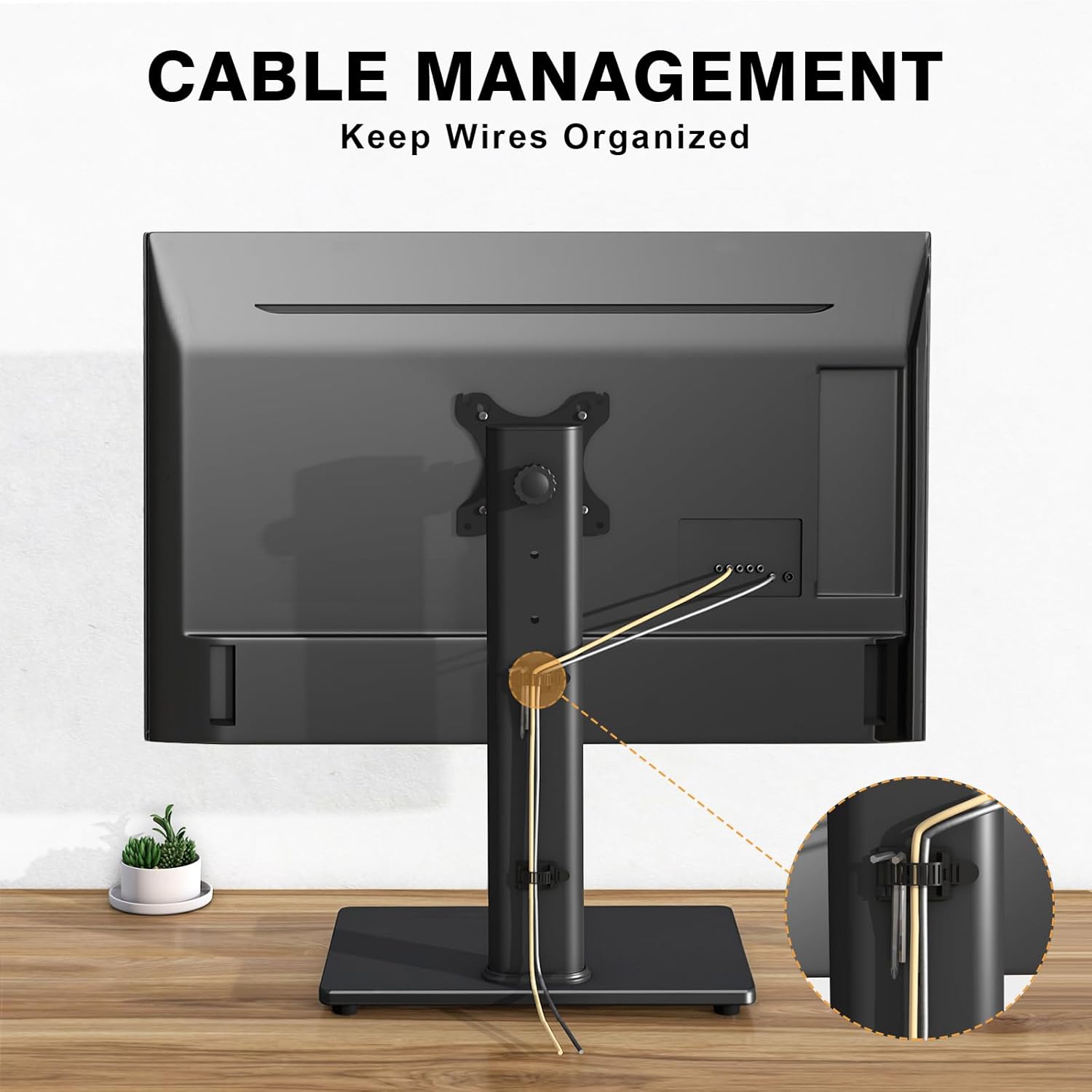
Figure 5.4: Using cable management clips.
6. Operating Instructions
The 5Rcom Monitor Stand MS1001U offers multiple adjustment options to customize your viewing experience.
6.1. Height Adjustment
The stand features 5 levels of vertical height adjustment, ranging from 8.2 inches to 16.1 inches. To adjust the height, loosen the locking mechanism on the support column, slide the monitor to the desired height, and then securely tighten the locking mechanism. This ergonomic design helps reduce strain on your eyes and neck.

Figure 6.1: Ergonomic height adjustment.
6.2. Swivel Adjustment
The monitor can swivel up to 70 degrees left or right (±70°). Gently rotate the monitor to achieve your optimal viewing angle. This is useful for sharing your screen with others or adjusting your position.

Figure 6.2: Monitor swivel functionality.
6.3. Tilt Adjustment
Adjust the monitor's tilt angle from +10° to -15° to reduce glare and find a comfortable viewing position. Loosen the tilt knob or screw on the VESA plate, adjust the angle, and then retighten.

Figure 6.3: Monitor tilt adjustment.
6.4. Rotation
The VESA plate allows for a full 360° rotation, enabling you to switch your monitor between landscape and portrait orientations. Simply rotate the monitor to the desired orientation.

Figure 6.4: 360° monitor rotation.
7. Maintenance
- Cleaning: Use a soft, damp cloth to clean the stand. Avoid abrasive cleaners or solvents that could damage the finish.
- Hardware Check: Periodically check all screws and connections to ensure they remain tight and secure. Retighten if necessary.
- Cable Management: Regularly check cable routing to prevent pinching or excessive tension on cables.
- Base Protection: The base is equipped with non-slip rubber feet to protect your desk surface. Ensure these feet are intact and clean.
8. Troubleshooting
| Problem | Possible Cause | Solution |
| Monitor is wobbly or unstable. | Loose connections; Overweight monitor; Uneven surface. | Ensure all screws are tightened. Verify monitor weight is within limits. Place stand on a flat, stable surface. |
| Cannot adjust height. | Locking mechanism is too tight; Obstruction. | Loosen the height locking mechanism. Check for any obstructions preventing movement. |
| Monitor does not swivel or rotate smoothly. | Tight connections; Dirt or debris in joints. | Ensure swivel/rotation points are not overtightened. Clean any visible debris from moving parts. |
| Cables are messy. | Cable management not utilized. | Use the provided cable management clips to route and secure cables along the support column. |
9. Warranty and Customer Support
This 5Rcom product comes with a standard manufacturer's warranty. For detailed warranty information, please refer to the documentation provided at the time of purchase or contact your retailer. If you encounter any issues or have questions regarding the assembly, operation, or maintenance of your monitor stand, please contact 5Rcom customer support for assistance.
