
1. Introduction
This manual provides detailed instructions for the installation, operation, and maintenance of your VECHTEL Android 15 Car Stereo 7-Inch Touchscreen Radio. Please read this manual thoroughly before using the product to ensure proper functionality and safety.
The VECHTEL Android 15 Car Stereo is an advanced in-dash navigation system featuring a 7-inch HD touchscreen, 4G RAM, 64G ROM, Wireless CarPlay, Android Auto, GPS, WiFi, Bluetooth 5.0, FM radio, and a 32-band EQ. It is designed to enhance your driving experience with modern connectivity and entertainment options.
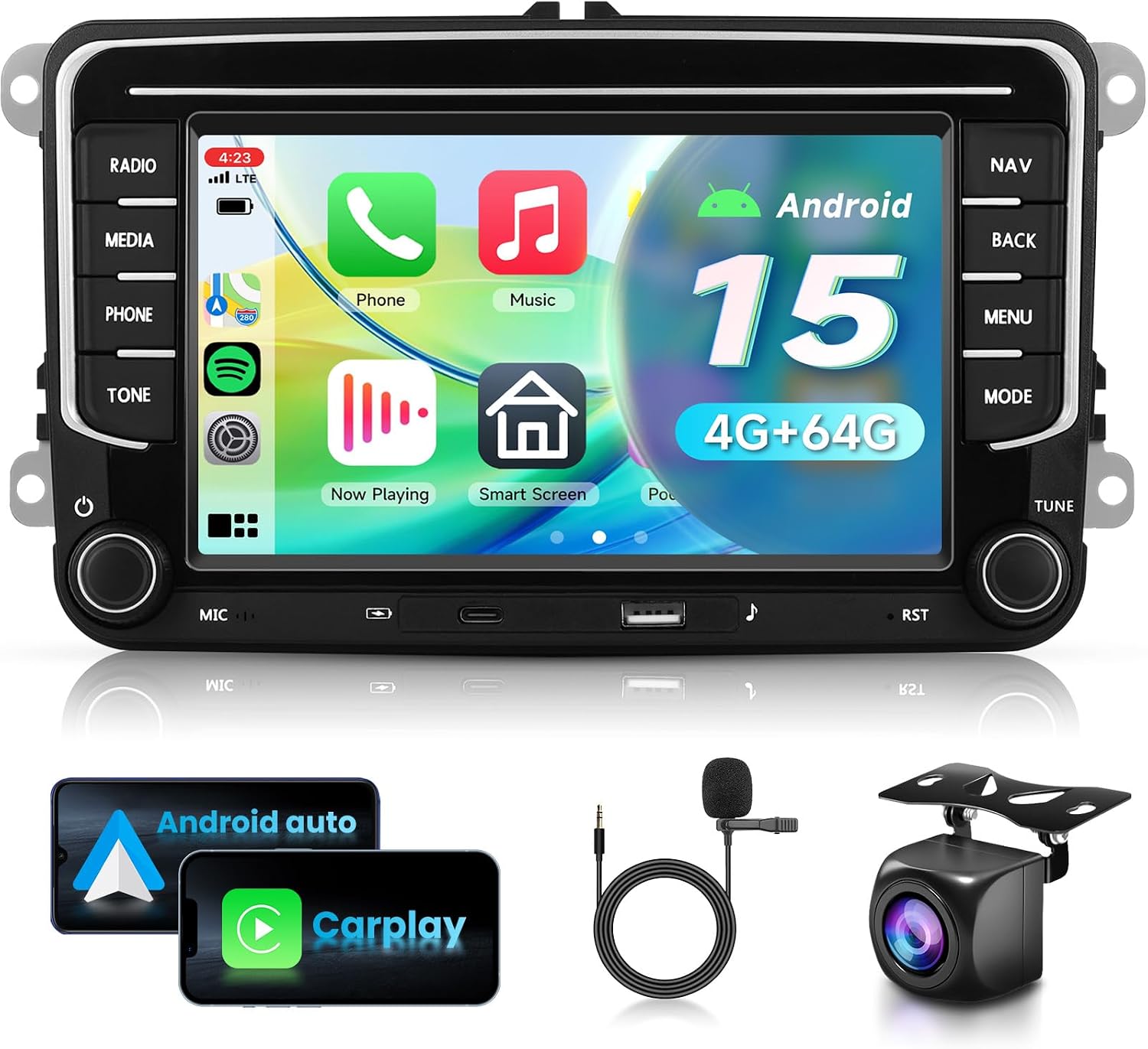
Image 1.1: VECHTEL Android 15 Car Stereo with included accessories like backup camera, microphone, and wiring harnesses.
2. Applicable Car Models
This car stereo is designed for specific VW, SEAT, and Skoda models. Please verify your vehicle's compatibility before installation.
- For VW: Jetta, Passat B6/V6/B7, Tiguan, Golf 5/6, Beetle, T5, Polo, Touran, Sharan, EOS, Caddy, Scirocco, Amarok, Multzvan, Sportline, Bora.
- For SEAT: Altea (05/2004), Toledo (12/2004), Leon (09/2005), Altea XL (04/2007), Alhambra (2010).
- For SKODA: Fabia Limousine (02/2007-2012), Fabia Combi (04/2007-2012), Practic (04/2007-2012), Roomster (04/2006-2012), Yeti (2009-2012).
For a comprehensive list and visual guide, refer to the images below. If your vehicle's power cord is 52-pin, please contact customer support for a suitable adapter.

Image 2.1: Visual guide for compatible vehicle models and dashboard appearance.

Image 2.2: Example of the VECHTEL car stereo installed in a compatible VW vehicle.
3. Setup and Installation
3.1 Package Contents
Before beginning installation, ensure all components are present in the package:
- VECHTEL Android 15 Car Stereo Unit
- Power Harness (36-pin and 40-pin adapters included)
- CANBUS box
- GPS Antenna
- RCA Cable
- Rear Camera Input Cable
- USB Cable
- Radio Antenna
- Rear Camera
- Microphone (MIC)
- User Manual

Image 3.1: Dimensions of the stereo unit and a visual list of all package contents.

Image 3.2: Detailed view of the accessories included in the package.
3.2 Wiring Harness Compatibility
The package includes 36-pin and 40-pin wiring harness connectors. It is crucial to select the correct harness matching your vehicle's connector specifications. If your vehicle uses a 52-pin connector, it is not suitable for direct installation with the included harnesses. Please contact customer support for assistance in obtaining the correct adapter.

Image 3.3: Wiring harness compatibility guide.

Image 3.4: Dashboard compatibility check for installation.
3.3 CANBUS Connection
The CANBUS box is essential for integrating the stereo with your vehicle's existing systems, especially for features like steering wheel controls and displaying vehicle information.
- For General Car Player: Connect port A and B of the ACC line. Do not install the CANBUS.
- For Highly Equipped Car Player: Disconnect port A and B of the ACC line. The CANBUS needs to be installed.
Image 3.5: CANBUS connection instructions.
3.4 Backup Camera Wiring
Properly connecting the backup camera ensures its functionality when reversing your vehicle.
- Connect Red Cable 1 and Red Cable 3 to the positive (+) terminal of the car's reverse light power supply.
- Connect Black Cable 2 to the negative (-) terminal of the car's reverse light power supply.
- Connect Black Cable 4 to the reverse trigger wire on the main power harness of the stereo unit.

Image 3.6: Backup camera wiring diagram.
4. Operating Instructions
4.1 Power On/Off and Touchscreen
Press the power button to turn the unit on or off. The 7-inch HD IPS touchscreen (1024*600 resolution) provides a responsive interface for all functions. Navigate through menus and applications by tapping, swiping, and pinching.

Image 4.1: High-definition touchscreen display.
4.2 Wireless CarPlay and Android Auto
Connect your iPhone or Android smartphone wirelessly via Bluetooth to access CarPlay or Android Auto. This allows for voice control, navigation, music streaming, and other compatible apps directly on the stereo display, minimizing distractions while driving.

Image 4.2: Wireless CarPlay and Android Auto in operation.

Image 4.3: Visual comparison of Wireless CarPlay and Android Auto.
4.3 GPS Navigation
The unit supports GPS navigation. After connecting to Wi-Fi, you can use online maps. Offline maps can be downloaded via applications like Herewego for navigation without an internet connection.
4.4 WiFi Connectivity
Connect the stereo to a Wi-Fi hotspot (e.g., from your smartphone) to browse the internet, download apps, and access online services.
4.5 Bluetooth 5.0
Pair your smartphone via Bluetooth 5.0 for hands-free calling and wireless audio streaming. Access your phonebook directly from the stereo.
4.6 Mirror Link
Synchronize your phone's screen to the car stereo display, allowing you to view videos and other content from your smartphone on the larger screen.

Image 4.4: GPS, WiFi, and Mirror Link functionalities.
4.7 FM/RDS Radio
Tune into FM radio stations. The RDS (Radio Data System) feature displays station information where available. Save your favorite stations for quick access.
4.8 32-Band EQ Audio Settings
Customize your audio experience with the built-in 32-band equalizer. Adjust frequencies to match your musical preferences and vehicle acoustics.

Image 4.5: Audio EQ, Bluetooth, and display features.

Image 4.6: FM/RDS Radio and Split Screen features.
4.9 Steering Wheel Control (SWC)
If your vehicle supports it and the CANBUS is correctly installed, you can program your steering wheel buttons to control the stereo's functions, such as volume, track skipping, and answering calls.
4.10 Backup Camera Functionality
When the vehicle is shifted into reverse, the stereo automatically displays the view from the included backup camera. The camera features HD image quality, IP69 waterproofing, a wide-angle lens, and night vision capabilities for improved safety.

Image 4.7: Backup camera features and view.

Image 4.8: Backup camera and steering wheel control functions.
4.11 Split Screen
The Android 15 system allows for split-screen functionality, enabling you to run two applications simultaneously, such as navigation and music playback.
5. Maintenance
To ensure the longevity and optimal performance of your VECHTEL car stereo, follow these maintenance guidelines:
- Cleaning the Screen: Use a soft, lint-free cloth to gently wipe the touchscreen. For stubborn smudges, slightly dampen the cloth with water or a screen-safe cleaner. Avoid harsh chemicals or abrasive materials.
- Software Updates: Periodically check for system updates via the Wi-Fi connection to ensure you have the latest features and security patches.
- Temperature Control: Avoid exposing the unit to extreme temperatures. While designed for automotive use, prolonged exposure to direct sunlight or extreme cold can affect performance.
- Cable Connections: Ensure all cables are securely connected. Loose connections can lead to intermittent issues.
6. Troubleshooting
If you encounter issues with your car stereo, refer to the following common problems and solutions:
- No Power:
- Check all power connections and fuses.
- Ensure the ignition is on.
- No Sound:
- Verify volume settings are not muted or too low.
- Check speaker wiring connections.
- Ensure the correct audio source is selected.
- GPS Not Working/Inaccurate:
- Ensure the GPS antenna is properly installed and has a clear view of the sky.
- Check GPS settings within the system.
- Verify internet connection for online maps.
- Bluetooth Connection Issues:
- Ensure Bluetooth is enabled on both the stereo and your device.
- Delete previous pairings and re-pair the device.
- Move the device closer to the stereo.
- Backup Camera Not Displaying:
- Check camera wiring, especially the reverse trigger wire.
- Ensure the vehicle is in reverse gear.
- Touchscreen Unresponsive:
- Restart the unit.
- Perform a factory reset (note: this will erase all user data).
For issues not covered here, please contact VECHTEL customer support.
7. Specifications
| Feature | Specification |
|---|---|
| Operating System | Android 15 |
| RAM | 4GB |
| ROM | 64GB |
| Screen Size | 7-inch |
| Screen Resolution | 1024*600 HD IPS |
| Connectivity | Bluetooth 5.0, USB, Wi-Fi |
| Special Features | Wireless CarPlay, Android Auto, Touchscreen, GPS Navigation, FM/RDS Radio, 32 EQ, Mirror Link, Steering Wheel Control, Backup Camera Support |
| Compatible Devices | iOS and Android smartphones |
| Audio Output Mode | Stereo |
| Video Encoding | H.264, H.265/HEVC |
| Item Weight | 2.57 pounds (1.17 Kilograms) |
| Package Dimensions | 12.17 x 10.75 x 4.29 inches |
8. Warranty and Support
Your VECHTEL Android 15 Car Stereo comes with a standard manufacturer's warranty. Please refer to the warranty card included in your package for specific terms and conditions.
For technical support, troubleshooting assistance, or warranty claims, please contact VECHTEL customer service. You can typically find support information on the seller's page or through the contact details provided with your product documentation.

Image 8.1: Guide to accessing VECHTEL technical support.