
1. Product Overview
The WINGBO Black Industrial Ceiling Fan No Light 84" (Model SYCF8402) is designed for efficient air circulation in large spaces. It features a robust industrial-style design with nine aluminum blades and a matte black finish. This fan is equipped with a reversible DC motor and a 6-speed remote control, providing versatile airflow for both cooling in summer and circulating warm air in winter. Its durable construction ensures long-term performance.
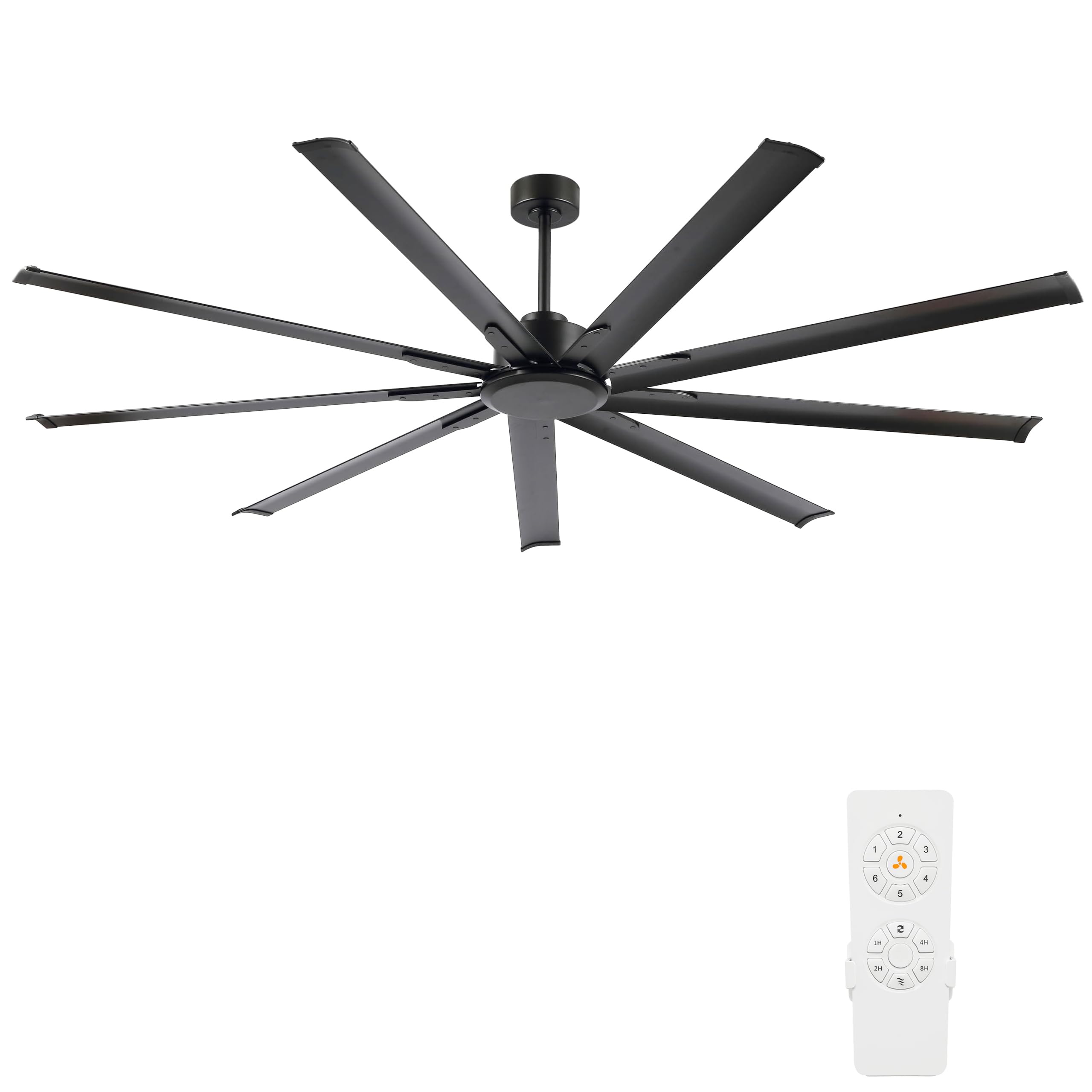
Key Features:
- Industrial-Style Design: Features 9 robust aluminum blades and a matte finish, suitable for various large indoor environments.
- Maximum Airflow: Engineered with 9 blades to deliver exceptional airflow, ideal for large rooms, warehouses, or shops.
- Quiet & Efficient Operation: Powered by a high-performance DC motor for strong, reliable airflow with minimal noise.
- Reversible Motor: Allows for seasonal adjustment of airflow direction, providing cooling in summer and heat circulation in winter.
- Durable Build: Constructed from high-quality aluminum materials for lasting durability and consistent performance.
- 6-Speed Remote Control: Offers convenient control over fan speed and direction.


2. Important Safety Information
READ AND SAVE THESE INSTRUCTIONS.
To reduce the risk of fire, electric shock, or personal injury, please follow these guidelines:
- Always turn off the power at the main circuit breaker before installation, cleaning, or servicing.
- Ensure all electrical connections comply with local codes and national electrical codes. If you are unfamiliar with electrical wiring, consult a qualified electrician.
- The mounting structure must be capable of supporting a minimum of 130 pounds (59 kg). As noted in customer reviews, some ceilings may require additional bracing in the attic.
- Install the fan with the blades at least 7 feet (2.1 meters) from the floor.
- Do not operate the fan with damaged wiring or if any parts are missing.
- Avoid placing objects in the path of the fan blades.
- Use only replacement parts specified by the manufacturer.
- This fan is designed for indoor use only.
3. What's Included
Verify that all components are present before beginning installation:
- Ceiling Fan Motor Assembly
- 9 Aluminum Blades
- Remote Control
- Mounting Bracket
- Downrods (4.5", 12", 24" options)
- Hardware Pack (screws, washers, wire nuts, etc.)
- Instruction Manual

4. Product Specifications
| Brand | WINGBO |
| Model Number | SYCF8402 |
| Size | 84 inches |
| Color | Black |
| Number of Blades | 9 |
| Blade Material | Aluminum |
| Motor Type | DC Motor |
| Number of Speeds | 6 |
| Control Method | Remote Control |
| Reversible Motor | Yes |
| Indoor/Outdoor Usage | Indoor |
| Product Dimensions (D x W x H) | 84"D x 84"W x 20"H (with standard downrod) |
| Special Features | Timer, Quiet Operation |
5. Setup & Installation
5.1 Pre-Installation Checklist
- Ensure power is disconnected at the circuit breaker.
- Verify that the mounting location can support the fan's weight (minimum 130 lbs / 59 kg).
- Confirm all parts listed in "What's Included" are present.
- Gather necessary tools: screwdriver, wire strippers, adjustable wrench, ladder, voltage tester.
5.2 Mounting the Fan
- Secure the Mounting Bracket: Attach the mounting bracket to the ceiling junction box. Ensure the junction box is securely fastened to the building structure and can support the fan's weight. Use hardware suitable for your ceiling type.
- Assemble Downrod: Select the appropriate downrod length (4.5", 12", or 24"). Feed the electrical wires from the fan motor through the downrod.
- Attach Fan to Downrod: Securely attach the fan motor assembly to the chosen downrod.
- Hang Fan Assembly: Carefully lift the fan assembly and hang it from the mounting bracket.

5.3 Electrical Wiring
- Connect the fan's electrical wires to the household wiring according to the wiring diagram provided in the full manual. Typically, this involves connecting live, neutral, and ground wires.
- Ensure all wire connections are secure using wire nuts.
- Tuck all wires neatly into the junction box.
5.4 Attaching Blades
- Attach each of the 9 aluminum blades to the fan motor housing using the provided screws and washers. Ensure all screws are tightened securely.
5.5 Final Assembly
- Install the canopy cover over the mounting bracket, securing it with the designated screws.
- Restore power at the circuit breaker.
- Test the fan operation with the remote control.

6. Operating Instructions
6.1 Remote Control Functions
The WINGBO Industrial Ceiling Fan is operated via the included remote control. Ensure batteries are correctly installed in the remote.
- Power Button: Turns the fan ON or OFF.
- Speed Control: Adjusts fan speed through 6 settings (typically indicated by +/- buttons or dedicated speed buttons).
- Reverse Function: Changes the direction of blade rotation for seasonal use.
- Timer Function: Sets the fan to operate for a predetermined duration (e.g., 1h, 2h, 4h, 8h).
6.2 Reversible Motor Function
The reversible DC motor allows you to optimize airflow for different seasons:
- Summer Mode (Counter-clockwise rotation): Pushes air downwards, creating a cooling breeze.
- Winter Mode (Clockwise rotation): Draws air upwards, circulating warm air trapped near the ceiling throughout the room.

6.3 Timer Setting
To activate the timer, press the corresponding button on the remote control (e.g., 1H, 2H, 4H, 8H). The fan will automatically turn off after the selected time period.

7. Maintenance
Regular maintenance ensures optimal performance and extends the lifespan of your WINGBO ceiling fan.
- Cleaning: Periodically wipe the fan blades and motor housing with a soft, damp cloth. Do not use abrasive cleaners or solvents, as these can damage the finish.
- Blade Inspection: Check the blades for any signs of damage or warping. Ensure all blade screws remain tight.
- Motor Lubrication: The DC motor is permanently lubricated and does not require additional oiling.
- Electrical Connections: Annually inspect all electrical connections for tightness and signs of wear.
Always disconnect power at the circuit breaker before performing any cleaning or maintenance.
8. Troubleshooting
Refer to the table below for common issues and their solutions.
| Problem | Possible Cause | Solution |
|---|---|---|
| Fan does not start | No power supply; Loose wire connections; Remote control battery low/dead. | Check circuit breaker; Verify all wire connections are secure; Replace remote control batteries. |
| Fan makes excessive noise | Loose blade screws; Loose mounting hardware; Unbalanced blades; Faulty motor. | Tighten all blade screws; Ensure mounting hardware is secure; Check for bent or damaged blades; Contact customer support if motor is faulty. |
| Fan wobbles | Loose blade screws; Uneven blade installation; Loose mounting bracket. | Tighten all blade screws; Ensure blades are installed evenly; Secure mounting bracket to ceiling. |
| Remote control not working | Dead batteries; Remote not paired with fan; Obstruction between remote and receiver. | Replace batteries; Refer to full manual for remote pairing instructions; Ensure clear line of sight. |
9. Warranty & Customer Support
WINGBO offers a comprehensive warranty for this product:
- Motor Warranty: Free motor replacement for 10 years.
- Other Parts Warranty: 3-year warranty on all other parts.
For technical assistance, warranty claims, or general inquiries, please contact WINGBO customer support through their official channels. Refer to the product packaging or the official WINGBO website for the most current contact information.

