
Introduction
This manual provides detailed instructions for the TIMEURE TU-2306 Pedometer Watch. This device is designed to track your daily activity, including steps, calories burned, and distance traveled, without requiring a smartphone application or frequent charging.
Key features include time, date, and week display, an alarm, countdown timer, stopwatch, EL backlight for low-light conditions, and 30M water resistance.
To ensure accurate step counting, the watch filters out short, irregular movements. Continuous movements lasting less than 10 seconds are initially disregarded. If a continuous movement exceeds 10 seconds, all steps from that movement, including the initial ones, will be accumulated.

Image: Overview of the TIMEURE TU-2306 Pedometer Watch's functions and display.
Setup
Battery Installation/Activation
The watch comes with a pre-installed CR2032 battery, designed to last up to 15 months. No initial charging is required. The watch is ready for use upon receipt.
Time and Date Setting
To set the time, date, and day of the week, press the 'MODE' button to cycle through the setting options. Use the 'CHECK' and 'SWITCH' buttons to adjust the values. The watch supports both 12-hour and 24-hour formats, which can be selected during the time setting process.
Unit Selection
Within the settings menu, you can switch between kilometers and miles for distance tracking, and between Celsius and Fahrenheit for temperature display (if applicable to your model).
Operating Instructions
Basic Display and Mode Navigation
The main display shows the current time, date, and step count. Press the 'MODE' button repeatedly to cycle through different functions: Time/Date, Pedometer, Alarm, Stopwatch, and Countdown.
Pedometer Function
The watch automatically tracks your steps, calories burned, and distance traveled. To view historical step data, press the 'CHECK' button while in pedometer mode.
Alarm
To set the alarm, navigate to the alarm mode using the 'MODE' button. Use 'CHECK' and 'SWITCH' to set the desired alarm time and activate/deactivate the alarm. When activated, the watch will chime at the set time.
Hourly Chime
The hourly chime feature can be enabled or disabled in the settings, providing an audible alert at the top of each hour.
Stopwatch
In stopwatch mode, use the 'SWITCH' button to start and stop the timer. Press 'CHECK' to reset the stopwatch.
Countdown Timer
To use the countdown timer, navigate to countdown mode. Set the desired duration using the 'CHECK' and 'SWITCH' buttons, then start the countdown. An alert will sound when the timer reaches zero.
EL Backlight
Press the 'LIGHT' button located on the side of the watch to activate the 5-second EL backlight. This improves visibility of the display in dark or low-light conditions.

Image: Demonstration of the 5-second backlight and other key functions.
Maintenance
Water Resistance
The TIMEURE TU-2306 Pedometer Watch is 30M water-resistant. This means it is suitable for daily activities such as cold showers, washing hands, swimming, and exposure to rainwater. Note: It is not recommended for use with hot water, steam, or during diving activities, as this can compromise the water seal.

Image: The watch demonstrating its 30M water resistance.
Band Care
The watch features a durable stainless steel woven band. To clean the band, wipe it gently with a soft, damp cloth. Avoid using harsh chemicals or abrasive materials, which can damage the finish. Ensure the band is dry before wearing.
Band Adjustment and Replacement
The watch band is designed for easy adjustment and replacement. It features an adjustable folding buckle that can be opened and closed without special tools. To remove or install the band, locate the 'switch ear' mechanism and gently release the pins. This allows for convenient cleaning or swapping with compatible bands.

Image: Instructions for adjusting or replacing the watch band.
Battery Replacement
The watch uses a CR2032 lithium metal battery. When the display dims, functions become erratic, or the watch stops working, it may be time to replace the battery. It is recommended to consult a professional watch repair service for battery replacement to ensure proper sealing and water resistance.
Troubleshooting
Inaccurate Step Count
- Ensure the watch is worn securely on your wrist. Loose wearing can affect sensor accuracy.
- Remember that the watch filters out short, irregular movements. Continuous activity for over 10 seconds is required for steps to be accumulated.
- If issues persist, try resetting the watch to its factory settings (refer to specific reset instructions if available in the full manual, or contact support).
Display Issues (Dim or Blank Screen)
- Check the battery. If the display is dim or blank, the CR2032 battery may need replacement.
- If the battery is new and the issue persists, contact customer support.
Buttons Unresponsive
- Ensure no debris or foreign objects are obstructing the buttons.
- If buttons remain unresponsive, a soft reset (if applicable) or battery removal/reinsertion may resolve the issue.
Specifications
| Feature | Detail |
|---|---|
| Model Number | TU-2306 |
| Brand | TIMEURE |
| Material | Metal (case), Stainless Steel (band) |
| Display Size | 42 Millimeters |
| Item Weight | 118 g (0.12 Kilograms) |
| Battery Type | CR2032 Lithium Metal (included) |
| Battery Life | Up to 15 months |
| Water Resistance | 30M |
| Wrist Size Compatibility | 160-240mm (6.29-9.44 inches) |
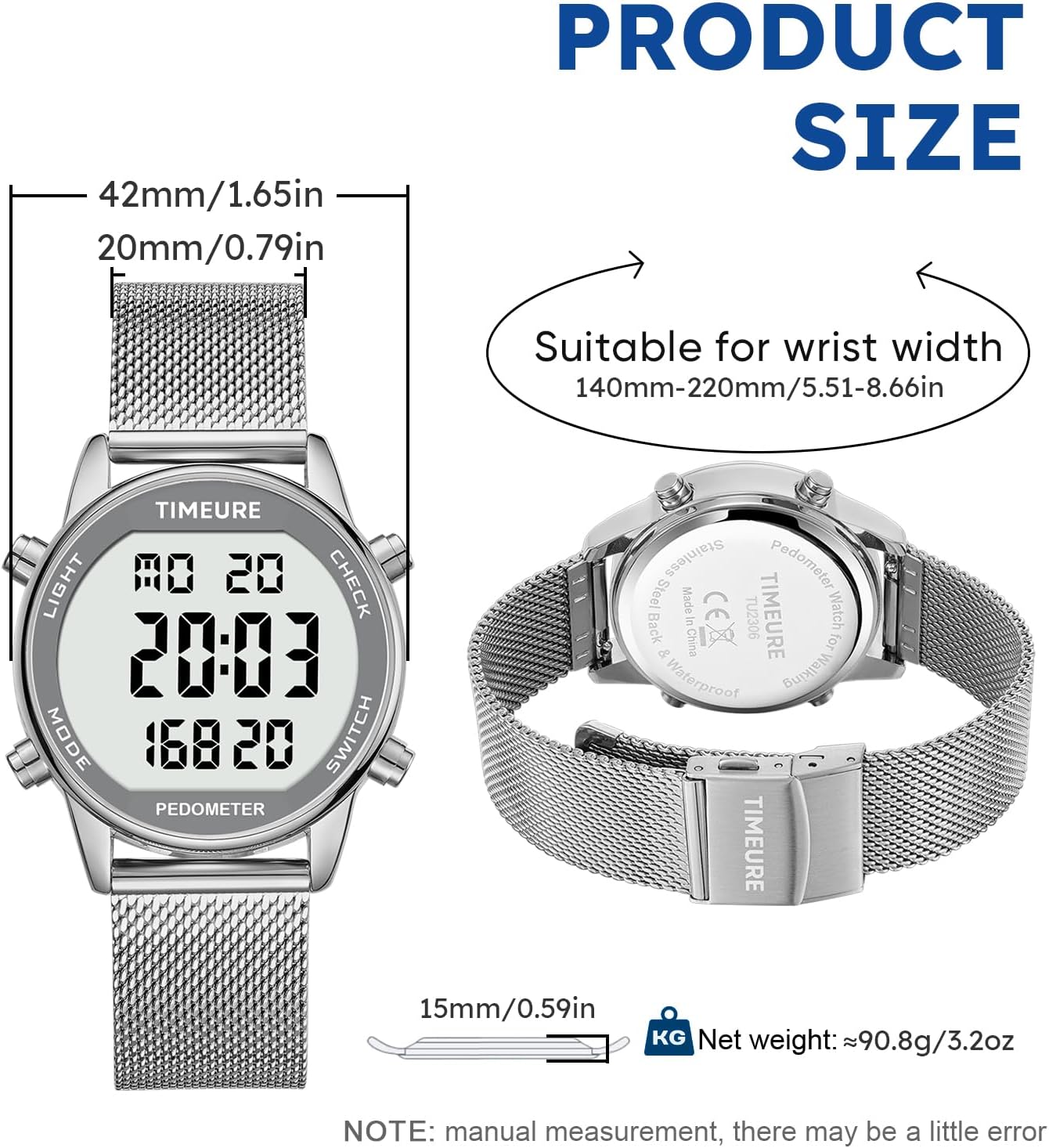
Image: Product dimensions and wrist size compatibility.
Warranty & Support
For warranty information or technical support regarding your TIMEURE TU-2306 Pedometer Watch, please contact TIMEURE directly. Refer to the product packaging or the official TIMEURE website for the most current contact details and warranty terms.
Manufacturer: TIMEURE


