
Introduction
Thank you for choosing the SIBRILLE 36W LED Arc Floor Lamp. This manual provides detailed instructions for the safe and efficient use of your new lamp. Please read it thoroughly before assembly and operation, and retain it for future reference.
This innovative floor lamp features three fabric shades, providing 3000 lumens of super bright illumination. It offers versatile lighting control through both a remote and touch interface, including stepless dimming, adjustable color temperature, and individual control for each light. Designed for modern homes, it enhances living rooms, bedrooms, and offices with both functionality and elegance.
What's in the Box
- Floor Lamp (main pole sections, curved arms with integrated LED bulbs)
- 3 Fabric Lampshades
- Weighted Base
- Power Adapter
- Remote Control
- User Manual

Image: All components included in the SIBRILLE 36W LED Arc Floor Lamp package.
Setup and Assembly
Follow these steps to assemble your SIBRILLE Arc Floor Lamp. An assembly video is also provided for visual guidance.
- Unpack Components: Carefully remove all parts from the packaging and lay them out on a clean, flat surface. Verify all components listed in the 'What's in the Box' section are present.
- Assemble Lamp Pole: Connect the main pole sections by twisting them clockwise until secure. Ensure the wires are not pinched.
- Attach Curved Arms: Gently tighten the curved pole sections, which hold the integrated LED bulbs, to the top of the main pole by hand.
- Secure Base: Attach the weighted base to the bottom of the main pole, twisting clockwise until firmly secured. Ensure the power cord exits through the designated slot in the base.
- Install Lampshades: For each lampshade, wrap the fabric around the metal frame and secure it. Then, place each assembled lampshade over its respective integrated LED bulb and secure it downwards onto the clasp. Ensure the lampshades are installed in three different directions for optimal light distribution.
- Connect Power: Connect the power adapter to the lamp's power cord, then plug the adapter into a standard wall outlet.

Image: Visual guide for assembling the SIBRILLE Arc Floor Lamp.
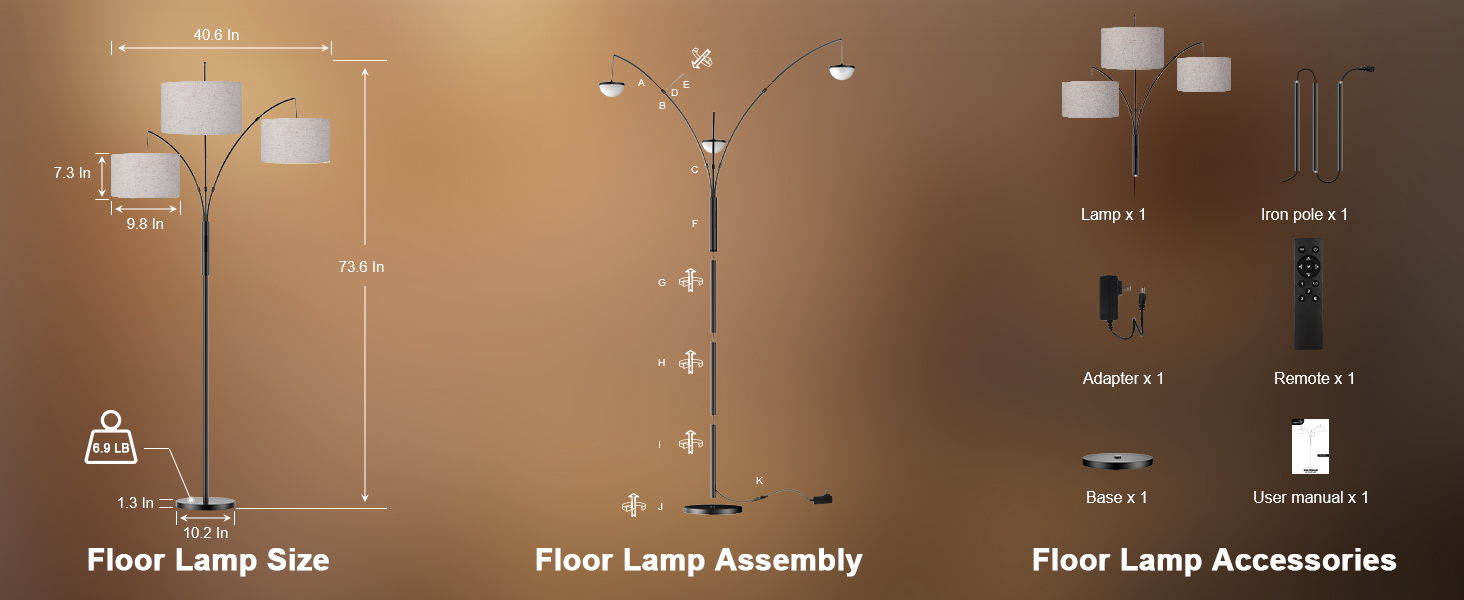
Image: Important tips for correct lampshade installation and arm positioning.
Video: Step-by-step assembly guide for the SIBRILLE Arc Floor Lamp.
Operating Instructions
Your SIBRILLE Arc Floor Lamp can be controlled using the included remote control or the touch panel on the lamp pole.
Remote Control Functions
- Power On/Off: Press the Power button.
- Brightness Adjustment: Use BRT+ to increase brightness and BRT- to decrease brightness (10% to 100% stepless dimming).
- Color Temperature Adjustment: Use WARM to decrease color temperature (towards 3000K warm white) and WHITE to increase color temperature (towards 6000K cool white).
- Individual Light Control: Buttons 1, 2, and 3 control each of the three lamps independently. Press to cycle through color temperatures (3000K-4000K-5000K-6000K-OFF). Long press to steplessly adjust brightness for the selected lamp.
- Memory Function: The lamp remembers your last brightness and color temperature settings when turned off and on.
- 1-Hour Timer: Press the 1H button to set the lamp to automatically turn off after one hour.
- Reading Mode: Press the Book icon button for an optimized reading light setting.
- Sleeping Mode: Press the Moon icon button for a soft, low-light setting suitable for sleeping.
- One Button Recovery: Press the M button to restore default settings or a previously saved custom setting.
Touch Control Functions
The lamp pole features three touch buttons labeled CCT1, CCT2, and CCT3, corresponding to each individual lamp.
- Short Press: Tap CCT1, CCT2, or CCT3 to cycle through color temperatures (3000K-4000K-5000K-6000K-OFF) for the respective lamp.
- Long Press: Press and hold CCT1, CCT2, or CCT3 to steplessly adjust the brightness for the respective lamp.
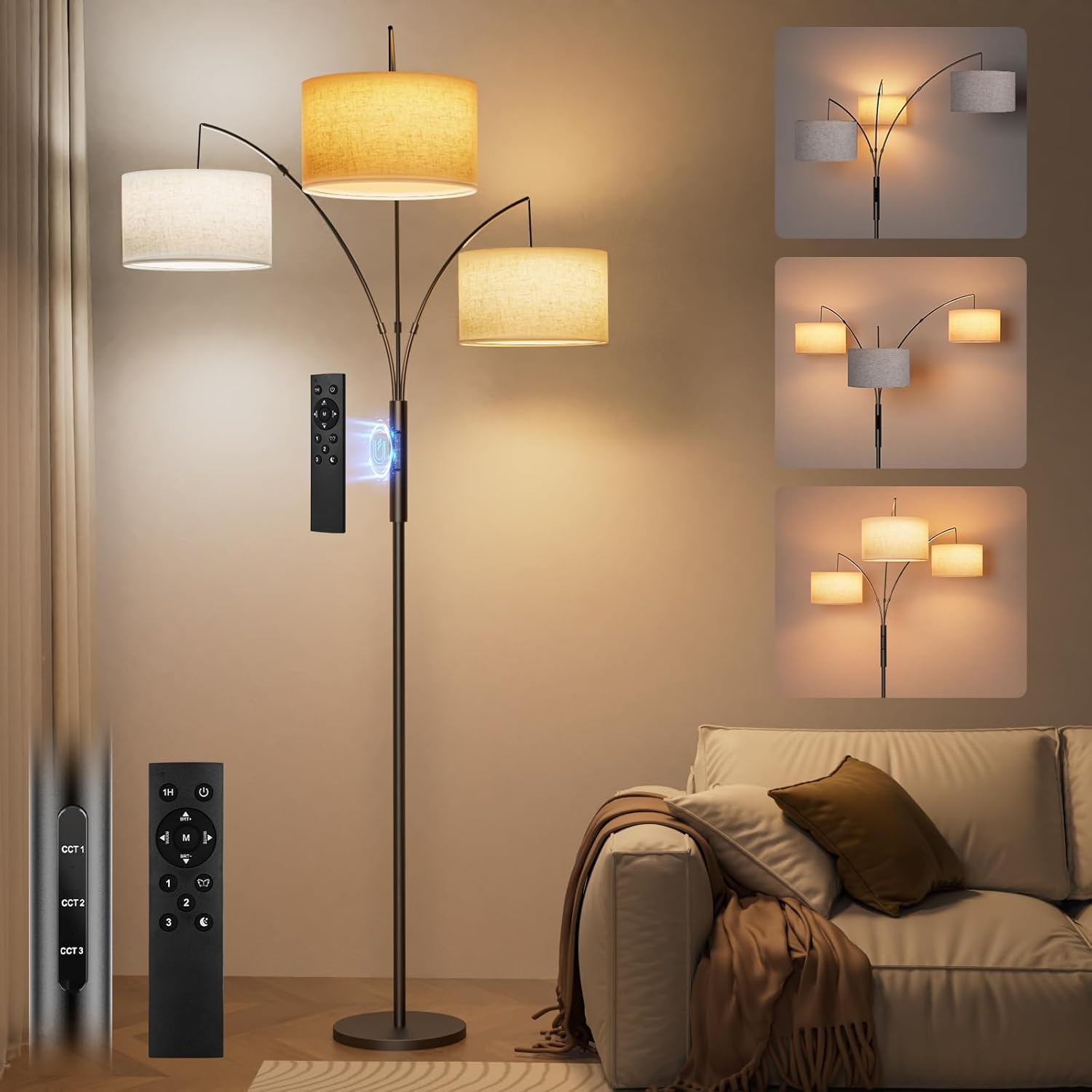
Image: Overview of the SIBRILLE Arc Floor Lamp with its remote and touch controls.

Image: Close-up of the remote and touch controls with function descriptions.

Image: Demonstrating individual control of each lamp head.

Image: Stepless dimming and color temperature adjustment capabilities.

Image: Reading mode and night light mode in use.
Image: The lamp's memory function retaining previous settings.

Image: Magnetic remote control attachment to the lamp pole.
Features
- Integrated LED Bulbs: All-in-one LED bulb design eliminates the need for frequent replacements.
- Dual Control: Conveniently adjust settings via remote control or touch panel.
- Stepless Dimming: Smoothly adjust brightness from 10% to 100%.
- Adjustable Color Temperature: Change light color from 3000K (warm white) to 6000K (cool white).
- Individual Light Control: Each of the three lamp heads can be controlled independently for brightness and color temperature.
- Memory Function: Retains the last used lighting settings.
- 1-Hour Timer: Automatically turns off the lamp after one hour.
- Pre-set Modes: Dedicated reading and sleeping modes for quick access to optimal lighting.
- Stable Design: Features a 6.9-pound weighted base to prevent tipping.
- Eye-Friendly Light: Provides gentle, non-flickering illumination to reduce eye strain.
Maintenance
- Cleaning: Disconnect the power before cleaning. Use a soft, dry cloth to wipe the lamp pole and shades. Do not use abrasive cleaners or solvents.
- Bulb Replacement: The LED bulbs are integrated and not user-replaceable. If a bulb malfunctions, please contact customer support.
- Cord Care: Regularly inspect the power cord for any damage. Do not operate the lamp with a damaged cord.
Troubleshooting
| Problem | Possible Cause | Solution |
|---|---|---|
| Lamp does not turn on. | Power cord not properly connected. | Ensure the power adapter is securely connected to the lamp and plugged into a working wall outlet. |
| Remote control not working. | Remote battery is low or depleted. | Replace the remote control battery (CR2025, not included). Ensure the remote is pointed towards the lamp's receiver. |
| Lights flicker or dim unexpectedly. | Loose connection or power fluctuation. | Check all pole connections for tightness. Try plugging the lamp into a different outlet. |
| Individual light control issues. | Incorrect button press or remote interference. | Ensure you are pressing the correct individual light button (1, 2, or 3) on the remote or CCT button on the touch panel. Try resetting the lamp by unplugging and replugging it. |
Specifications
- Brand: SIBRILLE
- Model Name: BP-F030-S
- Product Dimensions: 40.6"D x 40.6"W x 73.6"H
- Item Weight: 13.5 Pounds
- Light Source Type: LED (Integrated)
- Wattage: 36 watts
- Brightness: 3000 Lumens (Max)
- Color Temperature: 3000K (Warm White) to 6000K (Cool White)
- Control Method: Remote, Touch
- Number of Light Sources: 3
- Shade Material: Linen Fabric
- Base Material: Metal
- Power Source: Corded Electric (110 Volts)
- Special Features: 1-Hour Timer, Adjustable Color Temperature, All-In-One LED Bulb, Memory Function, Stepless Dimmable Brightness

Image: Key dimensions of the SIBRILLE Arc Floor Lamp.

Image: Detail of the lamp's stable, weighted base.
Warranty and Support
SIBRILLE is committed to providing high-quality products and superior customer service. For any issues, questions, or support needs regarding your SIBRILLE 36W LED Arc Floor Lamp, please contact us directly through Amazon's messaging service. Our team is ready to provide prompt and friendly assistance.
Please refer to your purchase documentation for specific warranty details and terms.

