
1. Product Overview
The Ejoyous Mini Portable Speaker Music Player TD-V26 is a compact and versatile audio device designed for both indoor and outdoor use. It supports playback from TF cards and U disks, features a built-in FM radio, and offers a portable design for easy carrying.
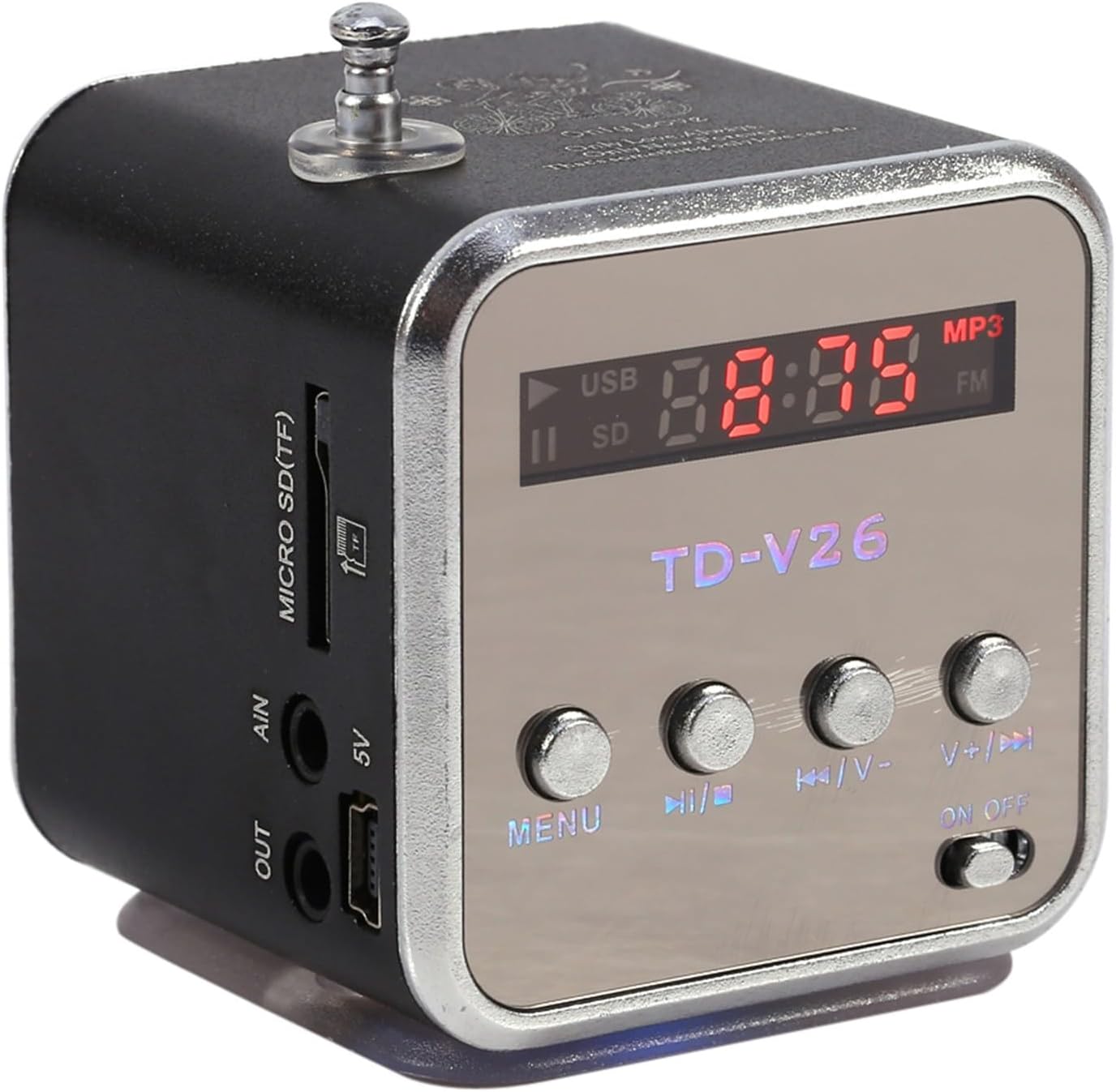
Figure 1: Front view of the Ejoyous Mini Portable Speaker TD-V26, showing the display, control buttons, and side ports for Micro SD (TF), AIN, OUT, and 5V power input.
Key Features:
- Compact and Portable Design: Lightweight and mini-sized, fitting comfortably in your hand for easy transport.
- Multiple Playback Options: Supports music playback from TF (Micro SD) cards and U disks (USB flash drives).
- FM Radio: Integrated high-sensitivity FM radio module for clear signal reception.
- Long Battery Life: Built-in 600mAh battery provides approximately 1-2 hours of playback time, depending on volume.
- Headphone Output: Includes a 3.5mm headphone jack for private listening.
2. Setup
2.1 Charging the Speaker
Before first use, fully charge the speaker. Connect the provided USB charging cable to the 5V input port on the speaker and the other end to a USB power adapter (not included) or a computer USB port. The charging indicator (if available) will show the charging status.
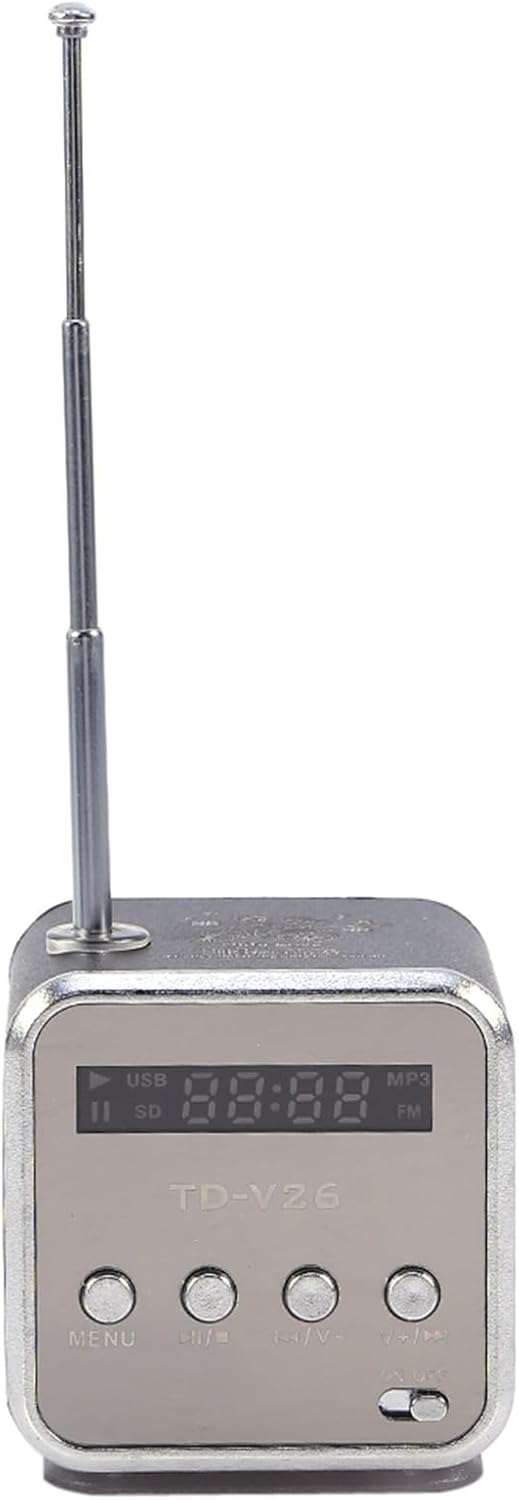
Figure 2: Side view of the speaker with the antenna extended, showing the Micro SD (TF) card slot, AIN (audio input), OUT (headphone output), and 5V (charging) ports.
2.2 Inserting Storage Media
The speaker supports TF (Micro SD) cards and U disks formatted with FAT16 or FAT32 file systems.
- For TF Card: Locate the Micro SD (TF) slot on the side of the speaker. Gently insert the TF card with the metal contacts facing down until it clicks into place.
- For U Disk: Locate the USB port (often labeled '5V' or near the charging port) on the side of the speaker. Insert your U disk into this port.
Ensure your music files are in MP3 format for compatibility.
3. Operating Instructions
3.1 Power On/Off
- To power on, slide the 'ON/OFF' switch to the 'ON' position. The display will light up.
- To power off, slide the 'ON/OFF' switch to the 'OFF' position.
3.2 Mode Selection
Press the 'MENU' button (or 'MODE' button, depending on the model variation) to cycle through available modes: TF Card playback, U Disk playback, and FM Radio.

Figure 3: Comparison of 'New Type' and 'Old Type' TD-V26 speakers. Note the slight difference in button labels (e.g., 'MENU' vs 'MODE'). Functionality remains similar.
3.3 Music Playback (TF Card/U Disk)
- Once in TF Card or U Disk mode, the speaker will automatically begin playing MP3 files.
- Press the 'Play/Pause' button (often labeled with a play/pause icon) to pause or resume playback.
- Press the 'Previous Track/Volume Down' button (often labeled with 'K4/V-') briefly to go to the previous track.
- Press the 'Next Track/Volume Up' button (often labeled with 'V+/K4') briefly to go to the next track.
3.4 FM Radio Operation
- Switch to FM Radio mode using the 'MENU' or 'MODE' button.
- Extend the telescopic antenna for better reception.
- To auto-scan and save stations: In FM mode, press and hold the 'Play/Pause' button. The speaker will scan for available stations and save them automatically.
- To change stations: Briefly press the 'Previous Track/Volume Down' or 'Next Track/Volume Up' buttons to navigate through saved stations.
3.5 Volume Adjustment
- To decrease volume: Press and hold the 'Previous Track/Volume Down' button ('K4/V-').
- To increase volume: Press and hold the 'Next Track/Volume Up' button ('V+/K4').
3.6 Using Headphone Output
Connect standard 3.5mm headphones to the 'OUT' port for private listening. The speaker's internal sound will be muted.
4. Maintenance
- Cleaning: Use a soft, dry cloth to clean the speaker's exterior. Do not use liquid cleaners or abrasive materials.
- Storage: Store the speaker in a cool, dry place away from direct sunlight and extreme temperatures.
- Battery Care: To prolong battery life, avoid fully discharging the battery frequently. Charge the speaker regularly, even if not in use for extended periods.
- Water Exposure: This speaker is not waterproof. Avoid exposure to water or high humidity.
5. Troubleshooting
| Problem | Possible Cause | Solution |
|---|---|---|
| Speaker does not power on. | Battery is depleted. | Charge the speaker for at least 30 minutes. |
| No sound during playback. | Volume is too low or muted. Incorrect mode selected. | Increase the volume. Ensure the correct mode (TF/U Disk) is selected. Check if headphones are plugged in. |
| TF card/U disk not recognized. | Card/disk not inserted correctly. Incorrect file system. Corrupted files. | Reinsert the card/disk. Ensure it is formatted to FAT16/FAT32. Check if music files are in MP3 format. Try a different card/disk. |
| Poor FM radio reception. | Antenna not extended. Weak signal area. | Fully extend the telescopic antenna. Try moving to a different location for better signal. Perform an auto-scan again. |
| Short battery life. | High volume usage. Battery degradation over time. | Reduce playback volume. Ensure the speaker is fully charged before use. |
6. Specifications
- Music Format: Supports common rate MP3 format
- Headphone Jack: 3.5mm output
- Power Specifications: DC5V (USB power adapter or computer USB charging)
- Lithium Battery: 600mA
- Endurance: 1-2 hours (actual playback time depends on volume)
- Frequency Response Range: 120-16KHz
- Storage Media: Storage Card / TF memory card (supports FAT16 / FAT32 file system)
- SNR (Signal-to-Noise Ratio): >95dB
- Output Power: RMS 3W THD = 10%
- Product Dimensions: 5 x 5 x 5.2cm (1.97 x 1.97 x 2 inches)
- Item Weight: Approximately 150g (5.1 ounces)
7. Warranty and Support
For warranty information or technical support, please refer to the product packaging or contact your retailer. Keep your purchase receipt for warranty claims.