
1. Introduction
This manual provides essential instructions for the safe and efficient operation of your TIGERKING D25LK-W Small Drop Safe. Please read this manual thoroughly before installation and use, and retain it for future reference.
The TIGERKING D25LK-W is a compact steel safe designed for securing valuables. It features a digital keypad, an alarm system, dual locking bolts, and a convenient drop slot for deposits. It can be mounted to a wall or floor for enhanced security.

Image 1.1: Front view of the TIGERKING D25LK-W Small Drop Safe.
2. Safety Information
- Do not store emergency keys inside the safe. Keep them in a secure, separate location.
- Ensure the safe is installed on a stable surface or securely mounted to a wall or floor to prevent unauthorized removal.
- Avoid exposing the safe to extreme temperatures or humidity.
- Do not attempt to force the safe open if the digital code fails. Use the emergency key.
- Keep the keypad clean and dry.
3. Package Contents
Verify that all items are present in the package:
- 1 x TIGERKING D25LK-W Small Drop Safe
- 2 x Emergency Keys
- 4 x Expansion Bolts (for mounting)
- 1 x External Battery Box
- 1 x User Manual (this document)
4. Setup
4.1 Initial Opening
Upon receiving your safe, it will be locked. Use one of the provided emergency keys to open it for the first time.
- Locate the emergency keyhole, usually concealed behind the TIGERKING logo plate or a small cover on the keypad.
- Insert the emergency key and turn it clockwise.
- While the key is turned, rotate the knob on the safe door clockwise to open the door.

Image 4.1: Opening the safe with the emergency key.
4.2 Battery Installation
The digital keypad requires batteries to function. The battery compartment is located on the inside of the safe door.
- Open the safe door using the emergency key.
- Locate the battery compartment cover on the inside of the door.
- Remove the cover and insert 4 AA batteries (not included), ensuring correct polarity (+/-).
- Replace the battery compartment cover.
4.3 Setting User Code
You can set a personal 3-8 digit code for digital access.
- With the safe door open, press the red reset button located on the inside of the door, near the hinge. You will hear a beep.
- On the keypad, enter your desired 3-8 digit code.
- Press the '#' key to confirm. The safe will beep, indicating the code is set.
- Test the new code with the door open before closing it. Enter your code, then press '#' and turn the knob clockwise.
4.4 Mounting Instructions
For enhanced security, the safe can be mounted to a wall or floor using the provided expansion bolts.
- Choose a suitable location, ensuring the mounting surface is solid (e.g., concrete wall, wooden stud).
- Position the safe and mark the locations for the pre-drilled holes on the back or bottom of the safe.
- Drill pilot holes into the wall or floor at the marked locations.
- Align the safe with the drilled holes and insert the expansion bolts.
- Tighten the bolts securely to fasten the safe in place.

Image 4.2: Wall mounting diagram for the safe.
5. Operating Instructions
5.1 Opening with Digital Code
- Enter your 3-8 digit personal code on the keypad.
- Press the '#' key.
- Within 5 seconds, rotate the knob clockwise to open the safe door.
5.2 Opening with Emergency Key
The emergency key can be used if you forget your code, the batteries are dead, or the keypad malfunctions.
- Locate the emergency keyhole.
- Insert the emergency key and turn it clockwise.
- While the key is turned, rotate the knob on the safe door clockwise to open the door.
5.3 Using the Drop Slot
The drop slot allows for quick deposits without opening the main door.
- Insert cash, envelopes, or small documents into the slot located on the front top of the safe.
- Ensure items are fully inserted and fall into the safe compartment.

Image 5.1: Using the drop slot for deposits.
5.4 Alarm System
The safe is equipped with a dual alarm system for enhanced security.
- Vibration Alarm: If the safe experiences violent vibration, the alarm will activate.
- Incorrect Entry Alarm: After three consecutive incorrect code entries, the alarm will activate.
- To stop the alarm, enter the correct digital code.
- Low Battery Warning: When batteries are low, "LO-BATT" will display on the screen. Replace batteries promptly.

Image 5.2: Dual Warning System activation.
6. Maintenance
6.1 Battery Replacement
When the "LO-BATT" indicator appears, replace the batteries immediately to ensure continued operation.
- Open the safe door.
- Remove the battery compartment cover on the inside of the door.
- Replace all 4 AA batteries with new ones, observing correct polarity.
- Replace the cover.
If the batteries die completely and you cannot open the safe with the digital code, use the external battery box. Connect the external battery box to the port on the keypad, enter your code, and open the safe. Then replace the internal batteries.
6.2 Cleaning
Wipe the exterior of the safe with a soft, damp cloth. Do not use abrasive cleaners or solvents, as these can damage the finish or electronic components.
7. Troubleshooting
| Problem | Possible Cause | Solution |
|---|---|---|
| Safe does not open with digital code. | Incorrect code entered; batteries are low or dead. | Re-enter the correct code. Replace batteries or use the external battery box. Use emergency key if necessary. |
| Keypad is unresponsive. | Batteries are dead; keypad malfunction. | Replace batteries or use the external battery box. If still unresponsive, contact customer support. |
| Alarm sounds unexpectedly. | Safe experienced vibration; incorrect code entered multiple times. | Enter the correct digital code to silence the alarm. Avoid disturbing the safe. |
| Door does not close properly. | Obstruction in the door frame; locking bolts misaligned. | Check for any obstructions. Ensure the safe is on a level surface. |
8. Specifications
- Model: D25LK-W
- Brand: TIGERKING
- Material: Alloy Steel
- Color: Snow White
- Exterior Dimensions (D x W x H): 13.8" x 9.9" x 9.9" (35cm x 25cm x 25cm)
- Interior Dimensions (H x W x D): 7.5" x 11.4" x 7.5" (19cm x 29cm x 19cm)
- Capacity: 1.2 Cubic Feet
- Item Weight: 20 Pounds
- Lock Type: Electronic Combination Lock, Key
- Special Features: Alarm System, Anti-Theft, Combination Lock, Removable Shelf, Sensor Light, Drop Slot
- Mounting Type: Wall Mount, Floor Mount
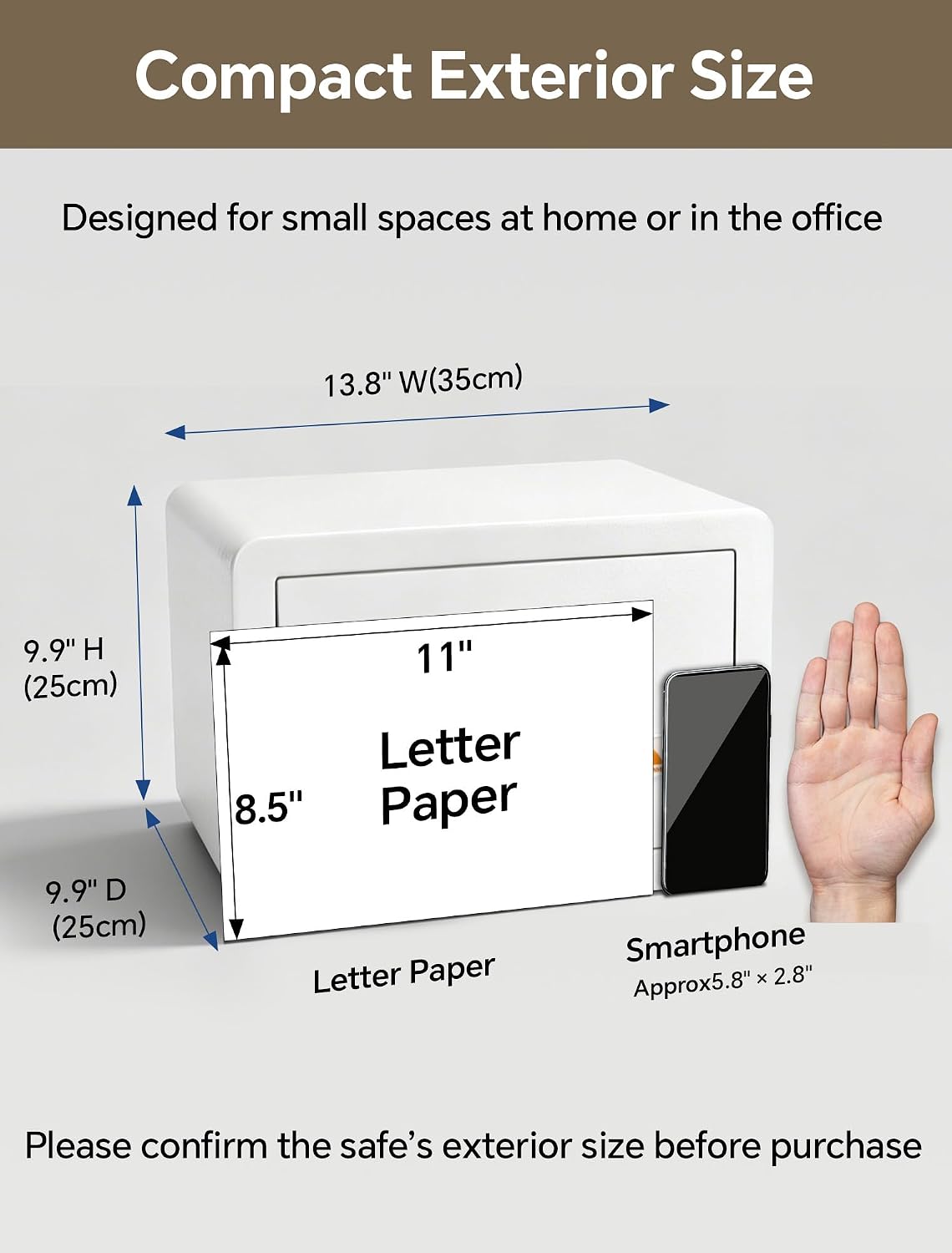
Image 8.1: Exterior Dimensions.

Image 8.2: Interior Dimensions.
Video 8.1: Overview of the TIGERKING Solid Steel Home Safe features and usage.
9. Warranty and Support
TIGERKING provides a 1-Year Limited Warranty for this product, covering manufacturing defects from the date of purchase.
For any questions, technical assistance, or warranty claims, please contact TIGERKING customer service. Refer to the contact information provided with your purchase documentation or visit the official TIGERKING website.