
Hawkrown 230 CFM
Hawkrown Bathroom Exhaust Fan with Bluetooth Speaker User Manual
Model: 230 CFM | Brand: Hawkrown
Introduction
This manual provides detailed instructions for the installation, operation, and maintenance of your Hawkrown Bathroom Exhaust Fan with Bluetooth Speaker. This multi-functional unit integrates ventilation, lighting, audio, and a digital display to enhance your bathroom environment. Please read this manual thoroughly before installation and use to ensure proper function and safety.
Safety Information
WARNING: To reduce the risk of fire, electric shock, or injury to persons, observe the following:
- Installation work and electrical wiring must be done by qualified person(s) in accordance with all applicable codes and standards, including fire-rated construction codes and standards.
- Sufficient air is needed for proper combustion and exhausting of gases through the flue (chimney) of fuel burning equipment to prevent back-drafting. Follow the heating equipment manufacturer’s guideline and safety standards such as those published by the National Fire Protection Association (NFPA), and the American Society for Heating, Refrigeration and Air Conditioning Engineers (ASHRAE), and the local code authorities.
- When cutting or drilling into wall or ceiling, do not damage electrical wiring and other hidden utilities.
- Ducted fans must always be vented to the outdoors.
- Do not use this fan with any solid-state speed control device.
- This unit is designed for installation in a ceiling only.
- This product is certified by UL and FCC, ensuring safe and reliable use.
Package Contents
Please verify that all components are present and undamaged before proceeding with installation.
- Bathroom Exhaust Fan Unit
- Light Cover (13" x 13")
- Remote Control
- Adhesive Wall Mount Holder for Remote
- Power Plug (for socket connection)
- Installation Hardware (e.g., spring clips)
Installation
For detailed installation steps, please refer to the official Installation Manual (PDF) available here. Below are key considerations and general steps.
Pre-Installation Checks
- Ensure power is turned off at the circuit breaker before beginning any installation.
- Test the machine according to the instructions before final installation.
- The product measures 12.4" x 11.22" x 3.94" and fits an 11.22" x 11.22" square ceiling opening.
- The duct outlet is 3.15". Ensure your ductwork is compatible or prepare an adapter.
Measuring and Cutting the Ceiling Hole
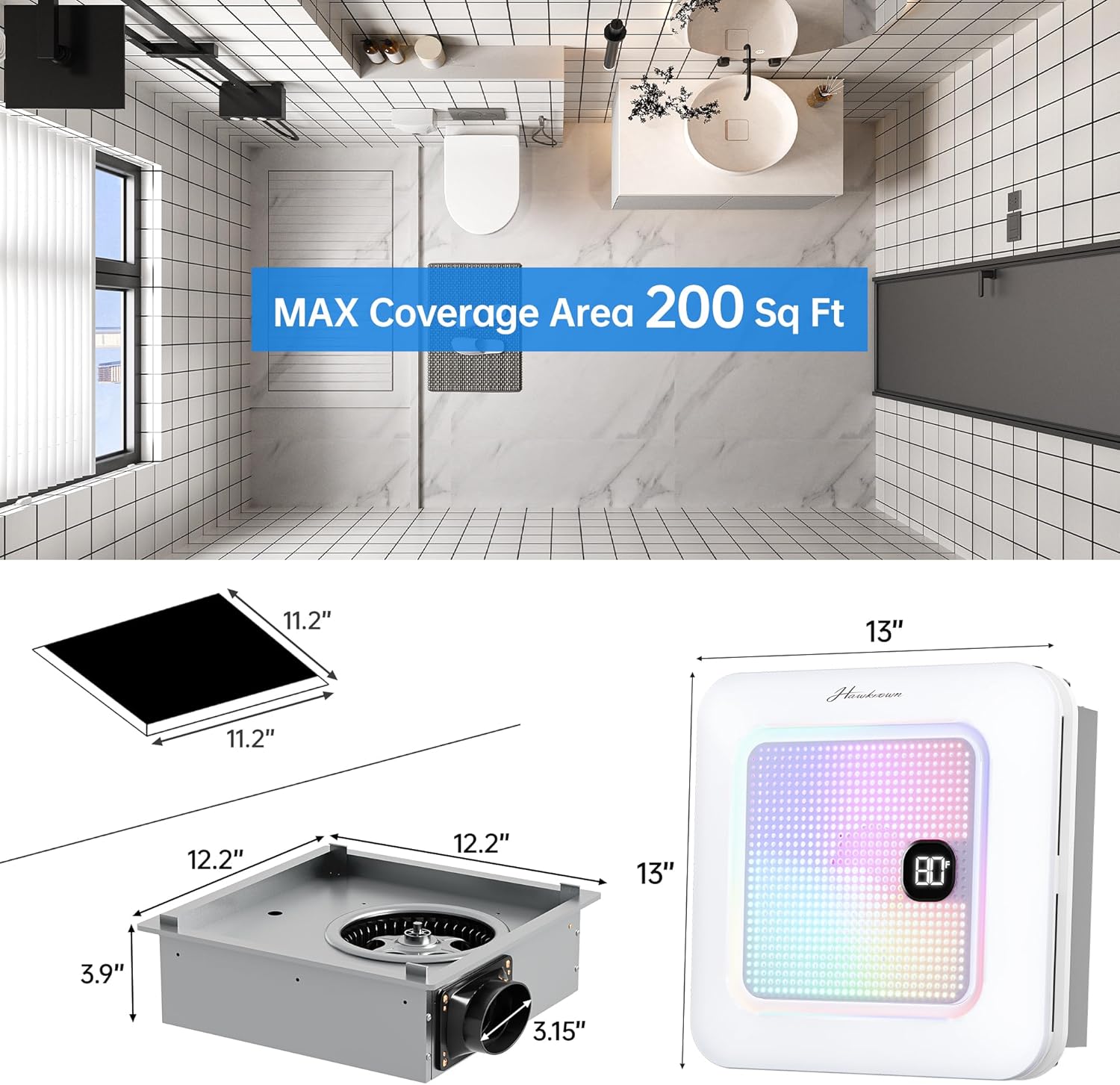
Measure the hole size before installation. The recommended ceiling opening is 11.22" x 11.22".
Adjusting Hole Size (If Necessary)

If the Hole Is Too Small:
- Trace the housing outline onto the ceiling.
- Use a keyhole saw to carefully cut along the marked lines, enlarging the hole to the correct size.
If the Hole Is Too Big:
- Cut a piece of drywall to fill the excess space and fit the fan properly.
- Secure the drywall patch to a sturdy wooden backing for support.
- Insert the patch into the hole and fasten it by driving screws through the ceiling into the wood.
- Cover the patched areas with spackling compound for a smooth finish.
Mounting the Fan

Tilt the machine diagonally when placing it into the ceiling opening. The spring clip design allows for quick and secure installation. Once the main unit is in place, attach the light cover to the machine.
Electrical Connection
The exhaust fan comes with a plug for easy socket connection or can be wired via terminals. Users can choose the connection method based on preference. Ensure all connections are secure and comply with local electrical codes.
Operating Instructions
Remote Control Overview

The remote control operates all functions of the fan. It comes with an adhesive wall mount holder for convenient placement.
| No. | Function |
|---|---|
| 1 | All ON/OFF (Turns off all functions except lighting and night light. Long-press to pair with the main unit.) |
| 2 | RGB ON/OFF |
| 3 | Last Song |
| 4 | Select RGB Mode |
| 5 | Volume up/Volume down |
| 6 | Light ON/OFF |
| 7 | Fan ON/OFF |
| 8 | Play/Pause |
| 9 | Next Song |
| 10 | Brightness up/Brightness down |
| 11 | Color Temp up/Color Temp down |
| 12 | Nightlight ON/OFF (200lm) |
| 13 | 2600lm 3CCT (2700K-4000K-6500K) |
Pairing the Remote Control
After powering on the fan, long press the "All ON/OFF" button (button 1 on the remote). When you hear a beep, it means the pairing is successful.
Ventilation Function

The 230 CFM exhaust fan provides powerful airflow to quickly remove moisture, odors, and steam, preventing mirror fogging. It operates at a quiet 1.0 sone. Press the "Fan ON/OFF" button (button 7) on the remote to control the exhaust fan.
Lighting Functions

The fan features versatile lighting options:
- Stepless Dimming & Color Temperature: Adjust brightness (button 10) and choose between 3000K (warm white), 4500K (neutral white), or 6500K (cool white) color temperatures (button 11).
- Nightlight: A 200lm nightlight provides soft illumination (button 12).
- RGB LED Options: Enjoy 7 RGB LED color options (button 2 for ON/OFF, button 4 to select mode).
- Dynamic Light Modes: Choose from 3 dynamic light modes: Ripple, Breathing, and Music Sync.

This image illustrates the stepless dimming capability and the three available color temperatures (3000K, 4500K, 6500K), as well as the nightlight mode.

This image demonstrates the three dynamic RGB lighting modes: Ripple, Rhythm, and Breathing, which can be selected for a personalized ambiance.
Bluetooth Speaker Function

The built-in Bluetooth speaker allows for audio playback directly from your device.
- First-Time Setup:
- Press the Play/Pause button (center button, No. 8) on the remote.
- Open your phone's Bluetooth settings.
- Select "Hawkrown" to pair.
- Auto Reconnect: Once paired, your device will automatically reconnect every time the exhaust fan is powered on. No need to repeat the setup.
- Music Control: Use the remote to switch songs (buttons 3 & 9), play/pause (button 8), and control volume (button 5).
- Music Sync: The RGB lighting can sync with your music for an immersive experience.
- Memory Mode: The system includes a memory mode to restore previous settings for a seamless experience.
Maintenance
Regular maintenance ensures optimal performance and longevity of your exhaust fan.
- Cleaning the Light Cover: Periodically wipe the light cover with a soft, damp cloth. Do not use abrasive cleaners.
- Cleaning the Fan Grille: Gently vacuum or wipe the fan grille to remove dust and debris.
- Internal Cleaning: For deeper cleaning of the fan blades or motor, it is recommended to consult a qualified technician. Always disconnect power before attempting any internal cleaning.
- Remote Control: Keep the remote control dry and clean. Replace batteries as needed.
Troubleshooting
If you encounter issues with your Hawkrown Bathroom Exhaust Fan, please refer to the following common solutions:
| Problem | Possible Cause | Solution |
|---|---|---|
| Fan not operating | No power; Loose wiring; Remote not paired. | Check circuit breaker. Ensure all electrical connections are secure. Re-pair the remote control by long-pressing the "All ON/OFF" button after powering on. |
| Light not working | Light function off; Power issue. | Press the "Light ON/OFF" button (No. 6) on the remote. Check power supply. |
| Bluetooth not connecting | Not in pairing mode; Already connected to another device; Device too far. | Ensure the fan is powered on and the remote's Play/Pause button has been pressed. Disconnect from other devices. Move your device closer to the fan. |
| Fan is noisy | Obstruction in fan; Loose mounting; Ductwork issues. | Ensure no debris is obstructing the fan blades. Check that the unit is securely mounted in the ceiling. Inspect ductwork for kinks or blockages. |
| Remote control not responding | Low batteries; Not paired. | Replace remote control batteries. Re-pair the remote control with the fan. |
If problems persist, please contact Hawkrown customer service for assistance.
Specifications
| Feature | Detail |
|---|---|
| Brand | Hawkrown |
| Model Name | 230 CFM |
| Color | Ivory |
| Product Dimensions | 12.4"D x 12.4"W x 3.94"H |
| Air Flow Capacity | 230 Cubic Feet Per Minute (CFM) |
| Sone Level | 1.0 Sone |
| Power Source | AC |
| Control Method | Remote |
| Special Features | Quiet Operation, Remote Controlled, Bluetooth Speaker, Dimmable LED Light, 7 LED Colors, 3 Color Temperatures, Nightlight, Digital Display |
| Recommended Room Size | 160 to 230 square feet |
| Certifications | FCC, UL |
| Item Weight | 8 pounds |
Warranty and Support
Hawkrown products are designed for quality and reliability. This product is certified by UL and FCC, ensuring safe and reliable use.
For any questions, concerns, or technical support, please contact Hawkrown customer service. We provide 24-hour online customer service and a worry-free after-sales guarantee, giving you peace of mind throughout your purchase and use.
Please refer to your purchase documentation for specific warranty terms and contact information.
Related documents230 CFM


Ask a question about this manual
Ask about setup, troubleshooting, compatibility, parts, safety, or missing instructions. Manuals+ will review the question and use this page’s manual context to help answer it.