
1. Introduction
This manual provides detailed instructions for the safe operation, installation, maintenance, and troubleshooting of your Durastar DRWHC122XNA1 12,000 BTU Window Air Conditioner with Supplemental Heating. Please read this manual thoroughly before using the appliance and retain it for future reference. Proper use and care will ensure optimal performance and longevity of your unit.
2. Safety Information
Your safety and the safety of others are very important. Please read all safety messages in this manual and on the appliance. Failure to follow these instructions may result in serious injury or death.
- Electrical Requirements: This unit requires a special 230V electrical outlet (NEMA 6-20P). Do not attempt to operate this unit with a standard 115V outlet. Improper electrical connection can cause fire, electric shock, or injury.
- Grounding: Ensure the unit is properly grounded. Do not remove the grounding prong from the power cord.
- Installation: Install the unit according to the installation instructions provided. Ensure the window opening is suitable for the unit's dimensions and that the unit is securely fastened.
- Maintenance: Disconnect power before cleaning or servicing the unit. Do not attempt to repair or replace any part of the unit unless specifically recommended in this manual.
- Children and Pets: Keep children and pets away from the unit during operation.
- Flammable Materials: Do not store or use gasoline or other flammable vapors and liquids in the vicinity of this or any other appliance.
3. Product Overview
The Durastar DRWHC122XNA1 is a versatile window-mounted air conditioner designed to provide both cooling and supplemental heating for areas up to 550 sq. ft. It features multiple operating modes, a remote control, and an energy-saving function.

Front view of the Durastar Window Air Conditioner, showing the main grille and control panel.
Control Panel and Remote Control
The unit can be operated via the integrated control panel or the included remote control. The control panel features a digital display and various buttons for mode selection, temperature adjustment, fan speed, and timer settings.

Detailed view of the control panel on the Durastar Window Air Conditioner, illustrating button functions and indicators.
4. Setup and Installation
Proper installation is crucial for the efficient and safe operation of your air conditioner. This unit is designed for window installation.
Window Requirements
The unit requires a window opening with a minimum height of 16-1/2 inches and a width between 26-13/16 inches and 36 inches. Ensure the window frame is sturdy enough to support the unit's weight (approximately 71.7 pounds).
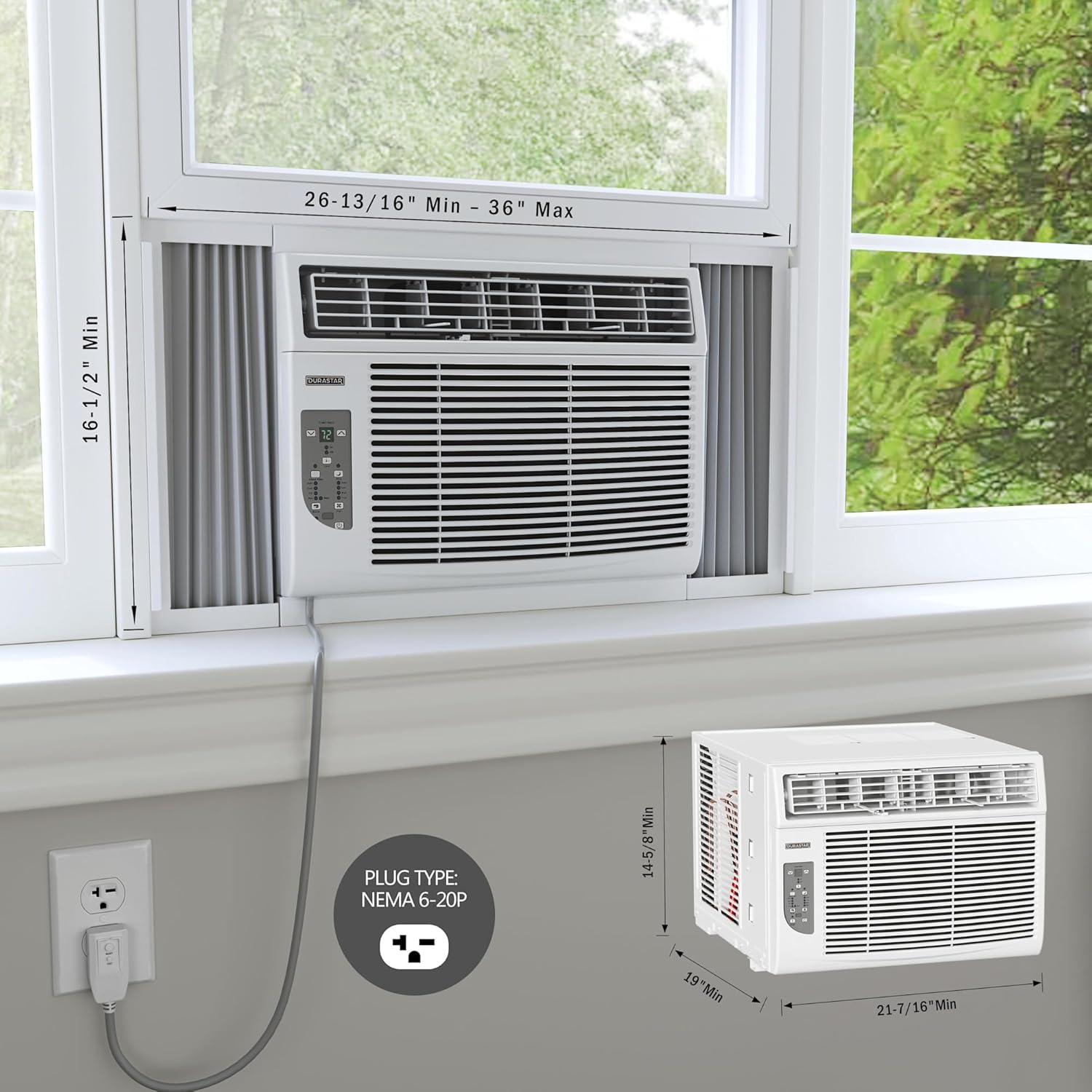
Diagram illustrating the unit's dimensions and the required NEMA 6-20P plug for installation.
Electrical Connection
This air conditioner operates on 230 Volts and requires a dedicated 230V electrical outlet with a NEMA 6-20P receptacle. Do not use extension cords or adapters. Consult a qualified electrician if you are unsure about your electrical setup.

Close-up of the NEMA 6-20P power plug, which is required for this 230V unit.
Installation Steps (Summary)
- Prepare the window opening by cleaning the area.
- Attach the top rail and accordion panels to the unit.
- Carefully place the unit into the window opening, ensuring it is level or slightly tilted outwards for proper drainage.
- Extend the accordion panels to fill the window opening and secure them with screws.
- Install the window sash seal and foam insulation strips to prevent air leakage.
- Secure the unit to the window frame using the provided brackets and screws.
- Plug the unit into the dedicated 230V NEMA 6-20P outlet.
Refer to the detailed installation guide included with your product for complete step-by-step instructions and diagrams.
5. Operating Instructions
Your Durastar air conditioner offers various modes and settings to optimize your comfort.
Operating Modes
- Cool Mode: Provides 12,000 BTU of cooling power. Adjust the temperature setting to your desired level.
- Heat Mode: Provides 11,000 BTU of supplemental heating. Use this mode for additional warmth.
- Fan Mode: Circulates air without cooling or heating. Select from Low, Medium, or High fan speeds.
- Dry Mode (Dehumidify): Reduces humidity in the room. The fan speed is automatically controlled in this mode.
- Auto Mode: The unit automatically selects the appropriate operating mode (Cool, Heat, or Fan) and fan speed based on the room temperature and your set temperature.
Additional Features
- Energy Saver Mode: When activated, the fan will turn off when the compressor cycles off. The fan will periodically turn on to sample the room air.
- Sleep Mode: Gradually increases the set temperature (in cooling mode) or decreases it (in heating mode) over several hours to save energy and provide comfortable sleeping conditions.
- Timer Function: Program the unit to turn on or off automatically after a set period (up to 24 hours).
- Follow Me Feature: (If applicable, check remote control) The remote control acts as a thermostat, sensing the temperature at its location and adjusting the unit's operation accordingly for more precise comfort.
- 4-Way Air Directional Louvers: Adjust the horizontal and vertical direction of the airflow to optimize distribution.
6. Maintenance
Regular maintenance ensures efficient operation and extends the life of your air conditioner.
Air Filter Cleaning
The air filter should be cleaned every two weeks or more frequently depending on usage and air quality. A dirty filter can reduce cooling/heating efficiency and airflow.
- Disconnect power to the unit before cleaning.
- Open the front panel and remove the air filter.
- Wash the filter with warm, soapy water. Rinse thoroughly.
- Allow the filter to dry completely before reinstalling.
- The "Check Filter" indicator light will illuminate after a certain period of operation to remind you to clean the filter. Reset it after cleaning.
General Cleaning
Wipe the cabinet with a soft, damp cloth. Do not use harsh chemicals, abrasives, or waxes. Ensure no water enters the electrical components.
7. Troubleshooting
Before contacting customer service, review the following common issues and their solutions.
| Problem | Possible Cause | Solution |
|---|---|---|
| Unit does not turn on. | No power, circuit breaker tripped, incorrect voltage (115V instead of 230V). | Check power cord connection. Reset circuit breaker. Ensure unit is plugged into a 230V NEMA 6-20P outlet. |
| Unit not cooling/heating effectively. | Dirty air filter, blocked air intake/exhaust, room too large, doors/windows open. | Clean air filter. Clear obstructions. Close doors/windows. Ensure unit is appropriately sized for the room. |
| Excessive noise. | Loose installation, fan blade obstruction, normal operating sounds. | Check installation for secure fit. Remove any obstructions. Some operational noise (e.g., fan, compressor) is normal. |
| Water dripping inside. | Unit not tilted slightly outwards, drain plug blocked. | Ensure unit is slightly tilted to the outside for proper condensation drainage. Check and clear drain plug if accessible. |
8. Specifications
Technical specifications for the Durastar DRWHC122XNA1 Window Air Conditioner.
| Feature | Specification |
|---|---|
| Model Number | DRWHC122XNA1 |
| Cooling Capacity | 12,000 BTU |
| Heating Capacity | 11,000 BTU |
| Voltage | 230 Volts |
| Cooling Area Coverage | 450-550 sq. ft. |
| Product Dimensions (D x W x H) | 19"D x 21.44"W x 14.63"H |
| Item Weight | 71.7 pounds |
| Noise Level | 61 dB |
| Seasonal Energy Efficiency Ratio (SEER) | 10.9 |
| Refrigerant Type | R-32 |
| Included Components | Product Only (includes remote control, installation hardware, weather seals) |
9. Warranty and Support
Manufacturer's Warranty
This Durastar air conditioner is covered by a 2-Year Manufacturer's Warranty. This warranty covers defects in materials and workmanship under normal use. Please retain your proof of purchase for warranty claims.
Customer Support
For technical assistance, warranty claims, or questions not covered in this manual, please contact Durastar customer support. Refer to the contact information provided on the product packaging or the official Durastar website.


