
1. Introduction
The VIHELM BLE-YC02 is a multi-functional water quality testing device designed to accurately measure pH, Salinity, and Oxidation-Reduction Potential (ORP) in various water environments. This device is suitable for monitoring water quality in pools, aquariums, and other applications. It features a high-precision probe, USB charging, a reset button, and an integrated solar panel for convenient power options. Data can be accessed and monitored via a dedicated smartphone application.
2. Safety Information
- Read all instructions before operating the device.
- Keep the device away from extreme temperatures and direct sunlight when not in use.
- Ensure the USB charging port is dry before connecting a charging cable.
- Do not attempt to disassemble or modify the device, as this may void the warranty and cause damage.
- Handle the probe with care to avoid damage.
3. Product Overview
The BLE-YC02 meter integrates several key components for its operation and functionality.
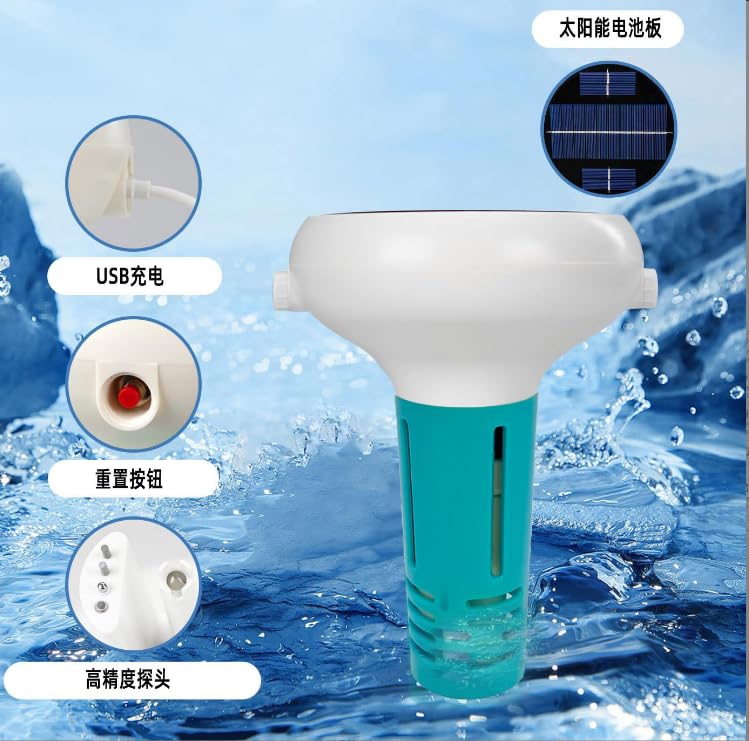
Figure 3.1: Key components of the BLE-YC02 meter, including the USB charging port, reset button, high-precision probe, and solar panel.
- Solar Panel: Located on the top surface, provides supplementary power and extends battery life.
- USB Charging Port: For charging the internal battery using a standard USB cable.
- Reset Button: Used to reset the device to factory settings or troubleshoot connectivity issues.
- High-Precision Probe: The submerged part of the device responsible for taking measurements.
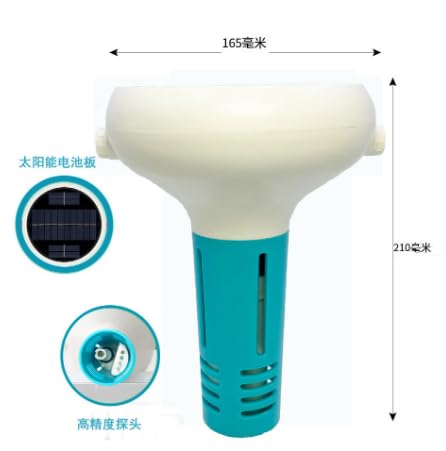
Figure 3.2: Physical dimensions of the BLE-YC02 meter, showing a width of 165mm and a height of 210mm.
4. Setup
4.1 Initial Charging
Before first use, fully charge the device using the provided USB cable. Connect the cable to the USB charging port on the device and to a standard USB power adapter (not included). The solar panel will also contribute to charging when exposed to sunlight.
4.2 App Installation and Connection
- Download the official VIHELM water quality monitoring application from your smartphone's app store (iOS or Android).
- Ensure your smartphone's Bluetooth is enabled.
- Power on the BLE-YC02 device.
- Open the application and follow the on-screen instructions to search for and connect to your BLE-YC02 device via Bluetooth.
- Once connected, the app will display real-time data from the meter.
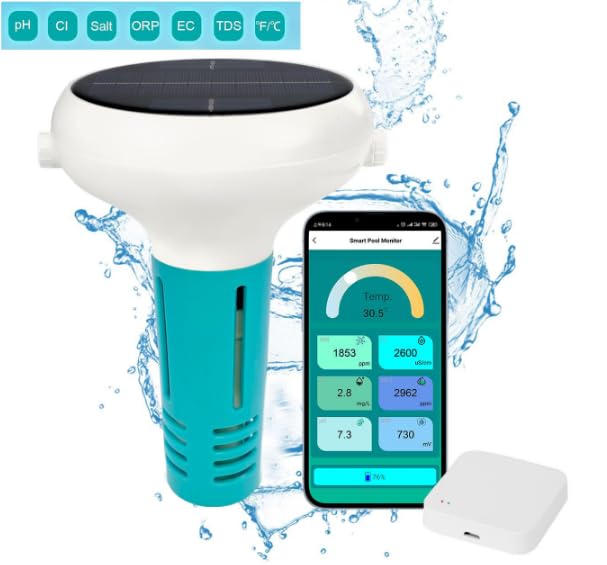
Figure 4.1: The BLE-YC02 meter wirelessly connected to its smartphone application, showing various water quality readings.
5. Operating Instructions
5.1 Taking Measurements
- Ensure the device is charged and connected to the smartphone app.
- Carefully place the BLE-YC02 meter into the water you wish to test, ensuring the high-precision probe is fully submerged.
- Allow a few moments for the readings to stabilize.
- View the real-time pH, Salinity, ORP, EC, TDS, and Temperature readings directly on your smartphone application.
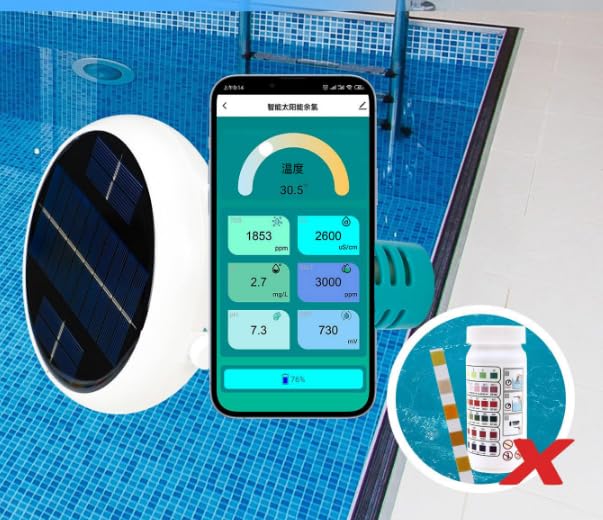
Figure 5.1: The BLE-YC02 meter in a pool, demonstrating its use for water quality monitoring without the need for chemical test strips.
5.2 Data Monitoring
The application provides a comprehensive interface for monitoring and recording data. You can view daily, weekly, and monthly trends for all measured parameters.
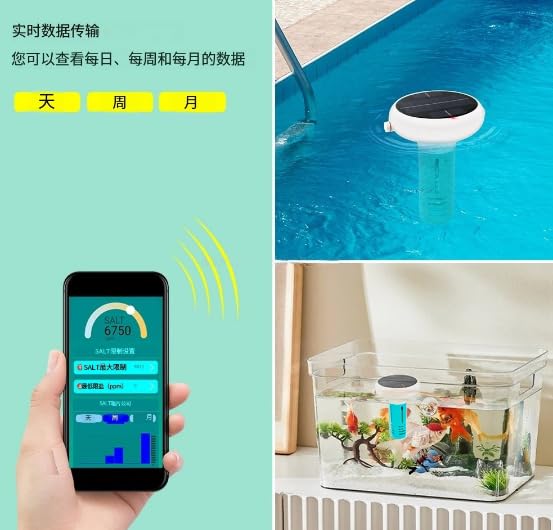
Figure 5.2: The BLE-YC02 meter in various water environments, with the app showing real-time data and historical trends.
6. Calibration
For accurate readings, regular calibration of the pH and Salinity functions is recommended. Refer to the in-app instructions for specific calibration procedures.
6.1 pH Calibration (General Steps)
- Prepare standard pH buffer solutions (e.g., pH 4.00, pH 7.00, pH 10.00).
- Rinse the probe with distilled water and blot dry.
- Submerge the probe in the first buffer solution (e.g., pH 7.00).
- Access the calibration function in the app and follow prompts to calibrate to the known pH value.
- Repeat with other buffer solutions as required for multi-point calibration.
6.2 Salinity Calibration (General Steps)
- Prepare a standard salinity solution of known concentration.
- Rinse the probe with distilled water and blot dry.
- Submerge the probe in the standard salinity solution.
- Access the calibration function in the app and follow prompts to calibrate to the known salinity value.
7. Maintenance
7.1 Probe Cleaning
After each use, rinse the probe thoroughly with distilled or deionized water to remove any residue. Do not use abrasive materials or harsh chemicals, as this can damage the sensor.
7.2 Storage
Store the device in a cool, dry place when not in use. Ensure the probe is kept moist by using a storage solution or by placing a small amount of distilled water in the probe cap (if applicable) to prevent the sensor from drying out.
8. Troubleshooting
- Device not turning on: Ensure the device is fully charged. Connect it to a USB power source and allow it to charge for at least 2 hours.
- Cannot connect to app: Ensure Bluetooth is enabled on your smartphone and the device is within range. Try restarting both the device and the app. If issues persist, use the reset button on the device.
- Inaccurate readings: Calibrate the device according to the instructions in Section 6. Ensure the probe is clean and free of debris. Check if the probe is fully submerged in the water sample.
- App not displaying data: Verify the device is connected via Bluetooth. Check for app updates and ensure your phone's operating system is compatible.
9. Specifications
| Parameter | Detail |
|---|---|
| Model Number | BLE-YC02 |
| Manufacturer | VIHELM |
| Measured Parameters | pH, Salinity, ORP, EC, TDS, Temperature |
| Connectivity | Bluetooth Low Energy (BLE) |
| Power Source | USB Rechargeable, Solar Panel |
| Included Components | BLE-YC02 x1 |
10. Warranty and Support
For warranty information and technical support, please refer to the documentation provided with your purchase or contact VIHELM customer service directly. Contact details can typically be found on the manufacturer's website or within the product packaging.