
1. Introduction and Overview
This manual provides essential information for the installation and maintenance of your Kircuit Control Bracket replacement part. This component is designed to restore the functionality of specific KitchenAid microwave models by replacing a damaged or worn control bracket.
The Kircuit Control Bracket is engineered for universal compatibility with the listed models, ensuring a straightforward replacement process and helping to extend the lifespan of your appliance while preserving its original features and settings.
2. Compatibility
This replacement control bracket is compatible with the following KitchenAid microwave models:
- KHMS145KSS0
- KHMS145KSS1
- KHMS155LBL0
- KHMS155LBL1
- KHMS155LBL2
- KHMS155LBL3
- KHMS155LBT0
- KHMS155LBT1
Please verify your microwave's model number before proceeding with installation to ensure proper fit and function. The model number is typically located on a label inside the microwave door frame or on the back of the appliance.
3. Safety Information
WARNING: Before attempting any repair or replacement on an electrical appliance, always disconnect the power supply to the appliance. Failure to do so can result in electric shock, serious injury, or death.
- Ensure the microwave is unplugged from the wall outlet or the circuit breaker is turned off.
- Wear appropriate personal protective equipment, such as gloves, if necessary.
- If you are unsure about any step of the installation process, consult a qualified appliance repair technician.
- Keep small parts away from children.
4. Installation Guide
This section outlines the general steps for replacing the control bracket. Specific disassembly and reassembly procedures may vary slightly depending on your exact microwave model. Refer to your microwave's service manual for detailed instructions if available.
4.1 Required Tools
- Screwdriver set (Phillips and/or flathead)
- Pliers (optional, for stubborn connections)
- Work gloves (recommended)
4.2 Step-by-Step Installation
- Disconnect Power: Unplug the microwave from the electrical outlet or turn off the circuit breaker supplying power to the microwave.
- Access the Control Panel: Depending on your model, this may involve removing screws from the top, side, or bottom of the microwave to release the outer casing or the control panel assembly.
- Locate the Existing Bracket: Identify the damaged or faulty control bracket. It typically supports the control board or other components behind the control panel.
- Disconnect Components: Carefully disconnect any wires or components attached to the old bracket. Take photos if necessary to remember the connections.
- Remove Old Bracket: Unscrew and remove the old control bracket.
- Install New Bracket: Position the Kircuit replacement control bracket in place and secure it with the original screws. Ensure it is firmly seated.
- Reconnect Components: Reattach all wires and components to the new bracket as they were originally connected. Double-check all connections for security.
- Reassemble Microwave: Carefully reassemble the control panel and outer casing of the microwave, ensuring all screws are tightened.
- Restore Power: Plug the microwave back into the electrical outlet or turn on the circuit breaker.
- Test Functionality: Test the microwave's control panel and functions to ensure proper operation.
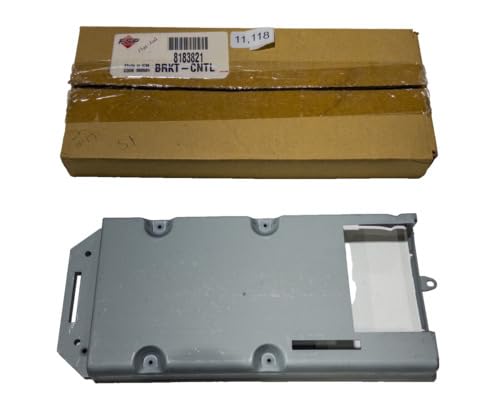
Image 1: The Kircuit Control Bracket replacement part, shown with its packaging. The bracket is a grey metal component with various mounting points and cutouts, designed to securely hold internal microwave components.
5. Operating Considerations
As a structural component, the control bracket itself does not have operational controls. Its proper installation ensures the stable and correct functioning of your microwave's control panel and internal electronics. Once installed, the microwave should operate as intended, with all original features accessible and responsive.
6. Maintenance
The Kircuit Control Bracket is designed for durability and typically requires no specific maintenance after installation. However, during any future internal servicing of your microwave, it is advisable to:
- Inspect for Damage: Check the bracket for any signs of corrosion, bending, or stress cracks.
- Ensure Secure Fastening: Verify that all screws securing the bracket are tight.
- Clean: If accessible and necessary, gently wipe away any dust or debris from the bracket and surrounding components using a dry, soft cloth.
7. Troubleshooting
If you encounter issues after installing the replacement control bracket, consider the following:
- Microwave Not Powering On:
- Ensure the microwave is fully plugged in and the circuit breaker is on.
- Double-check all electrical connections made during installation.
- Control Panel Not Responding:
- Verify that the control board is correctly seated on the new bracket and all ribbon cables or wires are securely connected.
- Ensure no wires are pinched or damaged during reassembly.
- Bracket Does Not Fit:
- Reconfirm your microwave's model number against the compatibility list in Section 2.
- Ensure the bracket is oriented correctly.
For persistent issues, it is recommended to consult a professional appliance repair technician.
8. Specifications
| Product Name: | Control Bracket Replacement Part |
| Brand: | Kircuit |
| Compatible Models: | KitchenAid KHMS145KSS0, KHMS145KSS1, KHMS155LBL0, KHMS155LBL1, KHMS155LBL2, KHMS155LBL3, KHMS155LBT0, KHMS155LBT1 |
| Material: | Metal (as depicted) |
| ASIN: | B0DQ8FHRQ4 |
| Manufacturer: | Kircuit |
9. Warranty and Support
For warranty information or technical support regarding your Kircuit Control Bracket replacement part, please refer to the documentation provided with your purchase or contact the seller directly. Kircuit aims to provide reliable replacement parts to ensure the longevity and performance of your appliances.
For general inquiries or further assistance, you may visit the Kircuit store on Amazon.