
1. Introduction
Thank you for choosing the OMAIC Rechargeable Voice Remote Control. This manual provides detailed instructions for the setup, operation, and maintenance of your new remote controls (models BN59-01432A and BN59-01312A). These remotes are designed to be compatible with a wide range of Samsung Smart TVs, offering convenient control and voice functionality.

Image: The OMAIC BN59-01432A and BN59-01312A remote controls.
2. Package Contents
Your package should contain the following items:
- 1 x OMAIC BN59-01432A Rechargeable Voice Remote Control
- 1 x OMAIC BN59-01312A Voice Remote Control
- 1 x User Manual (this document)
3. Specifications
| Feature | Description |
|---|---|
| Brand | OMAIC |
| Model Numbers | BN59-01432A, BN59-01312A |
| Special Feature | Voice Search |
| Color | Black |
| Max Supported Devices | 2 (per remote) |
| Compatible Devices | Samsung Televisions, Samsung Smart TVs |
| Connectivity | Wireless |
| Rechargeable (BN59-01432A) | USB Type-C port |
| Operating Distance | Up to 45 feet (approx. 13.7 meters) |
| Response Time | 0.1 seconds |

Image: Key features and specifications of the OMAIC remote controls.
4. Setup and Pairing
Before first use, please ensure the BN59-01432A rechargeable remote is fully charged. Charging typically takes 1-2 hours via its USB Type-C port.
4.1. Pairing the Remote Control
Both BN59-01432A and BN59-01312A remotes use the same pairing method:
- Ensure your Samsung Smart TV is powered on.
- Point the remote control towards your TV.
- Press and hold the Back (
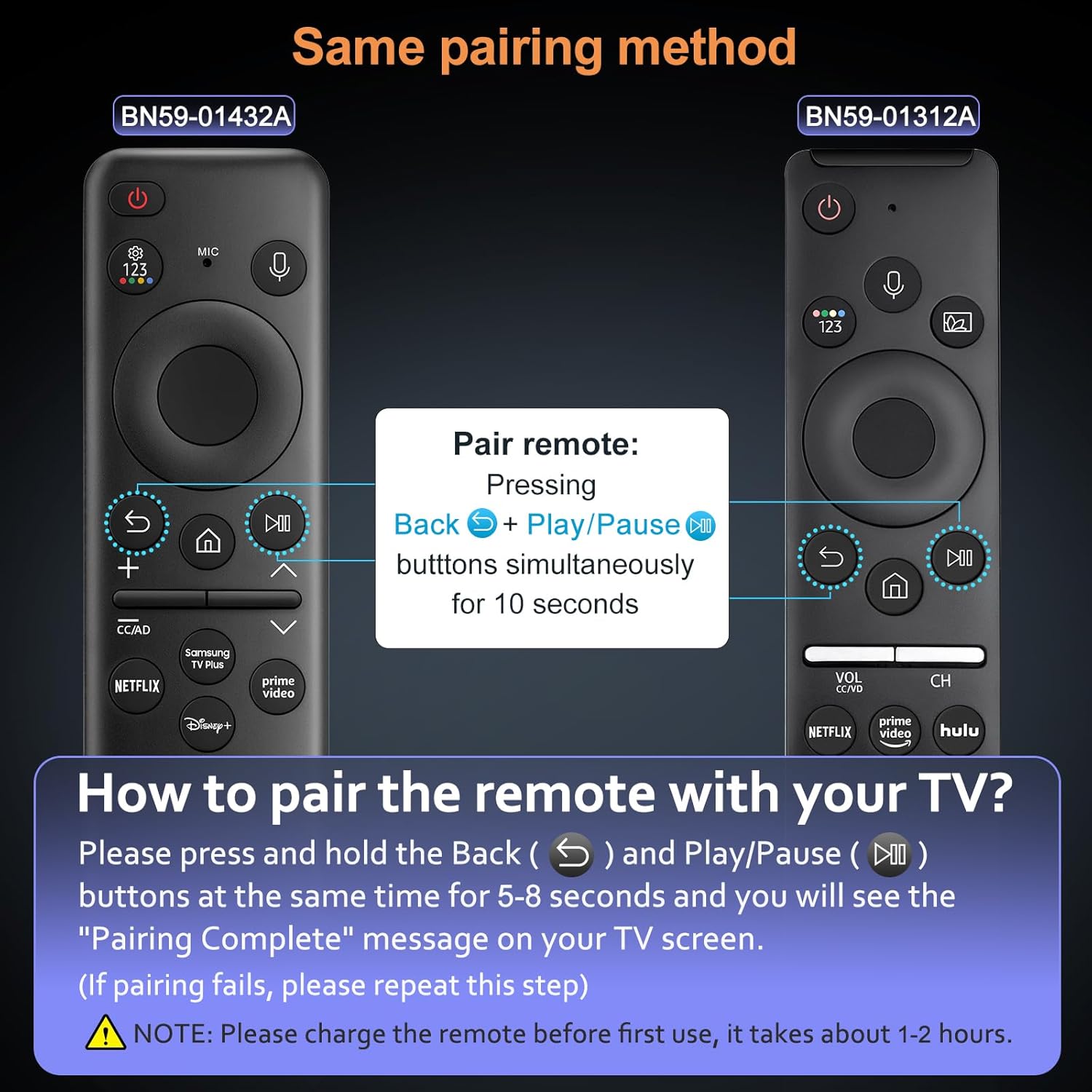 ) and Play/Pause () buttons simultaneously for 5-8 seconds.
 - A "Pairing Complete" message should appear on your TV screen, indicating successful pairing.
Note:
- If pairing fails, please repeat the steps.
- The voice function requires your TV to support this feature. Please check your TV settings if the voice function does not work after pairing.
Image: Visual guide for pairing the OMAIC remote control with a Samsung TV.
5. Operating Instructions
5.1. Voice Function
The voice function allows you to control your TV using voice commands. To use this feature:
- Press and hold the Microphone button (
 ) on the remote control.
 - Speak your command clearly into the remote. For example, "Turn the volume up to 20" or "Open Netflix."
- Release the Microphone button when you are finished speaking.
Ensure your TV's voice assistant is enabled and configured for optimal performance.
Image: User demonstrating the voice control feature of the remote.
5.2. Shortcut Buttons
Both remote models feature dedicated shortcut buttons for quick access to popular streaming services:
- Netflix: Directly opens the Netflix application.
- Prime Video: Directly opens the Amazon Prime Video application.
- Hulu: Directly opens the Hulu application.
- Samsung TV Plus / Disney+: Depending on the remote model, one of these buttons will directly open the respective application.

Image: Shortcut buttons for popular streaming services on the OMAIC remote controls.
6. Charging (BN59-01432A Only)
The BN59-01432A remote control is rechargeable via a USB Type-C port, eliminating the need for frequent battery replacements.
6.1. Charging Procedure
- Locate the USB Type-C port on the bottom edge of the BN59-01432A remote control.
- Connect a standard USB Type-C charging cable (not included) to the remote's port.
- Connect the other end of the cable to a USB power source (e.g., wall adapter, computer USB port).
- The remote's indicator light (if present) may show charging status.
- A full charge typically takes 1-2 hours.
It is recommended to fully charge the remote before its first use to ensure optimal battery life.

Image: The USB Type-C charging port on the BN59-01432A remote control.
7. Compatibility
These OMAIC remote controls are compatible with a wide range of Samsung Smart TVs. The voice function specifically requires your TV to support voice commands.
7.1. Compatible Samsung TV Models (Partial List)
- QE1C, QN990C, LST9C, S90C, Q80C, Q80CD, CU8000D, Q70CD, QN85CD, QN90CD, Q60C, QN800C, QN900C, CU8000, QN850C, Q70C, QN85C, QN90C, S95C
- Q80D, Q70D, Q60D, DU8000, QN90D, QN85D, S90D, S95D, QN800D, QN900D, LS03D, LS03B, LS03C
- M70C, S9, M80C, M50C, LSP3B, G85SB, G7, G70B, G65B, M70B, M8
- And other Samsung Smart TV models that support BN59-01330A, BN59-01312B, BN59-01312D, BN59-01312E, BN59-01312F, BN59-01330B, BN59-01330C, BN59-01330N, BN59-01330Q, BN59-01329A, BN59-01329C, BN59-01329F, BN59-01455A, BP59-00149A, BN59-01456A, BN59-01385A, BN59-01391A, BN59-01330H, BN59-01363A, BN59-01357A remotes.
Please verify your TV's model number and voice function support for full compatibility.

Image: OMAIC remotes compatible with various Samsung Smart TV models.
8. Troubleshooting
| Problem | Possible Cause | Solution |
|---|---|---|
| Remote not pairing | Incorrect pairing procedure, low battery (BN59-01432A) | Ensure BN59-01432A is charged. Repeat pairing steps (hold Back and Play/Pause for 5-8 seconds). Ensure TV is on. |
| Voice function not working | TV does not support voice function, remote not paired correctly, microphone blocked | Verify your TV model supports voice control. Re-pair the remote. Ensure nothing is obstructing the microphone on the remote. |
| Remote unresponsive | Low battery (BN59-01432A), remote out of range, interference | Charge BN59-01432A. Move closer to the TV (within 45 feet). Remove any obstructions between the remote and TV. |
| Shortcut buttons not working | App not installed on TV, TV not connected to internet | Ensure the respective app (Netflix, Prime Video, Hulu, etc.) is installed and updated on your Samsung TV. Verify your TV has an active internet connection. |
9. Maintenance
- Cleaning: Use a soft, dry cloth to clean the remote control. Do not use liquid cleaners or abrasive materials.
- Storage: Store the remote in a cool, dry place away from direct sunlight and extreme temperatures.
- Battery Care (BN59-01432A): For optimal battery life, avoid fully discharging the remote frequently. Charge it when the battery indicator is low.
- Avoid Drops: Protect the remote from drops and impacts, which can damage internal components.
10. Warranty and Support
OMAIC provides a 90-day after-sales service for this product. If you encounter any issues or have questions regarding your remote controls, please contact our customer support team.
We are committed to responding within 12 hours and will endeavor to resolve any problems as quickly as possible.
For support, please refer to the contact information provided with your purchase or visit the OMAIC brand store on Amazon.