
1. Introduction
This manual provides comprehensive instructions for the safe and effective use of the BUUBO Portable NH3 Ammonia Gas Detector, Model 2255800909010927. This device is designed for real-time detection of ammonia (NH3) gas, offering high precision and reliability in various industrial and domestic environments. Please read this manual thoroughly before operating the device and retain it for future reference.
2. Safety Information
- Always operate the device in accordance with local safety regulations and guidelines.
- Do not attempt to open or modify the device, as this may compromise its explosion-proof integrity and void the warranty.
- Ensure the device is fully charged before use to guarantee continuous operation.
- Regularly check the device for any signs of damage. Do not use if damaged.
- The device is explosion-proof (Exib IIC T4 Gb) and protected against dust and water (IP65), but it should not be submerged in water.
- Calibration should be performed periodically to maintain accuracy.
3. Package Contents
Verify that all items listed below are present in your package:
- 1 x NH3 Gas Monitor
- 1 x English User Manual
- 1 x Charging Adaptor
- 1 x USB Charging Cable
- 1 x Calibration Cover
- 1 x Metal Aluminum Box (for storage)
4. Product Overview
The BUUBO Portable NH3 Ammonia Gas Detector is a robust and reliable device designed for accurate gas detection. It features a high-definition display and multiple alarm methods to ensure user safety.

Figure 4.1: Front view of the BUUBO Portable NH3 Ammonia Gas Detector, showing the display and control buttons.

Figure 4.2: The gas detector highlighting its four alarm methods: light, sound, vibration, and display alerts.
Key Features:
- Industrial-grade Sensor: High precision for real-time data and strong stability.
- Four Alarm Methods: Sound, light, vibration, and screen display alerts. Alarm values are adjustable, and the sound exceeds 80dB.
- Rechargeable Battery: 3.7V 1800mAh lithium battery provides over 10 hours of continuous operation (7+ hours for gas detection). Charging time is less than 5 hours.
- Durable Construction: Made from high-strength ABS material, explosion-proof.
- Compact and Portable: Designed for easy handling and use in harsh environments.
5. Setup
5.1 Charging the Device
- Connect the USB charging cable to the charging port on the device.
- Connect the other end of the USB cable to the provided charging adaptor.
- Plug the adaptor into a standard power outlet.
- The battery indicator on the display will show charging status. A full charge typically takes less than 5 hours.
5.2 Powering On/Off
- To Power On: Press and hold the power button (usually the central button below the display) for a few seconds until the screen illuminates.
- To Power Off: Press and hold the power button again until the device shuts down.
6. Operating Instructions
6.1 Understanding the Display
The HD display provides real-time information about gas concentration, battery status, time, and environmental conditions.
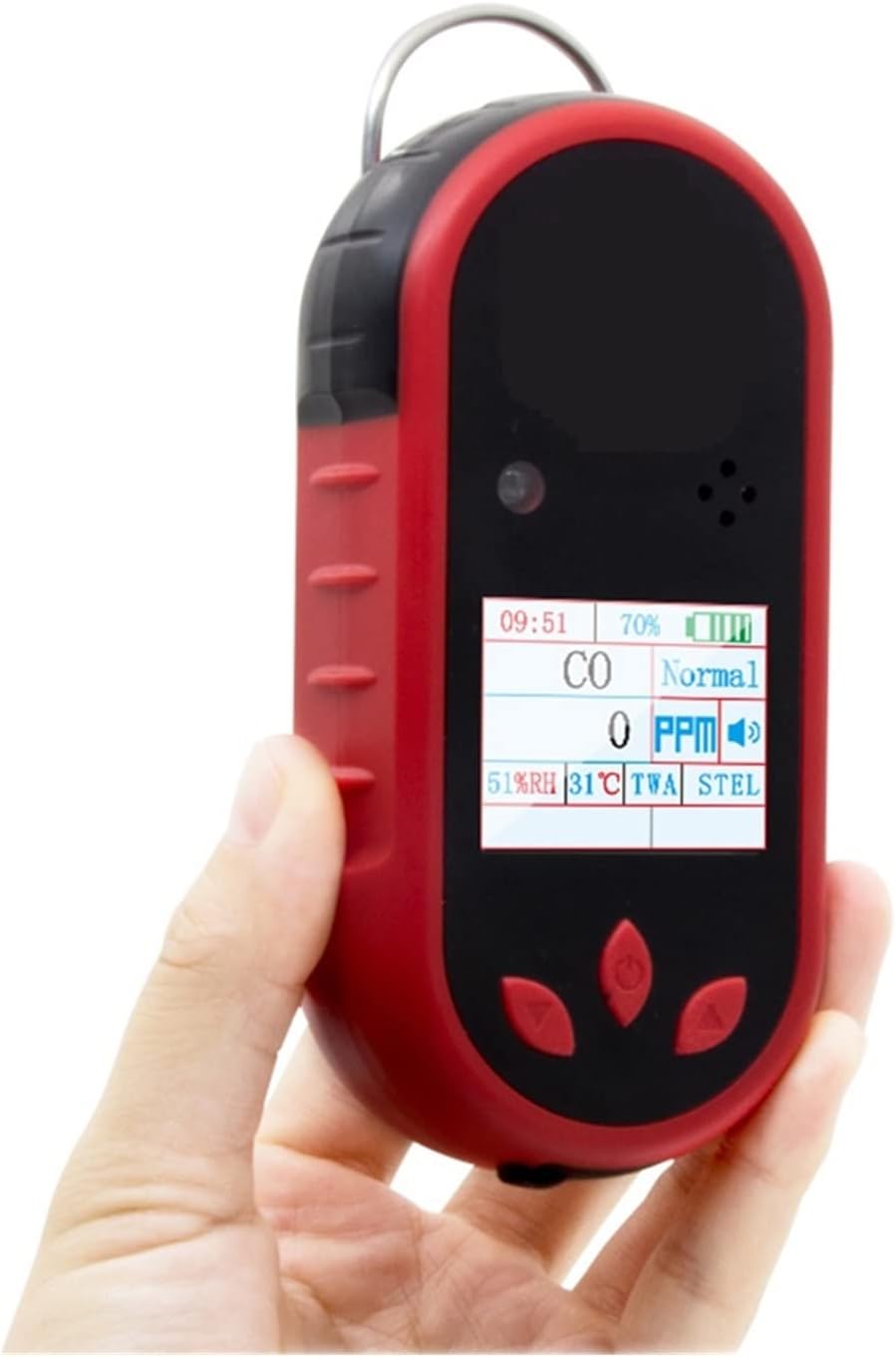
Figure 6.1: A close-up view of the device's display, showing readings for CO (Carbon Monoxide), PPM (Parts Per Million), battery level, and environmental data.
- Gas Type: Indicates the gas being detected (e.g., NH3).
- Concentration: Displays the current gas concentration in PPM (Parts Per Million).
- Battery Indicator: Shows the remaining battery life.
- Time/Date: Current time and date.
- Environmental Data: May include humidity (RH) and temperature.
- TWA/STEL: Time-Weighted Average and Short-Term Exposure Limit indicators.
6.2 Gas Detection
Once powered on, the device will automatically begin detecting NH3 gas. Ensure the sensor area is clear of obstructions.
6.3 Alarm Methods
The detector employs four distinct alarm methods:
- Sound Alarm: An audible alert exceeding 80dB.
- Light Flashing: A visual flashing light on the device.
- Vibrating Alert: The device will vibrate.
- Screen Display: The display will show an alarm message or change color.
6.4 Setting Alarm Values
The high and low alarm values can be adjusted through the device's menu. Refer to the on-screen menu for navigation and adjustment. Typically, this involves using the navigation buttons to select "Alarm Set" and then adjusting the desired thresholds.

Figure 6.2: The device's menu interface, showing options for settings including alarm thresholds.
7. Maintenance
7.1 Cleaning
Wipe the device with a soft, damp cloth. Do not use abrasive cleaners or solvents. Ensure no liquid enters the sensor or charging ports.
7.2 Calibration
Regular calibration is essential for maintaining the accuracy of the gas detector. Use the provided calibration cover and follow the calibration procedure outlined in the device's on-screen menu or a separate calibration guide if available. It is recommended to calibrate the device at least once every 6-12 months, or more frequently depending on usage and environmental conditions.
7.3 Storage
When not in use, store the device in the provided metal aluminum box in a cool, dry place, away from direct sunlight and extreme temperatures.
8. Troubleshooting
| Problem | Possible Cause | Solution |
|---|---|---|
| Device does not power on. | Low battery or faulty battery. | Charge the device fully. If problem persists, contact support. |
| Inaccurate readings. | Sensor contamination or calibration required. | Clean the sensor area. Perform a calibration. |
| Alarm not sounding/flashing/vibrating. | Alarm settings incorrect or hardware issue. | Check alarm settings in the menu. Ensure volume/vibration is enabled. |
| Display not working. | Device malfunction. | Restart the device. If problem persists, contact support. |
9. Specifications
| Feature | Detail |
|---|---|
| Gas Type | Single Gas Detector (NH3 Ammonia) |
| Gas Measurement Range | 0-50 ppm |
| Alarm Methods | Sound (>80dB), Light Flashing, Vibrating Alert, Screen Display |
| Operating Temperature | -20°C to 50°C (except LEL sensor: 0°C to 40°C) |
| Operating Humidity | <95% RH (non-condensing) |
| Display | HD Display |
| Power Source | Built-in 3.7V Li-battery (1800mAh) |
| Battery Runtime | Approximately 10 hours (7+ hours for gas detection) |
| Charging Time | Less than 5 hours |
| Product Net Weight | 227g (with battery) / 1.76 ounces (50 Grams) |
| Product Dimensions | 140mm × 64mm × 34mm (L × W × H) |
| Explosion-proof Mark | Exib IIC T4 Gb |
| Protection Class | IP65 |
| Record Storage | 1000 groups of alarm records |
| Model Number | 2255800909010927 |

Figure 9.1: The device's compact size (124mm length, 175g weight) and various application environments such as chemical plants, collieries, pipelines, gas stations, labs, and storage facilities.
10. Warranty and Support
Specific warranty details are not provided in this manual. For warranty information, technical support, or service inquiries, please contact your retailer or the manufacturer directly using the contact information provided at the point of purchase.