
1. Introduction
The LEMEGA DAB GO is a compact and portable digital radio designed for versatile listening. It supports DAB, DAB+, and FM radio, and features Bluetooth connectivity for streaming audio from your devices. With a built-in rechargeable battery providing up to 15 hours of playback, a vibrant color display, and convenient functions like dual alarms and a sleep timer, the DAB GO is suitable for use in various settings, from your kitchen to outdoor spaces.
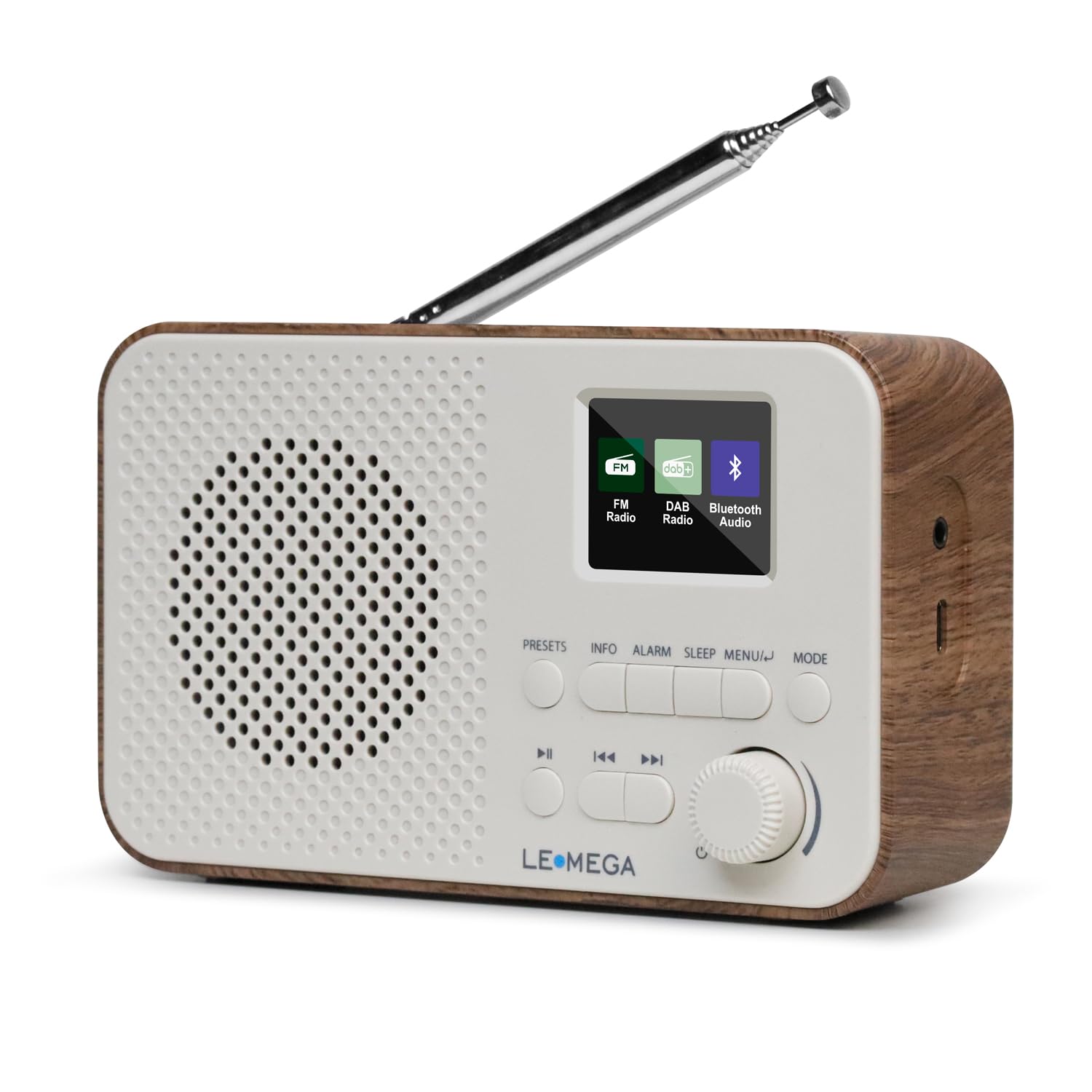
Front view of the LEMEGA DAB GO portable digital radio, showcasing its compact design, speaker grille, color display, and control buttons.
2. Safety Information
- Do not expose the unit to rain, moisture, or extreme temperatures.
- Avoid placing the unit near heat sources or in direct sunlight.
- Use only the supplied USB-C cable for charging.
- Do not attempt to disassemble or modify the unit. This will void the warranty.
- Keep out of reach of children.
3. Package Contents
Please check that all items are present:
- 1 x LEMEGA DAB GO Portable Digital Radio
- 1 x USB-C Power Cable
- 1 x User Manual (this document)

An image illustrating the package contents, including the LEMEGA DAB GO radio, USB-C cable, and user manual. Also shown are the product dimensions: 16.0cm (width), 9.5cm (height), and 6.0cm (depth).
4. Product Overview
Familiarize yourself with the controls and features of your LEMEGA DAB GO radio.

Detailed view of the LEMEGA DAB GO radio's control panel, including the 'Presets', 'Info', 'Alarm', 'Sleep', 'Menu', 'Mode' buttons, and the multi-function rotary knob for volume and selection. The color display shows station information.
Control Buttons and Functions:
- Presets: Short press to recall preset stations. Long press to store current station.
- Info: Display detailed information about the current station or track.
- Alarm: Set and manage alarm functions.
- Sleep: Activate or adjust the sleep timer.
- Menu: Access system settings and options.
- Mode: Switch between DAB, FM, and Bluetooth modes.
- Rotary Knob (Volume/Select): Turn to adjust volume, navigate menus, or tune stations. Press to confirm selections or play/pause.
- Skip/Tune Buttons (<< / >>): Navigate tracks in Bluetooth mode or manually tune frequencies in FM mode.
5. Setup
5.1. Charging the Battery
Before first use, fully charge the internal rechargeable battery. Connect the supplied USB-C cable to the radio's USB-C port and the other end to a standard USB power adapter (not supplied). The charging indicator on the display will show the charging status. A full charge provides up to 15 hours of playback, depending on usage and volume level.
5.2. Initial Power On
- Extend the telescopic antenna for optimal reception.
- Press and hold the Power button (integrated into the rotary knob) to turn on the radio.
- The radio will guide you through initial setup, including language selection. Use the rotary knob to select your preferred language and press to confirm.
- The radio will then automatically perform a full scan for DAB/DAB+ stations. This may take a few minutes.

The LEMEGA DAB GO radio in an outdoor setting, demonstrating its portability and suitability for various environments.
6. Operating Instructions
6.1. Power On/Off
Press and hold the Power button (rotary knob) to turn the radio on or off.
6.2. Mode Selection
Press the Mode button repeatedly to cycle through available modes: DAB, FM, and Bluetooth.
6.3. DAB/DAB+ Radio
- Select DAB mode using the Mode button.
- If it's the first time or you've moved location, the radio will perform an automatic scan. To manually initiate a scan, press Menu, select 'Full Scan', and press the rotary knob to confirm.
- Once scanning is complete, turn the rotary knob to browse available stations. Press the knob to select a station.
- To store a preset: Tune to the desired station, then press and hold the Presets button. Use the rotary knob to select a preset number (1-40) and press the knob to confirm.
- To recall a preset: Short press the Presets button. Use the rotary knob to select the desired preset number and press the knob to confirm.
6.4. FM Radio
- Select FM mode using the Mode button.
- To manually tune: Turn the rotary knob to adjust the frequency.
- To auto-scan: Press and hold the rotary knob. The radio will scan for the next available station.
- Storing and recalling presets works the same way as in DAB mode (refer to 6.3).
6.5. Bluetooth Mode
- Select Bluetooth mode using the Mode button. The radio will display 'Bluetooth Pairing' and become discoverable.
- On your Bluetooth-enabled device (smartphone, tablet, laptop), go to its Bluetooth settings and search for available devices.
- Select "LEMEGA DAB GO" from the list to pair and connect.
- Once connected, you can stream audio from your device to the radio. Use the radio's rotary knob (press for play/pause) or the skip buttons to control playback, or control directly from your device.

The LEMEGA DAB GO radio displaying Bluetooth connection, with a smartphone nearby showing a music playlist, illustrating wireless audio streaming.
6.6. Alarm Settings
The radio features dual alarms.
- Press the Alarm button. Use the rotary knob to select 'Alarm 1' or 'Alarm 2' and press to confirm.
- Follow the on-screen prompts to set the alarm time, duration, source (DAB, FM, or Buzzer), and frequency (Daily, Weekdays, Weekends, Once).
- When an alarm sounds, press any button (except Power) to activate snooze. Press the Power button to turn off the alarm.
6.7. Sleep Timer
The sleep timer allows the radio to turn off automatically after a set period.
- Press the Sleep button repeatedly to cycle through available sleep durations (e.g., 15, 30, 45, 60, 90, 120 minutes, or Off).
- The selected duration will be displayed briefly. The radio will automatically turn off after this time.
6.8. Equalizer Settings
Adjust the audio output to your preference.
- Press the Menu button.
- Use the rotary knob to navigate to 'Equalizer' and press to select.
- Choose from various preset sound profiles (e.g., Normal, Classic, Jazz, Pop, Rock) or a custom setting.
6.9. Headphone Use
Connect standard 3.5mm headphones to the headphone jack on the side of the radio for private listening. The internal speaker will be muted automatically.
7. Maintenance
- Cleaning: Use a soft, dry, lint-free cloth to clean the radio's surface. Do not use abrasive cleaners, waxes, or solvents.
- Battery Care: To prolong battery life, avoid fully discharging the battery frequently. Charge the radio regularly, even if not in use for extended periods. Store the radio in a cool, dry place.
- Antenna: Handle the telescopic antenna carefully to prevent damage.
8. Troubleshooting
If you encounter issues with your LEMEGA DAB GO, please refer to the following common problems and solutions:
| Problem | Solution |
|---|---|
| No power / Radio does not turn on. | Ensure the USB-C power cable is securely connected and the battery is charged. Try connecting to a different USB power source. |
| Poor radio reception (DAB/FM). | Fully extend and adjust the telescopic antenna. Try moving the radio to a different location, away from potential interference sources (e.g., other electronic devices). Perform a full station scan. |
| Bluetooth not connecting or pairing. | Ensure the radio is in Bluetooth mode and displaying 'Bluetooth Pairing'. Check that Bluetooth is enabled on your device and it's within range. Forget "LEMEGA DAB GO" from your device's Bluetooth list and try pairing again. Ensure no other device is currently connected to the radio. |
| Difficulty storing preset stations. | To store a preset, you must press and hold the Presets button until the preset number selection appears. Then, use the rotary knob to select a number and press to confirm. A short press only recalls presets. |
| Short battery life. | Battery life can vary based on volume level, screen brightness, and mode of operation. Ensure the radio is fully charged before portable use. Consider reducing screen brightness via the menu settings if available. |
9. Specifications
- Model: DAB GO
- Dimensions (W x H x D): 16 x 9.5 x 6 cm
- Weight: 520 g
- Power Source: Electric with cable, Battery powered (Rechargeable)
- Battery Type: 1 Non-standard battery (included)
- Connectivity: Bluetooth 5, USB-C
- Tuner Technology: DAB/DAB+/FM
- Supported Radio Bands: DAB, DAB+, FM
- Display Type: Color display
- Audio Output Mode: Stereo
- Special Features: Portable, Rechargeable, Built-in Clock, Dual Alarm, Sleep Timer, Headphone Jack
- Material: Plastic
10. Warranty and Support
The LEMEGA DAB GO comes with a 1-year product warranty from the date of purchase. This warranty covers manufacturing defects under normal use.
For technical support, warranty claims, or any questions regarding your product, please contact LEMEGA customer support. You can typically find contact information on the official LEMEGA website (Visit LEMEGA Store) or through the retailer where you purchased the product. Please have your proof of purchase ready when contacting support.
