
Introduction
This manual provides detailed instructions for the safe and effective use of your Bubbacare Smooth Glide Epilator. Please read this manual thoroughly before first use and retain it for future reference.
The Bubbacare Smooth Glide Epilator is designed for efficient hair removal from various body areas, including the face, arms, legs, and bikini line, providing smooth skin for up to four weeks.

Image: The Bubbacare Smooth Glide Epilator.
Package Contents
Verify that all items are present in the package:
- Epilator (x1)
- Storage Bag (x1)
- User Manual (x1)
- Cleaning Brush (x1)
- USB Charging Cable (x1)

Image: Contents of the Bubbacare Smooth Glide Epilator package.
Product Features
- 36 Tweezer System: Efficiently removes hair from the root.
- 2 Speed Settings: Low speed for sensitive areas and fine hair, high speed for thicker hair.
- Built-in LED Light: Illuminates fine hairs for thorough removal.
- Ergonomic Grip: Designed for comfortable handling.
- Cordless & USB Rechargeable: Convenient for home and travel use.
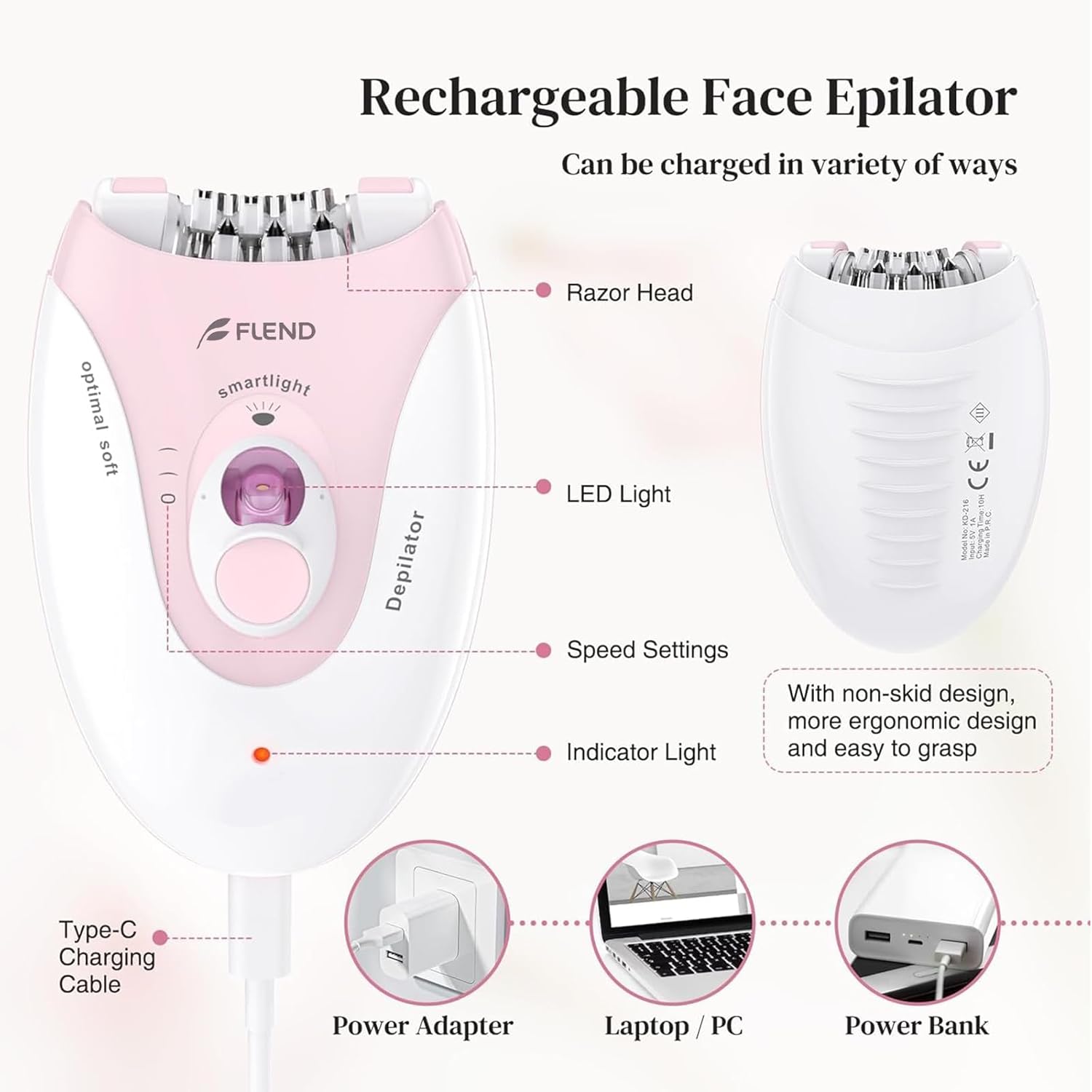
Image: Key components of the epilator, including the razor head, LED light, and charging port.
Setup
Charging the Device
- Before first use, fully charge the epilator.
- Connect the provided USB charging cable to the epilator's Type-C port.
- Plug the other end of the USB cable into a 5V adapter, computer, power bank, or car charger.
- The indicator light will show charging status. A full charge provides approximately 30 minutes of operation.
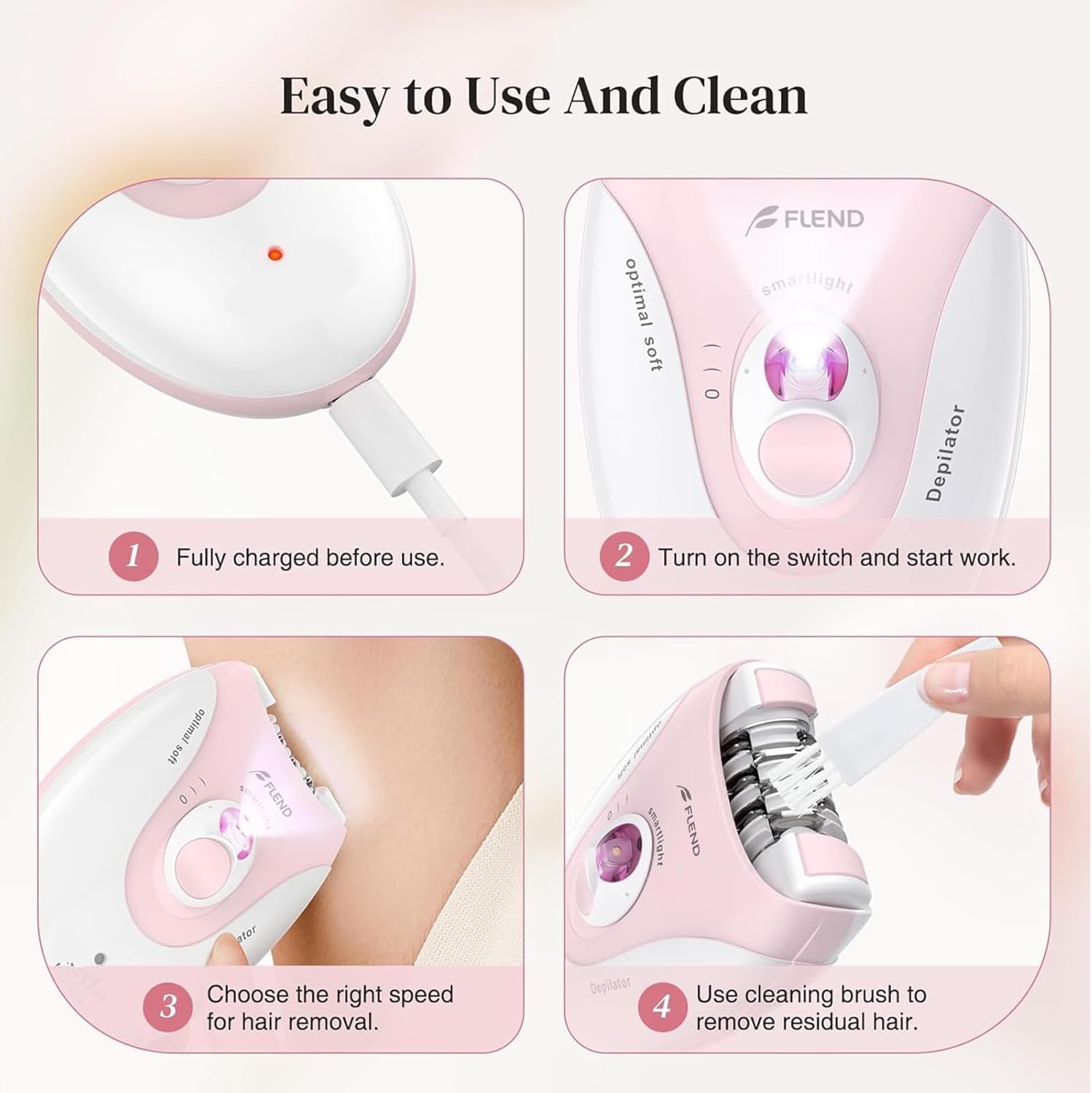
Image: Steps for initial charging and basic operation.
Operating Instructions
Preparation for Epilation
- For optimal results and reduced discomfort, take a hot bath or shower for approximately 15 minutes before epilation. This helps to open pores.
- Ensure your skin is clean and dry before starting.
Using the Epilator
- Turn on the epilator using the switch. The built-in LED light will automatically activate to illuminate the area.
- Select the appropriate speed setting:
- Low Speed: Recommended for beginners, sensitive skin areas (e.g., face, upper lip, armpits, bikini area), or fine hair.
- High Speed: Suitable for faster epilation on areas with thicker hair, such as arms and legs.
- Hold the skin taut with one hand to help the hairs stand up and reduce discomfort.
- Position the epilator at a 90-degree angle to your skin.
- Move the epilator slowly and steadily against the direction of hair growth, maintaining constant contact with the skin.

Image: Epilator speed settings and applicable body areas.

Image: Illustration of the epilation technique, showing the 90-degree angle and direction against hair growth.
Post-Epilation Care
- After epilation, moisturize your skin with a gentle, low-chemical content body lotion to soothe and hydrate.
- It is recommended to epilate in the evening, as any temporary redness or bumps can settle overnight.
Maintenance
Cleaning the Epilator
- Ensure the epilator is turned off and disconnected from any power source before cleaning.
- Use the provided cleaning brush to remove any loose hairs from the epilator head.
- Do not immerse the epilator in water. Clean the body with a dry or slightly damp cloth.
Troubleshooting
If you encounter issues with your Bubbacare Smooth Glide Epilator, please refer to the following common solutions:
- Device not turning on: Ensure the epilator is fully charged. Connect it to a power source and allow sufficient time for charging.
- Ineffective hair removal:
- Ensure the epilator head is clean and free of debris.
- Verify you are holding the epilator at a 90-degree angle to the skin.
- Move the device slowly against the direction of hair growth.
- Ensure your skin is taut during epilation.
- Excessive discomfort:
- Try using the lower speed setting, especially on sensitive areas.
- Ensure skin is prepared by taking a warm bath/shower beforehand.
- Hold the skin taut to minimize pulling.
If problems persist, please contact customer support.
Specifications
| Feature | Detail |
|---|---|
| Brand | Bubbacare |
| Model | Smooth Glide Epilator |
| ASIN | B0DQ5CC9XC |
| Color | Light-pink-06 |
| Power Source | Battery Powered (Rechargeable via USB) |
| Item Weight | 0.27 Kilograms (approx. 9.59 ounces) |
| Voltage | 5 Volts (DC) |
| Tweezer Count | 36 |
Important Safety Information
- Keep the device away from water and do not use it in wet conditions.
- Do not use the epilator on irritated, infected, or broken skin.
- Consult a doctor before use if you have a skin condition or severe skin sensitivity.
- Keep out of reach of children.
Warranty and Support
Information regarding product warranty and customer support was not provided in the available product details. Please refer to the product packaging or the seller's website for specific warranty terms and contact information for support.
Official Product Videos
No official product videos from the seller were provided in the available product data.