1. Important Safety Instructions
Before operating the BORGUSI CTM5417 treadmill, please read and understand all safety instructions. Keep this manual for future reference.
- Always attach the safety key clip to your clothing before starting the treadmill. In case of an emergency, pulling the safety key will immediately stop the machine.
- Ensure the treadmill is placed on a flat, stable surface with adequate clearance around it (at least 2 meters at the rear and 0.6 meters on each side).
- Keep children and pets away from the treadmill during operation.
- Consult a physician before starting any exercise program, especially if you have pre-existing health conditions.
- Wear appropriate athletic footwear and clothing.
- Do not operate the treadmill if it is damaged or malfunctioning. Contact customer support immediately.
- Unplug the treadmill from the power outlet when not in use, before cleaning, and before performing any maintenance.
- The maximum user weight capacity for this treadmill is 181.4 kg (400 lbs). Do not exceed this limit.
2. Product Overview
The BORGUSI CTM5417 is a foldable treadmill designed for home use, featuring automatic incline, a powerful 4.0 HP brushless motor, and a wide running surface. It includes an LED display, touch console, Bluetooth connectivity for app integration, and built-in speakers.

Image 2.1: BORGUSI CTM5417 Treadmill in operation, showcasing its design and a user running.
Key Features:
- 4.0 HP Brushless Motor: Provides smooth, quiet, and efficient operation with speeds from 1 to 20 km/h.
- 20% Automatic Incline: Offers varied workout intensity with up to 5.2 degrees of incline.
- Wide Running Surface: Measures 129.5 x 48 cm (51.2 x 18.9 inches) for comfortable use.
- Foldable Design: Allows for easy storage and space-saving.
- LED Backlit Display & Touch Console: Real-time workout data and quick adjustments.
- Bluetooth Connectivity: Integrates with fitness apps like KINOMAP and Zwift, and features built-in speakers.
- Dual Shock-Absorbing Pillars: Reduces impact on joints and minimizes noise.
- High Weight Capacity: Supports users up to 181.4 kg (400 lbs).
3. Setup and Assembly
The BORGUSI CTM5417 treadmill is designed for minimal assembly. It arrives largely pre-assembled, requiring only a few steps to prepare for use.
- Unpacking: Carefully remove the treadmill from its packaging. It is recommended to have two people for this step due to the unit's weight.
- Unfolding: The treadmill comes in a folded configuration. Gently lift the console frame to its upright position until it locks securely.
- Attach Handlebars: Locate the handlebars and clip them into the designated slots on the console frame. Ensure they are firmly secured.
- Attach Water Bottle Holder: Install the water bottle holder onto the console as instructed in the included toolkit manual.
- Placement: Position the treadmill on a level surface. Ensure there is sufficient clear space around the unit for safe operation and access.
- Power Connection: Plug the power cord into a grounded electrical outlet.

Image 3.1: The treadmill shown in its folded and unfolded states, highlighting the automatic incline mechanism.

Image 3.2: Dimensions of the BORGUSI CTM5417 treadmill, illustrating the elevated console design suitable for taller users.
4. Operating Instructions
4.1 Console Overview
The treadmill features an intuitive console with an LED display and a central shuttle knob for control.

Image 4.1: Close-up of the treadmill's console, showing the shuttle knob for speed adjustment and LED displays for various metrics.
- LED Display: Shows real-time data including Time, Speed, Distance, Calories, Pulse, and Incline.
- Shuttle Knob:
- Press once to Start/Pause the treadmill.
- Press and hold for a few seconds to Stop the treadmill.
- Rotate the knob to adjust the speed during operation.
- Rotating the dial also cycles through displayed metrics (miles, calories, timing, mph).
- Incline Buttons: Use the dedicated buttons on the console to adjust the automatic incline level.
- Quick Speed/Incline Buttons: Pre-set buttons allow for rapid changes to speed and incline.
4.2 Starting a Workout
- Ensure the safety key is properly inserted into the console and clipped to your clothing.
- Step onto the treadmill belt, holding onto the handlebars for balance.
- Press the shuttle knob once to start the treadmill. The belt will begin moving at a low speed.
- Rotate the shuttle knob clockwise to increase speed or counter-clockwise to decrease speed.
- Adjust the incline using the incline buttons as desired.
4.3 Stopping a Workout
- To pause your workout, press the shuttle knob once.
- To stop the treadmill completely, press and hold the shuttle knob for a few seconds, or pull the safety key. The incline will automatically reset to 0% upon stopping.
4.4 Bluetooth Connectivity and App Integration
The BORGUSI CTM5417 treadmill supports Bluetooth connectivity for enhanced workout tracking and entertainment.

Image 4.2: Illustration of the treadmill's Bluetooth app integration and built-in speaker capabilities for an interactive workout experience.
- Pairing: Turn on Bluetooth on your mobile device. Search for the treadmill's Bluetooth signal (usually named "BORGUSI" or similar) and pair.
- App Integration: Download compatible fitness apps such as KINOMAP or Zwift from your device's app store. Follow the in-app instructions to connect to your treadmill for tracking workouts and interactive training.
- Built-in Speakers: Once paired, you can play music or podcasts through the treadmill's integrated speakers.
5. Maintenance
Regular maintenance ensures the longevity and optimal performance of your treadmill.
5.1 Cleaning
- Always unplug the treadmill before cleaning.
- Wipe down the console and exterior surfaces with a damp cloth after each use to remove sweat and dust. Avoid abrasive cleaners or solvents.
- Periodically vacuum underneath the treadmill to prevent dust and debris from accumulating in the motor area.
5.2 Belt Lubrication
The running belt requires periodic lubrication to reduce friction and extend its lifespan. The treadmill comes with lubricant.
- Unplug the treadmill.
- Loosen the rear roller bolts slightly to allow access under the belt.
- Apply the provided silicone lubricant evenly under the center of the running belt.
- Tighten the rear roller bolts.
- Run the treadmill at a low speed (e.g., 3 km/h) for 5 minutes to distribute the lubricant.
- Lubricate the belt every 3-6 months, or more frequently with heavy use, or if you notice increased friction or noise.
5.3 Belt Adjustment
If the running belt shifts to one side or slips, it may need adjustment.
- Centering the Belt: If the belt drifts to the left, turn the left rear roller bolt clockwise in quarter-turn increments. If it drifts to the right, turn the right rear roller bolt clockwise. Run the treadmill at a low speed and observe the belt's movement, adjusting as needed until it runs centrally.
- Tightening the Belt: If the belt slips during use, it may be too loose. Turn both rear roller bolts clockwise in quarter-turn increments, ensuring equal tension on both sides. Do not overtighten.
6. Troubleshooting
This section addresses common issues you might encounter with your BORGUSI CTM5417 treadmill.
| Problem | Possible Cause | Solution |
|---|---|---|
| Treadmill does not start. | Power cord not plugged in; Safety key not inserted; Circuit breaker tripped. | Ensure power cord is securely plugged in. Insert the safety key fully. Check your home's circuit breaker. |
| Running belt slips or hesitates. | Belt too loose; Insufficient lubrication. | Adjust belt tension (see Section 5.3). Apply silicone lubricant under the belt (see Section 5.2). |
| Loud noise during operation. | Lack of lubrication; Loose components; Belt rubbing. | Lubricate the running belt. Check all visible bolts and screws for tightness. Ensure the belt is centered. |
| Incline not working. | Incline motor issue; Connection problem. | Ensure all cables are securely connected. If the problem persists, contact customer support. |
| Bluetooth connection issues. | Device not discoverable; Interference; App issue. | Ensure Bluetooth is enabled on your device and the treadmill. Try restarting both devices. Check app settings and permissions. |
If you encounter a problem not listed here or if the suggested solutions do not resolve the issue, please contact BORGUSI customer support.
7. Specifications
Detailed technical specifications for the BORGUSI CTM5417 Treadmill.
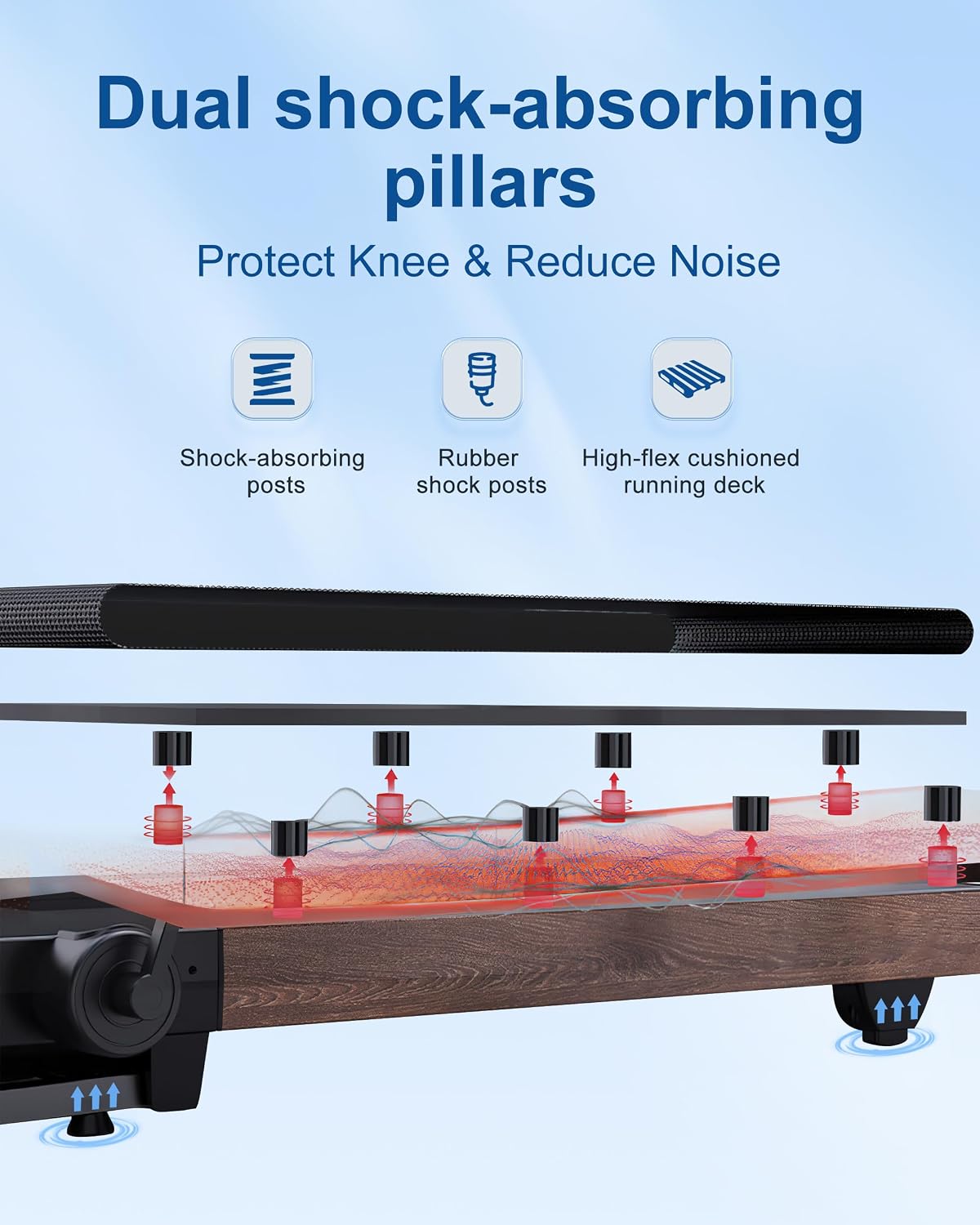
Image 7.1: Visual representation of the treadmill's wide running surface (18.9 inches) and robust 400 LB (181.4 kg) weight capacity.

Image 7.2: Diagram illustrating the 4.0 HP brushless motor, highlighting its quiet operation (under 45dB) and speed range (0.6-12 MPH).

Image 7.3: Cutaway view of the treadmill's dual shock-absorbing pillars, designed to protect knees and reduce noise during use.
| Feature | Detail |
|---|---|
| Model Number | CTM5417 |
| Brand | BORGUSI |
| Motor Power | 4.0 HP Brushless |
| Speed Range | 1 - 20 km/h (0.6 - 12 mph) |
| Incline | 20% Automatic (up to 5.2 degrees) |
| Running Surface (L x W) | 129.5 cm x 48 cm (51.2 inches x 18.9 inches) |
| Max User Weight | 181.4 kg (400 lbs) |
| Display Type | LED Backlit |
| Workout Programs | 12 Pre-set Programs |
| Connectivity | Bluetooth (KINOMAP, Zwift compatible) |
| Audio | Built-in Bluetooth Speakers |
| Shock Absorption | Dual Shock-Absorbing Pillars |
| Foldable | Yes |
| Dimensions (L x W x H) | 154.94 cm x 76.2 cm x 132.08 cm (61 inches x 30 inches x 52 inches) |
| Product Weight | 54.88 kg (121 lbs) |
| Frame Material | Alloy Steel |
| Included Components | Treadmill, Lubricant, Tool Kit, Safety Key, User Manual |
8. Warranty and Support
BORGUSI provides comprehensive customer support and warranty coverage for your CTM5417 treadmill.
- Customer Service: 24/7 customer support is available to assist with any questions or concerns.
- Parts Protection Plan: Enjoy peace of mind with a one-year parts protection plan, ensuring coverage for essential components.
- For warranty claims, technical assistance, or general inquiries, please refer to the contact information provided in your product packaging or visit the official BORGUSI website.


