
EZON H001H11
EZON H001 Military Digital Watch User Manual
Model: H001H11
Introduction
The EZON H001 Military Digital Watch is designed for outdoor enthusiasts, offering a comprehensive suite of features including altimeter, barometer, compass, thermometer, sunrise/sunset times, and a timer. Its robust construction ensures durability for various activities like hiking, trekking, and mountaineering. This manual provides detailed instructions for setting up, operating, and maintaining your watch to ensure optimal performance.
Safety Information
- Do not press any buttons underwater to prevent water ingress.
- Avoid exposing the watch to steam or hot water, as this can damage the waterproof seal.
- Keep the watch away from strong magnetic fields when using the compass function to ensure accuracy.
- Ensure the watch is securely fastened to prevent accidental loss during activities.
Product Overview

Front view of the EZON H001 Military Digital Watch, showing the digital display and button layout.

Overview of the watch's key features including barometer, altimeter, thermometer, 50 meters waterproof, backlight, worldtime, stopwatch, alarm, 12 months battery life, and compass.
Key Features:
- Altimeter: Measures current, relative, total upward, and downward altitude. Stores up to 50 altitude records.
- Barometer: Real-time monitoring of pressure changes to predict weather.
- Compass: Provides orientation and azimuth. Requires calibration for accuracy.
- Thermometer: Displays current temperature.
- Sunrise/Sunset Times: Provides local sunrise and sunset times.
- Stopwatch: Multifunctional with single-segment and split-segment timing.
- 5ATM Water Resistance: Suitable for short-term recreational swimming and cold showers (50 meters).
- EL Backlight: Ensures clear visibility in low-light conditions.
- World Time: Set your own time across 24 global time zones and 48 cities.
- Durable Design: Combines ultra-durable materials with a stainless steel back plate for wear and corrosion resistance.
Setup
1. Unboxing and Initial Power On:
This video demonstrates the unboxing process and initial power-on sequence for the EZON H001 watch. To power on, press and hold all four buttons simultaneously as shown in the video.
- Carefully remove the watch from its packaging.
- Remove any protective films from the watch face.
- To activate the display, press and hold all four buttons (LIGHT, MODE, BARO, ALTI) simultaneously until the display turns on.
2. Basic Time and Date Setting:
Upon initial power-on, you may need to set the current time, date, and other basic parameters. Refer to the detailed instructions in the included quick start guide for precise steps on navigating the settings menu using the MODE button and adjusting values with the other buttons.
Operating Instructions
1. Mode Navigation:
Press the MODE button (bottom left) to cycle through the main functions: Time, Chronograph, Record, Timer, World Time, Sunrise/Sunset, and Settings.
2. Altimeter Function:

The altimeter display showing current altitude and use time.
From the Time mode, press the ALTI button (bottom right) to enter Altimeter mode. The watch measures current altitude, relative altitude, total upward, and downward altitude. You can manually save up to 50 altitude records by pressing the ALTI button again while in Altimeter mode.
3. Barometer Function:

The barometer display showing current pressure and temperature.
From the Time mode, press the BARO button (top right) to enter Barometer mode. This function provides real-time monitoring of atmospheric pressure changes, which can be used to predict weather trends. The display also shows the current temperature.
4. Compass Function:
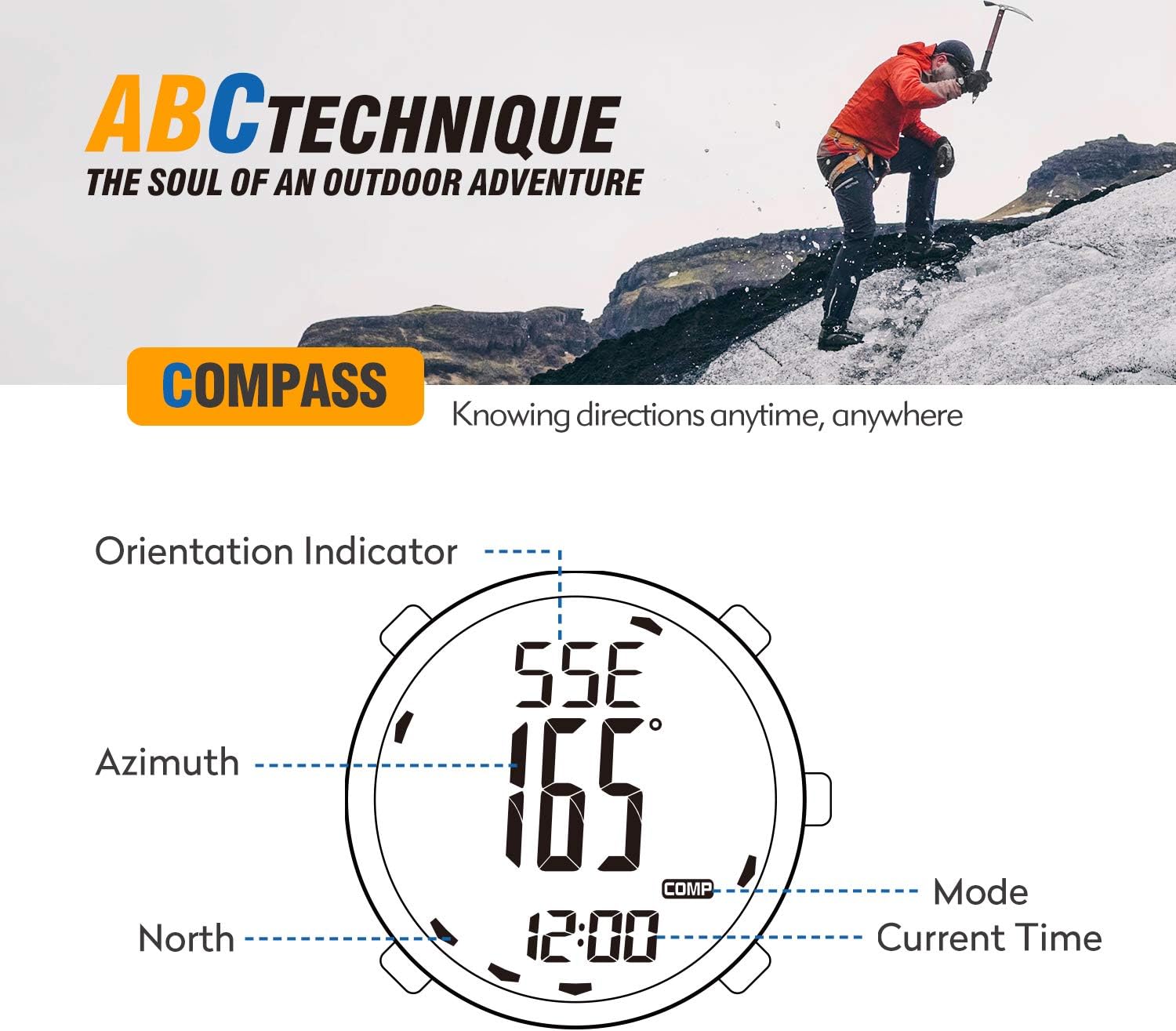
The compass display showing orientation indicator, azimuth, and current time.
From the Time mode, press the COMP button (top right) to enter Compass mode. For accurate readings, keep the watch in a horizontal position and away from magnetic fields. It is recommended to calibrate the compass and set the declination before measuring orientation. Refer to the full manual for calibration steps.
5. Stopwatch Mode:
Navigate to the Chronograph mode using the MODE button. This mode allows you to track your performance with both single-segment and split-segment timing. Press the START/STOP button (usually ALTI or BARO depending on context) to begin and end timing, and the LAP/RESET button (usually COMP or LIGHT) for split times or to reset.
6. Backlight:
Press the LIGHT button (top left) to activate the EL backlight for clear visibility in the dark. Note that the light button may also function as a lock button, requiring a longer press (e.g., 3 seconds) to unlock before activating the light.
Maintenance
1. Water Resistance:

The EZON H001 watch demonstrating its 5ATM water resistance.
The EZON H001 watch has a water resistance rating of 50 meters (5ATM). This means it is suitable for short-term recreational swimming and cold showers. Important: Do not press any buttons while the watch is submerged in water. Avoid exposure to steam or hot water, as high temperatures can compromise the waterproof seals.
2. Battery Life and Replacement:
The watch uses a CR2032 battery, which typically provides up to 12 months of life. When the battery is low, the display may dim or functions may become erratic. Battery replacement should ideally be performed by a qualified technician to ensure the waterproof seal is maintained.
3. Cleaning:
Clean the watch regularly with a soft, damp cloth. For stubborn dirt, a mild soap solution can be used, followed by rinsing with clean water and thorough drying. Avoid using harsh chemicals or abrasive materials that could damage the watch's finish or display.
Troubleshooting
| Problem | Possible Cause | Solution |
|---|---|---|
| Display is blank or unresponsive. | Watch is off or battery is depleted. | Press and hold all four buttons simultaneously to turn on. If still unresponsive, consider battery replacement. |
| Compass readings are inaccurate. | Interference from magnetic fields or needs calibration. | Move away from electronic devices or metal objects. Perform compass calibration as per the full manual. |
| Backlight not working. | Button lock engaged or low battery. | Press and hold the LIGHT button for 3 seconds to unlock. Check battery level. |
| Water inside the watch. | Buttons pressed underwater or exposure to hot water/steam. | Immediately take the watch to a service center. Avoid pressing buttons underwater or exposing to hot water. |
Specifications
| Feature | Detail |
|---|---|
| Model Number | H001H11 |
| Package Dimensions | 4.37 x 3.03 x 2.99 inches |
| Weight | 6.38 ounces |
| Battery Type | 1 Nonstandard Battery (CR2032) |
| Water Resistance | 50 meters (5ATM) |
| Case Material | Plastic |
| Mirror Material | Hardened Glass |
| Band Material | TPU |
| Altimeter Precision | 1m/3ft |
| Altimeter Measuring Range | -500m to 9000m (-1640ft to 29527ft) |
| Barometer Precision | 1hPa (0.01inHg) |
| Barometer Measuring Range | 300hPa to 1100hPa (8.86inHg to 32.48inHg) |
Warranty and Support
EZON offers comprehensive support for its products:
- Lifetime Support: Assistance available for the lifespan of the product.
- 24-Hour Response: Expect a response to inquiries within 24 hours.
- 30-Day Return Policy: Products can be returned within 30 days of purchase.
- 1-Year Free Replacement: Eligible for a free replacement within one year of purchase for manufacturing defects.
For further assistance, please visit the official EZON website or contact their customer support.
Ask a question about this manual
Ask about setup, troubleshooting, compatibility, parts, safety, or missing instructions. Manuals+ will review the question and use this page’s manual context to help answer it.